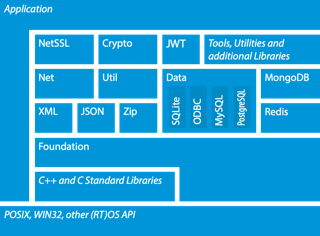
pocoproject/poco is a C++ project with 9.5k stars in the Backend space. The POCO C++ Libraries are powerful cross-platform C++ libraries for building network- and internet-based applications that run on desktop, server, mobile, IoT, and embedded systems.
Snapshot summary built from the project's own GitHub metadata — there's no written TopGit review yet. The page will update automatically when a full review is published.
WHY NO REVIEW YET
TopGit writes full reviews for the most-starred, most-requested repositories. This page is a snapshot until then — see the READ ME tab for the original README in full.
A collection of C++ class libraries, conceptually similar to the Java Class Library or the .NET Framework.
Focused on solutions to frequently-encountered practical problems.
Focused on "internet-age" network-centric applications.
Written in efficient, modern, 100% ANSI/ISO Standard C++.
Based on and complementing the C++ Standard Library/STL.
Highly portable and available on many different platforms, from embedded to server.
Open Source, licensed under the Boost Software License.
To start using POCO, see the Guided Tour
and Getting Started documents.
Quick Start (with CMake)
Prerequisites
CMake 3.26 or newer
A C++20 compiler (Visual C++ 2022, GCC 12, Clang 16, Apple Clang 16, or newer). CMake selects C++20 when the
compiler supports it and falls back to C++17 otherwise; some features are only available with C++20.
OpenSSL 1.1.1 or newer headers and libraries (optional, but recommended)
MySQL, PostgreSQL, ODBC, and Apache/APR client libraries (optional)
C++20, CMake 3.28 or later, and Ninja (for C++ modules)
Most Unix/Linux systems already have OpenSSL preinstalled. If your system
does not have OpenSSL, please get it from https://www.openssl.org or
another source. You do not have to build OpenSSL yourself - a binary
distribution is fine. For example, via Debian APT:
$ sudo apt-get install openssl libssl-dev
On macOS, the easiest way to install OpenSSL is via Homebrew:
$ brew install openssl
On Windows, the easiest way to install OpenSSL is via
WinGet:
$ winget install --id -e ShiningLight.OpenSSL.Dev
One may use a binary (prebuilt) release, for example the one from Shining Light
Productions that comes with a
Windows installer.
OpenSSL can also be installed via the vcpkg package manager.
On Windows, POCO can also use the native Windows TLS APIs (SChannel).
Installing All Dependencies (Linux, macOS, Windows)
All dependencies can be installed with the following commands:
CMake (version 3.26 or newer) is the official build system for
building the POCO C++ Libraries.
$ git clone -b main https://github.com/pocoproject/poco.git
$ cd poco
$ mkdir cmake-build
$ cd cmake-build
$ cmake ..
$ cmake --build . --config Release
On macOS, it's necessary to tell CMake where to find the OpenSSL headers
and libraries by setting the OPENSSL_ROOT_DIR CMake variable.
For example, if OpenSSL has been installed with Homebrew,
the cmake invocation becomes:
Other common ways of building with CMake (e.g., cmake-gui) will also work.
There are also a number of project-specific CMake variables that can be changed.
Reducing Binary Size
The default build includes all components and features. For size-constrained
deployments, consider the following options:
Build only needed components (-DPOCO_MINIMAL_BUILD=ON -DENABLE_<COMPONENT>=ON): Only build the specific libraries you need.
Disable FastLogger (-DENABLE_FASTLOGGER=OFF): The Quill-based
high-performance logger adds ~290 KB to Foundation. Disable it if
you don't need sub-microsecond logging.
Enable hidden visibility (-DCMAKE_CXX_VISIBILITY_PRESET=hidden -DCMAKE_VISIBILITY_INLINES_HIDDEN=ON): Allows the linker to discard
unreferenced internal symbols from shared libraries.
With a proper CMake toolchain file (specified via the CMAKE_TOOLCHAIN_FILE CMake variable),
the POCO C++ Libraries can be cross-compiled for embedded Linux systems:
The POCO C++ Libraries headers and libraries can optionally be installed by building the install target.
$ sudo cmake --build . --target install
The default install location is /usr/local/ on Linux and macOS and
C:\Program Files\ on Windows and can be overridden by setting
the CMAKE_INSTALL_PREFIX CMake variable.
Building and Installing - Using vcpkg
You can download and install poco using the vcpkg dependency manager:
$ git clone https://github.com/Microsoft/vcpkg.git
$ cd vcpkg
$ ./bootstrap-vcpkg.sh
$ ./vcpkg integrate install
$ ./vcpkg install poco
The poco port in vcpkg is kept up to date by Microsoft team members and community contributors.
If the version is out of date, please create an issue or pull request
on the vcpkg repository.
Building and Installing - Using Conan
You can download and install poco using the Conan
package manager. It needs to be installed first.
You can install Poco libraries from Conan Center:
$ conan install --requires=poco/1.15.4
Or, you can download Poco recipe and build locally:
The Poco recipe and packages in Conan Center are kept up to date by Conan team members and community contributors.
If the version is out of date, or you detect any wrong behavior, please create an issue or pull request
on the Conan Center Index repository.
Building Without CMake
If you do not want to or cannot use CMake, POCO can also be built with GNU Make
(Linux, macOS and other supported Unix platforms).
Please refer to the documentation for more information.
Getting POCO via a Package Manager
POCO can also be obtained via different package managers.
Community and Contributing
POCO has an active user and contributing community, please visit our website and blog.
Answers to POCO-related questions can also be found on Stack Overflow.
Please see CONTRIBUTING for submitting contributions, bug reports, feature requests or security issues.
POCO vs. Boost
In regards to Boost, in spite of some functional overlapping,
POCO is best thought of as a Boost complement (rather than replacement).
Side-by-side use of Boost and POCO is a very common occurrence.
How does pocoproject/poco compare to other Backend projects?
pocoproject/poco is tracked by TopGit in the Backend category, with 9.5k GitHub stars and written in C++. Browse the Backend topic page on TopGit to compare it against similar projects by stars and activity.
How many stars does pocoproject/poco have?
pocoproject/poco has 9.5k GitHub stars — refresh the page for the live number, or check github.com/pocoproject/poco. TopGit mirrors GitHub's count but does not claim minute-by-minute accuracy.
Is pocoproject/poco open source?
TopGit's metadata for pocoproject/poco does not record a license. Most public repositories on GitHub ARE open source, but the exact terms vary — verify by opening the LICENSE file directly.
What else is in the Backend space?
pocoproject/poco is tracked by TopGit under the Backend category, alongside 14 GitHub-tagged topics. Trending and Topics pages list peer repositories of comparable stars and language.
What is pocoproject/poco?
pocoproject/poco (pocoproject/poco) is a C++ project on GitHub. From the project's own README: The POCO C++ Libraries are powerful cross-platform C++ libraries for building network- and internet-based applications that run on desktop, server, mobile, IoT, and embedded systems.
Where can I see pocoproject/poco in action?
The project maintains a homepage at https://pocoproject.org. The README tab on this page also usually contains screenshots and a quickstart.
Where do I read more about pocoproject/poco?
This TopGit page is a snapshot — the READ ME tab shows the project's own README content (links stripped, images preserved). The GitHub repository at github.com/pocoproject/poco is the definitive source.
Read full README in the tab above.
Want a second opinion on poco?
Ask an AI that can read this page — one click and you get its take on poco.

 /poco