postlight/headless-wp-starter — 4.5k★ on GitHub (JavaScript). 🔪 WordPress + React Starter Kit: Spin up a WordPress-powered React app in one step
Snapshot summary built from the project's own GitHub metadata — there's no written TopGit review yet. The page will update automatically when a full review is published.
WHY NO REVIEW YET
TopGit writes full reviews for the most-starred, most-requested repositories. This page is a snapshot until then — see the READ ME tab for the original README in full.
Postlight's Headless WordPress + React Starter Kit is an automated toolset that will spin up three things:
A WordPress backend that serves its data via the WP REST API and GraphQL.
A sample React frontend powered by the WP GraphQL API, which supports posts, pages, categories, menus, search, and user sign-in.
Another sample server-side rendered React frontend using Next.js powered by the WP REST API.
You can read all about it in this handy introduction.
What's inside:
An automated installer which bootstraps a core WordPress installation that provides an established, stable REST API.
A plugin which exposes a newer, in-progress GraphQL API for WordPress.
The WordPress plugins you need to set up custom post types and custom fields (Advanced Custom Fields and Custom Post Type UI).
Plugins which expose those custom fields and WordPress menus in the WP REST API (ACF to WP API and WP-REST-API V2 Menus).
JWT authentication plugins: JWT WP REST and JWT WP GraphQL.
All the starter WordPress theme code and settings headless requires, including pretty permalinks, CORS Allow-Origin headers, and useful logging functions for easy debugging.
A mechanism for easily importing data from an existing WordPress installation anywhere on the web using WP Migrate DB Pro and its accompanying plugins (license required).
A sample, starter frontend React app powered by GraphQL.
Another sample, starter frontend React app, server-side rendered via Next.js, powered by the WP REST API.
Docker containers and scripts to manage them, for easily running the frontend React apps and backend locally or deploying it to any hosting provider with Docker support.
Let's get started.
Install
Prerequisite: Before you begin, you need Docker installed. On Linux, you might need to install docker-compose separately.
Docker Compose builds and starts four containers by default: db-headless, wp-headless, frontend & frontend-graphql:
docker-compose up -d
Wait a few minutes for Docker to build the services for the first time. After the initial build, startup should only take a few seconds.
You can follow the Docker output to see build progress and logs:
docker-compose logs -f
Alternatively, you can use some useful Docker tools like Kitematic and/or VSCode Docker plugin to follow logs, start / stop / remove containers and images.
Optional: you can run the frontend locally while WordPress still runs on Docker:
docker-compose up -d wp-headless
cd frontend && yarn && yarn start
Once the containers are running, you can visit the React frontends and backend WordPress admin in your browser.
Frontend
This starter kit provides two frontend containers:
frontend container powered by the WP REST API is server-side rendered using Next.js, and exposed on port 3000: http://localhost:3000
frontend-graphql container powered by GraphQL, exposed on port 3001: http://localhost:3001
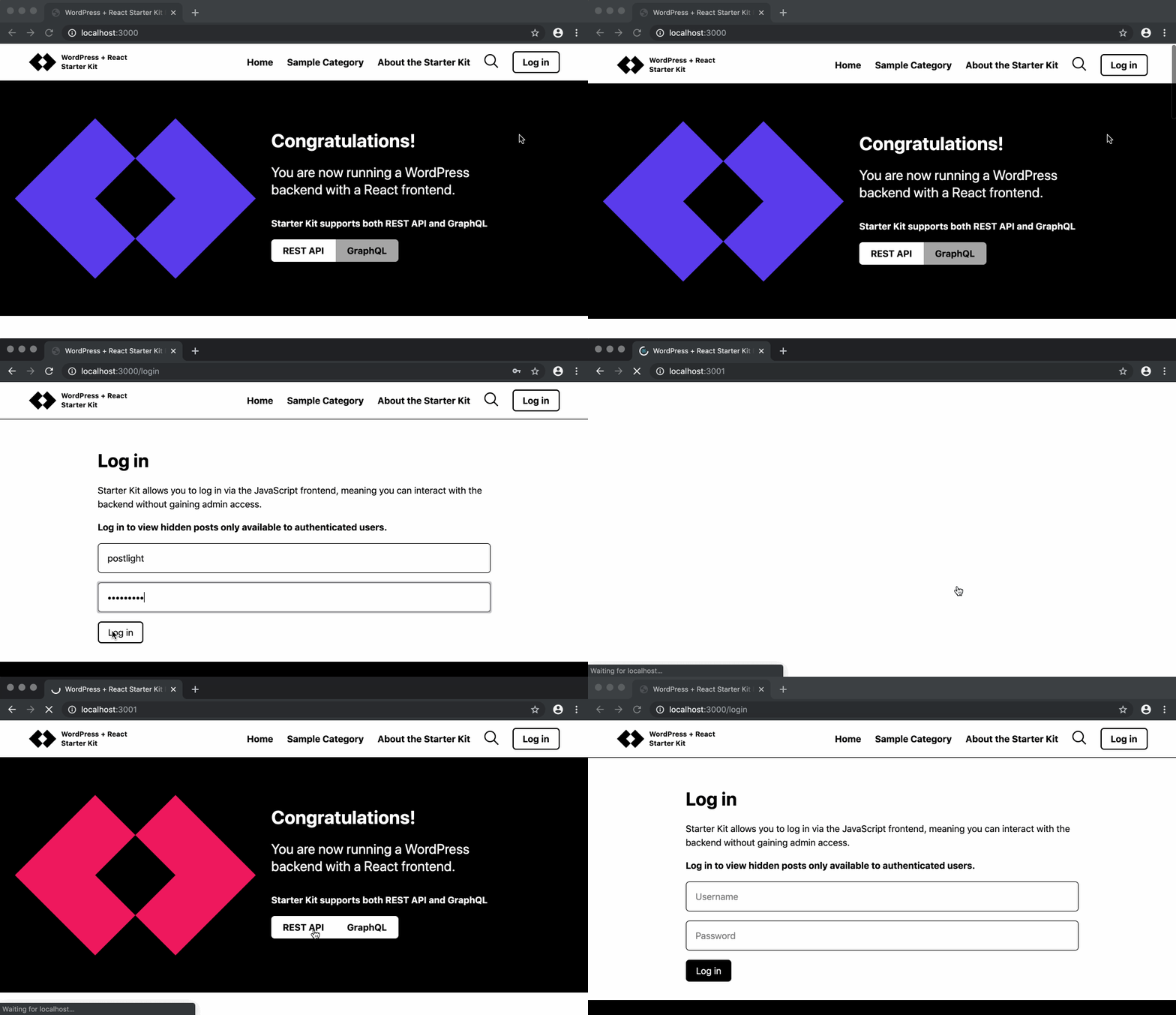
Here's what the frontend looks like:
You can follow the yarn start output by running docker-compose logs command followed by the container name. For example:
docker-compose logs -f frontend
If you need to restart that process, restart the container:
docker-compose restart frontend
PS: Browsing the Next.js frontend in development mode is relatively slow due to the fact that pages are being built on demand. In a production environment, there would be a significant improvement in page load.
Backend
The wp-headless container exposes Apache on host port 8080:
You can use a plugin called WP Migrate DB Pro to connect to another WordPress installation and import data from it. (A Pro license will be required.)
To do so, first set MIGRATEDB_LICENSE & MIGRATEDB_FROM in .env and recreate containers to enact the changes.
docker-compose up -d
Then run the import script:
docker exec wp-headless migratedb_import
If you need more advanced functionality check out the available WP-CLI commands:
docker exec wp-headless wp help migratedb
Extend the REST and GraphQL APIs
At this point you can start setting up custom fields in the WordPress admin, and if necessary, creating custom REST API endpoints in the Postlight Headless WordPress Starter theme.
The primary theme code is located in wordpress/wp-content/themes/postlight-headless-wp.
You can also modify and extend the GraphQL API, An example of creating a Custom Type and registering a Resolver is located in: wordpress/wp-content/themes/postlight-headless-wp/inc/graphql.
REST & GraphQL JWT Authentication
To give WordPress users the ability to sign in via the frontend app, use something like the WordPress Salt generator to generate a secret for JWT, then define it in wp-config.php
To lint and format the JavaScript apps, both Prettier and ESLint configuration files are included.
Hosting
Most WordPress hosts don't also host Node applications, so when it's time to go live, you will need to find a hosting service for the frontend.
That's why we've packaged the frontend app in a Docker container, which can be deployed to a hosting provider with Docker support like Amazon Web Services or Google Cloud Platform. For a fast, easier alternative, check out Now.
Troubleshooting Common Errors
Breaking Change Alert - Docker
If you had the project already setup and then updated to a commit newer than 99b4d7b, you will need to go through the installation process again because the project was migrated to Docker.
You will need to also migrate MySQL data to the new MySQL db container.
Docker Caching
In some cases, you need to delete the wp-headless image (not only the container) and rebuild it.
CORS errors
If you have deployed your WordPress install and are having CORS issues be sure to update /wordpress/wp-content/themes/postlight-headless-wp/inc/frontend-origin.php with your frontend origin URL.
See anything else you'd like to add here? Please send a pull request!
🔬 A Labs project from your friends at Postlight. Happy coding!
Yes — postlight/headless-wp-starter ships under the GPL-2.0 license, which makes its source code freely readable (and, depending on license terms, forkable and reusable). Source: github.com/postlight/headless-wp-starter.
What else is in the Frontend space?
postlight/headless-wp-starter is tracked by TopGit under the Frontend category, alongside 10 GitHub-tagged topics. Trending and Topics pages list peer repositories of comparable stars and language.
What is postlight/headless-wp-starter?
postlight/headless-wp-starter (postlight/headless-wp-starter) is a JavaScript project on GitHub. From the project's own README: 🔪 WordPress + React Starter Kit: Spin up a WordPress-powered React app in one step
What license does postlight/headless-wp-starter use?
postlight/headless-wp-starter is released under the GPL-2.0 license. Always verify the LICENSE file directly on GitHub for the authoritative terms — license strings can be edited out of sync with a project's actual stance.
Where can I see postlight/headless-wp-starter in action?
The project maintains a homepage at https://archive.postlight.com/labs/wordpress-react-starter-kit. The README tab on this page also usually contains screenshots and a quickstart.
Where do I read more about postlight/headless-wp-starter?
This TopGit page is a snapshot — the READ ME tab shows the project's own README content (links stripped, images preserved). The GitHub repository at github.com/postlight/headless-wp-starter is the definitive source.
Why is postlight/headless-wp-starter categorized under Frontend?
TopGit places postlight/headless-wp-starter in the Frontend category based on its GitHub topics and description (tagged: "graphql-api", "headless-cms", "headless-wp"). Categories are assigned from real repository metadata, not editorial guesswork.
Read full README in the tab above.
Want a second opinion on headless-wp-starter?
Ask an AI that can read this page — one click and you get its take on headless-wp-starter.

 /headless-wp-starter