projectdiscovery/subfinder — 14.6k★ on GitHub (Go). Fast passive subdomain enumeration tool.
Snapshot summary built from the project's own GitHub metadata — there's no written TopGit review yet. The page will update automatically when a full review is published.
WHY NO REVIEW YET
TopGit writes full reviews for the most-starred, most-requested repositories. This page is a snapshot until then — see the READ ME tab for the original README in full.
Features •
Install •
Usage •
API Setup •
Library •
Join Discord
subfinder is a subdomain discovery tool that returns valid subdomains for websites, using passive online sources. It has a simple, modular architecture and is optimized for speed. subfinder is built for
doing one thing only - passive subdomain enumeration, and it does that very well.
We have made it to comply with all the used passive source licenses and usage restrictions. The passive model guarantees speed and stealthiness that can be leveraged by both penetration testers and bug bounty
hunters alike.
Features
Fast and powerful resolution and wildcard elimination modules
STDIN/OUT support enables easy integration into workflows
Usage
subfinder -h
This will display help for the tool. Here are all the switches it supports.
Usage:
  ./subfinder [flags]

Flags:
INPUT:
  -d, -domain string[]  domains to find subdomains for
  -dL, -list string     file containing list of domains for subdomain discovery

SOURCE:
  -s, -sources string[]           specific sources to use for discovery (-s crtsh,github). Use -ls to display all available sources.
  -recursive                      use only sources that can handle subdomains recursively (e.g. subdomain.domain.tld vs domain.tld)
  -all                            use all sources for enumeration (slow)
  -es, -exclude-sources string[]  sources to exclude from enumeration (-es alienvault,zoomeyeapi)

FILTER:
  -m, -match string[]     subdomain or list of subdomain to match (file or comma separated)
  -f, -filter string[]     subdomain or list of subdomain to filter (file or comma separated)
  -match-regex string[]   regex or list of regex to match on output subdomain (cli, file)
  -filter-regex string[]  regex or list of regex to filter on output subdomain (cli, file)

RATE-LIMIT:
  -rl, -rate-limit int  maximum number of http requests to send per second
  -rls value            maximum number of http requests to send per second for providers in key=value format (-rls "hackertarget=10/s,shodan=15/s")
  -t int                number of concurrent goroutines for resolving (-active only) (default 10)

UPDATE:
  -up, -update                 update subfinder to latest version
  -duc, -disable-update-check  disable automatic subfinder update check

OUTPUT:
  -o, -output string       file to write output to
  -oJ, -json               write output in JSONL format
  -oD, -output-dir string  directory to write output (-dL only)
  -cs, -collect-sources    include all sources in the output (-json only)
  -oI, -ip                 include host IP in output (-active only)

CONFIGURATION:
  -config string                flag config file (default "$CONFIG/subfinder/config.yaml")
  -pc, -provider-config string  provider config file (default "$CONFIG/subfinder/provider-config.yaml")
  -r string[]                   comma separated list of resolvers to use
  -rL, -rlist string            file containing list of resolvers to use
  -nW, -active                  display active subdomains only
  -proxy string                 http proxy to use with subfinder
  -ei, -exclude-ip              exclude IPs from the list of domains
  -mr, -max-results int         limit the number of results per source (0 = unlimited; honored by paginating sources)

DEBUG:
  -silent             show only subdomains in output
  -version            show version of subfinder
  -v                  show verbose output
  -nc, -no-color      disable color in output
  -ls, -list-sources  list all available sources (-oJ for JSON)

OPTIMIZATION:
  -timeout int                  seconds to wait before timing out (default 30)
  -max-time int                 minutes to wait for enumeration results (default 10)
  -rsr, -response-size-read int max response body size to read in bytes from passive sources (0 = unlimited)
Environment Variables
Subfinder supports environment variables to specify custom paths for configuration files:
SUBFINDER_CONFIG - Path to config.yaml file (overrides default $CONFIG/subfinder/config.yaml)
SUBFINDER_PROVIDER_CONFIG - Path to provider-config.yaml file (overrides default $CONFIG/subfinder/provider-config.yaml)
Installation
subfinder requires go1.26 to install successfully. Run the following command to install the latest version:
go install -v github.com/projectdiscovery/subfinder/v2/cmd/subfinder@latest
Learn about more ways to install subfinder here: https://docs.projectdiscovery.io/tools/subfinder/install.
Post Installation Instructions
subfinder can be used right after the installation, however many sources required API keys to work. Learn more here: https://docs.projectdiscovery.io/tools/subfinder/install#post-install-configuration.
Running Subfinder
Learn about how to run Subfinder here: https://docs.projectdiscovery.io/tools/subfinder/running.
Filtering results with regular expressions
-match-regex and -filter-regex take Go regular expressions, repeated or from a file (one per line), and combine with -match and -filter:
Subfinder can also be used as library and a minimal examples of using subfinder SDK is available here
Resources
Recon with Me !!!
License
subfinder is made with 🖤 by the projectdiscovery team. Community contributions have made the project what it is. See
the THANKS.md file for more details.
Read the usage disclaimer at DISCLAIMER.md and contact us for any API removal.
Yes — projectdiscovery/subfinder ships under the MIT license, which makes its source code freely readable (and, depending on license terms, forkable and reusable). Source: github.com/projectdiscovery/subfinder.
What else is in the Security space?
projectdiscovery/subfinder is tracked by TopGit under the Security category, alongside 7 GitHub-tagged topics. Trending and Topics pages list peer repositories of comparable stars and language.
What is projectdiscovery/subfinder?
projectdiscovery/subfinder (projectdiscovery/subfinder) is a Go project on GitHub. From the project's own README: Fast passive subdomain enumeration tool.
What license does projectdiscovery/subfinder use?
projectdiscovery/subfinder is released under the MIT license. Always verify the LICENSE file directly on GitHub for the authoritative terms — license strings can be edited out of sync with a project's actual stance.
Where can I see projectdiscovery/subfinder in action?
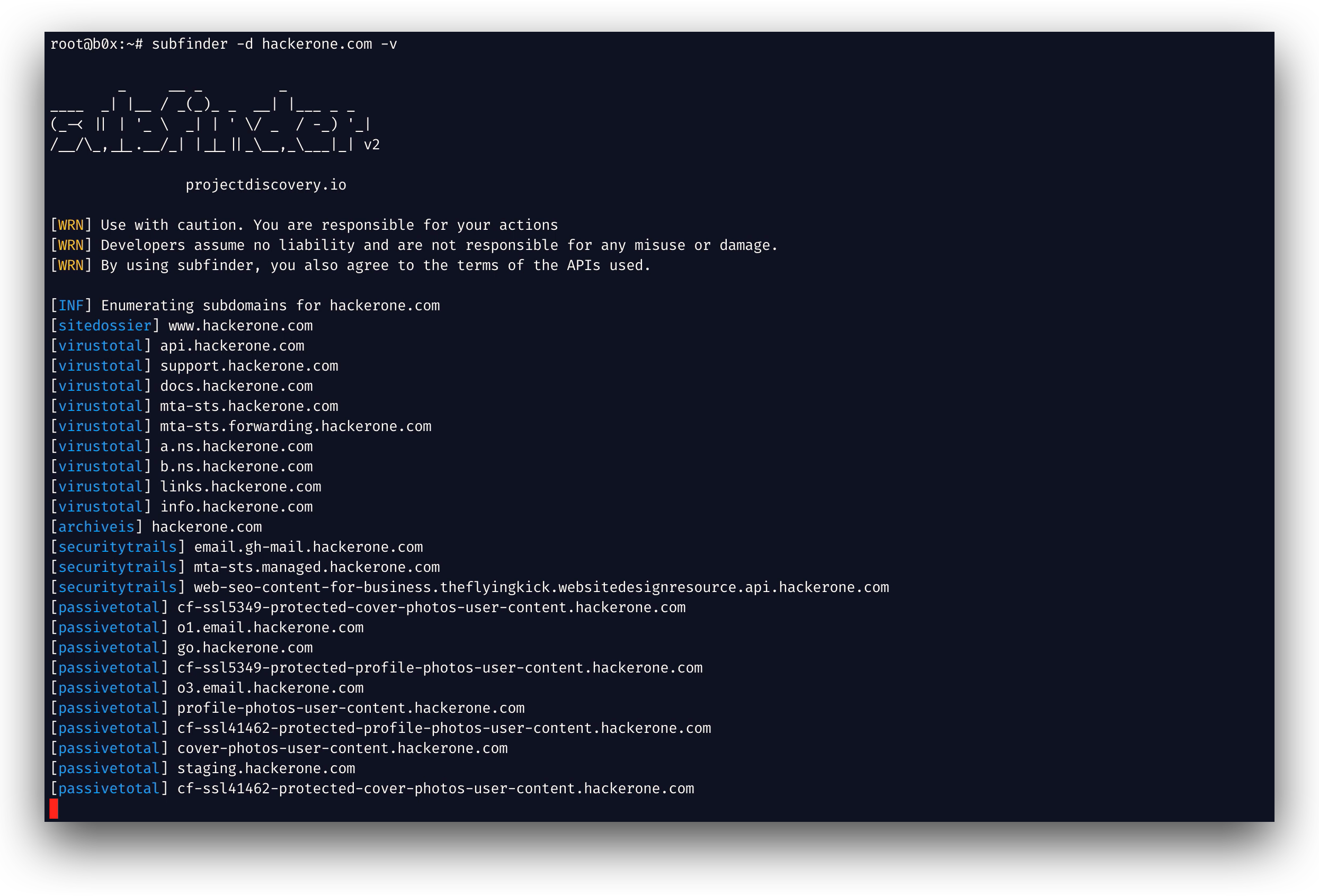
The project maintains a homepage at https://projectdiscovery.io. The README tab on this page also usually contains screenshots and a quickstart.
Where do I read more about projectdiscovery/subfinder?
This TopGit page is a snapshot — the READ ME tab shows the project's own README content (links stripped, images preserved). The GitHub repository at github.com/projectdiscovery/subfinder is the definitive source.
Why is projectdiscovery/subfinder categorized under Security?
TopGit places projectdiscovery/subfinder in the Security category based on its GitHub topics and description (tagged: "bugbounty", "hacking", "hacktoberfest"). Categories are assigned from real repository metadata, not editorial guesswork.
Read full README in the tab above.
Is subfinder worth your time?
ChatGPT, Claude and Perplexity can all read this page. Ask one of them what it makes of subfinder.
 /subfinder