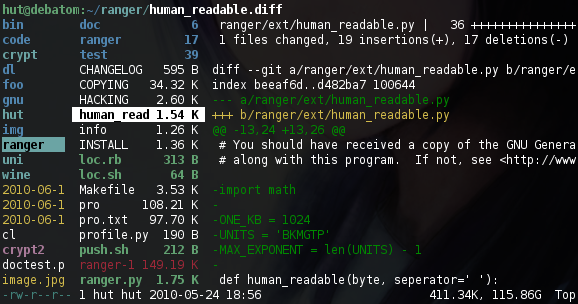
Ranger is a console file manager with VI key bindings. It provides a
minimalistic and nice curses interface with a view on the directory hierarchy.
It ships with rifle, a file launcher that is good at automatically finding
out which program to use for what file type.
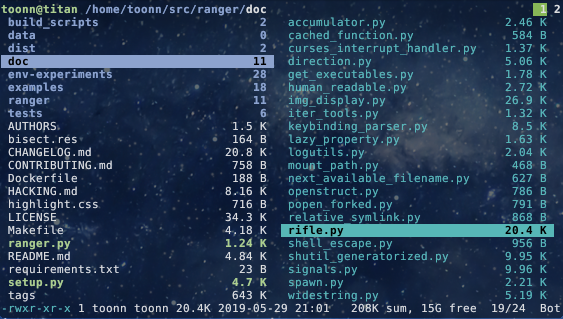
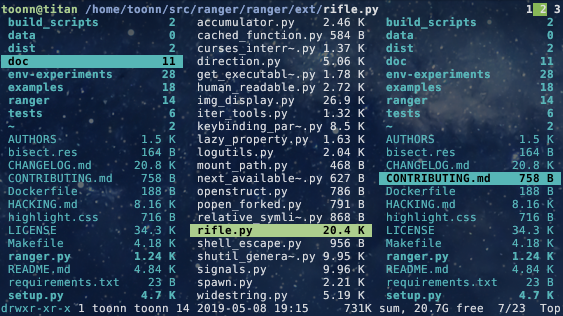
For mc aficionados there's also the multi-pane viewmode.
This file describes ranger and how to get it to run. For instructions on the
usage, please read the man page (man ranger in a terminal). See HACKING.md
for development-specific information.
For configuration, check the files in ranger/config/ or copy the
default config to ~/.config/ranger with ranger --copy-config
(see instructions).
The examples/ directory contains several scripts and plugins that demonstrate how
ranger can be extended or combined with other programs. These files can be
found in the git repository or in /usr/share/doc/ranger.
A note to packagers: Versions meant for packaging are listed in the changelog
on the website.
About
- Authors: see
AUTHORS file
- License: GNU General Public License Version 3
- Website: https://ranger.fm/
- Download: https://ranger.fm/ranger-stable.tar.gz
- Bug reports: https://github.com/ranger/ranger/issues
- git clone https://github.com/ranger/ranger.git
Design Goals
- An easily maintainable file manager in a high level language
- A quick way to switch directories and browse the file system
- Keep it small but useful, do one thing and do it well
- Console-based, with smooth integration into the unix shell
Features
- UTF-8 Support (if your Python copy supports it)
- Multi-column display
- Preview of the selected file/directory
- Common file operations (create/chmod/copy/delete/...)
- Renaming multiple files at once
- VIM-like console and hotkeys
- Automatically determine file types and run them with correct programs
- Change the directory of your shell after exiting ranger
- Tabs, bookmarks, mouse support...
Dependencies
- Python (
>=2.6 or >=3.1) with the curses module
and (optionally) wide-unicode support
- A pager (
less by default)
Optional dependencies
For general usage:
file for determining file typeschardet (Python package) for improved encoding detection of text filessudo to use the "run as root" featurepython-bidi (Python package) to display right-to-left file names correctly
(Hebrew, Arabic)
For enhanced file previews (with scope.sh):
img2txt (from caca-utils) for ASCII-art image previewsw3mimgdisplay, ueberzug, mpv, iTerm2, kitty (or other terminal supporting the Kitty graphics protocol), terminology or urxvt for image previewsconvert (from imagemagick) to auto-rotate images and for image previewsrsvg-convert (from librsvg)
for SVG previewsffmpeg, or ffmpegthumbnailer for video thumbnailshighlight, bat or pygmentize for syntax highlighting of codeatool, bsdtar, unrar and/or 7zz to preview archivesbsdtar, tar, unrar, unzip and/or zipinfo (and sed) to preview
archives as their first imagelynx, w3m or elinks to preview html pagespdftotext or mutool (and fmt) for textual pdf previews, pdftoppm to
preview as imagedjvutxt for textual DjVu previews, ddjvu to preview as imagecalibre or epub-thumbnailer for image previews of ebookstransmission-show for viewing BitTorrent informationmediainfo or exiftool for viewing information about media filesodt2txt for OpenDocument text files (odt, ods, odp and sxw)python or jq for JSON filessqlite3 for listing tables in SQLite database (and optionally sqlite-utils for fancier box drawing.)jupyter nbconvert for Jupyter Notebooksfontimage for font previewsopenscad for 3D model previews (stl, off, dxf, scad, csg)draw.io for draw.io diagram previews
(drawio extension)
Installing
Use the package manager of your operating system to install ranger.
You can also install ranger through PyPI: pip install ranger-fm.
However, it is recommended to use pipx instead
(to benefit from isolated environments). Use
pipx run --spec ranger-fm ranger to install and run ranger in one step.
Check current version:


Installing from a clone
Note that you don't have to install ranger; you can simply run ranger.py.
To install ranger manually:
sudo make install
This translates roughly to:
sudo python setup.py install --optimize=1 --record=install_log.txt
This also saves a list of all installed files to install_log.txt, which you can
use to uninstall ranger.
Getting Started
After starting ranger, you can use the Arrow Keys or h j k l to
navigate, Enter to open a file or q to quit. The third column shows a
preview of the current file. The second is the main column and the first shows
the parent directory.
Ranger can automatically copy default configuration files to ~/.config/ranger
if you run it with the switch --copy-config=( rc | scope | ... | all ).
See ranger --help for a description of that switch. Also check
ranger/config/ for the default configuration.
Going Further
- To get the most out of ranger, read the Official User Guide.
- For frequently asked questions, see the FAQ.
- For more information on customization, see the wiki.
Community
For help, support, or if you just want to hang out with us, you can find us here:
- IRC: channel #ranger on Libera.Chat. Don't have an IRC client? Join us via the webchat!
- Reddit: r/ranger