On GitHub, rhysd/vim-clang-format has picked up 1.1k stars, Developer Tools, Vim script. Vim plugin for clang-format, a formatter for C, C++, Obj-C, Java, JavaScript, and so on.
Snapshot summary built from the project's own GitHub metadata — there's no written TopGit review yet. The page will update automatically when a full review is published.
WHY NO REVIEW YET
TopGit writes full reviews for the most-starred, most-requested repositories. This page is a snapshot until then — see the READ ME tab for the original README in full.
This plugin formats your code with specific coding style using clang-format.
Automatic formatting is provided for the following languages by default:
C
C++
Objective-C
JavaScript
Java
TypeScript
Protobuf
Cuda
Vala
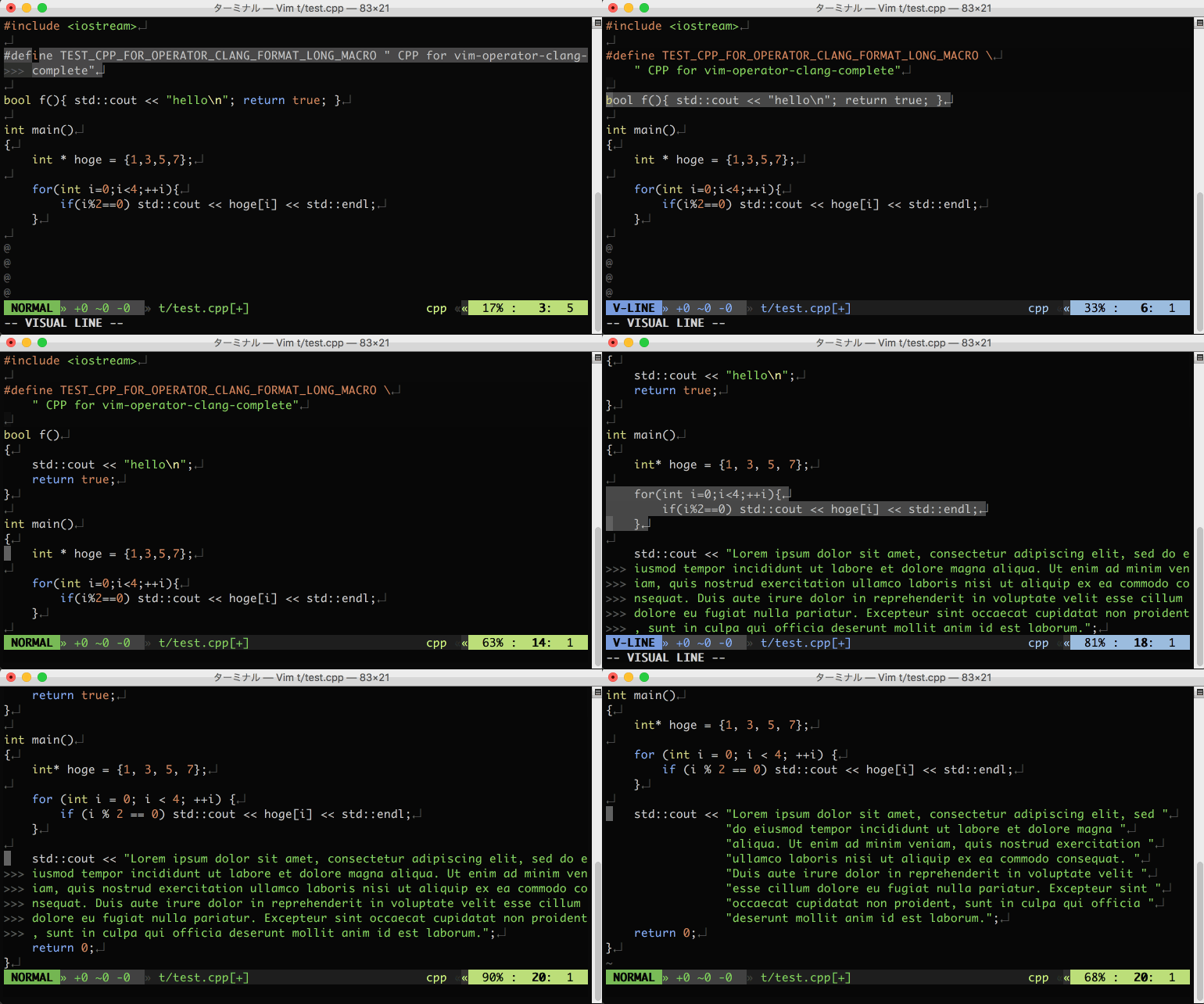
Screenshot
Requirements
clang-format command (3.4 or later), which is bundled in Clang extra tools
vim-operator-user(highly recommended)
vimproc.vim(recommended in Windows)
Installation
Copy plugin, doc and autoload directories into your ~/.vim or use :packadd in Vim8. Or please use your favorite plugin manager to install this plugin. I recommend latter.
Usage
:ClangFormat command is available.
If you use it in normal mode, the whole code will be formatted. If you use it in visual mode, the selected code will be formatted.
It is more convenient to map :ClangFormat to your favorite key mapping in normal mode and visual mode.
If you install vim-operator-user in advance, you can also map <Plug>(operator-clang-format) to your favorite key bind.
:ClangFormatAutoToggle command toggles the auto formatting on buffer write.
:ClangFormatAutoEnable command enables the auto formatting on buffer write. Useful for automatically enabling the auto format through a vimrc. :ClangFormatAutoDisable turns it off.
What is the difference from clang-format.py?
clang-format.py is Python script to use clang-format from Vim, which is installed with clang-format.
The usage is here.
Against clang-format.py, vim-clang-format has below advantages.
Style options are highly customizable in .vimrc. clang-format.py requires .clang-format file to customize a style.
vim-clang-format provides an operator mapping.
vim-clang-format doesn't need python interface.
In short, vim-clang-format has better Vim integration than clang-format.py.
Customization
You can customize formatting using some variables.
g:clang_format#code_style
g:clang_format#code_style is a base style.
llvm, google, chromium, mozilla is supported.
The default value is google.
For config information, execute clang-format -dump-config command.
g:clang_format#command
Name of clang-format. If the name of command is not clang-format
or you want to specify a command by absolute path, set this variable.
Default value is clang-format.
g:clang_format#extra_args
You can specify more extra options in g:clang_format#extra_args as String or List of String.
g:clang_format#detect_style_file
When this variable's value is 1, vim-clang-format automatically detects the style file like
.clang-format or _clang-format and applies the style to formatting.
g:clang_format#auto_format
When the value is 1, a current buffer is automatically formatted on saving the buffer.
Formatting is executed on BufWritePre event.
g:clang_format#auto_format_on_insert_leave
When the value is 1, inserted lines are automatically formatted on leaving insert mode.
Formatting is executed on InsertLeave event.
g:clang_format#auto_formatexpr
When the value is 1, formatexpr option is set by vim-clang-format automatically in C, C++ and ObjC codes.
Vim's format mappings (e.g. gq) get to use clang-format to format. This
option is not comptabile with Vim's textwidth feature. You must set
textwidth to 0 when the formatexpr is set.
g:clang_format#auto_filetypes
List of file types to which g:clang_format#auto_format, g:clang_format#auto_format_on_insert_leave,
and g:clang_format#auto_formatexpr should be applied.
The default value is ["c", "cpp", "objc", "java", "javascript", "typescript", "proto", "arduino"].
g:clang_format#enable_fallback_style
When the value is 0, -fallback-style=none option is added on executing clang-format command.
It means that vim-clang-format does nothing when .clang-format is not found.
The default value is 1.
Vimrc Example
let g:clang_format#style_options = {
            \ "AccessModifierOffset" : -4,
            \ "AllowShortIfStatementsOnASingleLine" : "true",
            \ "AlwaysBreakTemplateDeclarations" : "true",
            \ "Standard" : "C++11"}

" map to <Leader>cf in C++ code
autocmd FileType c,cpp,objc nnoremap <buffer><Leader>cf :<C-u>ClangFormat<CR>
autocmd FileType c,cpp,objc vnoremap <buffer><Leader>cf :ClangFormat<CR>
" if you install vim-operator-user
autocmd FileType c,cpp,objc map <buffer><Leader>x <Plug>(operator-clang-format)
" Toggle auto formatting:
nmap <Leader>C :ClangFormatAutoToggle<CR>
Auto-enabling auto-formatting
autocmd FileType c ClangFormatAutoEnable
For More Information
$ clang-format -help
$ clang-format -dump-config
clang-format's documentation and API documentation is useful in some cases.
In particular, the following link is useful to know the information of a key and its value of a style setting.
CLANG-FORMAT STYLE OPTIONS
License
The MIT License (MIT)

Copyright (c) 2013-2021 rhysd

Permission is hereby granted, free of charge, to any person obtaining a copy
of this software and associated documentation files (the "Software"), to deal
in the Software without restriction, including without limitation the rights
to use, copy, modify, merge, publish, distribute, sublicense, and/or sell
copies of the Software, and to permit persons to whom the Software is
furnished to do so, subject to the following conditions:

The above copyright notice and this permission notice shall be included in
all copies or substantial portions of the Software.

THE SOFTWARE IS PROVIDED "AS IS", WITHOUT WARRANTY OF ANY KIND, EXPRESS OR
IMPLIED, INCLUDING BUT NOT LIMITED TO THE WARRANTIES OF MERCHANTABILITY,
FITNESS FOR A PARTICULAR PURPOSE AND NONINFRINGEMENT. IN NO EVENT SHALL THE
AUTHORS OR COPYRIGHT HOLDERS BE LIABLE FOR ANY CLAIM, DAMAGES OR OTHER
LIABILITY, WHETHER IN AN ACTION OF CONTRACT, TORT OR OTHERWISE, ARISING FROM,
OUT OF OR IN CONNECTION WITH THE SOFTWARE OR THE USE OR OTHER DEALINGS IN
THE SOFTWARE.
How active is development on rhysd/vim-clang-format?
The most recent commit recorded on rhysd/vim-clang-format was 4.6 years ago, based on the GitHub push timestamp. The repository has 127 forks — one of the better signals of community interest.
How many stars does rhysd/vim-clang-format have?
rhysd/vim-clang-format has 1.1k GitHub stars — refresh the page for the live number, or check github.com/rhysd/vim-clang-format. TopGit mirrors GitHub's count but does not claim minute-by-minute accuracy.
Is rhysd/vim-clang-format open source?
TopGit's metadata for rhysd/vim-clang-format does not record a license. Most public repositories on GitHub ARE open source, but the exact terms vary — verify by opening the LICENSE file directly.
What else is in the Developer Tools space?
rhysd/vim-clang-format is tracked by TopGit under the Developer Tools category, alongside 5 GitHub-tagged topics. Trending and Topics pages list peer repositories of comparable stars and language.
What is rhysd/vim-clang-format?
rhysd/vim-clang-format (rhysd/vim-clang-format) is a Vim script project on GitHub. From the project's own README: Vim plugin for clang-format, a formatter for C, C++, Obj-C, Java, JavaScript, and so on.
What language is rhysd/vim-clang-format written in?
rhysd/vim-clang-format is written primarily in Vim script. GitHub's language field is based on the largest share of bytes in the default branch.
Where do I read more about rhysd/vim-clang-format?
This TopGit page is a snapshot — the READ ME tab shows the project's own README content (links stripped, images preserved). The GitHub repository at github.com/rhysd/vim-clang-format is the definitive source.
Read full README in the tab above.
Curious whether vim-clang-format is right for you?
Let ChatGPT, Claude, or Perplexity look into it — click below and see what AI actually says about vim-clang-format.