Rigellute/spotify-tui

On GitHub, Rigellute/spotify-tui has picked up 19.3k stars, Developer Tools, Rust. Spotify for the terminal written in Rust 🚀
Snapshot summary built from the project's own GitHub metadata — there's no written TopGit review yet. The page will update automatically when a full review is published.
TopGit writes full reviews for the most-starred, most-requested repositories. This page is a snapshot until then — see the READ ME tab for the original README in full.
Snapshot
Top contributors
Show top contributors
Spotify TUI






A Spotify client for the terminal written in Rust.
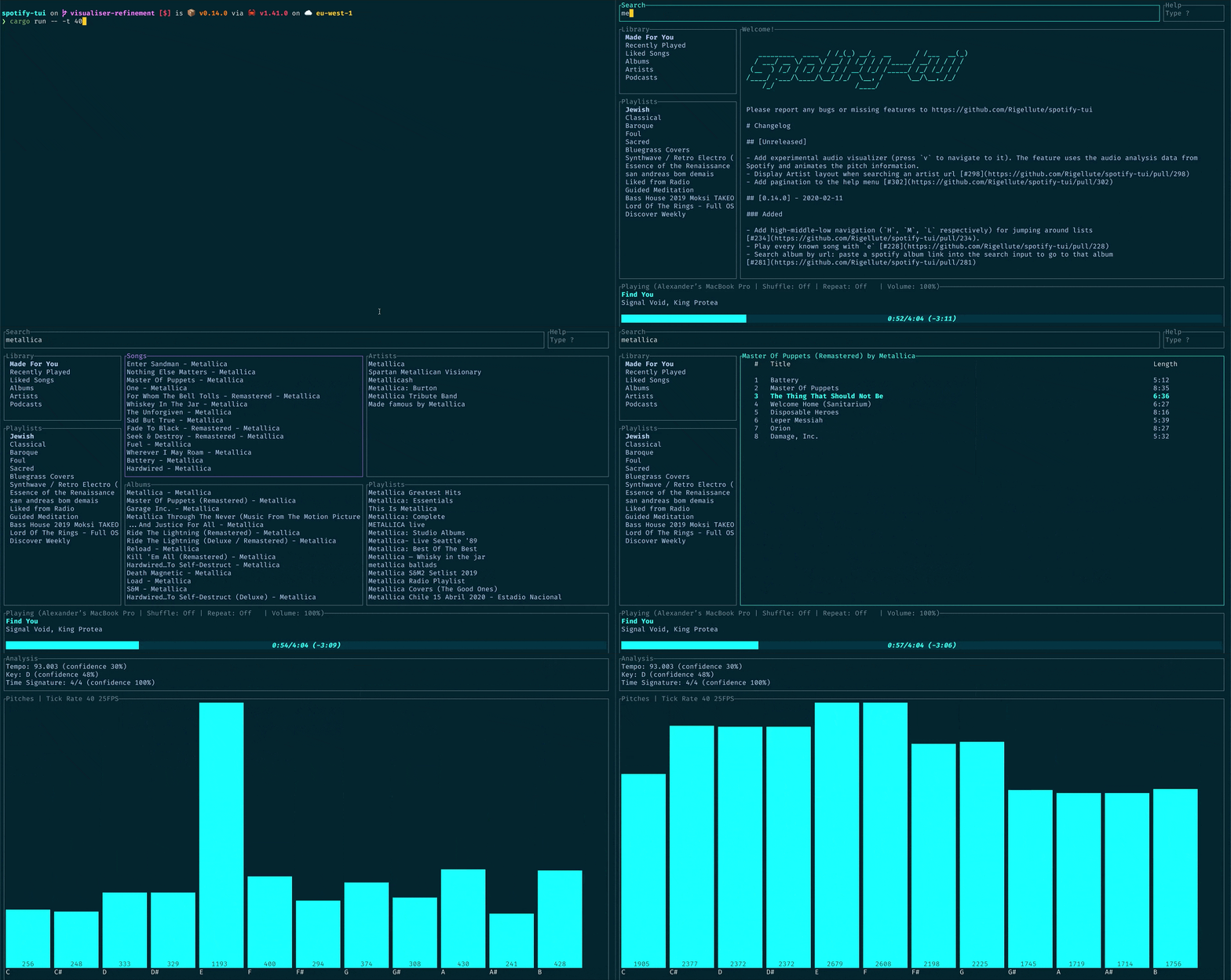
The terminal in the demo above is using the Rigel theme.
- Spotify TUI
- Installation
- Homebrew
- Snap
- AUR
- Nix
- Void Linux
- Fedora/CentOS
- Cargo
- Note on Linux
- Windows
- Scoop installer
- Manual
- Connecting to Spotify’s API
- Usage
- Installation
- Configuration
- Limitations
- Using with spotifyd
- Libraries used
- Development
- Windows Subsystem for Linux
- Contributors
- Roadmap
- High-level requirements yet to be implemented
Installation
The binary executable is spt.
Homebrew
For both macOS and Linux
brew install spotify-tui
To update, run
brew upgrade spotify-tui
Snap
For a system with Snap installed, run
snap install spt
The stable version will be installed for you automatically.
If you want to install the nightly build, run
snap install spt --edge
AUR
For those on Arch Linux you can find the package on AUR here. If however you're using an AUR helper you can install directly from that, for example (in the case of yay), run
yay -S spotify-tui
Nix
Available as the package spotify-tui. To install run:
nix-env -iA nixpkgs.spotify-tui
Where nixpkgs is the channel name in your configuration. For a more up-to-date installation, use the unstable channel.
It is also possible to add the package to environment.systemPackages (for NixOS), or home.packages when using home-manager.
Void Linux
Available on the official repositories. To install, run
sudo xbps-install -Su spotify-tui
Fedora/CentOS
Available on the Copr repositories. To install, run
sudo dnf copr enable atim/spotify-tui -y && sudo dnf install spotify-tui
Cargo
Use this option if your architecture is not supported by the pre-built binaries found on the releases page.
First, install Rust (using the recommended rustup installation method) and then
cargo install spotify-tui
This method will build the binary from source.
To update, run the same command again.
Note on Linux
For compilation on Linux the development packages for libssl are required.
For basic installation instructions, see install OpenSSL.
In order to locate dependencies, the compilation also requires pkg-config to be installed.
If you are using the Windows Subsystem for Linux, you'll need to install additional dependencies.
Windows 10
Scoop installer
First, make sure scoop installer is on your windows box, for instruction please visit scoop.sh
Then open powershell and run following two commands:
scoop bucket add scoop-bucket https://github.com/Rigellute/scoop-bucket
scoop install spotify-tui
After that program is available as: spt or spt.exe
Manual
- Download the latest binary for your OS.
cdto the file you just downloaded and unzipcdtospotify-tuiand run with./spt
Connecting to Spotify’s API
spotify-tui needs to connect to Spotify’s API in order to find music by
name, play tracks etc.
Instructions on how to set this up will be shown when you first run the app.
But here they are again:
- Go to the Spotify dashboard
- Click
Create an app- You now can see your
Client IDandClient Secret
- You now can see your
- Now click
Edit Settings - Add
http://localhost:8888/callbackto the Redirect URIs - Scroll down and click
Save - You are now ready to authenticate with Spotify!
- Go back to the terminal
- Run
spt - Enter your
Client ID - Enter your
Client Secret - Press enter to confirm the default port (8888) or enter a custom port
- You will be redirected to an official Spotify webpage to ask you for permissions.
- After accepting the permissions, you'll be redirected to localhost. If all goes well, the redirect URL will be parsed automatically and now you're done. If the local webserver fails for some reason you'll be redirected to a blank webpage that might say something like "Connection Refused" since no server is running. Regardless, copy the URL and paste into the prompt in the terminal.
And now you are ready to use the spotify-tui 🎉
You can edit the config at anytime at ${HOME}/.config/spotify-tui/client.yml. (for snap ${HOME}/snap/spt/current/.config/spotify-tui/client.yml)
Usage
The binary is named spt.
Running spt with no arguments will bring up the UI. Press ? to bring up a help menu that shows currently implemented key events and their actions.
There is also a CLI that is able to do most of the stuff the UI does. Use spt --help to learn more.
Here are some example to get you excited.
spt --completions zsh # Prints shell completions for zsh to stdout (bash, power-shell and more are supported)

spt play --name "Your Playlist" --playlist --random # Plays a random song from "Your Playlist"
spt play --name "A cool song" --track # Plays 'A cool song'

spt playback --like --shuffle # Likes the current song and toggles shuffle mode
spt playback --toggle # Plays/pauses the current playback

spt list --liked --limit 50 # See your liked songs (50 is the max limit)

# Looks for 'An even cooler song' and gives you the '{name} from {album}' of up to 30 matches
spt search "An even cooler song" --tracks --format "%t from %b" --limit 30
Configuration
A configuration file is located at ${HOME}/.config/spotify-tui/config.yml, for snap ${HOME}/snap/spt/current/.config/spotify-tui/config.yml
(not to be confused with client.yml which handles spotify authentication)
The following is a sample config.yml file:
# Sample config file

# The theme colours can be an rgb string of the form "255, 255, 255" or a string that references the colours from your terminal theme: Reset, Black, Red, Green, Yellow, Blue, Magenta, Cyan, Gray, DarkGray, LightRed, LightGreen, LightYellow, LightBlue, LightMagenta, LightCyan, White.
theme:
  active: Cyan # current playing song in list
  banner: LightCyan # the "spotify-tui" banner on launch
  error_border: Red # error dialog border
  error_text: LightRed # error message text (e.g. "Spotify API reported error 404")
  hint: Yellow # hint text in errors
  hovered: Magenta # hovered pane border
  inactive: Gray # borders of inactive panes
  playbar_background: Black # background of progress bar
  playbar_progress: LightCyan # filled-in part of the progress bar
  playbar_progress_text: Cyan # song length and time played/left indicator in the progress bar
  playbar_text: White # artist name in player pane
  selected: LightCyan # a) selected pane border, b) hovered item in list, & c) track title in player
  text: "255, 255, 255" # text in panes
  header: White # header text in panes (e.g. 'Title', 'Artist', etc.)

behavior:
  seek_milliseconds: 5000
  volume_increment: 10
  # The lower the number the higher the "frames per second". You can decrease this number so that the audio visualisation is smoother but this can be expensive!
  tick_rate_milliseconds: 250
  # Enable text emphasis (typically italic/bold text styling). Disabling this might be important if the terminal config is otherwise restricted and rendering text escapes interferes with the UI.
  enable_text_emphasis: true
  # Controls whether to show a loading indicator in the top right of the UI whenever communicating with Spotify API
  show_loading_indicator: true
  # Disables the responsive layout that makes the search bar smaller on bigger
  # screens and enforces a wide search bar
  enforce_wide_search_bar: false
  # Determines the text icon to display next to "liked" Spotify items, such as
  # liked songs and albums, or followed artists. Can be any length string.
  # These icons require a patched nerd font.
  liked_icon: ♥
  shuffle_icon: 🔀
  repeat_track_icon: 🔂
  repeat_context_icon: 🔁
  playing_icon: ▶
  paused_icon: ⏸
  # Sets the window title to "spt - Spotify TUI" via ANSI escape code.
  set_window_title: true

keybindings:
  # Key stroke can be used if it only uses two keys:
  # ctrl-q works,
  # ctrl-alt-q doesn't.
  back: "ctrl-q"

  jump_to_album: "a"

  # Shift modifiers use a capital letter (also applies with other modifier keys
  # like ctrl-A)
  jump_to_artist_album: "A"

  manage_devices: "d"
  decrease_volume: "-"
  increase_volume: "+"
  toggle_playback: " "
  seek_backwards: "<"
  seek_forwards: ">"
  next_track: "n"
  previous_track: "p"
  copy_song_url: "c"
  copy_album_url: "C"
  help: "?"
  shuffle: "ctrl-s"
  repeat: "r"
  search: "/"
  audio_analysis: "v"
  jump_to_context: "o"
  basic_view: "B"
  add_item_to_queue: "z"
Limitations
This app uses the Web API from Spotify, which doesn't handle streaming itself. So you'll need either an official Spotify client open or a lighter weight alternative such as spotifyd.
If you want to play tracks, Spotify requires that you have a Premium account.
Using with spotifyd
Follow the spotifyd documentation to get set up.
After that there is not much to it.
- Start running the spotifyd daemon.
- Start up
spt - Press
dto go to the device selection menu and the spotifyd "device" should be there - if not check these docs
Libraries used
- tui-rs
- rspotify
Development
- Install OpenSSL
- Install Rust
- Install
xorg-dev(required for clipboard support) - Clone or fork this repo and
cdto it - And then
cargo run
Windows Subsystem for Linux
You might get a linking error. If so, you'll probably need to install additional dependencies required by the clipboard package
sudo apt-get install -y -qq pkg-config libssl-dev libxcb1-dev libxcb-render0-dev libxcb-shape0-dev libxcb-xfixes0-dev
Contributors
Thanks goes to these wonderful people (emoji key):
 Alexander Keliris 💻 📖 🎨 📝 🤔 🚇 🚧 📦 👀 |  Mickael Marques 💵 |  Grzegorz Koperwas 📖 |  Austin Gassert 💻 |  Calen Robinette 💻 |  M*C*O 🚇 |  Andrew Chin 💻 |
 Sam Naser 💻 |  Micha 💻 |  neriglissar 💻 |  Timon 💻 |  echoSayonara 💻 |  D-Nice 📖 🚇 |  Grzegorz Pawlik 💻 |
 Lennart Bernhardt 💻 |  Arnaud Lefebvre 💻 |  tem1029 💻 |  Peter K. Moss 💻 |  Geoff Shannon 💻 |  Zachary Mayhew 💻 |  jfaltis 💻 |
 Marcel Schramm 📖 |  Fangyi Zhou 💻 |  Max 💻 |  Sven van der Vlist 💻 |  jacobchrismarsh 💻 |  Nils Rauch 💻 |  Nick Stockton 💻 🐛 🚧 💬 📖 |
 Stuart Hinson 💻 |  Sam Calvert 💻 📖 |  Jeroen Wijenbergh 📖 |  Kimberley Cook 📖 |  Audrey Baxter 💻 |  Norman 📖 |  Peter Maatman 💻 |
 AlexandreS 💻 |  Finn Vos 💻 |  Carlos Hernandez 📦 |  Pedro Alves 💻 |  jtagcat 📖 |  Benjamin Kitor 💻 |  Aleš Najmann 📖 📦 |
 Jeremy Stucki 💻 |  (´⌣`ʃƪ) 💻 |  Artem Polishchuk 📦 |  Chris Sosnin 💻 |  Ben Buhse 📖 |  Sean Li 💻 |  TimotheeGerber 💻 📖 |
 Ferdinand Ratajczak 💻 |  Sheel Choksi 💻 |  Michael Hellwig 📖 |  Oliver Daniel 💻 |  Drew Fisher 💻 |  ncoder-1 📖 |  Macguire Rintoul 📖 |
 Ricardo Holguin 💻 |  Keisuke Toyota 💻 |  Craig Astill 💻 |  Onielfa 💻 |  usrme 📖 |  Sergey A. 💻 |  Hideyuki Okada 💻 |
 kepae 💻 📖 |  Érico Nogueira Rolim 💻 |  Alexander Meinhardt Scheurer 💻 |  Ondřej Kinšt 💻 |  Kryan90 📖 |  n-ivanov 💻 |  bi1yeu 💻 📖 |
 May 💻 |  Bruno A. Muciño 💻 |  Finn Hediger 💻 |  dp304 💻 |  Marco Micera 📖 |  Marco Ieni 🚇 |  Artúr Kovács 💻 |
 Antony Kellermann 💻 |  Rasmus Pedersen 💻 |  noir-Z 📖 |  David Bailey 📖 |  sheepwall 💻 |  Hwatwasthat 💻 |  Jesse 💻 |
 Sang 📖 |  Yuuki Takahashi 📖 |  Alejandro Angulo 💻 |  Anton Kostin 📖 |  Justin Sexton 💻 |  Jiati Le 📖 |  Matthew Cobbing 💻 |
 Milo 🚇 |  Diego Veralli 💻 |  Maja Bojarska 💻 |
This project follows the all-contributors specification. Contributions of any kind welcome!
Roadmap
The goal is to eventually implement almost every Spotify feature.
High-level requirements yet to be implemented
- Add songs to a playlist
- Be able to scroll through result pages in every view
This table shows all that is possible with the Spotify API, what is implemented already, and whether that is essential.
| API method | Implemented yet? | Explanation | Essential? |
|---|---|---|---|
| track | No | returns a single track given the track's ID, URI or URL | No |
| tracks | No | returns a list of tracks given a list of track IDs, URIs, or URLs | No |
| artist | No | returns a single artist given the artist's ID, URI or URL | Yes |
| artists | No | returns a list of artists given the artist IDs, URIs, or URLs | No |
| artist_albums | Yes | Get Spotify catalog information about an artist's albums | Yes |
| artist_top_tracks | Yes | Get Spotify catalog information about an artist's top 10 tracks by country. | Yes |
| artist_related_artists | Yes | Get Spotify catalog information about artists similar to an identified artist. Similarity is based on analysis of the Spotify community's listening history. | Yes |
| album | Yes | returns a single album given the album's ID, URIs or URL | Yes |
| albums | No | returns a list of albums given the album IDs, URIs, or URLs | No |
| search_album | Yes | Search album based on query | Yes |
| search_artist | Yes | Search artist based on query | Yes |
| search_track | Yes | Search track based on query | Yes |
| search_playlist | Yes | Search playlist based on query | Yes |
| album_track | Yes | Get Spotify catalog information about an album's tracks | Yes |
| user | No | Gets basic profile information about a Spotify User | No |
| playlist | Yes | Get full details about Spotify playlist | Yes |
| current_user_playlists | Yes | Get current user playlists without required getting his profile | Yes |
| user_playlists | No | Gets playlists of a user | No |
| user_playlist | No | Gets playlist of a user | No |
| user_playlist_tracks | Yes | Get full details of the tracks of a playlist owned by a user | Yes |
| user_playlist_create | No | Creates a playlist for a user | Yes |
| user_playlist_change_detail | No | Changes a playlist's name and/or public/private state | Yes |
| user_playlist_unfollow | Yes | Unfollows (deletes) a playlist for a user | Yes |
| user_playlist_add_track | No | Adds tracks to a playlist | Yes |
| user_playlist_replace_track | No | Replace all tracks in a playlist | No |
| user_playlist_recorder_tracks | No | Reorder tracks in a playlist | No |
| user_playlist_remove_all_occurrences_of_track | No | Removes all occurrences of the given tracks from the given playlist | No |
| user_playlist_remove_specific_occurrenes_of_track | No | Removes all occurrences of the given tracks from the given playlist | No |
| user_playlist_follow_playlist | Yes | Add the current authenticated user as a follower of a playlist. | Yes |
| user_playlist_check_follow | No | Check to see if the given users are following the given playlist | Yes |
| me | No | Get detailed profile information about the current user. | Yes |
| current_user | No | Alias for me | Yes |
| current_user_playing_track | Yes | Get information about the current users currently playing track. | Yes |
| current_user_saved_albums | Yes | Gets a list of the albums saved in the current authorized user's "Your Music" library | Yes |
| current_user_saved_tracks | Yes | Gets the user's saved tracks or "Liked Songs" | Yes |
| current_user_followed_artists | Yes | Gets a list of the artists followed by the current authorized user | Yes |
| current_user_saved_tracks_delete | Yes | Remove one or more tracks from the current user's "Your Music" library. | Yes |
| current_user_saved_tracks_contain | No | Check if one or more tracks is already saved in the current Spotify user’s “Your Music” library. | Yes |
| current_user_saved_tracks_add | Yes | Save one or more tracks to the current user's "Your Music" library. | Yes |
| current_user_top_artists | No | Get the current user's top artists | Yes |
| current_user_top_tracks | No | Get the current user's top tracks | Yes |
| current_user_recently_played | Yes | Get the current user's recently played tracks | Yes |
| current_user_saved_albums_add | Yes | Add one or more albums to the current user's "Your Music" library. | Yes |
| current_user_saved_albums_delete | Yes | Remove one or more albums from the current user's "Your Music" library. | Yes |
| user_follow_artists | Yes | Follow one or more artists | Yes |
| user_unfollow_artists | Yes | Unfollow one or more artists | Yes |
| user_follow_users | No | Follow one or more users | No |
| user_unfollow_users | No | Unfollow one or more users | No |
| featured_playlists | No | Get a list of Spotify featured playlists | Yes |
| new_releases | No | Get a list of new album releases featured in Spotify | Yes |
| categories | No | Get a list of categories used to tag items in Spotify | Yes |
| recommendations | Yes | Get Recommendations Based on Seeds | Yes |
| audio_features | No | Get audio features for a track | No |
| audios_features | No | Get Audio Features for Several Tracks | No |
| audio_analysis | Yes | Get Audio Analysis for a Track | Yes |
| device | Yes | Get a User’s Available Devices | Yes |
| current_playback | Yes | Get Information About The User’s Current Playback | Yes |
| current_playing | No | Get the User’s Currently Playing Track | No |
| transfer_playback | Yes | Transfer a User’s Playback | Yes |
| start_playback | Yes | Start/Resume a User’s Playback | Yes |
| pause_playback | Yes | Pause a User’s Playback | Yes |
| next_track | Yes | Skip User’s Playback To Next Track | Yes |
| previous_track | Yes | Skip User’s Playback To Previous Track | Yes |
| seek_track | Yes | Seek To Position In Currently Playing Track | Yes |
| repeat | Yes | Set Repeat Mode On User’s Playback | Yes |
| volume | Yes | Set Volume For User’s Playback | Yes |
| shuffle | Yes | Toggle Shuffle For User’s Playback | Yes |
Related repositories
yt-dlp is a Python command-line downloader that pulls audio and video from thousands of sites and hands post-processing off to ffmpeg. It's a fork of youtube-dl built for people who want fast fixes when a site breaks, not a polished app.
Windows Terminal is Microsoft's open-source terminal application, developed in the microsoft/terminal GitHub repository (MIT license) alongside the original Windows Console Host. It adds tabs, rich text, globalization, configurable profiles, and theming on top of the console infrastructure the same repo maintains, and can be installed from the Microsoft Store, GitHub Releases, winget, or the unofficial Chocolatey and Scoop packages.
fzf is a Go-based command-line fuzzy finder that turns any piped list — files, shell history, running processes — into an interactively searchable menu, with official shell integration for Bash, Zsh, Fish, and Nushell plus a Vim/Neovim plugin. It's released under the MIT license and distributed as a single binary across Homebrew, most Linux package managers, and Windows package managers like Scoop and Chocolatey.
Tabby is a cross-platform terminal emulator that combines SSH, SFTP, Telnet, and serial connectivity in one application — eliminating the need to swap between PuTTY, a dedicated serial terminal, and an SSH client. The feature set is broad: split panes, Zmodem file transfers, encrypted credential storage, Clink-powered tab completion on Windows, and an active plugin ecosystem that adds Docker integration, MCP server support, and workspace management. The README is unusually candid about the trade-off: Tabby is not lightweight, and if RAM matters, it explicitly suggests Conemu or Alacritty instead. For developers who want a unified hub for remote connections and serial work without assembling a patchwork of separate tools, Tabby fills a genuine gap — but the memory appetite is real and worth knowing before you commit.
Quick answers
How active is development on Rigellute/spotify-tui?
The most recent commit recorded on Rigellute/spotify-tui was 2.4 years ago, based on the GitHub push timestamp. The repository has 577 forks — one of the better signals of community interest.
How many stars does Rigellute/spotify-tui have?
Rigellute/spotify-tui has 19.3k GitHub stars — refresh the page for the live number, or check github.com/Rigellute/spotify-tui. TopGit mirrors GitHub's count but does not claim minute-by-minute accuracy.
What else is in the Developer Tools space?
Rigellute/spotify-tui is tracked by TopGit under the Developer Tools category, alongside 7 GitHub-tagged topics. Trending and Topics pages list peer repositories of comparable stars and language.
What language is Rigellute/spotify-tui written in?
Rigellute/spotify-tui is written primarily in Rust. GitHub's language field is based on the largest share of bytes in the default branch.
What topics is Rigellute/spotify-tui associated with?
GitHub's repository topics for Rigellute/spotify-tui: "cli", "rust", "spotify", "spotify-api", "spotify-tui", "terminal", "terminal-based". TopGit's editorial category is Developer Tools.
Where do I read more about Rigellute/spotify-tui?
This TopGit page is a snapshot — the READ ME tab shows the project's own README content (links stripped, images preserved). The GitHub repository at github.com/Rigellute/spotify-tui is the definitive source.
Why is Rigellute/spotify-tui categorized under Developer Tools?
TopGit places Rigellute/spotify-tui in the Developer Tools category based on its GitHub topics and description (tagged: "cli", "rust", "spotify"). Categories are assigned from real repository metadata, not editorial guesswork.
Read full README in the tab above.
Curious whether spotify-tui is right for you?
Let ChatGPT, Claude, or Perplexity look into it — click below and see what AI actually says about spotify-tui.