rocboss/paopao-ce is a server-side project on GitHub with 4.5k stars, written primarily in Go. A scalable social community platform powered by Gin backend and modern TypeScript/Vue frontend architecture
Snapshot summary built from the project's own GitHub metadata — there's no written TopGit review yet. The page will update automatically when a full review is published.
WHY NO REVIEW YET
TopGit writes full reviews for the most-starred, most-requested repositories. This page is a snapshot until then — see the READ ME tab for the original README in full.
An open-source micro-community platform built with Go and Vue.
Designed for self-hosted social products, community experiments, and customizable deployments.
简体中文
·
Live Demo
·
Pull Requests
·
Project Notes
Overview
PaoPao is a full-stack, open-source micro-community system. It combines a Go backend, a Vue 3 web client, and an optional Tauri desktop application, with a modular feature system for storage, search, logging, observability, and deployment strategy.
The repository is suitable for teams or individuals who want to run a community product, evaluate an extensible social platform, or build on top of an existing codebase instead of starting from scratch.
Why PaoPao
Full-stack delivery: backend, web frontend, and desktop packaging live in one repository.
Modular runtime features: enable different capability sets through Features suites such as Default, Develop, Demo, and Slim.
Multiple deployment paths: run from source, Docker, Docker Compose, or all-in-one container images.
Self-hosting friendly: configuration is file-based and operational docs are already included in the repo.
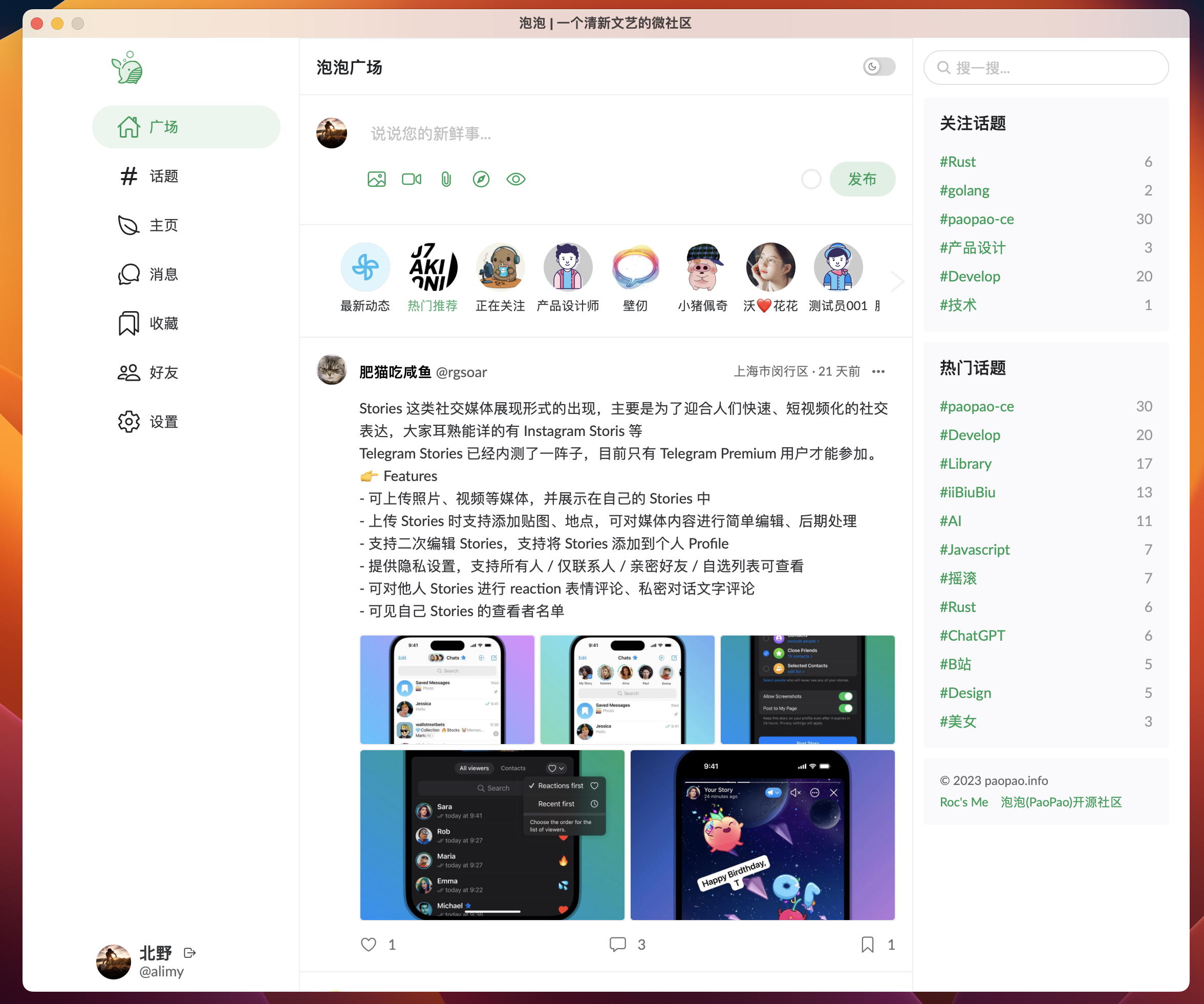
Preview
Web
Desktop
More screenshots and live behavior are available at PaoPao.
Architecture at a Glance
Layer
Primary stack
Backend
Go, Gin, Cobra, GORM, Mir
Web frontend
Vue 3, Vite, Naive UI
Desktop client
Tauri
Search
Meilisearch
Cache
Redis
Object storage
Local OSS, MinIO, AliOSS, COS, Huawei OBS, S3-compatible
Observability
OpenTelemetry, Sentry, Pyroscope, Pprof
Repository Layout
Path
Purpose
cmd/, internal/, pkg/
Backend application and shared packages
web/
Vue 3 web application and Tauri desktop frontend
docs/
Deployment, OpenAPI, design proposals, and related documentation
scripts/
SQL bootstrap and helper assets
config.yaml.sample
Complete runtime configuration template
Quick Start
Option A: Evaluate locally with Docker Compose
This is the fastest way to bring up a local environment for evaluation.
git clone https://github.com/rocboss/paopao-ce.git
cd paopao-ce
docker compose up -d
Then open:
http://localhost:8008 - PaoPao
http://localhost:7700 - Meilisearch
http://localhost:8001 - RedisInsight
Option B: Develop from source
Requirements
Go 1.24+
Node.js 20.19+ or 22.12+
MySQL 5.7+
Redis
Meilisearch
Rust + Tauri prerequisites if you plan to build the desktop app
Backend
Import scripts/paopao-mysql.sql into MySQL.
Copy the sample config and adjust only the bootstrap-critical values for your environment.
Start the backend.
cp config.yaml.sample config.yaml
make run
To build a release binary instead:
make build
To serve the embedded web UI from the Go binary, build the web assets first and run with the embed tag:
make build-web
make run TAGS='embed'
Web frontend
cd web
cp .env .env.local
yarn
yarn dev
To produce static assets:
yarn build
Desktop app
cd web
yarn tauri build
For the full installation guide, Docker build variants, desktop prerequisites, and migration notes, see INSTALL.md.
Configuration and Feature Suites
config.yaml.sample is now a minimal bootstrap template. At runtime, PaoPao loads the embedded default config first, then overlays ./custom/config.yaml or ./config.yaml if present, preferring the first file it finds.
That means the external config can stay intentionally small. In the current design:
Keep in YAML: ports, feature selection, database, Redis, JWT, and AdminSettings.EncryptionKey
Prefer the admin UI (/#/admin/settings): site profile, app behavior limits, search provider settings, object-storage settings, SMS/payment settings, and other operational knobs supported by the registry
Watch apply mode: some settings are live, while others are marked restart-required in the admin page
The Features section controls which capability bundles are enabled:
# Use the default suite
release/paopao serve

# Use only the declared develop suite
release/paopao serve --no-default-features --features develop

# Add sms on top of the default suite
release/paopao serve --features sms

# Enable features explicitly
release/paopao serve --no-default-features --features sqlite3,localoss,loggerfile,redis
For the current implementation status of each feature, see features-status.md.
Documentation Map
INSTALL.md - installation, Docker usage, and desktop build instructions
INSTALL_ZH.md - Chinese installation guide
docs/README.md - documentation index
docs/README_ZH.md - Chinese documentation index
docs/deploy/ - deployment documentation
docs/openapi/ - exported API documentation assets
docs/proposal/ - design notes and feature proposals
deployed-sites.md - known deployed instances
ROADMAP.md - roadmap and planning notes
Branch Strategy
The project uses a staged branch model:
Branch
Role
main
Stable production branch; bug-fix oriented
beta
Public testing branch
alpha
Internal testing branch
dev
Main development branch for new work
feature/*
Focused feature branches
r/*
Distribution-oriented release branches
If you plan to contribute new functionality, target dev unless the maintainers specify otherwise.
Contributing
Pull requests are welcome. If you want to contribute:
Fork the repository.
Create a branch from dev for feature work.
Keep changes focused and documented.
Open a PR with context about the problem, approach, and verification.
If you deploy your own instance, consider adding it to deployed-sites.md.
License
Distributed under the MIT License. See LICENSE for details.
The most recent commit recorded on rocboss/paopao-ce was 23 days ago, based on the GitHub push timestamp. The repository has 657 forks — one of the better signals of community interest.
How many stars does rocboss/paopao-ce have?
rocboss/paopao-ce has 4.5k GitHub stars — refresh the page for the live number, or check github.com/rocboss/paopao-ce. TopGit mirrors GitHub's count but does not claim minute-by-minute accuracy.
Is rocboss/paopao-ce open source?
Yes — rocboss/paopao-ce ships under the MIT license, which makes its source code freely readable (and, depending on license terms, forkable and reusable). Source: github.com/rocboss/paopao-ce.
What else is in the Backend space?
rocboss/paopao-ce is tracked by TopGit under the Backend category, alongside 8 GitHub-tagged topics. Trending and Topics pages list peer repositories of comparable stars and language.
What is rocboss/paopao-ce?
rocboss/paopao-ce (rocboss/paopao-ce) is a Go project on GitHub. From the project's own README: A scalable social community platform powered by Gin backend and modern TypeScript/Vue frontend architecture
What language is rocboss/paopao-ce written in?
rocboss/paopao-ce is written primarily in Go. GitHub's language field is based on the largest share of bytes in the default branch.
What license does rocboss/paopao-ce use?
rocboss/paopao-ce is released under the MIT license. Always verify the LICENSE file directly on GitHub for the authoritative terms — license strings can be edited out of sync with a project's actual stance.
Where do I read more about rocboss/paopao-ce?
This TopGit page is a snapshot — the READ ME tab shows the project's own README content (links stripped, images preserved). The GitHub repository at github.com/rocboss/paopao-ce is the definitive source.
Read full README in the tab above.
Curious whether paopao-ce is right for you?
Let ChatGPT, Claude, or Perplexity look into it — click below and see what AI actually says about paopao-ce.
 /paopao-ce