rust-embedded/rust-raspberrypi-OS-tutorials is a Backend project on GitHub, written primarily in Rust. It has 14.8k stars. :books: Learn to write an embedded OS in Rust :crab:
Snapshot summary built from the project's own GitHub metadata — there's no written TopGit review yet. The page will update automatically when a full review is published.
WHY NO REVIEW YET
TopGit writes full reviews for the most-starred, most-requested repositories. This page is a snapshot until then — see the READ ME tab for the original README in full.
Operating System development tutorials in Rust on the Raspberry Pi
ℹ️ Introduction
This is a tutorial series for hobby OS developers who are new to ARM's 64 bit ARMv8-A
architecture. The tutorials will give a guided, step-by-step tour of how to write a monolithic
Operating System kernel for an embedded system from scratch. They cover implementation of common
Operating Systems tasks, like writing to the serial console, setting up virtual memory and handling
HW exceptions. All while leveraging Rust's unique features to provide for safety and speed.
Have fun!
Best regards, Andre (@andre-richter)
P.S.: For other languages, please look out for alternative README files. For example,
README.CN.md or README.ES.md. Many thanks to our
translators 🙌.
📑 Organization
Each tutorial contains a stand-alone, bootable kernel binary.
Each new tutorial extends the previous one.
Each tutorial README will have a short tl;dr section giving a brief overview of the additions,
and show the source code diff to the previous tutorial, so that you can conveniently inspect the
changes/additions.
Some tutorials have a full-fledged, detailed text in addition to the tl;dr section. The
long-term plan is that all tutorials get a full text, but for now this is exclusive to
tutorials where I think that tl;dr and diff are not enough to get the idea.
The code written in these tutorials supports and runs on the Raspberry Pi 3 and the
Raspberry Pi 4.
Tutorials 1 till 5 are groundwork code which only makes sense to run in QEMU.
Starting with tutorial 5, you can load and run the kernel on the real
Raspberrys and observe output over UART.
Although the Raspberry Pi 3 and 4 are the main target boards, the code is written in a modular
fashion which allows for easy porting to other CPU architectures and/or boards.
I would really love if someone takes a shot at a RISC-V implementation!
For editing, I recommend Visual Studio Code with Rust Analyzer.
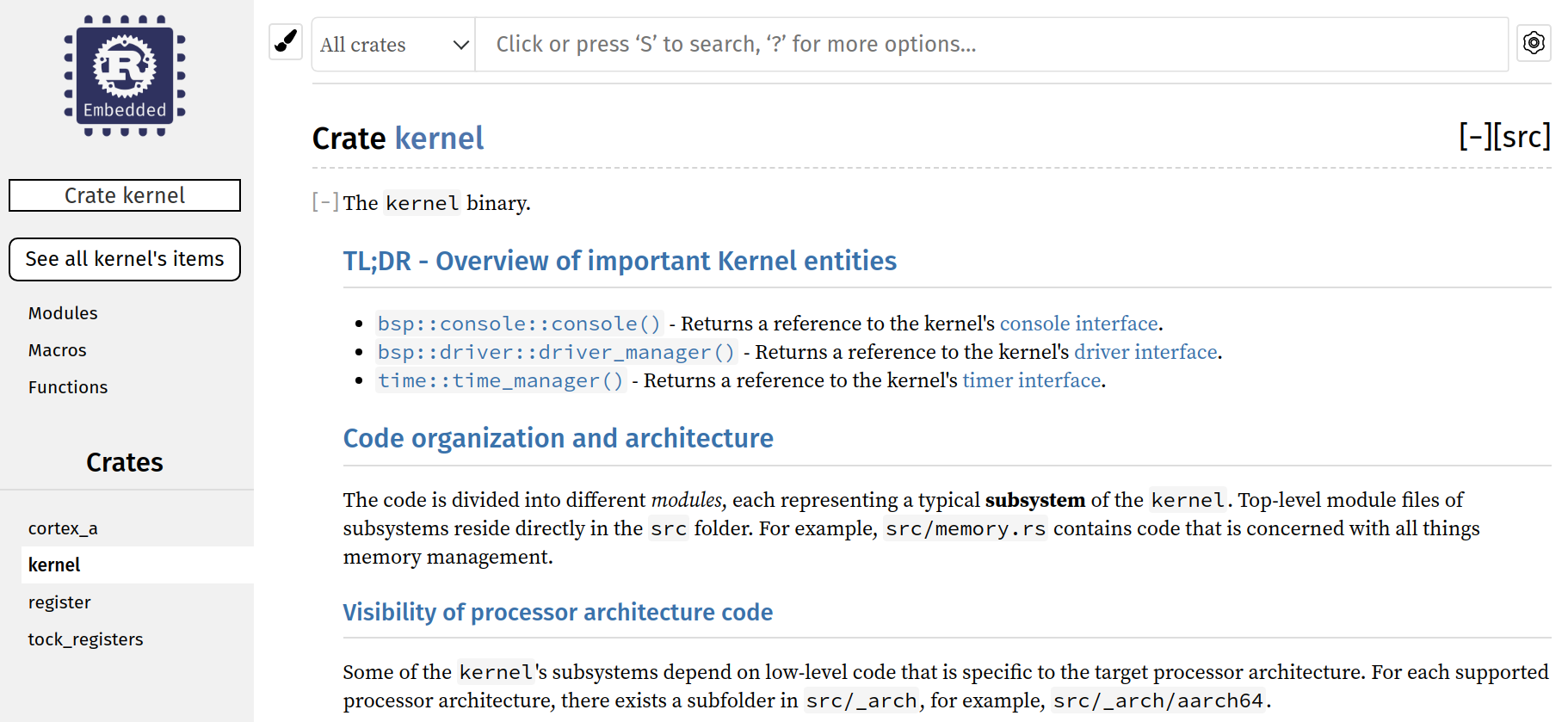
In addition to the tutorial text, also check out the make doc command in each tutorial. It lets
you browse the extensively documented code in a convenient way.
Output of make doc
🛠 System Requirements
The tutorials are primarily targeted at Linux-based distributions. Most stuff will also work on macOS, but this is only experimental.
🚀 The tl;dr Version
Install Docker Engine.
(Linux only) Ensure your user account is in the docker group.
Prepare the Rust toolchain. Most of it will be handled on first use through the
rust-toolchain.toml file. What's left for us to do is:
In case you use Visual Studio Code, I strongly recommend installing the Rust Analyzer extension.
(macOS only) Install a few Ruby gems.
This was last tested by the author with Ruby version 3.0.2 on macOS Monterey. If you are using
rbenv, the respective .ruby-version file is already in place. If you never heard of rbenv,
try using this little guide.
Run this in the repository root folder:
bundle config set --local path '.vendor/bundle'
bundle config set --local without 'development'
bundle install
🧰 More Details: Eliminating Toolchain Hassle
This series tries to put a strong focus on user friendliness. Therefore, efforts were made to
eliminate the biggest painpoint in embedded development as much as possible: Toolchain hassle.
Rust itself is already helping a lot in that regard, because it has built-in support for
cross-compilation. All that we need for cross-compiling from an x86 host to the Raspberry Pi's
AArch64 architecture will be automatically installed by rustup. However, besides the Rust
compiler, we will use some more tools. Among others:
QEMU to emulate our kernel on the host system.
A self-made tool called Minipush to load a kernel onto the Raspberry Pi on-demand over UART.
OpenOCD and GDB for debugging on the target.
There is a lot that can go wrong while installing and/or compiling the correct version of each tool
on your host machine. For example, your distribution might not provide the latest version that is
needed. Or you are missing some hard-to-get dependencies for the compilation of one of these tools.
This is why we will make use of Docker whenever possible. We are providing an
accompanying container that has all the needed tools or dependencies pre-installed, and it gets
pulled in automagically once it is needed. If you want to know more about Docker and peek at the
provided container, please refer to the repository's docker folder.
📟 USB Serial Output
Since the kernel developed in the tutorials runs on the real hardware, it is highly recommended to
get a USB serial cable to get the full experience.
You can find USB-to-serial cables that should work right away at [1] [2], but many others
will work too. Ideally, your cable is based on the CP2102 chip.
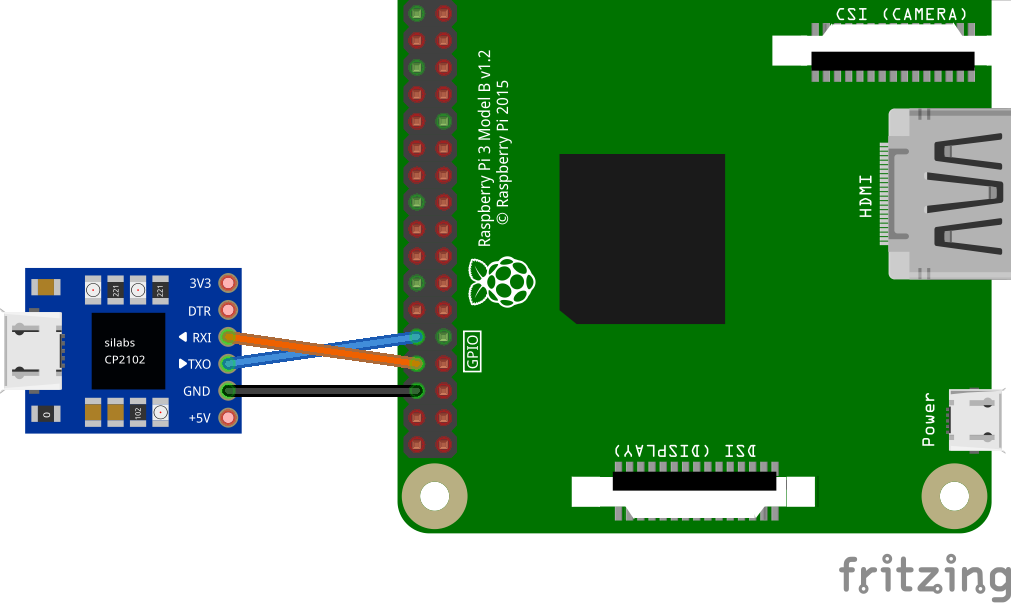
You connect it to GND and GPIO pins 14/15 as shown below.
Tutorial 5 is the first where you can use it. Check it out for
instructions on how to prepare the SD card to boot your self-made kernel from it.
Starting with tutorial 6, booting kernels on your Raspberry is getting
really comfortable. In this tutorial, a so-called chainloader is developed, which will be the
last file you need to manually copy on the SD card for a while. It will enable you to load the
tutorial kernels during boot on demand over UART.
🙌 Acknowledgements
The original version of the tutorials started out as a fork of Zoltan
Baldaszti's awesome tutorials on bare metal programming on
RPi3 in C. Thanks for giving me a head start!
Translations of this repository
Chinese
@colachg and @readlnh.
Need updating.
Spanish
@zanezhub.
In the future there'll be tutorials translated to spanish.
License
Licensed under either of
Apache License, Version 2.0, (LICENSE-APACHE or https://www.apache.org/licenses/LICENSE-2.0)
MIT license (LICENSE-MIT or https://opensource.org/licenses/MIT)
at your option.
Contribution
Unless you explicitly state otherwise, any contribution intentionally submitted for inclusion in the
work by you, as defined in the Apache-2.0 license, shall be dual licensed as above, without any
additional terms or conditions.
How active is development on rust-embedded/rust-raspberrypi-OS-tutorials?
The most recent commit recorded on rust-embedded/rust-raspberrypi-OS-tutorials was 2.8 years ago, based on the GitHub push timestamp. The repository has 871 forks — one of the better signals of community interest.
How many stars does rust-embedded/rust-raspberrypi-OS-tutorials have?
rust-embedded/rust-raspberrypi-OS-tutorials has 14.8k GitHub stars — refresh the page for the live number, or check github.com/rust-embedded/rust-raspberrypi-OS-tutorials. TopGit mirrors GitHub's count but does not claim minute-by-minute accuracy.
What else is in the Backend space?
rust-embedded/rust-raspberrypi-OS-tutorials is tracked by TopGit under the Backend category, alongside 16 GitHub-tagged topics. Trending and Topics pages list peer repositories of comparable stars and language.
What language is rust-embedded/rust-raspberrypi-OS-tutorials written in?
rust-embedded/rust-raspberrypi-OS-tutorials is written primarily in Rust. GitHub's language field is based on the largest share of bytes in the default branch.
What topics is rust-embedded/rust-raspberrypi-OS-tutorials associated with?
Where do I read more about rust-embedded/rust-raspberrypi-OS-tutorials?
This TopGit page is a snapshot — the READ ME tab shows the project's own README content (links stripped, images preserved). The GitHub repository at github.com/rust-embedded/rust-raspberrypi-OS-tutorials is the definitive source.
Why is rust-embedded/rust-raspberrypi-OS-tutorials categorized under Backend?
TopGit places rust-embedded/rust-raspberrypi-OS-tutorials in the Backend category based on its GitHub topics and description (tagged: "aarch64", "arm64", "armv8"). Categories are assigned from real repository metadata, not editorial guesswork.
Read full README in the tab above.
Still deciding about rust-raspberrypi-OS-tutorials?
One click hands the question to an AI along with this page — see what it says about rust-raspberrypi-OS-tutorials.

 /rust-raspberrypi-OS-tutorials