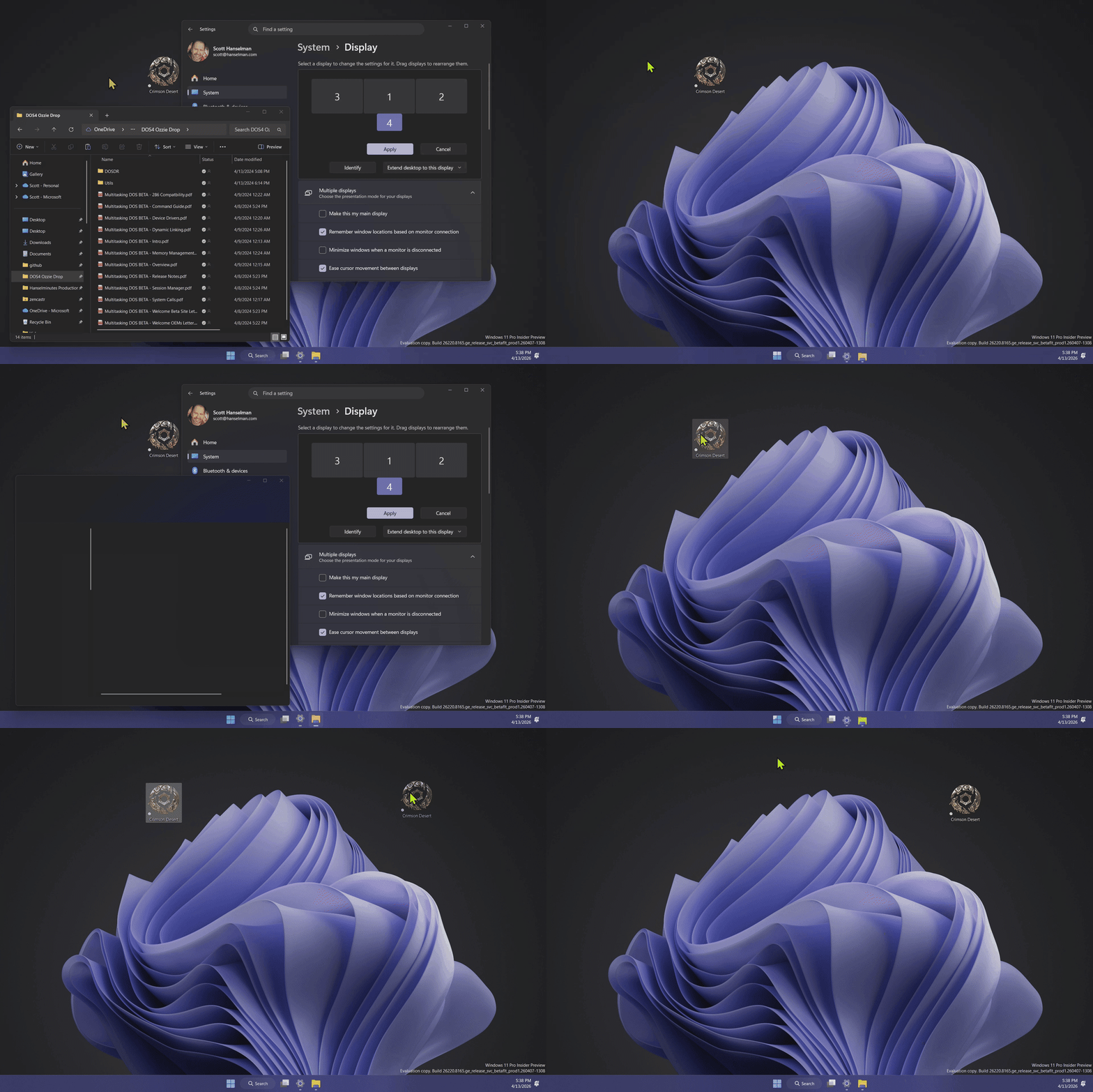
shanselman/PeekDesktop is one of the developer-focused repositories TopGit tracks, currently at 916 stars, written primarily in C#. Click your desktop to peek at it - just like macOS Sonoma.
Snapshot summary built from the project's own GitHub metadata — there's no written TopGit review yet. The page will update automatically when a full review is published.
WHY NO REVIEW YET
TopGit writes full reviews for the most-starred, most-requested repositories. This page is a snapshot until then — see the READ ME tab for the original README in full.
Click empty desktop wallpaper (or empty taskbar area) to reveal your desktop — just like macOS Sonoma.
PeekDesktop brings macOS Sonoma's "click wallpaper to reveal desktop" feature to Windows 10 and 11. By default it uses Explorer's native Show Desktop behavior, and it also includes an optional Fly Away experimental style plus tray toggles for Require Double-Click, Peek on Desktop Click, and Peek on Taskbar Click. Click or drag desktop icons normally without accidentally triggering peek. When you're done, click any window, the taskbar, or the wallpaper again and everything comes right back where it was.
Download
📥 Download the latest release
Install with Winget
PeekDesktop is submitted to the Windows Package Manager community repository as Hanselman.PeekDesktop when tagged releases are published. After the community manifest is accepted, install it with:
winget install Hanselman.PeekDesktop
Download a release
File
Platform
PeekDesktop-vX.Y.Z-win-x64.zip
Intel/AMD (most PCs)
PeekDesktop-vX.Y.Z-win-arm64.zip
ARM64 (Surface Pro X, Snapdragon, etc.)
No installer needed. Download the zip, extract it, and run PeekDesktop.exe. Release builds are self-contained, so you do not need to install .NET separately. It lives in your system tray and updates itself automatically — when a new version is available, it downloads, verifies the code signature, and restarts in place.
Documentation
Engineering Deep Dive - architecture, shell internals, experiments, debugging workflow, undocumented API notes, and release tradeoffs
Auto-Updater - how the in-place auto-update system works, security model, swap dance, testing
How It Works
Click empty desktop wallpaper or empty taskbar area (not an icon or taskbar button) -> your desktop is revealed
Stay on the desktop -> click or drag icons, right-click, and rearrange things while windows stay hidden
Click any app, the taskbar, or empty wallpaper again -> all windows restore to exactly where they were
That's it. It just works.
Peek Styles
Show Desktop (Explorer) — the default and recommended mode. Uses Explorer's native Show Desktop behavior.
Fly Away (Experimental) — animates windows offscreen. Fun but has known quirks with external window management (Win+D, taskbar). Use for the visual flair, but know it can get confused if the shell changes window state behind its back.
Under the Hood
PeekDesktop uses lightweight Windows APIs:
SetWindowsHookEx(WH_MOUSE_LL) — low-level mouse hook to detect desktop clicks
WindowFromPoint — identifies the window under your cursor
MSAA hit-testing (AccessibleObjectFromPoint) — distinguishes empty wallpaper from desktop icons
UI Automation hit-testing — classifies empty taskbar space without firing on Start, pinned apps, or tray buttons
Taskbar Show Desktop button click — primary path, immune to keyboard remapping (PowerToys, etc.)
Win+D SendInput — fallback if taskbar button is unavailable
EnumWindows + WINDOWPLACEMENT — captures exact position and state (including maximized) of every window
SetWinEventHook(EVENT_SYSTEM_FOREGROUND) — watches for when you switch back to an app
SetWindowPlacement — restores windows to their exact previous positions
No admin rights required. Uses < 5 MB RAM idle.
System Tray
Right-click the tray icon for options:
✅ Enabled — toggle the peek feature on/off
🔁 Start with Windows — launch automatically at login
🖱️ Require Double-Click — optionally require a double-click on the desktop to trigger peek
🎮 Pause While Gaming / Full-Screen — on by default for exclusive full-screen and known gaming fullscreen apps
🖥️ Peek on Desktop Click — on by default; turn it off for taskbar-only activation
📌 Peek on Taskbar Click — optionally trigger peek from empty taskbar space
🪟 Restore All Windows on App Switch — on by default; in Explorer show desktop mode, taskbar/Alt+Tab app switches restore all hidden windows behind the selected app
👀 Peek Style — switch between Explorer and fly-away modes
ℹ️ About — version info
⬇️ Check for Updates — download and install newer versions automatically
🔄 Auto-Check for Updates — on by default; silently checks for updates on startup
❌ Exit — quit PeekDesktop
When Windows is in dark mode, the tray menu also follows the system theme when supported by the OS.
What's New
Small Native AOT single-file builds for both x64 and ARM64
Peek on Taskbar Click — optional trigger from empty taskbar space
Release builds use .NET Native AOT — the exe is a fully native binary with no .NET runtime dependency. Current releases ship as self-contained single-file executables for both x64 and ARM64. Earlier experiments also used PublishAotCompressed (LZMA), but current builds favor compatibility and predictable startup behavior.
Clicking or dragging desktop icons does not start peek
Right-click desktop icons while peeking (context menus stay open)
Desktop icons remain usable while peeking
Exact window positions are restored
GitHub release-based update checks
Works with PowerToys Keyboard Manager (keyboard remapping)
Smooth minimize/restore animations (slide/fade)
Hotkey support (e.g., Ctrl+F12 to toggle peek)
Per-monitor peek (only minimize windows on the clicked monitor)
Exclude specific apps from being minimized
.NET Native AOT — The Size Journey 💾
PeekDesktop is a showcase for how small a .NET Native AOT application can get. Starting from a standard WinForms app, we systematically eliminated every managed framework dependency until the binary was pure Win32 P/Invoke — then compressed it to fit on a floppy disk.
Version
Binary Size
What Changed
v0.4.5
~65 MB
Self-contained .NET (no AOT)
v0.5.0
17.5 MB
Enabled Native AOT
v0.6.0
4.2 MB
Dropped WinForms — pure Win32 P/Invoke for tray icon, menus, message loop
v0.6.1
2.3 MB
Replaced HttpClient with OS-native WinHTTP (winhttp.dll)
Special thanks to Michal Strehovský — the architect of .NET Native AOT — whose PR #5 inspired the final round of optimizations that eliminated the JSON source generator, reflection, and managed delegates. When the person who built the AOT compiler optimizes your app, you pay attention. 🙏
How does shanselman/PeekDesktop compare to other Developer Tools projects?
shanselman/PeekDesktop is tracked by TopGit in the Developer Tools category, with 916 GitHub stars and written in C#. Browse the Developer Tools topic page on TopGit to compare it against similar projects by stars and activity.
Is shanselman/PeekDesktop open source?
Yes — shanselman/PeekDesktop ships under the MIT license, which makes its source code freely readable (and, depending on license terms, forkable and reusable). Source: github.com/shanselman/PeekDesktop.
What else is in the Developer Tools space?
shanselman/PeekDesktop is tracked by TopGit under the Developer Tools category. Trending and Topics pages list peer repositories of comparable stars and language.
What is shanselman/PeekDesktop?
shanselman/PeekDesktop (shanselman/PeekDesktop) is a C# project on GitHub. From the project's own README: Click your desktop to peek at it - just like macOS Sonoma.
Where do I read more about shanselman/PeekDesktop?
This TopGit page is a snapshot — the READ ME tab shows the project's own README content (links stripped, images preserved). The GitHub repository at github.com/shanselman/PeekDesktop is the definitive source.
Why is shanselman/PeekDesktop categorized under Developer Tools?
TopGit places shanselman/PeekDesktop in the Developer Tools category based on its GitHub topics and description. Categories are assigned from real repository metadata, not editorial guesswork.
Read full README in the tab above.
Is PeekDesktop worth your time?
ChatGPT, Claude and Perplexity can all read this page. Ask one of them what it makes of PeekDesktop.

 /PeekDesktop