simular-ai/Agent-S sits at 12.1k stars on GitHub, written primarily in Python. Agent S: an open agentic framework that uses computers like a human
Snapshot summary built from the project's own GitHub metadata — there's no written TopGit review yet. The page will update automatically when a full review is published.
WHY NO REVIEW YET
TopGit writes full reviews for the most-starred, most-requested repositories. This page is a snapshot until then — see the READ ME tab for the original README in full.
🏆 Agent S3: First to Surpass Human Performance on OSWorld (72.60%)
🌐 [S3 blog]
📄 [S3 Paper (TMLR 2026)]
🎥 [S3 Video]
🌐 [S2 blog]
📄 [S2 Paper (COLM 2025)]
🎥 [S2 Video]
🌐 [S1 blog]
📄 [S1 Paper (ICLR 2025)]
🎥 [S1 Video]
Deutsch |
Español |
français |
日本語 |
한국어 |
Português |
Русский |
中文
Skip the setup? Try Agent S in Simular Cloud
🥳 Updates
2026/07/30: The Agent S3 paper "Scaling Agents for Computer Use" is accepted to TMLR 2026!
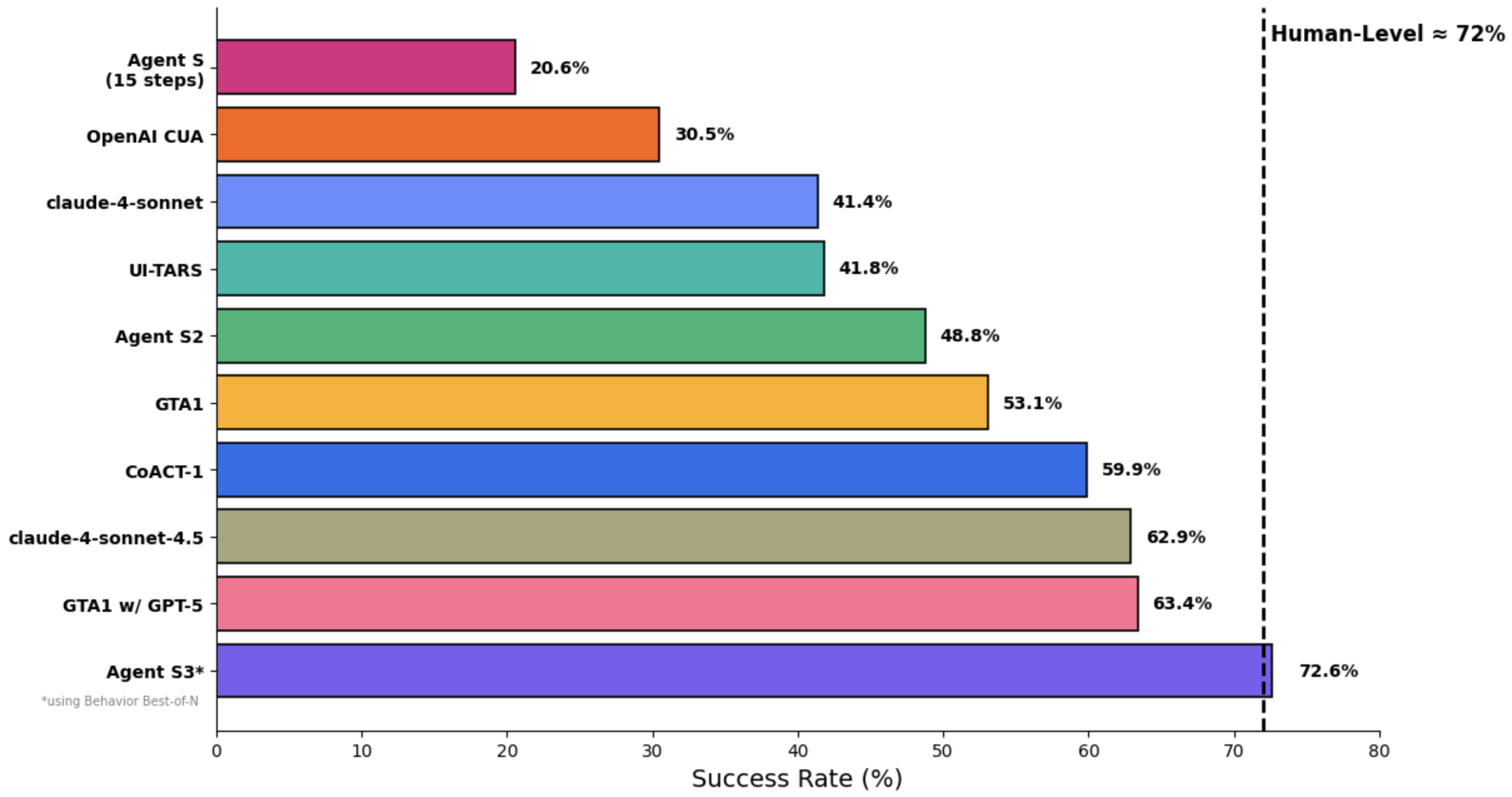
2025/12/15: Agent S3 is the first to surpass human-level performance on OSWorld with an impressive score of 72.60%!
2025/10/02: Released Agent S3 and its technical paper, setting a new SOTA of 69.9% on OSWorld (approaching 72% human performance), with strong generalizability on WindowsAgentArena and AndroidWorld! It is also simpler, faster, and more flexible.
2025/08/01: Agent S2.5 is released (gui-agents v0.2.5): simpler, better, and faster! New SOTA on OSWorld-Verified!
2025/07/07: The Agent S2 paper is accepted to COLM 2025! See you in Montreal!
2025/04/27: The Agent S paper won the Best Paper Award 🏆 at ICLR 2025 Agentic AI for Science Workshop!
2025/04/01: Released the Agent S2 paper with new SOTA results on OSWorld, WindowsAgentArena, and AndroidWorld!
2025/03/12: Released Agent S2 along with v0.2.0 of gui-agents, the new state-of-the-art for computer use agents (CUA), outperforming OpenAI's CUA/Operator and Anthropic's Claude 3.7 Sonnet Computer-Use!
2025/01/22: The Agent S paper is accepted to ICLR 2025!
2025/01/21: Released v0.1.2 of gui-agents library, with support for Linux and Windows!
2024/12/05: Released v0.1.0 of gui-agents library, allowing you to use Agent-S for Mac, OSWorld, and WindowsAgentArena with ease!
2024/10/10: Released the Agent S paper and codebase!
Table of Contents
💡 Introduction
🎯 Current Results
🛠️ Installation & Setup
🚀 Usage
🤝 Acknowledgements
💬 Citation
💡 Introduction
Welcome to Agent S, an open-source framework designed to enable autonomous interaction with computers through Agent-Computer Interface. Our mission is to build intelligent GUI agents that can learn from past experiences and perform complex tasks autonomously on your computer.
Whether you're interested in AI, automation, or contributing to cutting-edge agent-based systems, we're excited to have you here!
🎯 Current Results
On OSWorld, Agent S3 alone reaches 66% in the 100-step setting, already exceeding the previous state of the art of 63.4% (GTA1 w/ GPT-5). With the addition of Behavior Best-of-N, performance climbs even higher to 72.6%, surpassing human-level performance on OSWorld (~72%)!
Agent S3 also demonstrates strong zero-shot generalization! On WindowsAgentArena, accuracy rises from 50.2% using only Agent S3 to 56.6% by selecting from 3 rollouts. Similarly on AndroidWorld, performance improves from 68.1% to 71.6%
🛠️ Installation & Setup
Prerequisites
Single Monitor: Our agent is designed for single monitor screens
Security: The agent runs Python code to control your computer - use with care
Supported Platforms: Linux, Mac, and Windows
Installation
To install Agent S3 without cloning the repository, run
pip install gui-agents
If you would like to test Agent S3 while making changes, clone the repository and install using
pip install -e .
Don't forget to also brew install tesseract! Pytesseract requires this extra installation to work.
import os
os.environ["OPENAI_API_KEY"] = "<YOUR_API_KEY>"
Supported Models
We support Azure OpenAI, Anthropic, Gemini, Open Router, and vLLM inference. See models.md for details.
Grounding Models (Required)
For optimal performance, we recommend UI-TARS-1.5-7B hosted on Hugging Face Inference Endpoints or another provider. See Hugging Face Inference Endpoints for setup instructions.
🚀 Usage
⚡️ Recommended Setup:
For the best configuration, we recommend using OpenAI gpt-5-2025-08-07 as the main model, paired with UI-TARS-1.5-7B for grounding.
CLI
Note, this is running Agent S3, our improved agent, without bBoN.
⚠️ WARNING: The local coding environment executes arbitrary Python and Bash code locally on your machine. Only use this feature in trusted environments and with trusted inputs.
Required Parameters
--provider: Main generation model provider (e.g., openai, anthropic, etc.) - Default: "openai"
--model: Main generation model name (e.g., gpt-5-2025-08-07) - Default: "gpt-5-2025-08-07"
--ground_provider: The provider for the grounding model - Required
--ground_url: The URL of the grounding model - Required
--ground_model: The model name for the grounding model - Required
--grounding_width: Width of the output coordinate resolution from the grounding model - Required
--grounding_height: Height of the output coordinate resolution from the grounding model - Required
Optional Parameters
--model_temperature: The temperature to fix all model calls to (necessary to set to 1.0 for models like o3 but can be left blank for other models)
Grounding Model Dimensions
The grounding width and height should match the output coordinate resolution of your grounding model:
UI-TARS-1.5-7B: Use --grounding_width 1920 --grounding_height 1080
UI-TARS-72B: Use --grounding_width 1000 --grounding_height 1000
Optional Parameters
--model_url: Custom API URL for main generation model - Default: ""
--model_api_key: API key for main generation model - Default: ""
--ground_api_key: API key for grounding model endpoint - Default: ""
--max_trajectory_length: Maximum number of image turns to keep in trajectory - Default: 8
--enable_reflection: Enable reflection agent to assist the worker agent - Default: True
--enable_local_env: Enable local coding environment for code execution (WARNING: Executes arbitrary code locally) - Default: False
Local Coding Environment Details
The local coding environment enables Agent S3 to execute Python and Bash code directly on your machine. This is particularly useful for:
Data Processing: Manipulating spreadsheets, CSV files, or databases
File Operations: Bulk file processing, content extraction, or file organization
System Automation: Configuration changes, system setup, or automation scripts
Code Development: Writing, editing, or executing code files
Text Processing: Document manipulation, content editing, or formatting
When enabled, the agent can use the call_code_agent action to execute code blocks for tasks that can be completed through programming rather than GUI interaction.
Requirements:
Python: The same Python interpreter used to run Agent S3 (automatically detected)
Bash: Available at /bin/bash (standard on macOS and Linux)
System Permissions: The agent runs with the same permissions as the user executing it
Security Considerations:
The local environment executes arbitrary code with the same permissions as the user running the agent
Only enable this feature in trusted environments
Be cautious when the agent generates code for system-level operations
Consider running in a sandboxed environment for untrusted tasks
Bash scripts are executed with a 30-second timeout to prevent hanging processes
gui_agents SDK
First, we import the necessary modules. AgentS3 is the main agent class for Agent S3. OSWorldACI is our grounding agent that translates agent actions into executable python code.
import pyautogui
import io
from gui_agents.s3.agents.agent_s import AgentS3
from gui_agents.s3.agents.grounding import OSWorldACI
from gui_agents.s3.utils.local_env import LocalEnv  # Optional: for local coding environment

# Load in your API keys.
from dotenv import load_dotenv
load_dotenv()

current_platform = "linux"  # "darwin", "windows"
Next, we define our engine parameters. engine_params is used for the main agent, and engine_params_for_grounding is for grounding. For engine_params_for_grounding, we support custom endpoints like HuggingFace TGI, vLLM, and Open Router.
Refer to gui_agents/s3/cli_app.py for more details on how the inference loop works.
OSWorld
To deploy Agent S3 in OSWorld, follow the OSWorld Deployment instructions.
💬 Citations
If you find this codebase useful, please cite:
@misc{Agent-S3,
      title={The Unreasonable Effectiveness of Scaling Agents for Computer Use},
      author={Gonzalo Gonzalez-Pumariega and Vincent Tu and Chih-Lun Lee and Jiachen Yang and Ang Li and Xin Eric Wang},
      year={2025},
      eprint={2510.02250},
      archivePrefix={arXiv},
      primaryClass={cs.AI},
      url={https://arxiv.org/abs/2510.02250},
}

@misc{Agent-S2,
      title={Agent S2: A Compositional Generalist-Specialist Framework for Computer Use Agents},
      author={Saaket Agashe and Kyle Wong and Vincent Tu and Jiachen Yang and Ang Li and Xin Eric Wang},
      year={2025},
      eprint={2504.00906},
      archivePrefix={arXiv},
      primaryClass={cs.AI},
      url={https://arxiv.org/abs/2504.00906},
}

@inproceedings{Agent-S,
    title={{Agent S: An Open Agentic Framework that Uses Computers Like a Human}},
    author={Saaket Agashe and Jiuzhou Han and Shuyu Gan and Jiachen Yang and Ang Li and Xin Eric Wang},
    booktitle={International Conference on Learning Representations (ICLR)},
    year={2025},
    url={https://arxiv.org/abs/2410.08164}
}
How does simular-ai/Agent-S compare to other Developer Tools projects?
simular-ai/Agent-S is tracked by TopGit in the Developer Tools category, with 12.1k GitHub stars and written in Python. Browse the Developer Tools topic page on TopGit to compare it against similar projects by stars and activity.
How many stars does simular-ai/Agent-S have?
simular-ai/Agent-S has 12.1k GitHub stars — refresh the page for the live number, or check github.com/simular-ai/Agent-S. TopGit mirrors GitHub's count but does not claim minute-by-minute accuracy.
Is simular-ai/Agent-S open source?
Yes — simular-ai/Agent-S ships under the Apache-2.0 license, which makes its source code freely readable (and, depending on license terms, forkable and reusable). Source: github.com/simular-ai/Agent-S.
What else is in the Developer Tools space?
simular-ai/Agent-S is tracked by TopGit under the Developer Tools category, alongside 13 GitHub-tagged topics. Trending and Topics pages list peer repositories of comparable stars and language.
What is simular-ai/Agent-S?
simular-ai/Agent-S (simular-ai/Agent-S) is a Python project on GitHub. From the project's own README: Agent S: an open agentic framework that uses computers like a human
Where can I see simular-ai/Agent-S in action?
The project maintains a homepage at https://www.simular.ai. The README tab on this page also usually contains screenshots and a quickstart.
Where do I read more about simular-ai/Agent-S?
This TopGit page is a snapshot — the READ ME tab shows the project's own README content (links stripped, images preserved). The GitHub repository at github.com/simular-ai/Agent-S is the definitive source.
 simular-ai/Agent-S
 Agent S:
Use Computer Like a Human
Agent S:
Use Computer Like a Human