A developer-focused entry in TopGit's GitHub warehouse: stefanprodan/gitops-istio, 669 stars, Developer Tools. A GitOps recipe for Progressive Delivery with Flux v2, Flagger and Istio
Snapshot summary built from the project's own GitHub metadata — there's no written TopGit review yet. The page will update automatically when a full review is published.
WHY NO REVIEW YET
TopGit writes full reviews for the most-starred, most-requested repositories. This page is a snapshot until then — see the READ ME tab for the original README in full.
This is a guide where you will get hands-on experience with GitOps and
Progressive Delivery using Kubernetes and Istio.
Introduction
What is GitOps?
GitOps is a way to do Continuous Delivery, it works by using Git as a source of truth
for declarative infrastructure and workloads.
For Kubernetes this means using git push instead of kubectl apply/delete or helm install/upgrade.
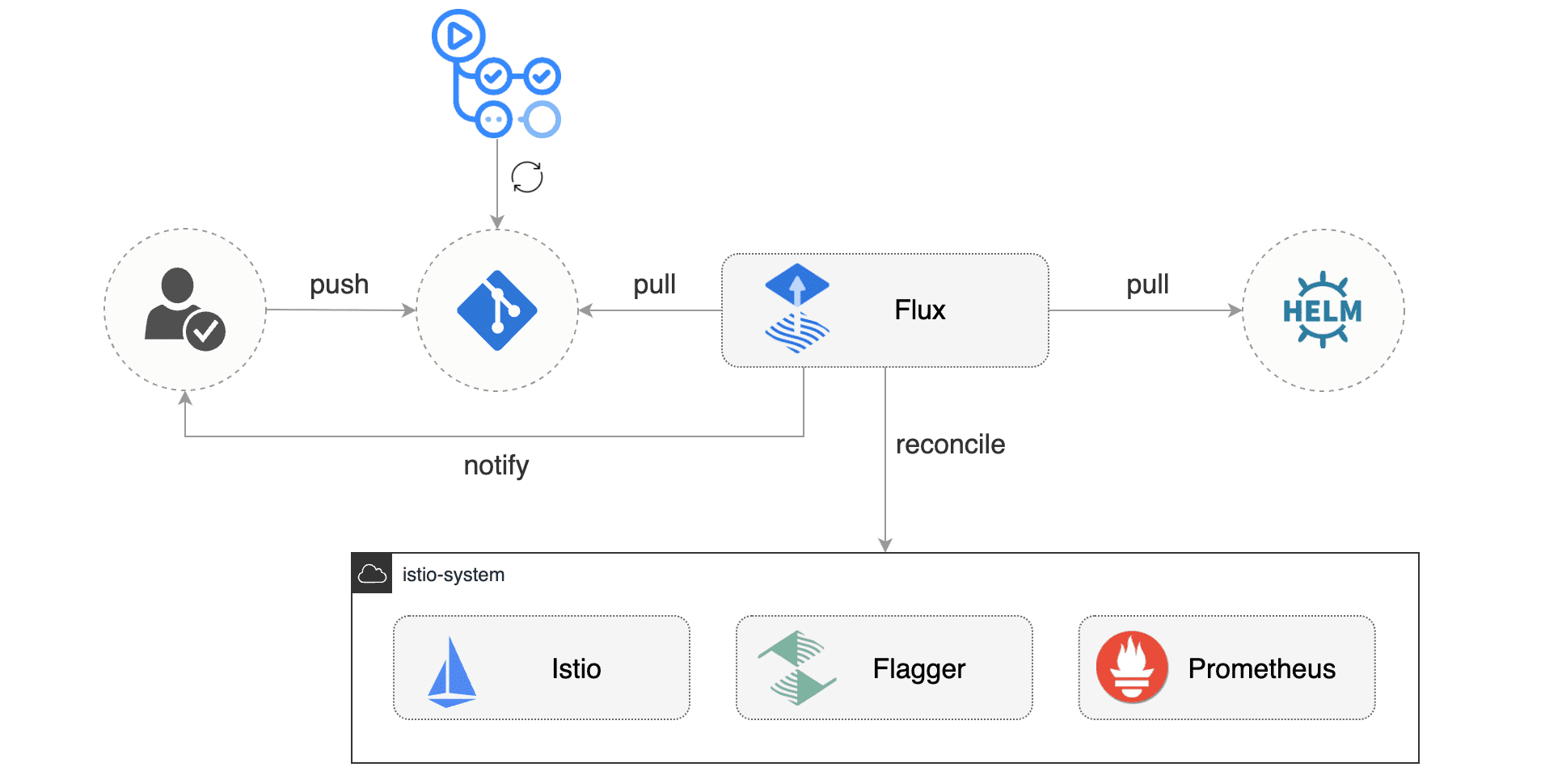
In this workshop you'll be using GitHub to host the config repository and Flux
as the GitOps delivery solution.
What is Progressive Delivery?
Progressive delivery is an umbrella term for advanced deployment patterns like canaries, feature flags and A/B testing.
Progressive delivery techniques are used to reduce the risk of introducing a new software version in production
by giving app developers and SRE teams a fine-grained control over the blast radius.
In this workshop you'll be using Flagger, Istio and Prometheus to automate
Canary Releases and A/B Testing for your applications.
Prerequisites
You'll need a Kubernetes cluster v1.20 or newer with LoadBalancer support.
For testing purposes you can use Minikube with 2 CPUs and 4GB of memory:
minikube start --cpus='2' --memory='4g'
If using Minikube, run the following in a separate terminal window/tab for the duration of this workshop:
minikube tunnel
This assigns an External-IP to the istio-gateway service and allows the helm install to complete successfully.
Install jq, yq and the flux CLI with Homebrew:
brew install jq yq fluxcd/tap/flux
Verify that your cluster satisfies the prerequisites with:
flux check --pre
Fork this repository and clone it:
git clone https://github.com/<YOUR-USERNAME>/gitops-istio
cd gitops-istio
Cluster bootstrap
With flux bootstrap command you can install Flux on a Kubernetes cluster
and configure it to manage itself from a Git repository.
If the Flux components are present on the cluster,
the bootstrap command will perform an upgrade if needed.
Bootstrap Flux by specifying your GitHub repository fork URL:
The above command requires ssh-agent, if you're using Windows see
flux bootstrap github documentation.
At bootstrap, Flux generates an SSH key and prints the public key.
In order to sync your cluster state with git you need to copy the public key and create a deploy key with write
access on your GitHub repository. On GitHub go to Settings > Deploy keys click on Add deploy key,
check Allow write access, paste the Flux public key and click Add key.
When Flux has access to your repository it will do the following:
installs Istio using the Istio base, istiod and gateway Helm charts
waits for Istio control plane to be ready
installs Flagger, Prometheus and Grafana
creates the Istio public gateway
creates the prod namespace
creates the load tester deployment
creates the frontend deployment and canary
creates the backend deployment and canary
When bootstrapping a cluster with Istio, it is important to control the installation order.
For the applications pods to be injected with Istio sidecar,
the Istio control plane must be up and running before the apps.
With Flux v2 you can specify the execution order by defining dependencies between objects.
For example, in clusters/my-cluster/apps.yaml
we tell Flux that the apps reconciliation depends on the istio-system one:
Flux issues Kubernetes events containing all the errors encountered during reconciliation.
You could also configure Flux to publish the events to Slack, MS Team, Discord and others;
please the notification guide for more details.
Istio control plane upgrades
Istio upgrades are automated using GitHub Actions and Flux.
When a new Istio version is available, the
update-istio GitHub Action workflow
will open a pull request with the manifest updates needed for upgrading Istio.
The new Istio version is tested on Kubernetes Kind by the
e2e workflow
and when the PR is merged into the main branch, Flux will upgrade Istio on the production cluster.
Application bootstrap
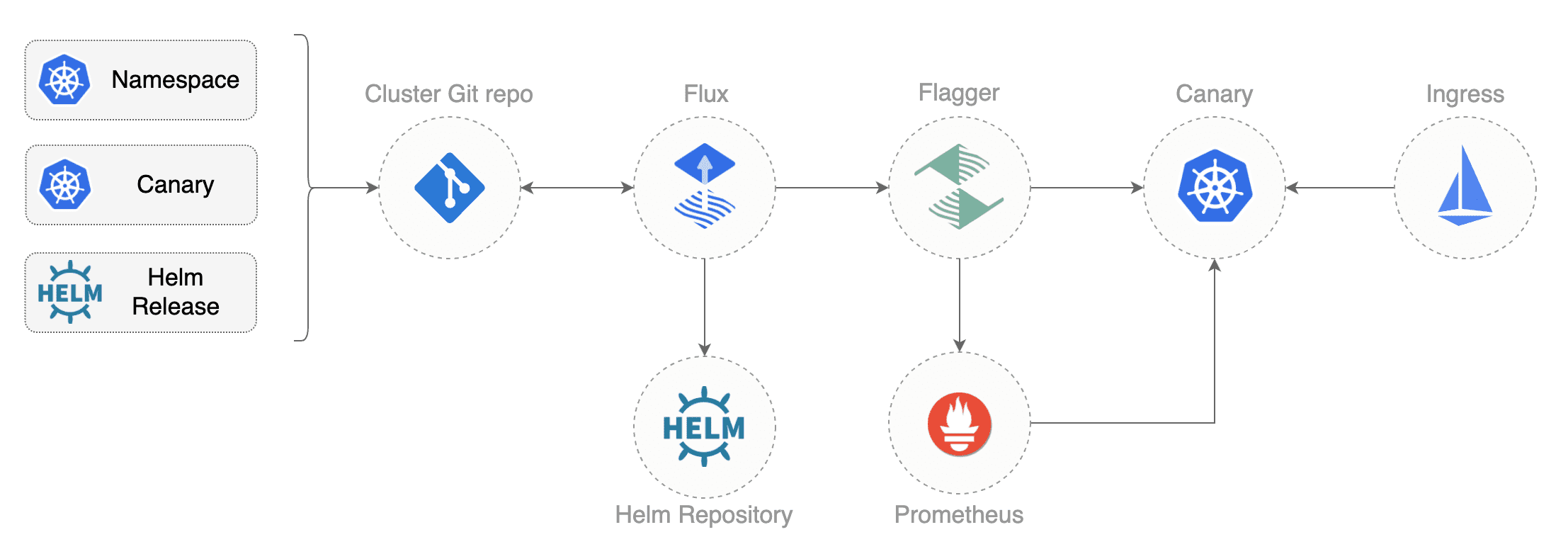
When Flux syncs the Git repository with your cluster, it creates the frontend/backend deployment, HPA and a canary object.
Flagger uses the canary definition to create a series of objects: Kubernetes deployments,
ClusterIP services, Istio destination rules and virtual services. These objects expose the application on the mesh and drive
the canary analysis and promotion.
# applied by Flux
deployment.apps/frontend
horizontalpodautoscaler.autoscaling/frontend
canary.flagger.app/frontend

# generated by Flagger
deployment.apps/frontend-primary
horizontalpodautoscaler.autoscaling/frontend-primary
service/frontend
service/frontend-canary
service/frontend-primary
destinationrule.networking.istio.io/frontend-canary
destinationrule.networking.istio.io/frontend-primary
virtualservice.networking.istio.io/frontend
Check if Flagger has successfully initialized the canaries:
kubectl -n prod get canaries

NAME       STATUS        WEIGHT
backend    Initialized   0
frontend   Initialized   0
When the frontend-primary deployment comes online,
Flagger will route all traffic to the primary pods and scale to zero the frontend deployment.
Find the Istio ingress gateway address with:
kubectl -n istio-system get svc istio-ingressgateway -ojson | jq .status.loadBalancer.ingress
Open a browser and navigate to the ingress address, you'll see the frontend UI.
Canary releases
Flagger implements a control loop that gradually shifts traffic to the canary while measuring key performance indicators
like HTTP requests success rate, requests average duration and pod health.
Based on analysis of the KPIs a canary is promoted or aborted, and the analysis result is published to Slack.
A canary analysis is triggered by changes in any of the following objects:
ConfigMaps and Secrets mounted as volumes or mapped to environment variables
For workloads that are not receiving constant traffic Flagger can be configured with a webhook,
that when called, will start a load test for the target workload. The canary configuration can be found
at apps/backend/canary.yaml.
Pull the changes from GitHub:
git pull origin main
To trigger a canary deployment for the backend app, bump the container image:
yq e '.images[0].newTag="6.1.1"' -i ./apps/backend/kustomization.yaml
Commit and push changes:
git add -A && \
git commit -m "backend 6.1.1" && \
git push origin main
Tell Flux to pull the changes or wait one minute for Flux to detect the changes on its own:
flux reconcile source git flux-system
Watch Flux reconciling your cluster to the latest commit:
watch flux get kustomizations
After a couple of seconds, Flagger detects that the deployment revision changed and starts a new rollout:
$ kubectl -n prod describe canary backend

Events:

New revision detected! Scaling up backend.prod
Starting canary analysis for backend.prod
Pre-rollout check conformance-test passed
Advance backend.prod canary weight 5
...
Advance backend.prod canary weight 50
Copying backend.prod template spec to backend-primary.prod
Promotion completed! Scaling down backend.prod
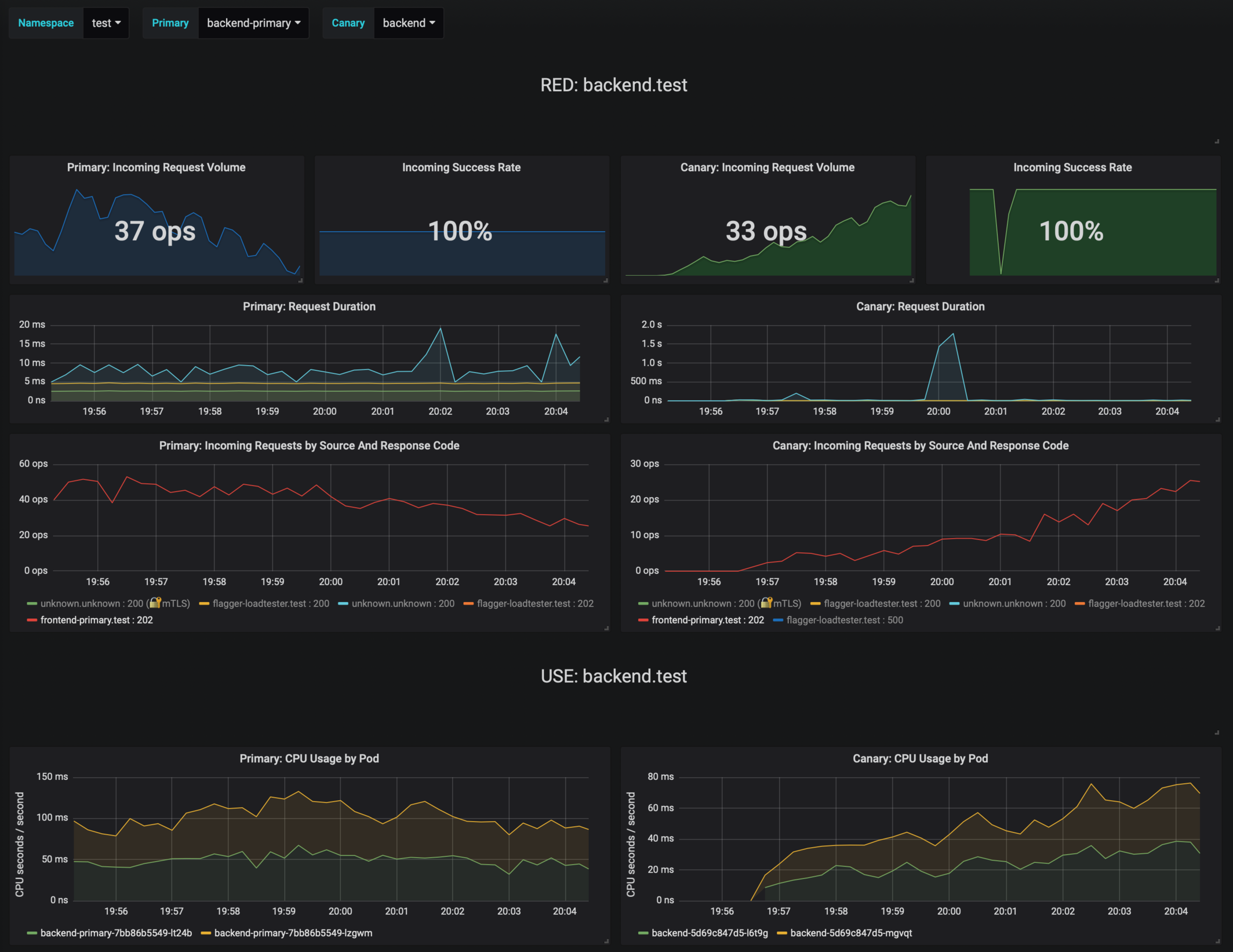
During the analysis the canary’s progress can be monitored with Grafana. You can access the dashboard using port forwarding:
The Istio dashboard URL is
http://localhost:3000/d/flagger-istio/istio-canary?refresh=10s&orgId=1&var-namespace=prod&var-primary=backend-primary&var-canary=backend
Note that if new changes are applied to the deployment during the canary analysis, Flagger will restart the analysis phase.
A/B testing
Besides weighted routing, Flagger can be configured to route traffic to the canary based on HTTP match conditions.
In an A/B testing scenario, you'll be using HTTP headers or cookies to target a certain segment of your users.
This is particularly useful for frontend applications that require session affinity.
You can enable A/B testing by specifying the HTTP match conditions and the number of iterations:
  analysis:
    # schedule interval (default 60s)
    interval: 10s
    # max number of failed metric checks before rollback
    threshold: 10
    # total number of iterations
    iterations: 12
    # canary match condition
    match:
      - headers:
          user-agent:
            regex: ".*Firefox.*"
      - headers:
          cookie:
            regex: "^(.*?;)?(type=insider)(;.*)?$"
The above configuration will run an analysis for two minutes targeting Firefox users and those that
have an insider cookie. The frontend configuration can be found at apps/frontend/canary.yaml.
Trigger a deployment by updating the frontend container image:
yq e '.images[0].newTag="6.1.1"' -i ./apps/frontend/kustomization.yaml

git add -A && \
git commit -m "frontend 6.1.1" && \
git push origin main

flux reconcile source git flux-system
Flagger detects that the deployment revision changed and starts the A/B testing:
$ kubectl -n istio-system logs deploy/flagger -f | jq .msg

New revision detected! Scaling up frontend.prod
Waiting for frontend.prod rollout to finish: 0 of 1 updated replicas are available
Pre-rollout check conformance-test passed
Advance frontend.prod canary iteration 1/10
...
Advance frontend.prod canary iteration 10/10
Copying frontend.prod template spec to frontend-primary.prod
Waiting for frontend-primary.prod rollout to finish: 1 of 2 updated replicas are available
Promotion completed! Scaling down frontend.prod
You can monitor all canaries with:
$ watch kubectl get canaries --all-namespaces

NAMESPACE   NAME      STATUS        WEIGHT
prod        frontend  Progressing   100
prod        backend   Succeeded     0
Rollback based on Istio metrics
Flagger makes use of the metrics provided by Istio telemetry to validate the canary workload.
The frontend app analysis
defines two metric checks:
When the number of failed checks reaches the canary analysis threshold, the traffic is routed back to the primary,
the canary is scaled to zero and the rollout is marked as failed.
$ kubectl -n istio-system logs deploy/flagger -f | jq .msg

New revision detected! Scaling up frontend.prod
Pre-rollout check conformance-test passed
Advance frontend.prod canary iteration 1/10
Halt frontend.prod advancement error-rate 31 > 1
Halt frontend.prod advancement latency 2000 > 500
...
Rolling back frontend.prod failed checks threshold reached 10
Canary failed! Scaling down frontend.prod
You can extend the analysis with custom metric checks targeting
Prometheus,
Datadog and
Amazon CloudWatch.
For configuring alerting of the canary analysis for Slack, MS Teams, Discord or Rocket see the
docs.
Getting Help
If you have any questions about progressive delivery:
Invite yourself to the CNCF community slack
and join the #flux and #flagger channels.
Check out the Flux talks section and to see a list of online talks,
hands-on training and meetups.
How active is development on stefanprodan/gitops-istio?
The most recent commit recorded on stefanprodan/gitops-istio was 3 months ago, based on the GitHub push timestamp. The repository has 427 forks — one of the better signals of community interest.
How many stars does stefanprodan/gitops-istio have?
stefanprodan/gitops-istio has 669 GitHub stars — refresh the page for the live number, or check github.com/stefanprodan/gitops-istio. TopGit mirrors GitHub's count but does not claim minute-by-minute accuracy.
What else is in the Developer Tools space?
stefanprodan/gitops-istio is tracked by TopGit under the Developer Tools category, alongside 7 GitHub-tagged topics. Trending and Topics pages list peer repositories of comparable stars and language.
What language is stefanprodan/gitops-istio written in?
TopGit's last sync did not record a primary language for stefanprodan/gitops-istio. Open the repository on GitHub to see the full breakdown by file extension.
What topics is stefanprodan/gitops-istio associated with?
GitHub's repository topics for stefanprodan/gitops-istio: "ab-testing", "flagger", "flux", "gitops", "istio", "kubernetes", "progressive-delivery". TopGit's editorial category is Developer Tools.
Where do I read more about stefanprodan/gitops-istio?
This TopGit page is a snapshot — the READ ME tab shows the project's own README content (links stripped, images preserved). The GitHub repository at github.com/stefanprodan/gitops-istio is the definitive source.
Why is stefanprodan/gitops-istio categorized under Developer Tools?
TopGit places stefanprodan/gitops-istio in the Developer Tools category based on its GitHub topics and description (tagged: "ab-testing", "flagger", "flux"). Categories are assigned from real repository metadata, not editorial guesswork.
Read full README in the tab above.
Curious whether gitops-istio is right for you?
Let ChatGPT, Claude, or Perplexity look into it — click below and see what AI actually says about gitops-istio.
 /gitops-istio