On GitHub, storybookjs/testing-react has picked up 593 stars, Frontend, TypeScript. Testing utilities that allow you to reuse your Storybook stories in your React unit tests!
Snapshot summary built from the project's own GitHub metadata — there's no written TopGit review yet. The page will update automatically when a full review is published.
WHY NO REVIEW YET
TopGit writes full reviews for the most-starred, most-requested repositories. This page is a snapshot until then — see the READ ME tab for the original README in full.
Testing utilities that allow you to reuse your stories in your unit tests
⚠️ Attention!
If you're using Storybook 7, you need to read this section. Otherwise, feel free to skip it.
@storybook/testing-react has been promoted to a first-class Storybook functionality. This means that you no longer need this package. Instead, you can import the same utilities, but from the @storybook/react package. Additionally, the internals of composeStories and composeStory have been revamped, so the way a story is composed is more accurate. The @storybook/testing-react package will be deprecated, so we recommend you to migrate.
Please do the following:
Uninstall this package
Update your imports
- import { composeStories } from '@storybook/testing-react';
+ import { composeStories } from '@storybook/react';

// OR
- import { setProjectAnnotations } from '@storybook/testing-react';
+ import { setProjectAnnotations } from '@storybook/react';
The problem
You are using Storybook for your components and writing tests for them with jest, most likely alongside Enzyme or React testing library. In your Storybook stories, you already defined the scenarios of your components. You also set up the necessary decorators (theming, routing, state management, etc.) to make them all render correctly. When you're writing tests, you also end up defining scenarios of your components, as well as setting up the necessary decorators. By doing the same thing twice, you feel like you're spending too much effort, making writing and maintaining stories/tests become less like fun and more like a burden.
The solution
@storybook/testing-react is a solution to reuse your Storybook stories in your React tests. By reusing your stories in your tests, you have a catalog of component scenarios ready to be tested. All args and decorators from your story and its meta, and also global decorators, will be composed by this library and returned to you in a simple component. This way, in your unit tests, all you have to do is select which story you want to render, and all the necessary setup will be already done for you. This is the missing piece that allows for better shareability and maintenance between writing tests and writing Storybook stories.
Installation
This library should be installed as one of your project's devDependencies:
via npm
npm install --save-dev @storybook/testing-react
or via yarn
yarn add --dev @storybook/testing-react
Setup
Storybook 6 and Component Story Format
This library requires you to be using Storybook version 6, Component Story Format (CSF) and hoisted CSF annotations, which is the recommended way to write stories since Storybook 6.
Essentially, if you use Storybook 6 and your stories look similar to this, you're good to go!
This is an optional step. If you don't have global decorators, there's no need to do this. However, if you do, this is a necessary step for your global decorators to be applied.
If you have global decorators/parameters/etc and want them applied to your stories when testing them, you first need to set this up. You can do this by adding to or creating a jest setup file:
// setupFile.js <-- this will run before the tests in jest.
import { setProjectAnnotations } from '@storybook/testing-react';
import * as globalStorybookConfig from './.storybook/preview'; // path of your preview.js file

setProjectAnnotations(globalStorybookConfig);
For the setup file to be picked up, you need to pass it as an option to jest in your test command:
// package.json
{
  "test": "react-scripts test --setupFiles ./setupFile.js"
}
Usage
composeStories
composeStories will process all stories from the component you specify, compose args/decorators in all of them and return an object containing the composed stories.
If you use the composed story (e.g. PrimaryButton), the component will render with the args that are passed in the story. However, you are free to pass any props on top of the component, and those props will override the default values passed in the story's args.
import { render, screen } from '@testing-library/react';
import { composeStories } from '@storybook/testing-react';
import * as stories from './Button.stories'; // import all stories from the stories file

// Every component that is returned maps 1:1 with the stories, but they already contain all decorators from story level, meta level and global level.
const { Primary, Secondary } = composeStories(stories);

test('renders primary button with default args', () => {
  render(<Primary />);
  const buttonElement = screen.getByText(
    /Text coming from args in stories file!/i
  );
  expect(buttonElement).not.toBeNull();
});

test('renders primary button with overriden props', () => {
  render(<Primary>Hello world</Primary>); // you can override props and they will get merged with values from the Story's args
  const buttonElement = screen.getByText(/Hello world/i);
  expect(buttonElement).not.toBeNull();
});
composeStory
You can use composeStory if you wish to apply it for a single story rather than all of your stories. You need to pass the meta (default export) as well.
import { render, screen } from '@testing-library/react';
import { composeStory } from '@storybook/testing-react';
import Meta, { Primary as PrimaryStory } from './Button.stories';

// Returns a component that already contain all decorators from story level, meta level and global level.
const Primary = composeStory(PrimaryStory, Meta);

test('onclick handler is called', () => {
  const onClickSpy = jest.fn();
  render(<Primary onClick={onClickSpy} />);
  const buttonElement = screen.getByRole('button');
  buttonElement.click();
  expect(onClickSpy).toHaveBeenCalled();
});
setting project annotations to composeStory or composeStories
setProjectAnnotations is intended to apply all the global configurations that are defined in your .storybook/preview.js file. This means that you might get unintended side-effects in case your preview.js imports certain mocks or other things you actually do not want to execute in your test files. If this is your case and you still need to provide some annotation overrides (decorators, parameters, etc) that normally come from preview.js, you can pass them directly as the optional last argument of both composeStories and composeStory functions:
composeStories:
import * as stories from './Button.stories'

// default behavior: uses overrides from setProjectAnnotations
const { Primary } = composeStories(stories)

// custom behavior: uses overrides defined locally
const { Primary } = composeStories(stories, { decorators: [...], globalTypes: {...}, parameters: {...})
composeStory:
import * as stories from './Button.stories'

// default behavior: uses overrides from setProjectAnnotations
const Primary = composeStory(stories.Primary, stories.default)

// custom behavior: uses overrides defined locally
const Primary = composeStory(stories.Primary, stories.default, { decorators: [...], globalTypes: {...}, parameters: {...})
Reusing story properties
The components returned by composeStories or composeStory not only can be rendered as React components, but also come with the combined properties from story, meta and global configuration. This means that if you want to access args or parameters, for instance, you can do so:
import { render, screen } from '@testing-library/react';
import { composeStory } from '@storybook/testing-react';
import * as stories from './Button.stories';

const { Primary } = composeStories(stories);

test('reuses args from composed story', () => {
  render(<Primary />);

  const buttonElement = screen.getByRole('button');
  // Testing against values coming from the story itself! No need for duplication
  expect(buttonElement.textContent).toEqual(Primary.args.children);
});
CSF3
Storybook 6.4 released a new version of CSF, where the story can also be an object. This is supported in @storybook/testing-react, but you have to match one of the requisites:
1 - Your story has a render method
2 - Or your meta has a render method
3 - Or your meta contains a component property
// Example 1: Meta with component property
export default {
  title: 'Button',
  component: Button, // <-- This is strictly necessary
};

// Example 2: Meta with render method:
export default {
  title: 'Button',
  render: args => <Button {...args} />,
};

// Example 3: Story with render method:
export const Primary = {
  render: args => <Button {...args} />,
};
Interactions with play function
Storybook 6.4 also brings a new function called play, where you can write automated interactions to the story.
In @storybook/testing-react, the play function does not run automatically for you, but rather comes in the returned component, and you can execute it as you please.
const { InputFieldFilled } = composeStories(stories);

test('renders with play function', async () => {
  const { container } = render(<InputFieldFilled />);

  // pass container as canvasElement and play an interaction that fills the input
  await InputFieldFilled.play({ canvasElement: container });

  const input = screen.getByRole('textbox') as HTMLInputElement;
  expect(input.value).toEqual('Hello world!');
});
Batch testing all stories from a file
Rather than specifying test by test manually, you can also run automated tests by using test.each in combination with composeStories. Here's an example for doing snapshot tests in all stories from a file:
import * as stories from './Button.stories';

const testCases = Object.values(composeStories(stories)).map((Story) => [
  // The ! is necessary in Typescript only, as the property is part of a partial type
  Story.storyName!,
  Story,
]);
// Batch snapshot testing
test.each(testCases)('Renders %s story', async (_storyName, Story) => {
  const tree = await render(<Story />);
  expect(tree.baseElement).toMatchSnapshot();
});
Typescript
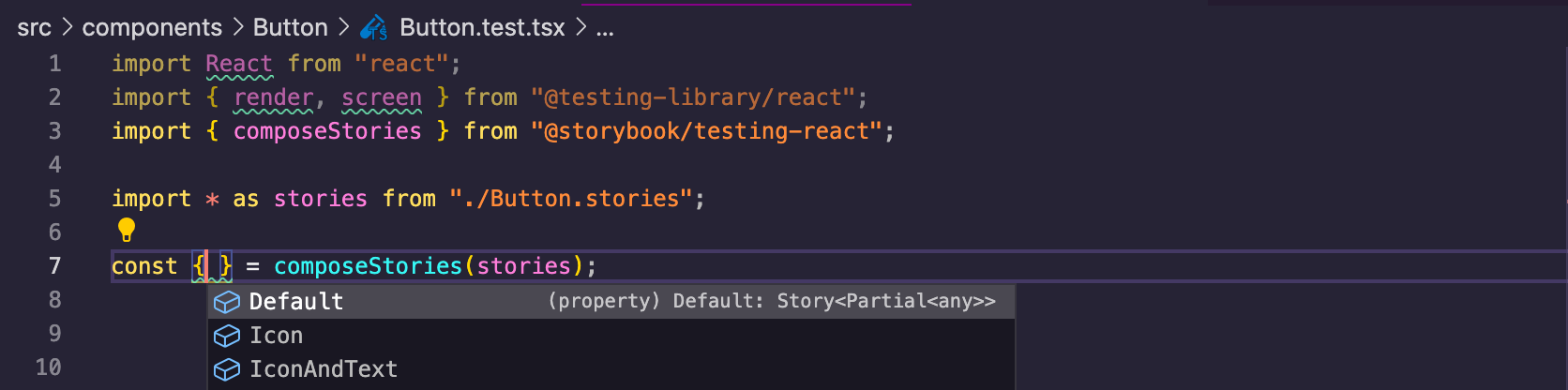
@storybook/testing-react is typescript ready and provides autocompletion to easily detect all stories of your component:
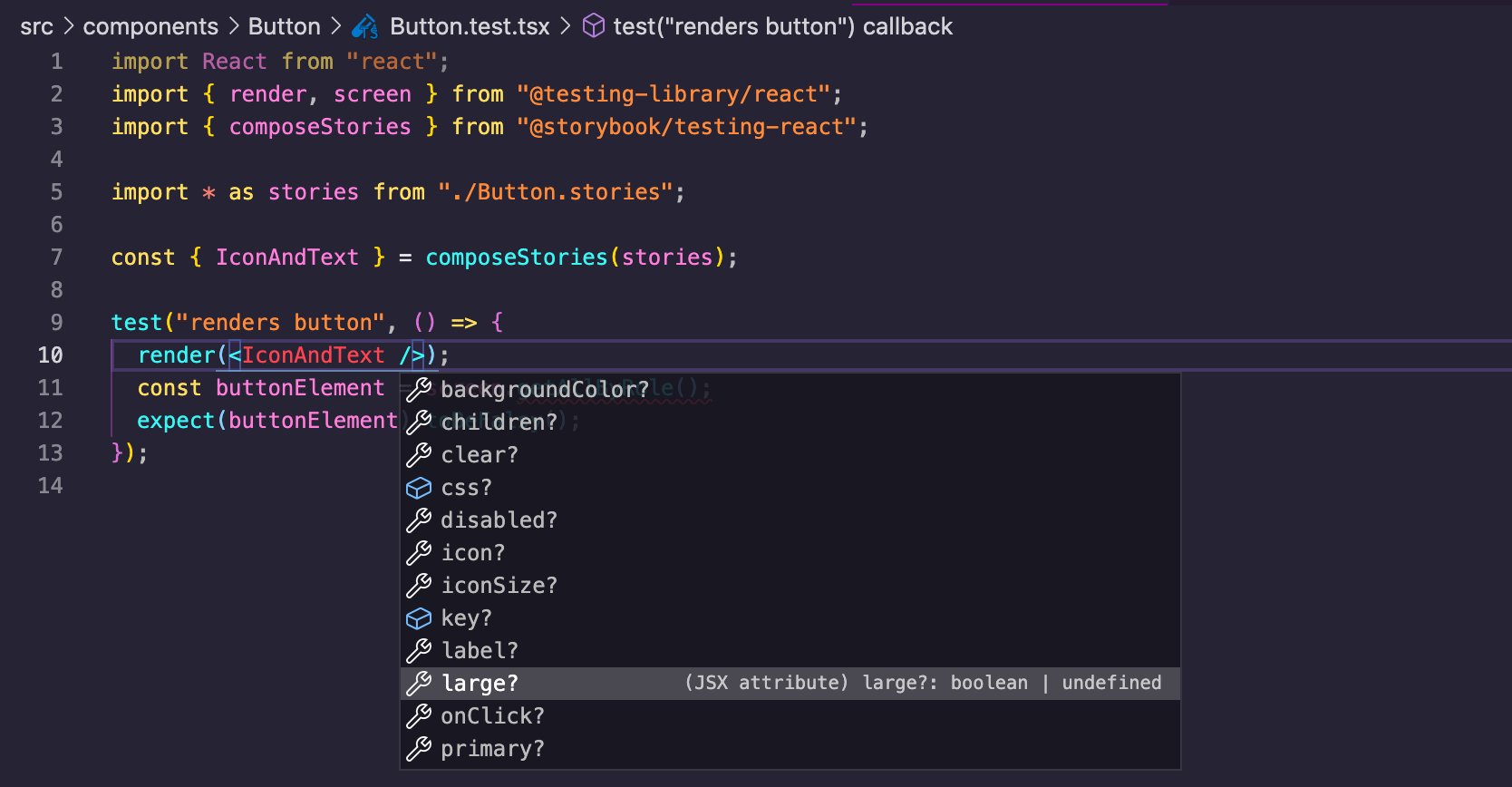
It also provides the props of the components just as you would normally expect when using them directly in your tests:
Type inference is only possible in projects that have either strict or strictBindApplyCall modes set to true in their tsconfig.json file. You also need a TypeScript version over 4.0.0. If you don't have proper type inference, this might be the reason.
// tsconfig.json
{
  "compilerOptions": {
    // ...
    "strict": true, // You need either this option
    "strictBindCallApply": true // or this option
    // ...
  }
  // ...
}
Disclaimer
For the types to be automatically picked up, your stories must be typed. See an example:
import React from 'react';
import { Story, Meta } from '@storybook/react';

import { Button, ButtonProps } from './Button';

export default {
  title: 'Components/Button',
  component: Button,
} as Meta;

// Story<Props> is the key piece needed for typescript validation
const Template: Story<ButtonProps> = args => <Button {...args} />;

export const Primary = Template.bind({});
Primary.args = {
  children: 'foo',
  size: 'large',
};
Does storybookjs/testing-react have a project website?
No homepage URL was recorded for storybookjs/testing-react in TopGit's last sync. The README tab above frequently contains screenshots and demo links, or check the repository description on GitHub.
How does storybookjs/testing-react compare to other Frontend projects?
storybookjs/testing-react is tracked by TopGit in the Frontend category, with 593 GitHub stars and written in TypeScript. Browse the Frontend topic page on TopGit to compare it against similar projects by stars and activity.
How many stars does storybookjs/testing-react have?
storybookjs/testing-react has 593 GitHub stars — refresh the page for the live number, or check github.com/storybookjs/testing-react. TopGit mirrors GitHub's count but does not claim minute-by-minute accuracy.
Is storybookjs/testing-react open source?
Yes — storybookjs/testing-react ships under the MIT license, which makes its source code freely readable (and, depending on license terms, forkable and reusable). Source: github.com/storybookjs/testing-react.
What else is in the Frontend space?
storybookjs/testing-react is tracked by TopGit under the Frontend category, alongside 4 GitHub-tagged topics. Trending and Topics pages list peer repositories of comparable stars and language.
What is storybookjs/testing-react?
storybookjs/testing-react (storybookjs/testing-react) is a TypeScript project on GitHub. From the project's own README: Testing utilities that allow you to reuse your Storybook stories in your React unit tests!
Where do I read more about storybookjs/testing-react?
This TopGit page is a snapshot — the READ ME tab shows the project's own README content (links stripped, images preserved). The GitHub repository at github.com/storybookjs/testing-react is the definitive source.
Read full README in the tab above.
Is testing-react worth your time?
ChatGPT, Claude and Perplexity can all read this page. Ask one of them what it makes of testing-react.
 /testing-react