An AI-powered entry in TopGit's GitHub warehouse: szad670401/HyperLPR, 6.3k stars, AI Tools, C++. High Performance Chinese License Plate Recognition Framework.
Snapshot summary built from the project's own GitHub metadata — there's no written TopGit review yet. The page will update automatically when a full review is published.
WHY NO REVIEW YET
TopGit writes full reviews for the most-starred, most-requested repositories. This page is a snapshot until then — see the READ ME tab for the original README in full.
# start server
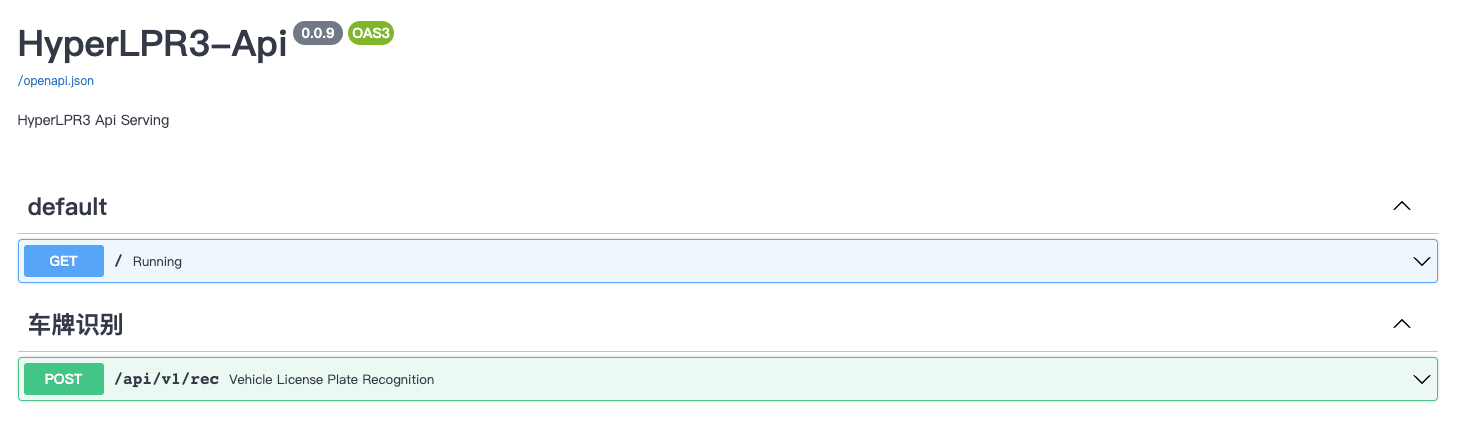
lpr3 rest --port 8715 --host 0.0.0.0
Path to open SwaggerUI after startup:http://localhost:8715/api/v1/docs View and test the online Identification API service:
Q&A
Q:Whether the accuracy of android in the project is consistent with that of apk-demo?
A:Please compile or download the Android shared library from the release and copy it to Prj-Android for testing。
Q:Source of training data for license plates?
A:Since the license plate data used for training involves legal privacy and other issues, it cannot be provided in this project. Open more big data sets CCPD registration dataset。
Q:Provision of training code?
A:The resources provide the old training code, and the training methods for HyperLPR3 will be sorted out and presented later。
Resources
HyperLPR3车牌识别-五分钟搞定: 中文车牌识别光速部署与使用
HyperLPR3车牌识别-Android-SDK光速部署与使用
HyperLPR3车牌识别-Linux/MacOS使用:C/C++库编译
HyperLPR3车牌识别-Android使用:SDK编译与部署
To be added... Contributions welcome
Other Versions
HyperLPRv1
HyperLPRv2
TODO
Support for rapid deployment of WebApi services
Support multiple license plates and double layers
Support large Angle license plate
Lightweight recognition model
Specialty
720p faster, single core Intel 2.2G CPU (MaBook Pro 2015) average recognition time is less than 100ms
End-to-end license plate recognition does not require character segmentation
The recognition rate is high, and the accuracy of the entrance and exit scene is about 95%-97%
Support cross-platform compilation and rapid deployment
Matters Need Attention:
The C++ and Python implementations of this project are separate
When compiling C++ projects, OpenCV 4.0 and MNN 2.0 must be used, otherwise it will not compile
Android project compilation ndk as far as possible to use version 21
Python Dependency
opencv-python (>3.3)
onnxruntime (>1.8.1)
fastapi (0.92.0)
uvicorn (0.20.0)
loguru (0.6.0)
python-multipart
tqdm
requests
Cross-platform support
Platform
Linux: x86、Armv7、Armv8
MacOS: x86
Android: arm64-v8a、armeabi-v7a
Embedded Development Board
Rockchip: rv1109rv1126(RKNPU)
CPP Dependency
Opencv 4.0 above
MNN 2.0 above
C/C++ Compiling Dependencies
Compiling C/C++ projects requires the use of third-party dependency libraries. After downloading the library, unzip it, and put it into the root directory (the same level as CMakeLists.txt) by copying or soft linking.baidu drive code: eu31
Linux/Mac Shared Library Compilation
Need to place or link dependencies in the project root (same level as CMakeLists.txt)
We recommend you to compile OpenCV yourself and install it into the system. This can help reduce compilation errors caused by version mismatches and compiler issues with system dependencies. However, you can also try using the pre-compiled OpenCV static library we provide for compilation. To do this, you need to enable the LINUX_USE_3RDPARTY_OPENCV switch.
# execute the script
sh command/build_release_linux_share.sh
Compiled to the build/linux/install/hyperlpr3 dir,Which contains:
include - header file
lib - shared dir
resource - test-images and models dir
Copy the files you need into your project
Linux/Mac Compiling the Demo
You need to complete the previous compilation step and ensure it's successful. The compiled files will be located in the root directory: build/linux/install/hyperlpr3. You will need to manually copy them to the current directory.
Go to the Prj-Linux folder
# go to Prj-linux
cd Prj-Linux
# exec sh
sh build.sh
The executable program is generated after compilation: PlateRecDemo,and Run the program
# go to build
cd build/
# first param models dir, second param image path
./PlateRecDemo ../hyperlpr3/resource/models/r2_mobile ../hyperlpr3/resource/images/test_img.jpg
Linux/Mac Quick Use SDK Code Example
// Load image
cv::Mat image = cv::imread(image_path);
// Create a ImageData
HLPR_ImageData data = {0};
data.data = image.ptr<uint8_t>(0);         // Setting the image data flow
data.width = image.cols;                   // Setting the image width
data.height = image.rows;                  // Setting the image height
data.format = STREAM_BGR;                  // Setting the current image encoding format
data.rotation = CAMERA_ROTATION_0;         // Setting the current image corner
// Create a Buffer
P_HLPR_DataBuffer buffer = HLPR_CreateDataBuffer(&data);

// Configure license plate recognition parameters
HLPR_ContextConfiguration configuration = {0};
configuration.models_path = model_path;         // Model folder path
configuration.max_num = 5;                      // Maximum number of license plates
configuration.det_level = DETECT_LEVEL_LOW;     // Level of detector
configuration.use_half = false;
configuration.nms_threshold = 0.5f;             // Non-maxima suppress the confidence threshold
configuration.rec_confidence_threshold = 0.5f;  // License plate number text threshold
configuration.box_conf_threshold = 0.30f;       // Detector threshold
configuration.threads = 1;
// Instantiating a Context
P_HLPR_Context ctx = HLPR_CreateContext(&configuration);
// Query the Context state
HREESULT ret = HLPR_ContextQueryStatus(ctx);
if (ret != HResultCode::Ok) {
    printf("create error.\n");
    return -1;
}
HLPR_PlateResultList results = {0};
// Execute LPR
HLPR_ContextUpdateStream(ctx, buffer, &results);

for (int i = 0; i < results.plate_size; ++i) {
	// Getting results
    std::string type;
    if (results.plates[i].type == HLPR_PlateType::PLATE_TYPE_UNKNOWN) {
        type = “Unknown";
    } else {
        type = TYPES[results.plates[i].type];
    }

    printf("<%d> %s, %s, %f\n", i + 1, type.c_str(),
           results.plates[i].code, results.plates[i].text_confidence);
}

// Release Buffer
HLPR_ReleaseDataBuffer(buffer);
// Release Context
HLPR_ReleaseContext(ctx);
Android: Compile the Shared Library
The first step is to install third-party dependencies
You need to prepare NDKS and configure environment variables: $ANDROID_NDK
Supports cross-compilation on Linux/MacOS
# execute the script
sh command/build_release_android_share.sh
Compiled to the: build/release_android/,Which contains:
arm64-v8a - 64bit shard library
armeabi-v7a - 32bit shard library
After compiling,Copyarm64-v8aandarmeabi-v7a dirs to Prj-Android/hyperlpr3/libs,And compile the Prj-Android project to use.
Compile with Docker
If you need to compile with docker, we provide a few ways to compile:
1. Compile the Linux-x86 Shared Library using Docker
You need to install docker and docker-compose,Build Image for hyperlpr_build:
docker build -t hyperlpr_build .
Start compiling the shared library:
docker-compose up build_linux_x86_shared_lib
Build dir: build/linux
Android SDK Demo
We have provided a demo project from the Android SDK source: hyperlpr3-android-sdk,You can compile the shared library and use the project as needed.
Quick to use in Android
If you need to quickly integrate our sdk in your own Android project, then you can add the following dependency to your project's build.gradle:
Step 1. Add the JitPack repository to your build file.Add it in your root build.gradle at the end of repositories:
// Initialization, which can be performed only once, is usually performed at program initialization
HyperLPR3.getInstance().init(this, new HyperLPRParameter());

…

// exec recognition
Plate[] plates =  HyperLPR3.getInstance().plateRecognition(bitmap, HyperLPR3.CAMERA_ROTATION_0, HyperLPR3.STREAM_BGRA);
Know more about: Prj-Android
License Plate Type is Supported(Chinese)
支持
单行蓝牌
单行黄牌
新能源车牌
教练车牌
有限支持
白色警用车牌
使馆/港澳车牌
双层黄牌
武警车牌
待支持
民航车牌
双层武警
双层军牌
双层农用车牌
双层个性化车牌
License plates from more countries
Note:Due to some imbalanced samples during training, some special license plates have low recognition rates, such as (Embassy/Hong Kong and Macao license plates), which will be improved in the subsequent versions.
No homepage URL was recorded for szad670401/HyperLPR in TopGit's last sync. The README tab above frequently contains screenshots and demo links, or check the repository description on GitHub.
How active is development on szad670401/HyperLPR?
The most recent commit recorded on szad670401/HyperLPR was 1.5 years ago, based on the GitHub push timestamp. The repository has 2.1k forks — one of the better signals of community interest.
Is szad670401/HyperLPR open source?
Yes — szad670401/HyperLPR ships under the Apache-2.0 license, which makes its source code freely readable (and, depending on license terms, forkable and reusable). Source: github.com/szad670401/HyperLPR.
What license does szad670401/HyperLPR use?
szad670401/HyperLPR is released under the Apache-2.0 license. Always verify the LICENSE file directly on GitHub for the authoritative terms — license strings can be edited out of sync with a project's actual stance.
What topics is szad670401/HyperLPR associated with?
GitHub's repository topics for szad670401/HyperLPR: "android", "cpp", "deep-learning", "plate-recognition", "tensorflow". TopGit's editorial category is AI Tools.
Where do I read more about szad670401/HyperLPR?
This TopGit page is a snapshot — the READ ME tab shows the project's own README content (links stripped, images preserved). The GitHub repository at github.com/szad670401/HyperLPR is the definitive source.
Read full README in the tab above.
Is HyperLPR worth your time?
ChatGPT, Claude and Perplexity can all read this page. Ask one of them what it makes of HyperLPR.
 /HyperLPR