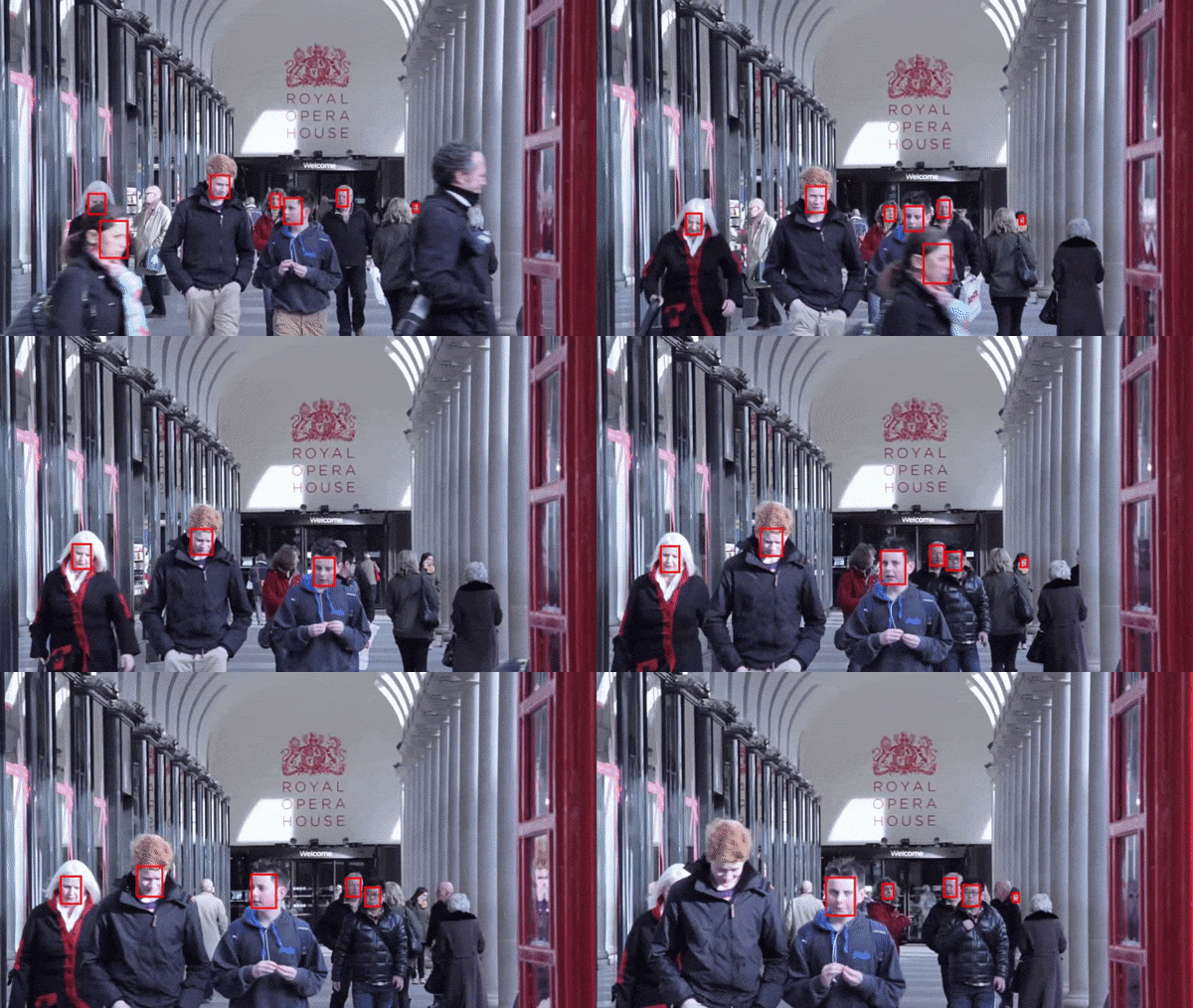
On GitHub, timesler/facenet-pytorch has picked up 5.2k stars, AI Tools, Python. Pretrained Pytorch face detection (MTCNN) and facial recognition (InceptionResnet) models
Snapshot summary built from the project's own GitHub metadata — there's no written TopGit review yet. The page will update automatically when a full review is published.
WHY NO REVIEW YET
TopGit writes full reviews for the most-starred, most-requested repositories. This page is a snapshot until then — see the READ ME tab for the original README in full.
You can also read a translated version of this file in Chinese 简体中文版.
This is a repository for Inception Resnet (V1) models in pytorch, pretrained on VGGFace2 and CASIA-Webface.
Pytorch model weights were initialized using parameters ported from David Sandberg's tensorflow facenet repo.
Also included in this repo is an efficient pytorch implementation of MTCNN for face detection prior to inference. These models are also pretrained. To our knowledge, this is the fastest MTCNN implementation available.
Table of contents
Table of contents
Quick start
Pretrained models
Example notebooks
Complete detection and recognition pipeline
Face tracking in video streams
Finetuning pretrained models with new data
Guide to MTCNN in facenet-pytorch
Performance comparison of face detection packages
The FastMTCNN algorithm
Running with docker
Use this repo in your own git project
Conversion of parameters from Tensorflow to Pytorch
References
Quick start
Install:
# With pip:
pip install facenet-pytorch

# or clone this repo, removing the '-' to allow python imports:
git clone https://github.com/timesler/facenet-pytorch.git facenet_pytorch

# or use a docker container (see https://github.com/timesler/docker-jupyter-dl-gpu):
docker run -it --rm timesler/jupyter-dl-gpu pip install facenet-pytorch && ipython
In python, import facenet-pytorch and instantiate models:
from facenet_pytorch import MTCNN, InceptionResnetV1

# If required, create a face detection pipeline using MTCNN:
mtcnn = MTCNN(image_size=<image_size>, margin=<margin>)

# Create an inception resnet (in eval mode):
resnet = InceptionResnetV1(pretrained='vggface2').eval()
Process an image:
from PIL import Image

img = Image.open(<image path>)

# Get cropped and prewhitened image tensor
img_cropped = mtcnn(img, save_path=<optional save path>)

# Calculate embedding (unsqueeze to add batch dimension)
img_embedding = resnet(img_cropped.unsqueeze(0))

# Or, if using for VGGFace2 classification
resnet.classify = True
img_probs = resnet(img_cropped.unsqueeze(0))
See help(MTCNN) and help(InceptionResnetV1) for usage and implementation details.
Pretrained models
See: models/inception_resnet_v1.py
The following models have been ported to pytorch (with links to download pytorch state_dict's):
Model name
LFW accuracy (as listed here)
Training dataset
20180408-102900 (111MB)
0.9905
CASIA-Webface
20180402-114759 (107MB)
0.9965
VGGFace2
There is no need to manually download the pretrained state_dict's; they are downloaded automatically on model instantiation and cached for future use in the torch cache. To use an Inception Resnet (V1) model for facial recognition/identification in pytorch, use:
from facenet_pytorch import InceptionResnetV1

# For a model pretrained on VGGFace2
model = InceptionResnetV1(pretrained='vggface2').eval()

# For a model pretrained on CASIA-Webface
model = InceptionResnetV1(pretrained='casia-webface').eval()

# For an untrained model with 100 classes
model = InceptionResnetV1(num_classes=100).eval()

# For an untrained 1001-class classifier
model = InceptionResnetV1(classify=True, num_classes=1001).eval()
Both pretrained models were trained on 160x160 px images, so will perform best if applied to images resized to this shape. For best results, images should also be cropped to the face using MTCNN (see below).
By default, the above models will return 512-dimensional embeddings of images. To enable classification instead, either pass classify=True to the model constructor, or you can set the object attribute afterwards with model.classify = True. For VGGFace2, the pretrained model will output logit vectors of length 8631, and for CASIA-Webface logit vectors of length 10575.
Example notebooks
Complete detection and recognition pipeline
Face recognition can be easily applied to raw images by first detecting faces using MTCNN before calculating embedding or probabilities using an Inception Resnet model. The example code at examples/infer.ipynb provides a complete example pipeline utilizing datasets, dataloaders, and optional GPU processing.
Face tracking in video streams
MTCNN can be used to build a face tracking system (using the MTCNN.detect() method). A full face tracking example can be found at examples/face_tracking.ipynb.
Finetuning pretrained models with new data
In most situations, the best way to implement face recognition is to use the pretrained models directly, with either a clustering algorithm or a simple distance metrics to determine the identity of a face. However, if finetuning is required (i.e., if you want to select identity based on the model's output logits), an example can be found at examples/finetune.ipynb.
Guide to MTCNN in facenet-pytorch
This guide demonstrates the functionality of the MTCNN module. Topics covered are:
Basic usage
Image normalization
Face margins
Multiple faces in a single image
Batched detection
Bounding boxes and facial landmarks
Saving face datasets
See the notebook on kaggle.
Performance comparison of face detection packages
This notebook demonstrates the use of three face detection packages:
facenet-pytorch
mtcnn
dlib
Each package is tested for its speed in detecting the faces in a set of 300 images (all frames from one video), with GPU support enabled. Performance is based on Kaggle's P100 notebook kernel. Results are summarized below.
Package
FPS (1080x1920)
FPS (720x1280)
FPS (540x960)
facenet-pytorch
12.97
20.32
25.50
facenet-pytorch (non-batched)
9.75
14.81
19.68
dlib
3.80
8.39
14.53
mtcnn
3.04
5.70
8.23
See the notebook on kaggle.
The FastMTCNN algorithm
This algorithm demonstrates how to achieve extremely efficient face detection specifically in videos, by taking advantage of similarities between adjacent frames.
See the notebook on kaggle.
Running with docker
The package and any of the example notebooks can be run with docker (or nvidia-docker) using:
docker run --rm -p 8888:8888
    -v ./facenet-pytorch:/home/jovyan timesler/jupyter-dl-gpu \
    -v <path to data>:/home/jovyan/data
    pip install facenet-pytorch && jupyter lab
Navigate to the examples/ directory and run any of the ipython notebooks.
See timesler/jupyter-dl-gpu for docker container details.
Use this repo in your own git project
To use this code in your own git repo, I recommend first adding this repo as a submodule. Note that the dash ('-') in the repo name should be removed when cloning as a submodule as it will break python when importing:
Alternatively, the code can be installed as a package using pip:
pip install facenet-pytorch
Conversion of parameters from Tensorflow to Pytorch
See: models/utils/tensorflow2pytorch.py
Note that this functionality is not needed to use the models in this repo, which depend only on the saved pytorch state_dict's.
Following instantiation of the pytorch model, each layer's weights were loaded from equivalent layers in the pretrained tensorflow models from davidsandberg/facenet.
The equivalence of the outputs from the original tensorflow models and the pytorch-ported models have been tested and are identical:
In order to re-run the conversion of tensorflow parameters into the pytorch model, ensure you clone this repo with submodules, as the davidsandberg/facenet repo is included as a submodule and parts of it are required for the conversion.
References
David Sandberg's facenet repo: https://github.com/davidsandberg/facenet
F. Schroff, D. Kalenichenko, J. Philbin. FaceNet: A Unified Embedding for Face Recognition and Clustering, arXiv:1503.03832, 2015. PDF
Q. Cao, L. Shen, W. Xie, O. M. Parkhi, A. Zisserman. VGGFace2: A dataset for recognising face across pose and age, International Conference on Automatic Face and Gesture Recognition, 2018. PDF
D. Yi, Z. Lei, S. Liao and S. Z. Li. CASIAWebface: Learning Face Representation from Scratch, arXiv:1411.7923, 2014. PDF
K. Zhang, Z. Zhang, Z. Li and Y. Qiao. Joint Face Detection and Alignment Using Multitask Cascaded Convolutional Networks, IEEE Signal Processing Letters, 2016. PDF
Does timesler/facenet-pytorch have a project website?
No homepage URL was recorded for timesler/facenet-pytorch in TopGit's last sync. The README tab above frequently contains screenshots and demo links, or check the repository description on GitHub.
How does timesler/facenet-pytorch compare to other AI Tools projects?
timesler/facenet-pytorch is tracked by TopGit in the AI Tools category, with 5.2k GitHub stars and written in Python. Browse the AI Tools topic page on TopGit to compare it against similar projects by stars and activity.
How many stars does timesler/facenet-pytorch have?
timesler/facenet-pytorch has 5.2k GitHub stars — refresh the page for the live number, or check github.com/timesler/facenet-pytorch. TopGit mirrors GitHub's count but does not claim minute-by-minute accuracy.
Is timesler/facenet-pytorch open source?
Yes — timesler/facenet-pytorch ships under the MIT license, which makes its source code freely readable (and, depending on license terms, forkable and reusable). Source: github.com/timesler/facenet-pytorch.
What else is in the AI Tools space?
timesler/facenet-pytorch is tracked by TopGit under the AI Tools category, alongside 10 GitHub-tagged topics. Trending and Topics pages list peer repositories of comparable stars and language.
What is timesler/facenet-pytorch?
timesler/facenet-pytorch (timesler/facenet-pytorch) is a Python project on GitHub. From the project's own README: Pretrained Pytorch face detection (MTCNN) and facial recognition (InceptionResnet) models
Where do I read more about timesler/facenet-pytorch?
This TopGit page is a snapshot — the READ ME tab shows the project's own README content (links stripped, images preserved). The GitHub repository at github.com/timesler/facenet-pytorch is the definitive source.
Read full README in the tab above.
Still deciding about facenet-pytorch?
One click hands the question to an AI along with this page — see what it says about facenet-pytorch.

 /facenet-pytorch