4.9k GitHub stars and counting — TimOliver/TOCropViewController is a Objective-C project TopGit is tracking across repositories on the platform. A view controller for iOS that allows users to crop portions of UIImage objects
Snapshot summary built from the project's own GitHub metadata — there's no written TopGit review yet. The page will update automatically when a full review is published.
WHY NO REVIEW YET
TopGit writes full reviews for the most-starred, most-requested repositories. This page is a snapshot until then — see the READ ME tab for the original README in full.
TOCropViewController is an open-source UIViewController subclass to crop out sections of UIImage objects, as well as perform basic rotations. It is excellent for things like editing profile pictures, or sharing parts of a photo online. It has been designed with the iOS Photos app editor in mind, and as such, behaves in a way that should already feel familiar to users of iOS.
For Swift developers, CropViewController is a Swift wrapper that completely encapsulates TOCropViewController and provides a much more native, Swiftier interface.
Proudly powering apps by
Looking for something more? If TOCropViewController doesn't meet your exact requirements, please consider IMG.LY with video editing and photo filter capabilities instead! (Disclaimer: Affiliate Link)
Features
Crop images by dragging the edges of a grid overlay.
Optionally, crop circular copies of images.
Rotate images in 90-degree segments.
Clamp the crop box to a specific aspect ratio.
A reset button to completely undo all changes.
iOS 7/8 translucency to make it easier to view the cropped region.
The choice of having the controller return the cropped image to a delegate, or immediately pass it to a UIActivityViewController.
A custom animation and layout when the device is rotated to landscape mode.
Custom 'opening' and 'dismissal' animations.
Localized in 28 languages.
System Requirements
iOS 12.0 or above.
Disclaimer: visionOS and Mac Catalyst modes are also enabled, however they are not officially supported. PRs are always welcome!
From the Carthage/Build folder, import one of the two frameworks into your Xcode project. For Objective-C projects, import just TOCropViewController.framework and for Swift, import CropViewController.framework instead. Each framework is separate; you do not need to import both.
Follow the remaining steps on Getting Started with Carthage to finish integrating the framework.
Manual Installation
All of the necessary source and resource files for TOCropViewController are in Objective-C/TOCropViewController, and all of the necessary Swift files are in Swift/CropViewController.
For Objective-C projects, copy just the TOCropViewController directory to your Xcode project. For Swift projects, copy both TOCropViewController and CropViewController to your project.
Examples
Using TOCropViewController is very straightforward. Simply create a new instance passing the UIImage object you wish to crop, and then present it modally on the screen.
While TOCropViewController prefers to be presented modally, it can also be pushed to a UINavigationController stack.
For a complete working example, check out the sample apps included in this repo.
Basic Implementation
Swift
func presentCropViewController() {
  let image: UIImage = ... //Load an image

  let cropViewController = CropViewController(image: image)
  cropViewController.delegate = self
  self.present(cropViewController, animated: true, completion: nil)
}

func cropViewController(_ cropViewController: CropViewController, didCropToImage image: UIImage, withRect cropRect: CGRect, angle: Int) {
        // 'image' is the newly cropped version of the original image
    }
Objective-C
- (void)presentCropViewController
{
  UIImage *image = ...; // Load an image

  TOCropViewController *cropViewController = [[TOCropViewController alloc] initWithImage:image];
  cropViewController.delegate = self;
  [self presentViewController:cropViewController animated:YES completion:nil];
}

- (void)cropViewController:(TOCropViewController *)cropViewController didCropToImage:(UIImage *)image withRect:(CGRect)cropRect angle:(NSInteger)angle
{
  // 'image' is the newly cropped version of the original image
}
Similar to many UIKitUIViewController subclasses, like MFMailComposeViewController, the class responsible for presenting view controller should also take care of dismissing it upon cancellation. To dismiss TOCropViewController, implement the cropViewController:didFinishCancelled: delegate method, and call dismissViewController:animated: from there.
Making a Circular Cropped Image
Swift
func presentCropViewController() {
    var image: UIImage? // Load an image
    let cropViewController = CropViewController(croppingStyle: .circular, image: image)
    cropViewController.delegate = self
    self.present(cropViewController, animated: true, completion: nil)
}

func cropViewController(_ cropViewController: TOCropViewController?, didCropToCircularImage image: UIImage?, with cropRect: CGRect, angle: Int) {
    // 'image' is the newly cropped, circular version of the original image
}
Objective-C
- (void)presentCropViewController
{
UIImage *image = ...; // Load an image

TOCropViewController *cropViewController = [[TOCropViewController alloc] initWithCroppingStyle:TOCropViewCroppingStyleCircular image:image];
cropViewController.delegate = self;
[self presentViewController:cropViewController animated:YES completion:nil];
}

- (void)cropViewController:(TOCropViewController *)cropViewController didCropToCircularImage:(UIImage *)image withRect:(CGRect)cropRect angle:(NSInteger)angle
{
// 'image' is the newly cropped, circular version of the original image
}
Sharing Cropped Images Via a Share Sheet
Swift
func presentCropViewController() {
    var image: UIImage? // Load an image
    let cropViewController = CropViewController(image: image)
    cropViewController.showActivitySheetOnDone = true
    self.present(cropViewController, animated: true, completion: nil)
}
Optionally, TOCropViewController also supports a custom presentation animation where an already-visible copy of the image will zoom in to fill the screen.
Swift
func presentCropViewController() {
    var image: UIImage? // Load an image
    var imageView = UIImageView(image: image)
    var frame: CGRect = view.convert(imageView.frame, to: view)

    let cropViewController = CropViewController(image: image)
    cropViewController.delegate = self
    self.present(cropViewController, animated: true, completion: nil)
    cropViewController.presentAnimated(fromParentViewController: self, fromFrame: frame, completion: nil)
}
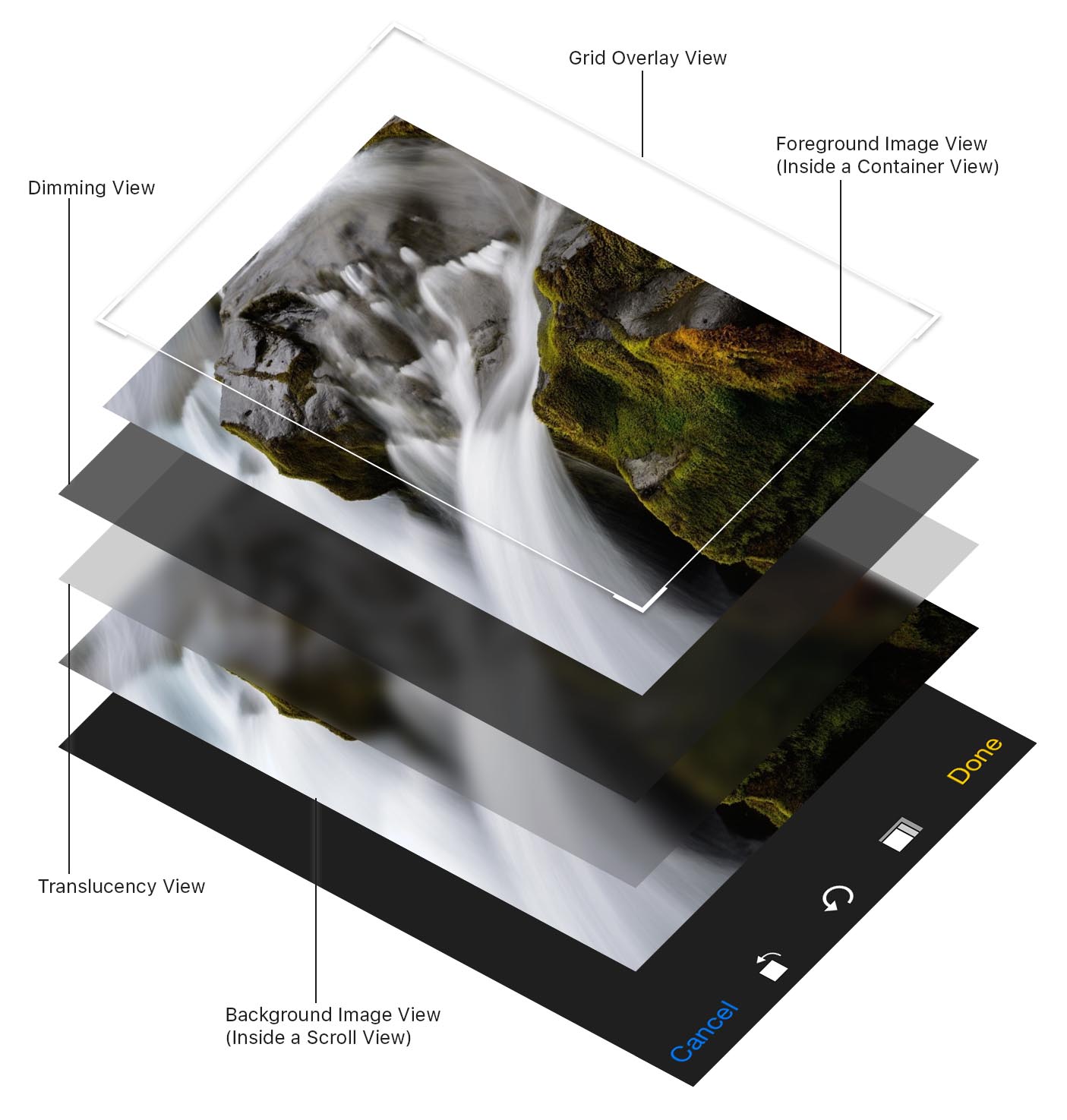
While traditional cropping UI implementations will usually just have a dimming view with a square hole cut out of the middle, TOCropViewController goes about its implementation a little differently.
Since there are two views that are overlaid over the image (A dimming view and a translucency view), trying to cut a hole open in both of them would be rather complex. Instead, an image view is placed in a scroll view in the background, and a copy of the image view is placed on top, inside a container view that is clipped to the designated cropping size. The size and position of the foreground image is then made to match the background view, creating the illusion that there is a hole in the dimming views, and minimising the number of views onscreen.
Credits
TOCropViewController was originally created by Tim Oliver as a component for iComics, a comic reader app for iOS.
Thanks also goes to TOCropViewController's growing list of contributors!
iOS Device mockups used in the screenshot created by Pixeden.
License
TOCropViewController is licensed under the MIT License, please see the LICENSE file.
How active is development on TimOliver/TOCropViewController?
The most recent commit recorded on TimOliver/TOCropViewController was 3 months ago, based on the GitHub push timestamp. The repository has 1.0k forks — one of the better signals of community interest.
How does TimOliver/TOCropViewController compare to other Image Tools projects?
TimOliver/TOCropViewController is tracked by TopGit in the Image Tools category, with 4.9k GitHub stars and written in Objective-C. Browse the Image Tools topic page on TopGit to compare it against similar projects by stars and activity.
How many stars does TimOliver/TOCropViewController have?
TimOliver/TOCropViewController has 4.9k GitHub stars — refresh the page for the live number, or check github.com/TimOliver/TOCropViewController. TopGit mirrors GitHub's count but does not claim minute-by-minute accuracy.
Is TimOliver/TOCropViewController open source?
Yes — TimOliver/TOCropViewController ships under the MIT license, which makes its source code freely readable (and, depending on license terms, forkable and reusable). Source: github.com/TimOliver/TOCropViewController.
What is TimOliver/TOCropViewController?
TimOliver/TOCropViewController (TimOliver/TOCropViewController) is a Objective-C project on GitHub. From the project's own README: A view controller for iOS that allows users to crop portions of UIImage objects
Where do I read more about TimOliver/TOCropViewController?
This TopGit page is a snapshot — the READ ME tab shows the project's own README content (links stripped, images preserved). The GitHub repository at github.com/TimOliver/TOCropViewController is the definitive source.
Read full README in the tab above.
Want a second opinion on TOCropViewController?
Ask an AI that can read this page — one click and you get its take on TOCropViewController.

 /TOCropViewController