tokio-rs/console is a Rust project with 4.6k stars in the Developer Tools space. a debugger for async rust!
Snapshot summary built from the project's own GitHub metadata — there's no written TopGit review yet. The page will update automatically when a full review is published.
WHY NO REVIEW YET
TopGit writes full reviews for the most-starred, most-requested repositories. This page is a snapshot until then — see the READ ME tab for the original README in full.
this repository contains an implementation of TurboWish/tokio-console,
a diagnostics and debugging tool for asynchronous Rust programs. the diagnostic
toolkit consists of multiple components:
a wire protocol for streaming diagnostic data from instrumented applications
to diagnostic tools. the wire format is defined using gRPC and protocol
buffers, for efficient transport on the wire and interoperability between
different implementations of data producers and consumers.
the console-api crate contains generated code for this wire format for
projects using the tonic gRPC implementation. additionally, projects using
other gRPC code generators (including those in other languages!) can depend on
the protobuf definitions themselves.
instrumentation for collecting diagnostic data from a process and exposing
it over the wire format. the console-subscriber crate in this repository
contains an implementation of the instrumentation-side API as a
tracing-subscriberLayer, for projects using Tokio and
tracing.
tools for displaying and exploring diagnostic data, implemented as gRPC
clients using the console wire protocol. the tokio-console crate
implements an an interactive command-line tool that consumes this data,
but other implementations, such as graphical or web-based tools, are
also possible.
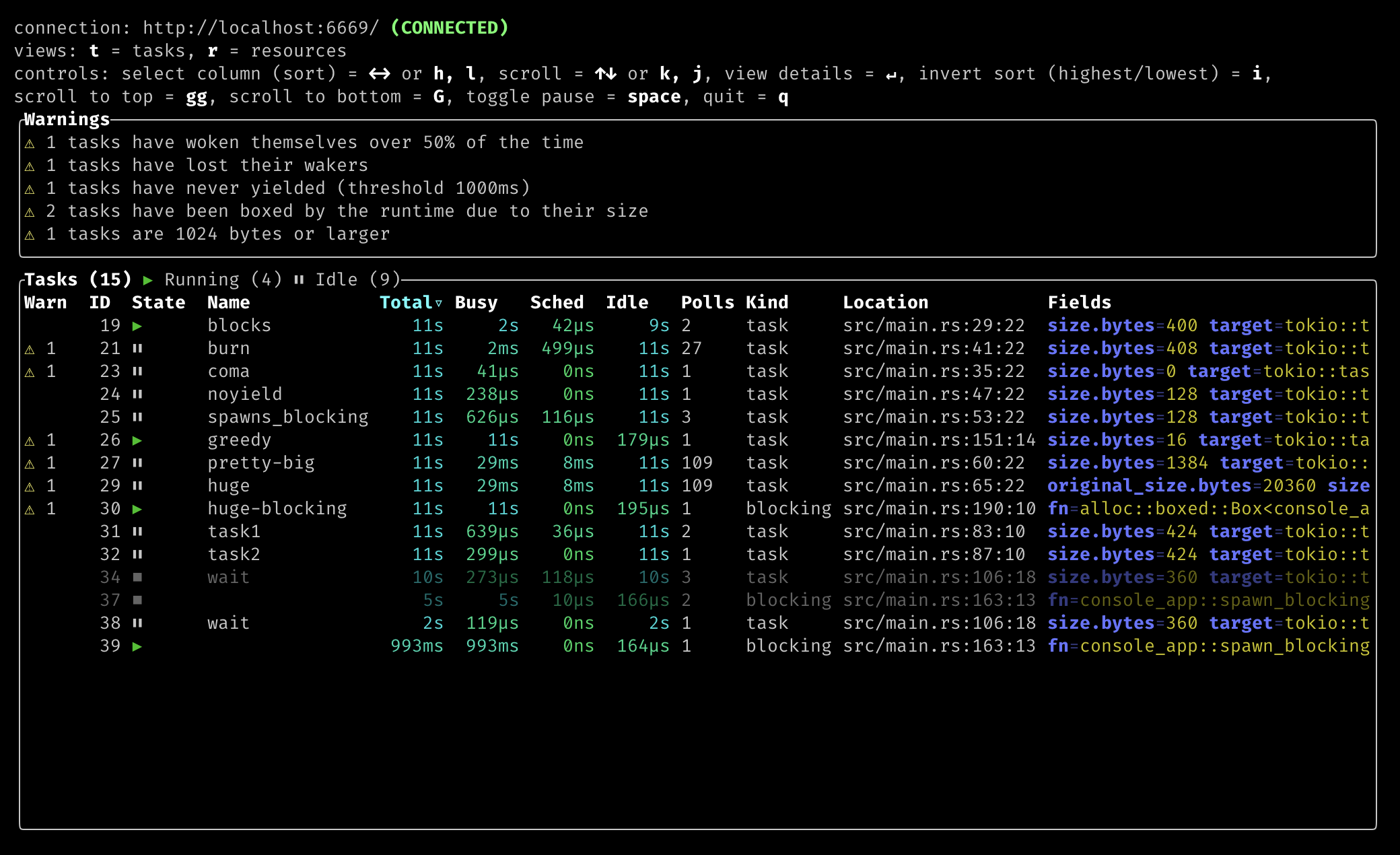
extremely cool and amazing screenshots
wow! whoa! it's like top(1) for tasks!
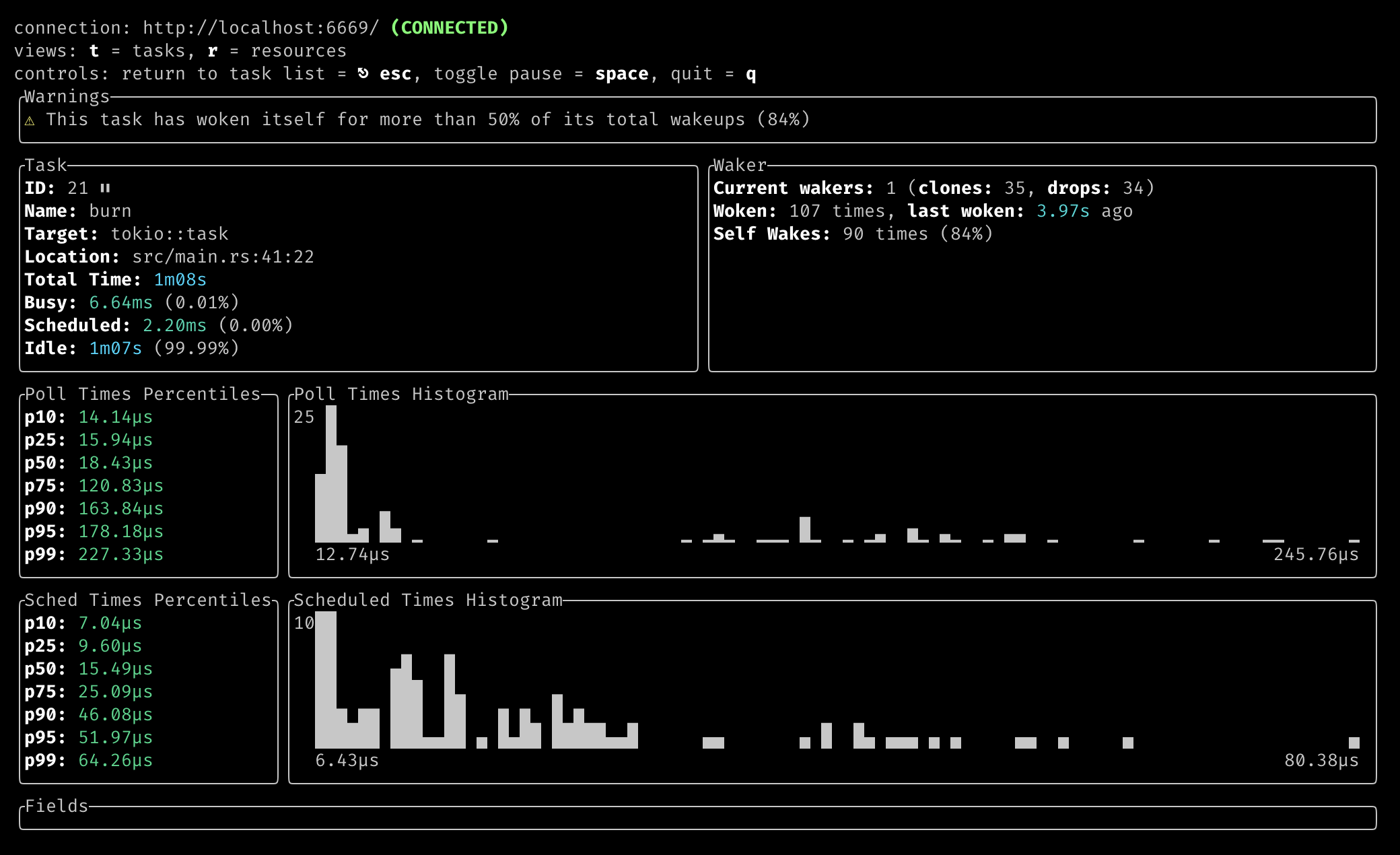
viewing details for a single task:
on the shoulders of giants
the console is part of a much larger effort to improve debugging tooling for
async Rust. a 2019 Google Summer of Code project by Matthias Prechtl
(@matprec) implemented an initial prototype, with a focus on interactive log
viewing. more recently, both the Tokio team and the async
foundations working group have made diagnostics and debugging
tools a priority for async Rust in 2021 and beyond. in particular, a
series of blog posts by @pnkfelix lay out much of
the vision that this project seeks to eventually implement.
furthermore, we're indebted to our antecedents in other programming languages
and environments for inspiration. this includes tools and systems such as
pprof, Unix top(1) and htop(1), XCode's Instruments, and many
others.
using it
instrumenting your program
to instrument an application using Tokio, add a dependency on the
console-subscriber crate, and add this one-liner to the top of your
main function:
console_subscriber::init();
notes:
in order to collect task data from Tokio, the tokio_unstable cfg must be
enabled. for example, you could build your project with
RUSTFLAGS="--cfg tokio_unstable" cargo build
or add the following to your .cargo/config.toml file:
[build]
rustflags = ["--cfg", "tokio_unstable"]
For more information on the appropriate location of your .cargo/config.toml file,
especially when using workspaces, see the
console-subscriber readme.
the tokio and runtimetracing targets must be enabled at the TRACE
level.
if you're using the console_subscriber::init() or
console_subscriber::Builder APIs, these targets are enabled
automatically.
if you are manually configuring the tracing subscriber using the
EnvFilter or Targets filters from tracing-subscriber, add
"tokio=trace,runtime=trace" to your filter configuration.
also, ensure you have not enabled any of the compile time filter
features in your Cargo.toml.
running the console
to run the console command-line tool, install tokio-console from crates.io
cargo install --locked tokio-console
and run locally
tokio-console
alternative method: run the tool from a local checkout of this repository
$ cargo run
by default, this will attempt to connect to an instrumented application running
on localhost on port 6669. if the application is running somewhere else, or is
serving the console endpoint on a different port, a target address can be passed
as an argument to the console (either as an <IP>:<PORT> or
<DNS_NAME>:<PORT>). for example:
cargo run -- http://my.great.console.app.local:5555
The console command-line tool supports a number of additional flags to configure
its behavior. The help command will print a list of supported command-line
flags and arguments:
$ tokio-console --help
The Tokio console: a debugger for async Rust.

Usage: tokio-console[EXE] [OPTIONS] [TARGET_ADDR] [COMMAND]

Commands:
  gen-config      Generate a `console.toml` config file with the default
                  configuration values, overridden by any provided
                  command-line arguments
  gen-completion  Generate shell completions
  help            Print this message or the help of the given
                  subcommand(s)

Arguments:
  [TARGET_ADDR]
          The address of a console-enabled process to connect to.

          This may be an IP address and port, or a DNS name.

          On Unix platforms, this may also be a URI with the `file`
          scheme that specifies the path to a Unix domain socket, as in
          `file://localhost/path/to/socket`.

          When the `vsock` feature is enabled, this may also be a URI
          with the `vsock` scheme that specifies a vsock connection, as
          in `vsock://2:6669` to connect to CID 2 port 6669.

          [default: http://127.0.0.1:6669]

Options:
      --log <LOG_FILTER>
          Log level filter for the console's internal diagnostics.

          Logs are written to a new file at the path given by the
          `--log-dir` argument (or its default value), or to the system
          journal if `systemd-journald` support is enabled.

          If this is set to 'off' or is not set, no logs will be
          written.

          [default: off]

          [env: RUST_LOG=]

  -W, --warn <WARNINGS>...
          Enable lint warnings.

          This is a comma-separated list of warnings to enable.

          Each warning is specified by its name, which is one of:

          * `self-wakes` -- Warns when a task wakes itself more than a
          certain percentage of its total wakeups. Default percentage is
          50%.

          * `lost-waker` -- Warns when a task is dropped without being
          woken.

          * `never-yielded` -- Warns when a task has never yielded.

          * `auto-boxed-future` -- Warnings when the future driving a
          task was automatically boxed by the runtime because it was
          large.

          * `large-future` -- Warnings when the future driving a task
          occupies a large amount of stack space.

          [default: self-wakes lost-waker never-yielded
          auto-boxed-future large-future]
          [possible values: self-wakes, lost-waker, never-yielded,
          auto-boxed-future, large-future]

  -A, --allow <ALLOW_WARNINGS>...
          Allow lint warnings.

          This is a comma-separated list of warnings to allow.

          Each warning is specified by its name, which is one of:

          * `self-wakes` -- Warns when a task wakes itself more than a
          certain percentage of its total wakeups. Default percentage is
          50%.

          * `lost-waker` -- Warns when a task is dropped without being
          woken.

          * `never-yielded` -- Warns when a task has never yielded.

          * `auto-boxed-future` -- Warnings when the future driving a
          task was automatically boxed by the runtime because it was
          large.

          * `large-future` -- Warnings when the future driving a task
          occupies a large amount of stack space.

          If this is set to `all`, all warnings are allowed.

          [possible values: all, self-wakes, lost-waker, never-yielded,
          large-future, auto-boxed-future]

      --log-dir <LOG_DIRECTORY>
          Path to a directory to write the console's internal logs to.

          [default: /tmp/tokio-console/logs]

      --lang <LANG>
          Overrides the terminal's default language

          [env: LANG=en_US.UTF-8]

      --ascii-only <ASCII_ONLY>
          Explicitly use only ASCII characters

          [possible values: true, false]

      --no-colors
          Disable ANSI colors entirely

      --colorterm <truecolor>
          Overrides the value of the `COLORTERM` environment variable.

          If this is set to `24bit` or `truecolor`, 24-bit RGB color
          support will be enabled.

          [env: COLORTERM=truecolor]
          [possible values: 24bit, truecolor]

      --palette <PALETTE>
          Explicitly set which color palette to use

          [possible values: 8, 16, 256, all, off]

      --no-duration-colors <COLOR_DURATIONS>
          Disable color-coding for duration units

          [possible values: true, false]

      --no-terminated-colors <COLOR_TERMINATED>
          Disable color-coding for terminated tasks

          [possible values: true, false]

      --retain-for <RETAIN_FOR>
          How long to continue displaying completed tasks and dropped
          resources after they have been closed.

          This accepts either a duration, parsed as a combination of
          time spans (such as `5days 2min 2s`), or `none` to disable
          removing completed tasks and dropped resources.

          Each time span is an integer number followed by a suffix.
          Supported suffixes are:

          * `nsec`, `ns` -- nanoseconds

          * `usec`, `us` -- microseconds

          * `msec`, `ms` -- milliseconds

          * `seconds`, `second`, `sec`, `s`

          * `minutes`, `minute`, `min`, `m`

          * `hours`, `hour`, `hr`, `h`

          * `days`, `day`, `d`

          * `weeks`, `week`, `w`

          * `months`, `month`, `M` -- defined as 30.44 days

          * `years`, `year`, `y` -- defined as 365.25 days

          [default: 6s]

  -h, --help
          Print help (see a summary with '-h')

  -V, --version
          Print version
running the console on windows
The console uses the UTF-8 character set to display graphs and other visual
features in the terminal. In order to display this rich terminal UI on Windows,
it's necessary to use a UTF-8-enabled terminal emulator, such as the new
Windows Terminal.
If you're using a terminal that supports UTF-8, make sure to explicitly call
tokio-console with the UTF-8 language flag set:
tokio-console --lang en_US.UTF-8
for development
the console-subscriber/examples directory contains some potentially useful
tools:
app.rs: a very simple example program that spawns a bunch of tasks in a loop
forever
dump.rs: a simple CLI program that dumps the data stream from a Tasks
server
No homepage URL was recorded for tokio-rs/console in TopGit's last sync. The README tab above frequently contains screenshots and demo links, or check the repository description on GitHub.
How does tokio-rs/console compare to other Developer Tools projects?
tokio-rs/console is tracked by TopGit in the Developer Tools category, with 4.6k GitHub stars and written in Rust. Browse the Developer Tools topic page on TopGit to compare it against similar projects by stars and activity.
How many stars does tokio-rs/console have?
tokio-rs/console has 4.6k GitHub stars — refresh the page for the live number, or check github.com/tokio-rs/console. TopGit mirrors GitHub's count but does not claim minute-by-minute accuracy.
Is tokio-rs/console open source?
Yes — tokio-rs/console ships under the MIT license, which makes its source code freely readable (and, depending on license terms, forkable and reusable). Source: github.com/tokio-rs/console.
What else is in the Developer Tools space?
tokio-rs/console is tracked by TopGit under the Developer Tools category, alongside 6 GitHub-tagged topics. Trending and Topics pages list peer repositories of comparable stars and language.
What is tokio-rs/console?
tokio-rs/console (tokio-rs/console) is a Rust project on GitHub. From the project's own README: a debugger for async rust!
Where do I read more about tokio-rs/console?
This TopGit page is a snapshot — the READ ME tab shows the project's own README content (links stripped, images preserved). The GitHub repository at github.com/tokio-rs/console is the definitive source.
Read full README in the tab above.
Still deciding about console?
One click hands the question to an AI along with this page — see what it says about console.
 /console