tweenjs/tween.js is a Frontend project on GitHub, written primarily in TypeScript. It has 10.1k stars. JavaScript/TypeScript animation engine
Snapshot summary built from the project's own GitHub metadata — there's no written TopGit review yet. The page will update automatically when a full review is published.
WHY NO REVIEW YET
TopGit writes full reviews for the most-starred, most-requested repositories. This page is a snapshot until then — see the READ ME tab for the original README in full.
JavaScript (TypeScript) tweening engine for easy animations, incorporating optimised Robert Penner's equations.
More languages: English, 简体中文
<div id="box"></div>

<style>
	#box {
		background-color: deeppink;
		width: 100px;
		height: 100px;
	}
</style>

<script type="module">
	import {Tween, Easing} from 'https://unpkg.com/@tweenjs/[email protected]/dist/tween.esm.js'

	const box = document.getElementById('box') // Get the element we want to animate.

	const coords = {x: 0, y: 0} // Start at (0, 0)

	const tween = new Tween(coords, false) // Create a new tween that modifies 'coords'.
		.to({x: 300, y: 200}, 1000) // Move to (300, 200) in 1 second.
		.easing(Easing.Quadratic.InOut) // Use an easing function to make the animation smooth.
		.onUpdate(() => {
			// Called after tween.js updates 'coords'.
			// Move 'box' to the position described by 'coords' with a CSS translation.
			box.style.setProperty('transform', 'translate(' + coords.x + 'px, ' + coords.y + 'px)')
		})
		.start() // Start the tween immediately.

	// Setup the animation loop.
	function animate(time) {
		tween.update(time)
		requestAnimationFrame(animate)
	}
	requestAnimationFrame(animate)
</script>
Try this example on CodePen
Features
Does one thing only and does it well: tweens properties of an object
Doesn't take care of CSS units (e.g. appending px)
Doesn't interpolate colors
Easing functions are reusable outside of Tween
Can also use custom easing functions
Doesn't make its own animation loop, making it flexible for integration into
any animation loop.
Examples
hello world
(source)
Bars
(source)
Black and red
(source)
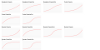
Graphs
(source)
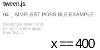
Simplest possible example
(source)
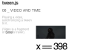
Video and time
(source)
Array interpolation
(source)
Dynamic to, object
(source)
Dynamic to, interpolation array
(source)
Dynamic to, large interpolation array
(source)
Repeat
(source)
Relative values
(source)
Yoyo
(source)
Stop all chained tweens
(source)
Custom functions
(source)
Relative start time
(source)
Pause tween
(source)
Complex properties
(source)
Animate an array of values
(source)
Installation
The recommended method is to use import syntax. Here we've listed various
install methods starting roughly with the most recommended first and least
desirable last. Evaluate all of the following methods to pick what is most
suitable for your project.
With npm install and import from node_modules
You can add tween.js as an npm dependency:
npm install @tweenjs/tween.js
Without a build tool
Installed locally
You can import from node_modules if you serve node_modules as part of your
website, using a standard importmap script tag. First, assuming node_modules
is at the root of your website, you can write an import map like so in your HTML
file:
If you are using Node.js,
Parcel, Webpack,
Rollup, Vite, or another build
tool, then you can install @tweenjs/tween.js with npm install @tweenjs/tween.js, and import the library into your JavaScript (or
TypeScript) file, and the build tool will know how to find the source code from
node_modules without needing to create an importmap script:
import * as TWEEN from '@tweenjs/tween.js'
However, note that this approach requires always running a build tool for your
app to work, while the importmap approach will simply work without any build
tools as a simple static HTML site.
Manual build
Another approach is to download the source code with git, manually build the
library, then place the output in your project. Node.js is required for this.
git clone https://github.com/tweenjs/tween.js
cd tween.js
npm install
npm run build
This will create some builds in the dist directory. There are currently two different builds of the library:
ES6 Module in /dist/tween.esm.js (recommended)
UMD in /dist/tween.umd.js (deprecated, will be removed in a future major version)
You are now able to copy one of those two files into your project, and use like this (recommended):
<script type="module">
	import {Tween} from 'path/to/tween.esm.js'
</script>
<script>
	const {Tween, Easing, Group /*, ...*/} = TWEEN

	const tween = new Tween(someObject)
	// ...
</script>
[!Note]
unpkg.com supports a semver version in the URL, where the ^ in the
URL tells unpkg to give you the latest version 20.x.x.
CommonJS (deprecated)
Skip this section if you don't know what CommonJS is!
[!Note]
This method is deprecated and will be removed in a future major version!
Any of the above methods work in older systems that still use CommonJS. Repeat
any of the above methods but using dist/tween.cjs instead of
dist/tween.esm.js or dist/tween.umd.js.
Documentation
User guide
Contributor guide
Tutorial using tween.js with three.js
Also: libtween, a port of tween.js to C by jsm174
Tests
You need to install npm first--this comes with node.js, so install that one first. Then, cd to tween.js's (or wherever you cloned the repo) directory and run:
npm install
To run the tests run:
npm test
If you want to add any feature or change existing features, you must run the
tests to make sure you didn't break anything else. Any pull request (PR) needs
to have updated passing tests for feature changes (or new passing tests for new
features or fixes) in src/tests.ts to be accepted. See
contributing for more information.
The most recent commit recorded on tweenjs/tween.js was 1.6 years ago, based on the GitHub push timestamp. The repository has 1.4k forks — one of the better signals of community interest.
Is tweenjs/tween.js open source?
TopGit's metadata for tweenjs/tween.js does not record a license. Most public repositories on GitHub ARE open source, but the exact terms vary — verify by opening the LICENSE file directly.
The project maintains a homepage at https://tweenjs.github.io/tween.js/. The README tab on this page also usually contains screenshots and a quickstart.
Where do I read more about tweenjs/tween.js?
This TopGit page is a snapshot — the READ ME tab shows the project's own README content (links stripped, images preserved). The GitHub repository at github.com/tweenjs/tween.js is the definitive source.
Read full README in the tab above.
Still deciding about tween.js?
One click hands the question to an AI along with this page — see what it says about tween.js.
 /tween.js