Urinx/WeixinBot

Urinx/WeixinBot — 7.4k★ on GitHub (Python). 网页版微信API,包含终端版微信及微信机器人
Snapshot summary built from the project's own GitHub metadata — there's no written TopGit review yet. The page will update automatically when a full review is published.
TopGit writes full reviews for the most-starred, most-requested repositories. This page is a snapshot until then — see the READ ME tab for the original README in full.
Snapshot
Top contributors
Show top contributors
WeixinBot 


网页版微信API,包含终端版微信及微信机器人
Contents
- Demo
- Web Weixin Pipeline
- Web Weixin API
- Discussion Group
- Recent Update
Demo
为了确保能正常运行示例脚本,请安装所需的第三方包。
pip install -r requirements.txt
注:下面演示的图片与功能可能不是最新的,具体请看源码。
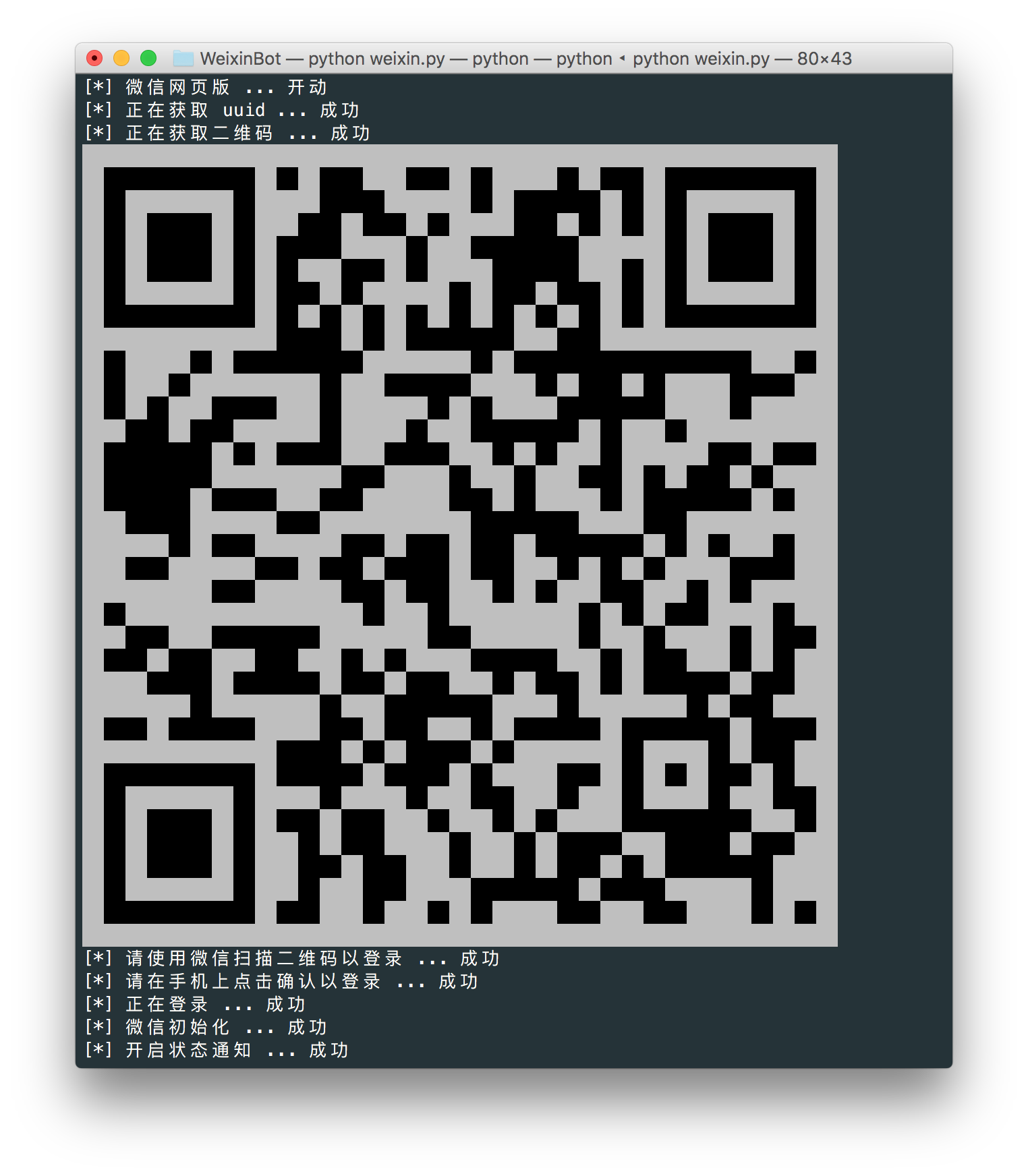
按照操作指示在手机微信上扫描二维码然后登录,你可以选择是否开启自动回复模式。
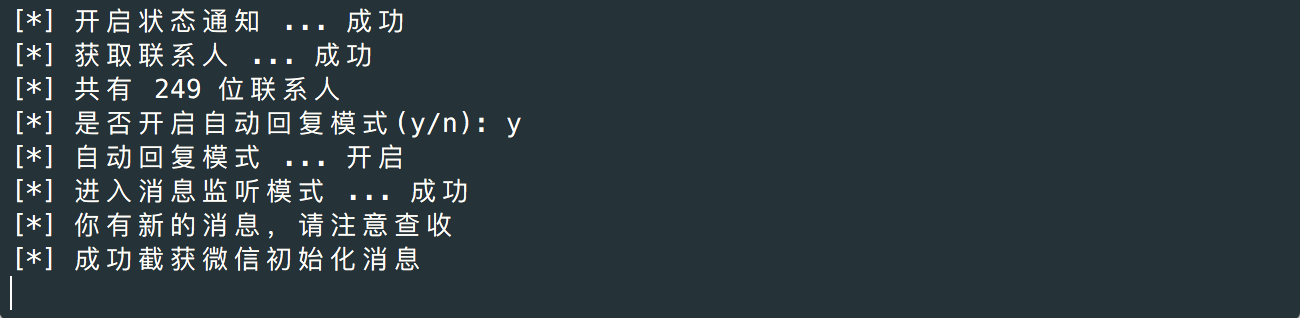
开启自动回复模式后,如果接收到的是文字消息就会自动回复,包括群消息。

名片,链接,动画表情和地址位置消息。
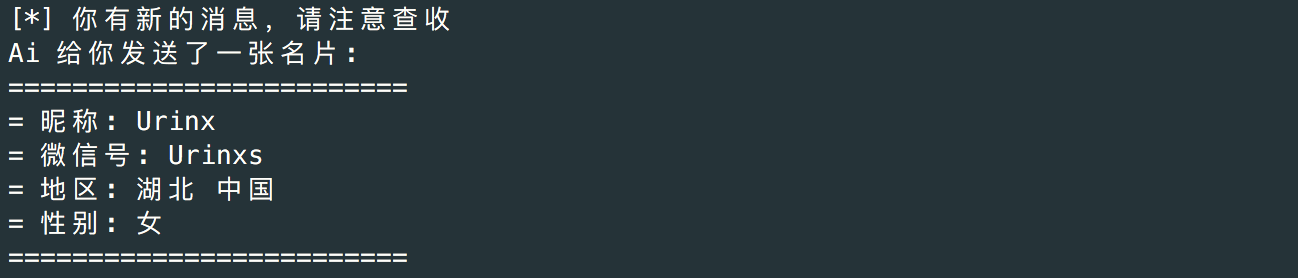
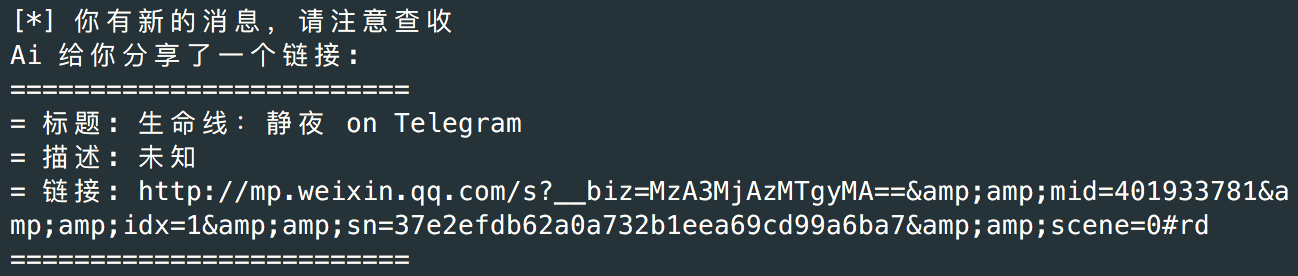
网页版上有的功能目前基本上都能支持。
Web Weixin Pipeline
       +--------------+     +---------------+   +---------------+
       |              |     |               |   |               |
       |   Get UUID   |     |  Get Contact  |   | Status Notify |
       |              |     |               |   |               |
       +-------+------+     +-------^-------+   +-------^-------+
               |                    |                   |
               |                    +-------+  +--------+
               |                            |  |
       +-------v------+               +-----+--+------+      +--------------+
       |              |               |               |      |              |
       |  Get QRCode  |               |  Weixin Init  +------>  Sync Check  <----+
       |              |               |               |      |              |    |
       +-------+------+               +-------^-------+      +-------+------+    |
               |                              |                      |           |
               |                              |                      +-----------+
               |                              |                      |
       +-------v------+               +-------+--------+     +-------v-------+
       |              | Confirm Login |                |     |               |
+------>    Login     +---------------> New Login Page |     |  Weixin Sync  |
|      |              |               |                |     |               |
|      +------+-------+               +----------------+     +---------------+
|             |
|QRCode Scaned|
+-------------+
Web Weixin API
登录
| API | 获取 UUID |
|---|---|
| url | https://login.weixin.qq.com/jslogin |
| method | POST |
| data | URL Encode |
| params | appid: 应用ID fun: new 应用类型 lang: zh_CN 语言 _: 时间戳 |
返回数据(String):
window.QRLogin.code = 200; window.QRLogin.uuid = "xxx"
注:这里的appid就是在微信开放平台注册的应用的AppID。网页版微信有两个AppID,早期的是
wx782c26e4c19acffb,在微信客户端上显示为应用名称为Web微信;现在用的是wxeb7ec651dd0aefa9,显示名称为微信网页版。
| API | 绑定登陆(webwxpushloginurl) |
|---|---|
| url | https://wx.qq.com/cgi-bin/mmwebwx-bin/webwxpushloginurl |
| method | GET |
| params | uin: xxx |
返回数据(String):
{'msg': 'all ok', 'uuid': 'xxx', 'ret': '0'}

通过这种方式可以省掉扫二维码这步操作,更加方便
| API | 生成二维码 |
|---|---|
| url | https://login.weixin.qq.com/l/ uuid |
| method | GET |
| API | 二维码扫描登录 |
|---|---|
| url | https://login.weixin.qq.com/cgi-bin/mmwebwx-bin/login |
| method | GET |
| params | tip: 1 未扫描 0 已扫描 uuid: xxx _: 时间戳 |
返回数据(String):
window.code=xxx;

xxx:
	408 登陆超时
	201 扫描成功
	200 确认登录

当返回200时,还会有
window.redirect_uri="https://wx.qq.com/cgi-bin/mmwebwx-bin/webwxnewloginpage?ticket=xxx&uuid=xxx&lang=xxx&scan=xxx";
| API | webwxnewloginpage |
|---|---|
| url | https://wx.qq.com/cgi-bin/mmwebwx-bin/webwxnewloginpage |
| method | GET |
| params | ticket: xxx uuid: xxx lang: zh_CN 语言 scan: xxx fun: new |
返回数据(XML):
<error>
	<ret>0</ret>
	<message>OK</message>
	<skey>xxx</skey>
	<wxsid>xxx</wxsid>
	<wxuin>xxx</wxuin>
	<pass_ticket>xxx</pass_ticket>
	<isgrayscale>1</isgrayscale>
</error>
微信初始化
| API | webwxinit |
|---|---|
| url | https://wx.qq.com/cgi-bin/mmwebwx-bin/webwxinit?pass_ticket=xxx&skey=xxx&r=xxx |
| method | POST |
| data | JSON |
| header | ContentType: application/json; charset=UTF-8 |
| params | { BaseRequest: { Uin: xxx, Sid: xxx, Skey: xxx, DeviceID: xxx, } } |
返回数据(JSON):
{
	"BaseResponse": {
		"Ret": 0,
		"ErrMsg": ""
	},
	"Count": 11,
	"ContactList": [...],
	"SyncKey": {
		"Count": 4,
		"List": [
			{
				"Key": 1,
				"Val": 635705559
			},
			...
		]
	},
	"User": {
		"Uin": xxx,
		"UserName": xxx,
		"NickName": xxx,
		"HeadImgUrl": xxx,
		"RemarkName": "",
		"PYInitial": "",
		"PYQuanPin": "",
		"RemarkPYInitial": "",
		"RemarkPYQuanPin": "",
		"HideInputBarFlag": 0,
		"StarFriend": 0,
		"Sex": 1,
		"Signature": "Apt-get install B",
		"AppAccountFlag": 0,
		"VerifyFlag": 0,
		"ContactFlag": 0,
		"WebWxPluginSwitch": 0,
		"HeadImgFlag": 1,
		"SnsFlag": 17
	},
	"ChatSet": xxx,
	"SKey": xxx,
	"ClientVersion": 369297683,
	"SystemTime": 1453124908,
	"GrayScale": 1,
	"InviteStartCount": 40,
	"MPSubscribeMsgCount": 2,
	"MPSubscribeMsgList": [...],
	"ClickReportInterval": 600000
}
| API | webwxstatusnotify |
|---|---|
| url | https://wx.qq.com/cgi-bin/mmwebwx-bin/webwxstatusnotify?lang=zh_CN&pass_ticket=xxx |
| method | POST |
| data | JSON |
| header | ContentType: application/json; charset=UTF-8 |
| params | { BaseRequest: { Uin: xxx, Sid: xxx, Skey: xxx, DeviceID: xxx }, Code: 3, FromUserName: 自己ID, ToUserName: 自己ID, ClientMsgId: 时间戳 } |
返回数据(JSON):
{
	"BaseResponse": {
		"Ret": 0,
		"ErrMsg": ""
	},
	...
}
获取联系人信息
| API | webwxgetcontact |
|---|---|
| url | https://wx.qq.com/cgi-bin/mmwebwx-bin//webwxgetcontact?pass_ticket=xxx&skey=xxx&r=xxx |
| method | POST |
| data | JSON |
| header | ContentType: application/json; charset=UTF-8 |
返回数据(JSON):
{
	"BaseResponse": {
		"Ret": 0,
		"ErrMsg": ""
	},
	"MemberCount": 334,
	"MemberList": [
		{
			"Uin": 0,
			"UserName": xxx,
			"NickName": "Urinx",
			"HeadImgUrl": xxx,
			"ContactFlag": 3,
			"MemberCount": 0,
			"MemberList": [],
			"RemarkName": "",
			"HideInputBarFlag": 0,
			"Sex": 0,
			"Signature": "你好,我们是地球三体组织。在这里,你将感受到不一样的思维模式,以及颠覆常规的世界观。而我们的目标,就是以三体人的智慧,引领人类未来科学技术500年。",
			"VerifyFlag": 8,
			"OwnerUin": 0,
			"PYInitial": "URINX",
			"PYQuanPin": "Urinx",
			"RemarkPYInitial": "",
			"RemarkPYQuanPin": "",
			"StarFriend": 0,
			"AppAccountFlag": 0,
			"Statues": 0,
			"AttrStatus": 0,
			"Province": "",
			"City": "",
			"Alias": "Urinxs",
			"SnsFlag": 0,
			"UniFriend": 0,
			"DisplayName": "",
			"ChatRoomId": 0,
			"KeyWord": "gh_",
			"EncryChatRoomId": ""
		},
		...
	],
	"Seq": 0
}
| API | webwxbatchgetcontact |
|---|---|
| url | https://wx.qq.com/cgi-bin/mmwebwx-bin/webwxbatchgetcontact?type=ex&r=xxx&pass_ticket=xxx |
| method | POST |
| data | JSON |
| header | ContentType: application/json; charset=UTF-8 |
| params | { BaseRequest: { Uin: xxx, Sid: xxx, Skey: xxx, DeviceID: xxx }, Count: 群数量, List: [ { UserName: 群ID, EncryChatRoomId: "" }, ... ], } |
返回数据(JSON)同上
同步刷新
| API | synccheck |
|---|---|
| protocol | https |
| host | webpush.weixin.qq.com webpush.wx2.qq.com webpush.wx8.qq.com webpush.wx.qq.com webpush.web2.wechat.com webpush.web.wechat.com |
| path | /cgi-bin/mmwebwx-bin/synccheck |
| method | GET |
| data | URL Encode |
| params | r: 时间戳 sid: xxx uin: xxx skey: xxx deviceid: xxx synckey: xxx _: 时间戳 |
返回数据(String):
window.synccheck={retcode:"xxx",selector:"xxx"}

retcode:
	0 正常
	1100 失败/登出微信
selector:
	0 正常
	2 新的消息
	7 进入/离开聊天界面
| API | webwxsync |
|---|---|
| url | https://wx.qq.com/cgi-bin/mmwebwx-bin/webwxsync?sid=xxx&skey=xxx&pass_ticket=xxx |
| method | POST |
| data | JSON |
| header | ContentType: application/json; charset=UTF-8 |
| params | { BaseRequest: { Uin: xxx, Sid: xxx, Skey: xxx, DeviceID: xxx }, SyncKey: xxx, rr: 时间戳取反 } |
返回数据(JSON):
{
	'BaseResponse': {'ErrMsg': '', 'Ret': 0},
	'SyncKey': {
		'Count': 7,
		'List': [
			{'Val': 636214192, 'Key': 1},
			...
		]
	},
	'ContinueFlag': 0,
	'AddMsgCount': 1,
	'AddMsgList': [
		{
			'FromUserName': '',
			'PlayLength': 0,
			'RecommendInfo': {...},
			'Content': "",
			'StatusNotifyUserName': '',
			'StatusNotifyCode': 5,
			'Status': 3,
			'VoiceLength': 0,
			'ToUserName': '',
			'ForwardFlag': 0,
			'AppMsgType': 0,
			'AppInfo': {'Type': 0, 'AppID': ''},
			'Url': '',
			'ImgStatus': 1,
			'MsgType': 51,
			'ImgHeight': 0,
			'MediaId': '',
			'FileName': '',
			'FileSize': '',
			...
		},
		...
	],
	'ModChatRoomMemberCount': 0,
	'ModContactList': [],
	'DelContactList': [],
	'ModChatRoomMemberList': [],
	'DelContactCount': 0,
	...
}
消息接口
| API | webwxsendmsg |
|---|---|
| url | https://wx.qq.com/cgi-bin/mmwebwx-bin/webwxsendmsg?pass_ticket=xxx |
| method | POST |
| data | JSON |
| header | ContentType: application/json; charset=UTF-8 |
| params | { BaseRequest: { Uin: xxx, Sid: xxx, Skey: xxx, DeviceID: xxx }, Msg: { Type: 1 文字消息, Content: 要发送的消息, FromUserName: 自己ID, ToUserName: 好友ID, LocalID: 与clientMsgId相同, ClientMsgId: 时间戳左移4位随后补上4位随机数 } } |
返回数据(JSON):
{
	"BaseResponse": {
		"Ret": 0,
		"ErrMsg": ""
	},
	...
}
| API | webwxrevokemsg |
|---|---|
| url | https://wx.qq.com/cgi-bin/mmwebwx-bin/webwxrevokemsg |
| method | POST |
| data | JSON |
| header | ContentType: application/json; charset=UTF-8 |
| params | { BaseRequest: { Uin: xxx, Sid: xxx, Skey: xxx, DeviceID: xxx }, SvrMsgId: msg_id, ToUserName: user_id, ClientMsgId: local_msg_id } |
返回数据(JSON):
{
	"BaseResponse": {
		"Ret": 0,
		"ErrMsg": ""
	}
}
发送表情
| API | webwxsendmsgemotion |
|---|---|
| url | https://wx2.qq.com/cgi-bin/mmwebwx-bin/webwxsendemoticon?fun=sys&f=json&pass_ticket=xxx |
| method | POST |
| data | JSON |
| header | ContentType: application/json; charset=UTF-8 |
| params | { BaseRequest: { Uin: xxx, Sid: xxx, Skey: xxx, DeviceID: xxx }, Msg: { Type: 47 emoji消息, EmojiFlag: 2, MediaId: 表情上传后的媒体ID, FromUserName: 自己ID, ToUserName: 好友ID, LocalID: 与clientMsgId相同, ClientMsgId: 时间戳左移4位随后补上4位随机数 } } |
图片接口
| API | webwxgeticon |
|---|---|
| url | https://wx.qq.com/cgi-bin/mmwebwx-bin/webwxgeticon |
| method | GET |
| params | seq: 数字,可为空 username: ID skey: xxx |
| API | webwxgetheadimg |
|---|---|
| url | https://wx.qq.com/cgi-bin/mmwebwx-bin/webwxgetheadimg |
| method | GET |
| params | seq: 数字,可为空 username: 群ID skey: xxx |
| API | webwxgetmsgimg |
|---|---|
| url | https://wx.qq.com/cgi-bin/mmwebwx-bin/webwxgetmsgimg |
| method | GET |
| params | MsgID: 消息ID type: slave 略缩图 or 为空时加载原图 skey: xxx |
多媒体接口
| API | webwxgetvideo |
|---|---|
| url | https://wx.qq.com/cgi-bin/mmwebwx-bin/webwxgetvideo |
| method | GET |
| params | msgid: 消息ID skey: xxx |
| API | webwxgetvoice |
|---|---|
| url | https://wx.qq.com/cgi-bin/mmwebwx-bin/webwxgetvoice |
| method | GET |
| params | msgid: 消息ID skey: xxx |
账号类型
| 类型 | 说明 |
|---|---|
| 个人账号 | 以@开头,例如:@xxx |
| 群聊 | 以@@开头,例如:@@xxx |
| 公众号/服务号 | 以@开头,但其VerifyFlag & 8 != 0 VerifyFlag: 一般个人公众号/服务号:8 一般企业的服务号:24 微信官方账号 微信团队:56 |
| 特殊账号 | 像文件传输助手之类的账号,有特殊的ID,目前已知的有:filehelper, newsapp, fmessage, weibo, qqmail, tmessage, qmessage, qqsync, floatbottle, lbsapp, shakeapp, medianote, qqfriend, readerapp, blogapp, facebookapp, masssendapp, meishiapp, feedsapp, voip, blogappweixin, weixin, brandsessionholder, weixinreminder, officialaccounts, notification_messages, wxitil, userexperience_alarm, notification_messages |
消息类型
消息一般格式:
{
	"FromUserName": "",
	"ToUserName": "",
	"Content": "",
	"StatusNotifyUserName": "",
	"ImgWidth": 0,
	"PlayLength": 0,
	"RecommendInfo": {...},
	"StatusNotifyCode": 4,
	"NewMsgId": "",
	"Status": 3,
	"VoiceLength": 0,
	"ForwardFlag": 0,
	"AppMsgType": 0,
	"Ticket": "",
	"AppInfo": {...},
	"Url": "",
	"ImgStatus": 1,
	"MsgType": 1,
	"ImgHeight": 0,
	"MediaId": "",
	"MsgId": "",
	"FileName": "",
	"HasProductId": 0,
	"FileSize": "",
	"CreateTime": 1454602196,
	"SubMsgType": 0
}
| MsgType | 说明 |
|---|---|
| 1 | 文本消息 |
| 3 | 图片消息 |
| 34 | 语音消息 |
| 37 | 好友确认消息 |
| 40 | POSSIBLEFRIEND_MSG |
| 42 | 共享名片 |
| 43 | 视频消息 |
| 47 | 动画表情 |
| 48 | 位置消息 |
| 49 | 分享链接 |
| 50 | VOIPMSG |
| 51 | 微信初始化消息 |
| 52 | VOIPNOTIFY |
| 53 | VOIPINVITE |
| 62 | 小视频 |
| 9999 | SYSNOTICE |
| 10000 | 系统消息 |
| 10002 | 撤回消息 |
微信初始化消息
MsgType: 51
FromUserName: 自己ID
ToUserName: 自己ID
StatusNotifyUserName: 最近联系的联系人ID
Content:
	<msg>
	    <op id='4'>
	        <username>
	        	// 最近联系的联系人
	            filehelper,xxx@chatroom,wxid_xxx,xxx,...
	        </username>
	        <unreadchatlist>
	            <chat>
	                <username>
	                	// 朋友圈
	                    MomentsUnreadMsgStatus
	                </username>
	                <lastreadtime>
	                    1454502365
	                </lastreadtime>
	            </chat>
	        </unreadchatlist>
	        <unreadfunctionlist>
	        	// 未读的功能账号消息,群发助手,漂流瓶等
	        </unreadfunctionlist>
	    </op>
	</msg>
文本消息
MsgType: 1
FromUserName: 发送方ID
ToUserName: 接收方ID
Content: 消息内容
图片消息
MsgType: 3
FromUserName: 发送方ID
ToUserName: 接收方ID
MsgId: 用于获取图片
Content:
	<msg>
		<img length="6503" hdlength="0" />
		<commenturl></commenturl>
	</msg>
小视频消息
MsgType: 62
FromUserName: 发送方ID
ToUserName: 接收方ID
MsgId: 用于获取小视频
Content:
	<msg>
		<img length="6503" hdlength="0" />
		<commenturl></commenturl>
	</msg>
地理位置消息
MsgType: 1
FromUserName: 发送方ID
ToUserName: 接收方ID
Content: http://weixin.qq.com/cgi-bin/redirectforward?args=xxx
// 属于文本消息,只不过内容是一个跳转到地图的链接
名片消息
MsgType: 42
FromUserName: 发送方ID
ToUserName: 接收方ID
Content:
	<?xml version="1.0"?>
	<msg bigheadimgurl="" smallheadimgurl="" username="" nickname=""  shortpy="" alias="" imagestatus="3" scene="17" province="" city="" sign="" sex="1" certflag="0" certinfo="" brandIconUrl="" brandHomeUrl="" brandSubscriptConfigUrl="" brandFlags="0" regionCode="" />

RecommendInfo:
	{
		"UserName": "xxx", // ID
		"Province": "xxx",
		"City": "xxx",
		"Scene": 17,
		"QQNum": 0,
		"Content": "",
		"Alias": "xxx", // 微信号
		"OpCode": 0,
		"Signature": "",
		"Ticket": "",
		"Sex": 0, // 1:男, 2:女
		"NickName": "xxx", // 昵称
		"AttrStatus": 4293221,
		"VerifyFlag": 0
	}
语音消息
MsgType: 34
FromUserName: 发送方ID
ToUserName: 接收方ID
MsgId: 用于获取语音
Content:
	<msg>
		<voicemsg endflag="1" cancelflag="0" forwardflag="0" voiceformat="4" voicelength="1580" length="2026" bufid="216825389722501519" clientmsgid="49efec63a9774a65a932a4e5fcd4e923filehelper174_1454602489" fromusername="" />
	</msg>
动画表情
MsgType: 47
FromUserName: 发送方ID
ToUserName: 接收方ID
Content:
	<msg>
		<emoji fromusername = "" tousername = "" type="2" idbuffer="media:0_0" md5="e68363487d8f0519c4e1047de403b2e7" len = "86235" productid="com.tencent.xin.emoticon.bilibili" androidmd5="e68363487d8f0519c4e1047de403b2e7" androidlen="86235" s60v3md5 = "e68363487d8f0519c4e1047de403b2e7" s60v3len="86235" s60v5md5 = "e68363487d8f0519c4e1047de403b2e7" s60v5len="86235" cdnurl = "http://emoji.qpic.cn/wx_emoji/eFygWtxcoMF8M0oCCsksMA0gplXAFQNpiaqsmOicbXl1OC4Tyx18SGsQ/" designerid = "" thumburl = "http://mmbiz.qpic.cn/mmemoticon/dx4Y70y9XctRJf6tKsy7FwWosxd4DAtItSfhKS0Czr56A70p8U5O8g/0" encrypturl = "http://emoji.qpic.cn/wx_emoji/UyYVK8GMlq5VnJ56a4GkKHAiaC266Y0me0KtW6JN2FAZcXiaFKccRevA/" aeskey= "a911cc2ec96ddb781b5ca85d24143642" ></emoji>
		<gameext type="0" content="0" ></gameext>
	</msg>
普通链接或应用分享消息
MsgType: 49
AppMsgType: 5
FromUserName: 发送方ID
ToUserName: 接收方ID
Url: 链接地址
FileName: 链接标题
Content:
	<msg>
		<appmsg appid=""  sdkver="0">
			<title></title>
			<des></des>
			<type>5</type>
			<content></content>
			<url></url>
			<thumburl></thumburl>
			...
		</appmsg>
		<appinfo>
			<version></version>
			<appname></appname>
		</appinfo>
	</msg>
音乐链接消息
MsgType: 49
AppMsgType: 3
FromUserName: 发送方ID
ToUserName: 接收方ID
Url: 链接地址
FileName: 音乐名
AppInfo: // 分享链接的应用
{
Type: 0,
AppID: wx485a97c844086dc9
}
Content:
<msg>
<appmsg appid="wx485a97c844086dc9" sdkver="0">
<title></title>
<des></des>
<action></action>
<type>3</type>
<showtype>0</showtype>
<mediatagname></mediatagname>
<messageext></messageext>
<messageaction></messageaction>
<content></content>
<contentattr>0</contentattr>
<url></url>
<lowurl></lowurl>
<dataurl>
http://ws.stream.qqmusic.qq.com/C100003i9hMt1bgui0.m4a?vkey=6867EF99F3684&guid=ffffffffc104ea2964a111cf3ff3edaf&fromtag=46
</dataurl>
<lowdataurl>
http://ws.stream.qqmusic.qq.com/C100003i9hMt1bgui0.m4a?vkey=6867EF99F3684&guid=ffffffffc104ea2964a111cf3ff3edaf&fromtag=46
</lowdataurl>
<appattach>
<totallen>0</totallen>
<attachid></attachid>
<emoticonmd5></emoticonmd5>
<fileext></fileext>
</appattach>
<extinfo></extinfo>
<sourceusername></sourceusername>
<sourcedisplayname></sourcedisplayname>
<commenturl></commenturl>
<thumburl>
http://imgcache.qq.com/music/photo/album/63/180_albumpic_143163_0.jpg
</thumburl>
<md5></md5>
</appmsg>
<fromusername></fromusername>
<scene>0</scene>
<appinfo>
<version>29</version>
<appname>摇一摇搜歌</appname>
</appinfo>
<commenturl></commenturl>
</msg>
群消息
MsgType: 1
FromUserName: @@xxx
ToUserName: @xxx
Content:
	@xxx:<br/>xxx
红包消息
MsgType: 49
AppMsgType: 2001
FromUserName: 发送方ID
ToUserName: 接收方ID
Content: 未知
注:根据网页版的代码可以看到未来可能支持查看红包消息,但目前走的是系统消息,见下。
系统消息
MsgType: 10000
FromUserName: 发送方ID
ToUserName: 自己ID
Content:
	"你已添加了 xxx ,现在可以开始聊天了。"
	"如果陌生人主动添加你为朋友,请谨慎核实对方身份。"
	"收到红包,请在手机上查看"
Discussion Group
如果你希望和 WeixinBot 的其他开发者交流,或者有什么问题和建议,欢迎大家加入微信群【Youth fed the dog】一起讨论。扫描下面的二维码添加机器人为好友,并回复【Aidog】获取入群链接。

注:这个不是群的二维码,是机器人拉你入群,记得回复机器人【Aidog】哦~ (secret code: Aidog)
Recent Update
- association_login 目前网页版微信已经可以脱离扫码,但是依然需要在客户端进行确认登录。
Related repositories
A complete and graceful API for Wechat. 微信个人号接口、微信机器人及命令行微信,三十行即可自定义个人号机器人。
微信机器人 / 可能是最优雅的微信个人号 API ✨✨
JSON-Server is an open-source Node.js tool from typicode that generates a REST API from a single JSON file, with full CRUD routes, query-param filtering, sorting, pagination, and relationship embedding built in. The GitHub repository and the project is MIT licensed. The current README documents a v1 beta; a separate v0.17.4 branch remains the stable release.
Dear ImGui is an open-source C++ library at ocornut/imgui for building graphical interfaces inside your own application, described in its own README as bloat-free and renderer agnostic. It targets content-creation tools, visualization panels, and debug UI for game engines and real-time applications rather than end-user software, and ships with officially maintained backends for DirectX, OpenGL, Vulkan, Metal, WebGPU, and more.
Quick answers
How active is development on Urinx/WeixinBot?
The most recent commit recorded on Urinx/WeixinBot was 6.7 years ago, based on the GitHub push timestamp. The repository has 2.0k forks — one of the better signals of community interest.
How does Urinx/WeixinBot compare to other API projects?
Urinx/WeixinBot is tracked by TopGit in the API category, with 7.4k GitHub stars and written in Python. Browse the API topic page on TopGit to compare it against similar projects by stars and activity.
How many stars does Urinx/WeixinBot have?
Urinx/WeixinBot has 7.4k GitHub stars — refresh the page for the live number, or check github.com/Urinx/WeixinBot. TopGit mirrors GitHub's count but does not claim minute-by-minute accuracy.
Is Urinx/WeixinBot open source?
Yes — Urinx/WeixinBot ships under the Apache-2.0 license, which makes its source code freely readable (and, depending on license terms, forkable and reusable). Source: github.com/Urinx/WeixinBot.
What is Urinx/WeixinBot?
Urinx/WeixinBot (Urinx/WeixinBot) is a Python project on GitHub. From the project's own README: 网页版微信API,包含终端版微信及微信机器人
Where do I read more about Urinx/WeixinBot?
This TopGit page is a snapshot — the READ ME tab shows the project's own README content (links stripped, images preserved). The GitHub repository at github.com/Urinx/WeixinBot is the definitive source.
Read full README in the tab above.
Want a second opinion on WeixinBot?
Ask an AI that can read this page — one click and you get its take on WeixinBot.