volcengine/OpenViking is tracked by TopGit as an AI tool, with 29.5k stars on GitHub, written primarily in Python. Self-evolving Context Database for AI Agents. Unify Agent Memory, Knowledge RAG and Skills.
Snapshot summary built from the project's own GitHub metadata — there's no written TopGit review yet. The page will update automatically when a full review is published.
WHY NO REVIEW YET
TopGit writes full reviews for the most-starred, most-requested repositories. This page is a snapshot until then — see the READ ME tab for the original README in full.
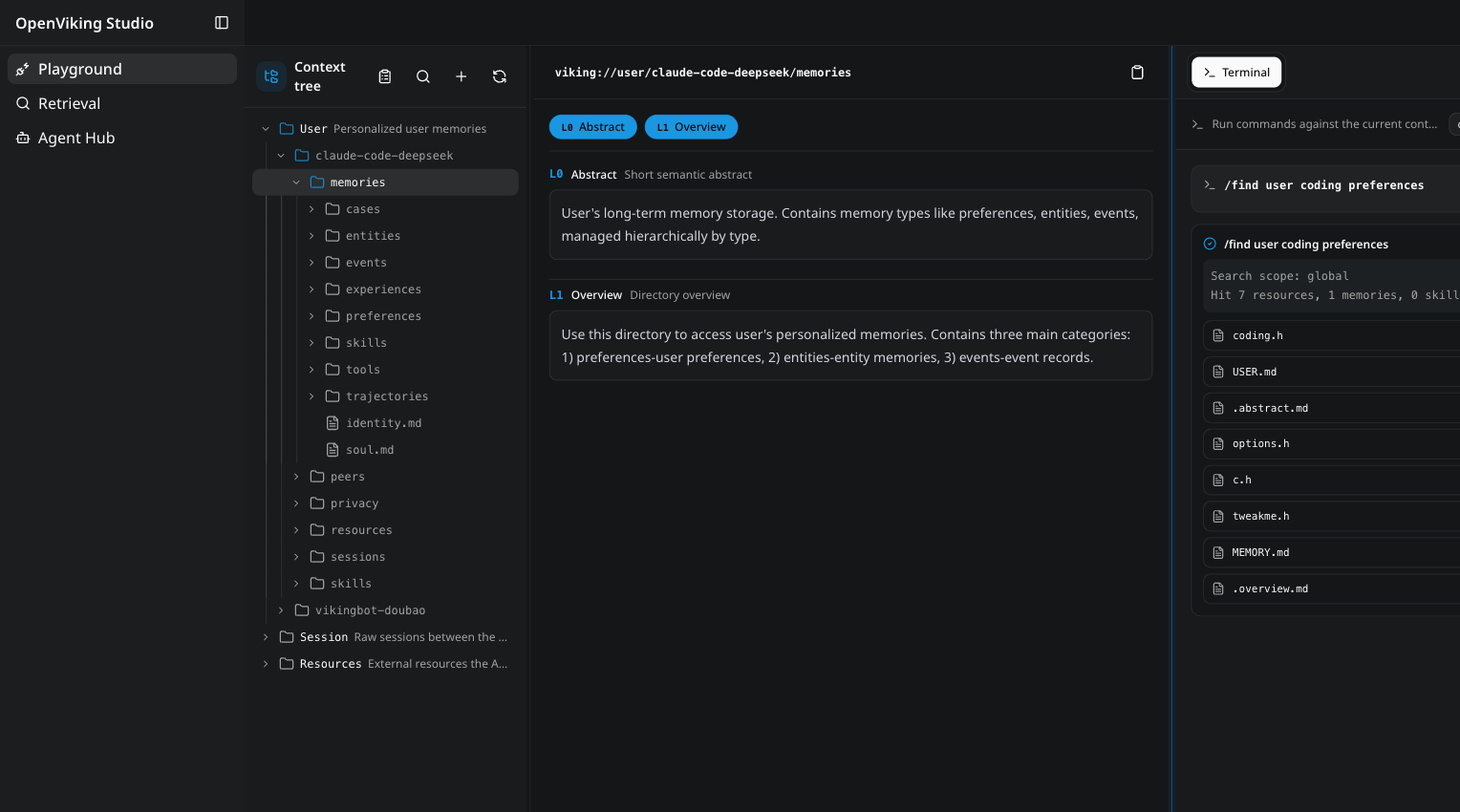
OpenViking is an open-source context database for AI agents. It stores memories, resources, and skills as one virtual filesystem under the viking:// protocol, so an agent browses its own context with ls, tree, and find instead of querying a black-box vector store. Content is processed into three tiers — L0 abstract, L1 overview, L2 details — and loaded on demand. Every retrieval leaves a trajectory you can watch and debug. Full introduction: Getting started.
The OpenViking Studio playground — a live demo you can open in the browser, no installation required.
Why OpenViking
One filesystem for all context. Memories, resources, and skills each get a viking:// URI. Agents locate and manipulate context deterministically, like a developer working with files. → Viking URI · Context types
Tiered loading cuts token spend. Every entry is processed into L0 (abstract), L1 (overview), and L2 (details) on write, then loaded only as deep as the task requires. → Context layers
Directory recursive retrieval. Vector search first locates the highest-scoring directory, then drills down layer by layer, so results arrive with their surrounding context intact. → Retrieval
Observable retrieval. Each query preserves its directory-browsing trajectory. When a result looks wrong, you can see exactly which path produced it. → Retrieval
Sessions become memory. After a session commits, OpenViking asynchronously extracts user preferences and agent experience into long-term memory. → Session
How the pieces fit together: Architecture. The thinking behind the design: The Database Paradigm for Context Engineering.
OpenViking 0.3.22 has been evaluated on long-conversation user memory (LoCoMo) and multi-turn agent tasks (tau2-bench). Full results and setup details, including knowledge-base QA, are in the benchmark report; reproduction scripts live in ./benchmark.
User memory (LoCoMo): with OpenViking, all three agent integrations land at 80–83% accuracy — up from 24–57% on their native memory — while input tokens drop by 34.3–91.0% and query latency by 58.45–66.10%.
Agent experience (tau2-bench): experience memory lifts task success by +6.87pp (retail) and +11.87pp (airline) over the same LLM without memory.
Quick start
💡 Want to see it in action first? Try OpenViking Studio — a live hosted instance with a context playground, semantic search, and a multi-agent hub. No installation required.
init walks you through provider setup and writes ~/.openviking/ov.conf. It supports Volcengine, OpenAI, Codex OAuth, Kimi, GLM, and local Ollama — for Ollama it can detect and install the runtime and pull models suited to your hardware. doctor checks the config file, Python version, provider connectivity, and disk space without a running server. Manual ov.conf templates, per-provider examples, environment variables, and Windows setup: Configuration guide · Quick start docs.
The install already includes the ov client CLI. With the server running:
ov status
ov add-resource https://github.com/volcengine/OpenViking # --wait
ov ls viking://resources/
ov tree viking://resources/volcengine -L 2
# wait some time for semantic processing if not --wait
ov find "what is openviking"
ov grep "openviking" --uri viking://resources/volcengine/OpenViking/docs/en
Next steps:
Client configuration (ov config), standalone CLI installs (npm / cargo), and advanced usage such as index rebuilding: CLI setup
Docker and production deployment: Deployment guide
Use it with your agent
Integrations inject OpenViking recall into your agent's context and auto-commit session memory:
Claude Code
Codex
OpenClaw
Hermes
Cursor
Trae
OpenCode
pi
MCP clients
LangChain / LangGraph
Setup instructions for each agent: Agent integrations overview.
OpenViking Helper (Beta)
OpenViking Helper is a desktop console, currently in beta for macOS and Windows x64:
Visual local agent setup: detects OpenViking CLI, Claude Code, Codex, Cursor, Trae, and OpenCode, then configures supported plugin, MCP, Hook, and CLI integrations.
Session trace inspection: parses Claude Code, Codex, and Trae sessions to show OpenViking recall, prompt injection, MCP calls, capture, and commit events.
Local memory and skill management: views local memory / rule files and SKILL.md skills, then syncs them to OpenViking.
Download:
macOS Apple Silicon (arm64)
macOS Intel (x64)
Windows (x64)
VikingBot
VikingBot is an AI agent framework built on top of OpenViking:
pip install "openviking[bot]"
openviking-server --with-bot
ov chat   # in another terminal
The official Docker image bundles VikingBot and starts it by default alongside the server and console UI. Details: VikingBot guide.
Deploy in production
For production, run OpenViking as a standalone HTTP service — see Server deployment and the Deployment guide.
Prefer not to operate it yourself? OpenViking Personal is officially hosted and ready to use, scales far beyond local hardware with VikingDB, and includes a free trial for up to 50 files; existing open-source users can move over with the migration tool. → openviking.ai
Managed Services
Volcano Engine (China Region)
Officially hosted on Volcano Engine, available in China.
Global hosting service on BytePlus (for regions outside China)
Private distributed enterprise edition (deployed via activation code, supports BYOC)
Research
OpenViking open-sources a subset of the core capabilities described in the VikingMem paper:
VikingMem: A Memory Base Management System for Stateful LLM-based Applications
Jiajie Fu, Junwen Chen, Mengzhao Wang, Aoxiang He, Maojia Sheng, Xiangyu Ke, Yifan Zhu, and Yunjun Gao.
arXiv:2605.29640, 2026. Accepted by VLDB 2026.
📄 Read the paper on arXiv
Partner Projects
OpenViking welcomes collaboration with other open-source projects to build the context data ecosystem. Our confirmed partners include:
How active is development on volcengine/OpenViking?
The most recent commit recorded on volcengine/OpenViking was 5 days ago, based on the GitHub push timestamp. The repository has 2.3k forks — one of the better signals of community interest.
Is volcengine/OpenViking open source?
Yes — volcengine/OpenViking ships under the AGPL-3.0 license, which makes its source code freely readable (and, depending on license terms, forkable and reusable). Source: github.com/volcengine/OpenViking.
What license does volcengine/OpenViking use?
volcengine/OpenViking is released under the AGPL-3.0 license. Always verify the LICENSE file directly on GitHub for the authoritative terms — license strings can be edited out of sync with a project's actual stance.
What topics is volcengine/OpenViking associated with?
GitHub's repository topics for volcengine/OpenViking: "agent-memory", "agent-plugins", "agentic-rag", "context-database", "dsh-plugin", "self-evolving". TopGit's editorial category is AI Tools.
Where can I see volcengine/OpenViking in action?
The project maintains a homepage at https://openviking.ai/. The README tab on this page also usually contains screenshots and a quickstart.
Where do I read more about volcengine/OpenViking?
This TopGit page is a snapshot — the READ ME tab shows the project's own README content (links stripped, images preserved). The GitHub repository at github.com/volcengine/OpenViking is the definitive source.
Read full README in the tab above.
Is OpenViking worth your time?
ChatGPT, Claude and Perplexity can all read this page. Ask one of them what it makes of OpenViking.
 /OpenViking