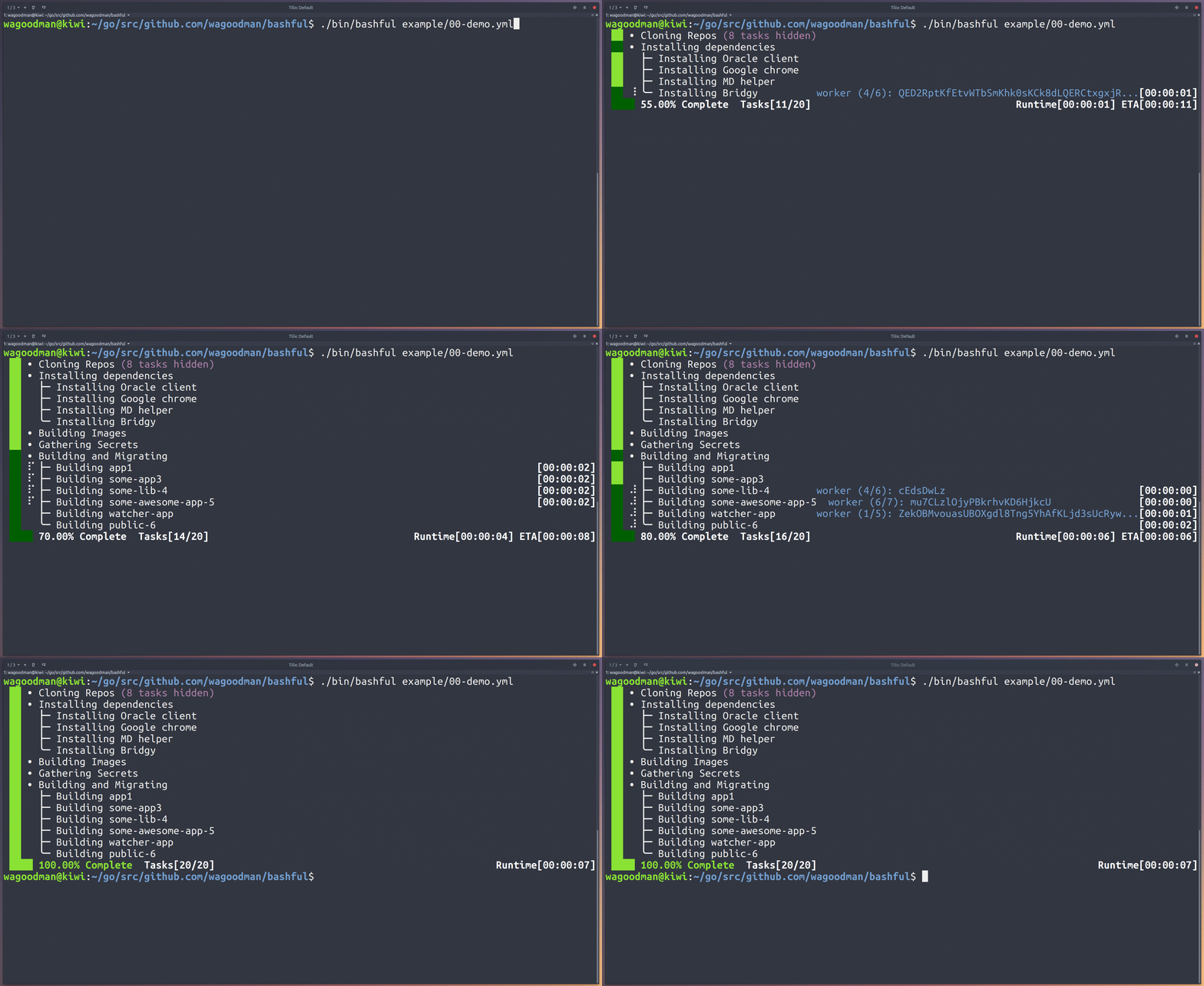
On GitHub, wagoodman/bashful has picked up 1.2k stars, Developer Tools, Go. Use a yaml file to stitch together commands and bash snippits and run them with a bit of style. Why? Because your bash script should be quiet and shy-like (...and not such a loud mouth).
Snapshot summary built from the project's own GitHub metadata — there's no written TopGit review yet. The page will update automatically when a full review is published.
WHY NO REVIEW YET
TopGit writes full reviews for the most-starred, most-requested repositories. This page is a snapshot until then — see the READ ME tab for the original README in full.
Use a yaml file to stitch together commands and bash snippets and run them with a bit of style.
Why? Because your bash script should be quiet and shy-like (...and not such a loud mouth).
"But why would you make this monstrosity?" you ask... because &>/dev/null and | tee -a some.log and set -e; do something; set +e and other similar things is getting annoying. And besides... why shouldn't your bash script output look pretty?
Features:
Run bash snippits ('tasks') in series or parallel
A nice vertical progress bar to show current task status (with inline realtime stdout/stderr)
Download url references to bash scripts and executables
Bundle set of scripts and listed resources into a single simi-portable executable
Log all task stdout/stderr to a log file
ETA for running tasks (that have already been run before)
Configuration yaml block to control the behavior/look & feel
Detailed error reports when commands fail
Control which failing command should halt execution
...Or make an installer that downloads and runs everything it needs:
# install.yaml
tasks:
    # The given url gets executed by default
    - name: Installing Cuda and Bazel
      url: https://raw.githubusercontent.com/jasimpson/tensorflow-on-aws/master/toa_part_1of2.sh

    # Or you can control how the url asset (<exec>) gets used
    - name: Installing Tensorflow
      url: https://raw.githubusercontent.com/jasimpson/tensorflow-on-aws/master/toa_part_2of2.sh
      cmd: source ~/.bashrc && <exec>
Package up the installed into a single executable and give it to someone else to run (must be the same architecture and OS type):
bashful bundle install.yaml
# now you have a new executable called "install.bundle", which can simply be executed
./install.bundle
Note: the bundle feature is pretty experimental right now.
You can even persist environment variables across tasks:
Which can be used as bash $# parameters (in this case $1 and $2):
tasks:
    - name: Show some stuff!
      cmd: echo $1
    - name: Show some other stuff!
      cmd: echo $2
There are a ton of examples in the example/ dir. Go check them out!
Configuration Options
Here is an exhaustive list of all of the config options (in the config yaml block). These options
are global options that apply to all tasks within the yaml file:
# this block is used to configure the look, feel, and behavior of all tasks
config:
    # which character used to delimintate the task list
    bullet-char: "-"

    # hide all child tasks after task section completion
    collapse-on-completion: false

    # change the colors of the vertical progress bar for a task in a particular state.
    # this should be a number from the 256 color palette.
    success-status-color: 10
    running-status-color: 22
    pending-status-color: 22
    error-status-color: 160

    # by default the screen is updated when an event occurs (when stdout from
    # a running process is read). This can be changed to only allow the
    # screen to be updated on an interval (to accomodate slower devices).
    event-driven: false

    # This is the character/string that is replaced in the cmd section of a task to reference a downloaded url
    exec-replace-pattern: '<exec>'

    # the number of tasks that can run simultaneously
    max-parallel-commands: 4

    # log all task output and events to the given logfile
    log-path: path/to/file.log

    # show/hide the detailed summary of all task failures after completion
    show-failure-report: true

    # show/hide the last summary line (showing % complete, number of tasks ran, eta, etc)
    show-summary-footer: true

    # show/hide the number of tasks that have failed in the summary footer line
    show-summary-errors: false

    # show/hide the number of tasks completed thus far on the summary footer line
    show-summary-steps: true

    # show/hide the eta and runtime figures on the summary footer line
    show-summary-times: false

    # globally enable/disable showing the stdout/stderr of each task
    show-task-output: true

    # Show an eta for each task on the screen (being shown on every line with a command running)
    show-task-times: true

    # Show only one line of output to the screen (instead of a line per task + a summary line)
    single-line: true

    # globally enable/disable haulting further execution when any one task fails
    stop-on-failure: true

    # This is the character/string that is replaced with items listed in the 'for-each' block
    replica-replace-pattern: '<replace>'

    # time in milliseconds to update each task on the screen (polling interval)
    update-interval: 250
The tasks block is an ordered list of processes to run. Each task has several options that can be configured:
tasks:
    - name: my awesome command      # a title for the task
      cmd: echo "woot"              # the command to be ran (required)

      collapse-on-completion: false # hide all defined 'parallel-tasks' after completion
      event-driven: true            # use a event driven or polling mechanism for displaying task stdout
      ignore-failure: false         # do not register any non-zero return code as a failure (this task will appear to never fail)
      show-output: true             # show task stdout to the screen
      stop-on-failure: true         # indicate if the application should continue if this cmd fails

      parallel-tasks: ...           # a list of tasks that should be performed concurrently

      for-each: ...                 # a list of parameters used to duplicate this task

      url: http://github.com/somescript.sh # download this url and execute it
      md5: ae8abe98aeb389ae8b39e3434bbc    # an expected md5 checksum of the url provided

      tags: something               # one or more 'tags' that can be used to execute a sub-selection of tasks within a run yaml
      tags:                         # e.g. 'bashful run some.yaml --tags      something'
        - something                 #      'bashful run some.yaml --tags      something,else'
        - else                      #      'bashful run some.yaml --only-tags something'
There are a ton of examples in the example/ dir. Go check them out!
Runtime Options
USAGE:
   bashful run [options] <path-to-yaml-file>
   bashful bundle <path-to-yaml-file>

COMMANDS:
     bundle   Bundle yaml and referenced url resources into a single executable
     run      Execute the given yaml

BUNDLE OPTIONS:
    None

RUN OPTIONS:
   --tags value       A comma delimited list of matching task tags.
                      If a task's tag matches *or if it is not tagged* then it will be executed (also see --only-tags).
   --only-tags value  A comma delimited list of matching task tags. A task will only be executed if it has a matching tag.

GLOBAL OPTIONS:
   --help, -h     show help
   --version, -v  print the version
Wish list
All feature requests are welcome!
at least 70% test coverage
truly cross platform (windows)
Multiple (serial) commands for a single task (cmd: [run something, run another thing])
Multiple url references for a single task (url: [https://someurl.com/some-script.sh, https://anotherurl.com/another-script.sh])
Allow parallel tasks within parallel tasks (really just allow deeper nesting of any kind of task)
Interact with the mouse to see more/less tasks (https://godoc.org/github.com/nsf/termbox-go#Event)
The most recent commit recorded on wagoodman/bashful was 4.7 years ago, based on the GitHub push timestamp. The repository has 45 forks — one of the better signals of community interest.
How many stars does wagoodman/bashful have?
wagoodman/bashful has 1.2k GitHub stars — refresh the page for the live number, or check github.com/wagoodman/bashful. TopGit mirrors GitHub's count but does not claim minute-by-minute accuracy.
Is wagoodman/bashful open source?
Yes — wagoodman/bashful ships under the MIT license, which makes its source code freely readable (and, depending on license terms, forkable and reusable). Source: github.com/wagoodman/bashful.
What else is in the Developer Tools space?
wagoodman/bashful is tracked by TopGit under the Developer Tools category, alongside 8 GitHub-tagged topics. Trending and Topics pages list peer repositories of comparable stars and language.
What is wagoodman/bashful?
wagoodman/bashful (wagoodman/bashful) is a Go project on GitHub. From the project's own README: Use a yaml file to stitch together commands and bash snippits and run them with a bit of style. Why? Because your bash script should be quiet and shy-like (...and not such a loud mouth).
What language is wagoodman/bashful written in?
wagoodman/bashful is written primarily in Go. GitHub's language field is based on the largest share of bytes in the default branch.
What license does wagoodman/bashful use?
wagoodman/bashful is released under the MIT license. Always verify the LICENSE file directly on GitHub for the authoritative terms — license strings can be edited out of sync with a project's actual stance.
Where do I read more about wagoodman/bashful?
This TopGit page is a snapshot — the READ ME tab shows the project's own README content (links stripped, images preserved). The GitHub repository at github.com/wagoodman/bashful is the definitive source.
Read full README in the tab above.
Curious whether bashful is right for you?
Let ChatGPT, Claude, or Perplexity look into it — click below and see what AI actually says about bashful.

 /bashful