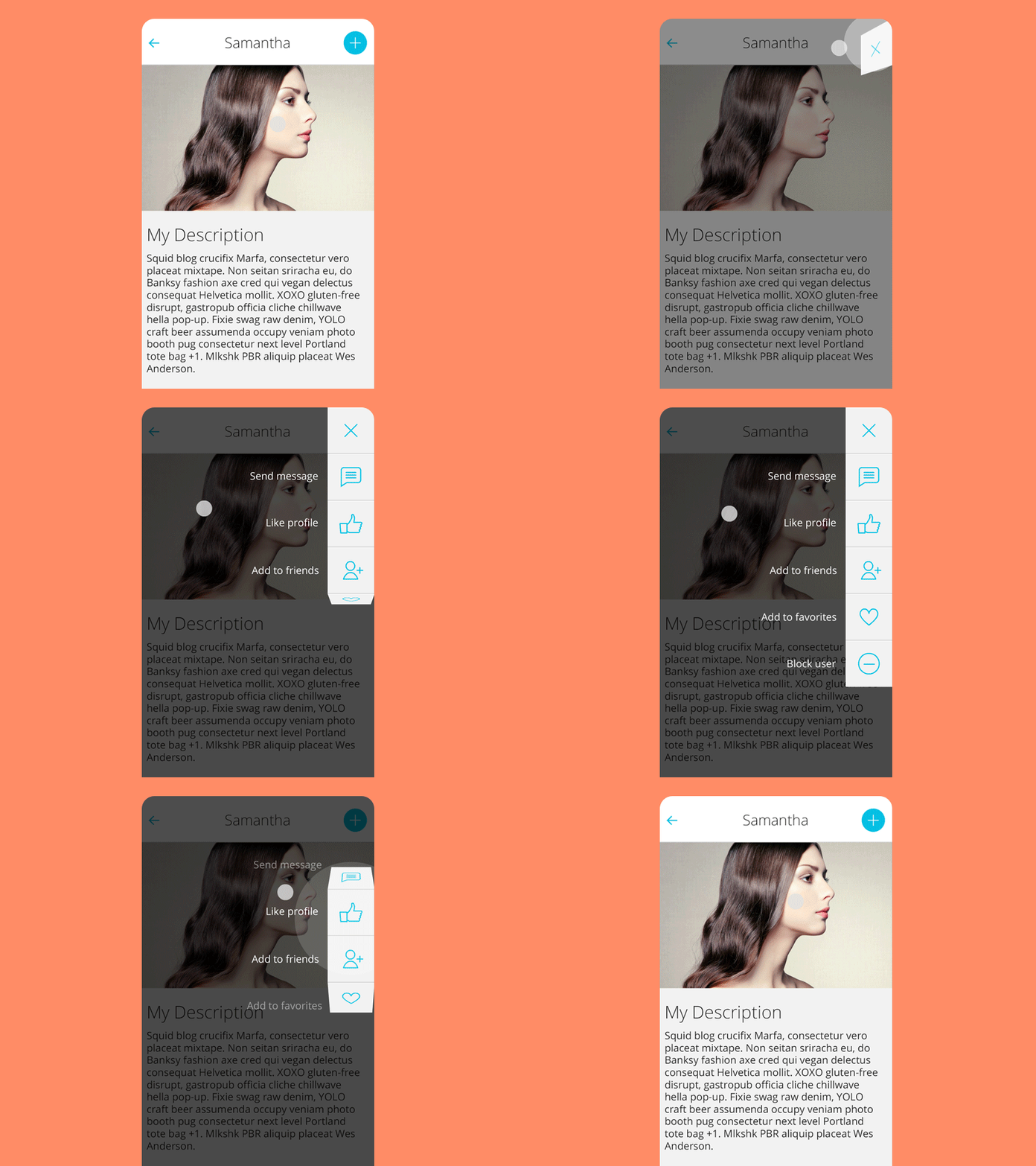
Yalantis/Context-Menu.Android is a mobile-focused project on GitHub with 3.8k stars, written primarily in Kotlin. You can easily add awesome animated context menu to your app.
Snapshot summary built from the project's own GitHub metadata — there's no written TopGit review yet. The page will update automatically when a full review is published.
WHY NO REVIEW YET
TopGit writes full reviews for the most-starred, most-requested repositories. This page is a snapshot until then — see the READ ME tab for the original README in full.
Now You can easily add text appearance style for menu titles:
	In your project styles create style for text appearance
	(For better visual effect extend it from TextView.DefaultStyle):

	<style name="TextViewStyle" parent="TextView.DefaultStyle">
        	<item name="android:textStyle">italic|bold</item>
        	<item name="android:textColor">#26D0EB</item>
	</style>

	And set it's id to your MenuObject :

        val bitmapDrawable = BitmapDrawable(
                resources,
                BitmapFactory.decodeResource(resources, R.drawable.icn_3)
        )

        val menuObject = MenuObject("Add to friends").apply {
            drawable = bitmapDrawable
            menuTextAppearanceStyle = R.style.TextViewStyle
        }
You can use any color as text color:
menuObject.textColor = ...
You can set any color as divider color:
menuObject.dividerColor = ...
Example:
    val close = MenuObject().apply { setResourceValue(R.drawable.icn_close) }

    val send = MenuObject("Send message").apply { setResourceValue(R.drawable.icn_1) }

    val addFriend = MenuObject("Add to friends").apply {
            drawable = BitmapDrawable(
                    resources,
                    BitmapFactory.decodeResource(resources, R.drawable.icn_3)
            )
    }

    val menuObjects = mutableListOf<MenuObject>().apply {
            add(close)
            add(send)
            add(addFriend)
    }
3. Create newInstance of ContextMenuDialogFragment, which received MenuParams object.
    val menuParams = MenuParams(
    	actionBarSize = resources.getDimension(R.dimen.tool_bar_height).toInt(),
    	menuObjects = getMenuObjects(),
    	isClosableOutside = false
    	// set other settings to meet your needs
    )

    // If you want to change the side you need to add 'gravity' parameter,
    // by default it is MenuGravity.END.

    // For example:

    val menuParams = MenuParams(
    	actionBarSize = resources.getDimension(R.dimen.tool_bar_height).toInt(),
    	menuObjects = getMenuObjects(),
    	isClosableOutside = false,
    	gravity = MenuGravity.START
    )

    val contextMenuDialogFragment = ContextMenuDialogFragment.newInstance(menuParams)
4. Set menu with button, which will open ContextMenuDialogFragment.
    contextMenuDialogFragment = menuItemClickListener = { view, position ->
    	// do something here
    }

    contextMenuDialogFragment = menuItemLongClickListener = { view, position ->
    	// do something here
    }
Customization:
For better experience menu item size should be equal to ActionBar height.
newInstance of ContextMenuDialogFragment receives MenuParams object that has the fields:
menuObjects - list of MenuObject objects,
animationDelay - delay in millis after fragment opening and before closing, which will make animation smoother on slow devices,
animationDuration - duration of every piece of animation in millis,
isClosableOutside - if menu can be closed on touch to non-button area,
isFitSystemWindows - if true, then the default implementation of fitSystemWindows(Rect) will be executed,
isClipToPadding - true to clip children to the padding of the group, false otherwise.
The last two parameters may be useful if you use Translucent parameters in your theme:
To stay Context Menu below Status Bar set fitSystemWindows to true and clipToPadding to false.
Compatibility
Android KitKat 4.4+
Changelog
Version: 1.1.4
added background color animation
Version: 1.1.2
added animation on close outside menu
Version: 1.1.1
bug with menuObject.textColor was fixed
Version: 1.1.0
library rewrited on Kotlin
added rtl support
added gravity parameter for MenuParams
Version: 1.0.8
added transparent menu background support
dependencies actualized
Version: 1.0.7
Text in menu now also clickable
Support libs and gradle updated
Version: 1.0.6
com.android.tools.build:gradle:1.5.0
Support libs and sdk updated to 23
Version: 1.0.5
Fixed setClosableOutside issue.
Fixed setAnimationDuration doesn´t work for open event issue.
Fixed menu item listener setting mechanism. It can be not activity but any class that implements listeners now. Issue. Attention! You have to set listeners to the context fragment manually. Check block 5 in the Usage.
Version: 1.0.4
Old ContextMenuDialogFragmentnewInstance methods are deprecated. Use new universal one that received MenuParams.
Added possibility to dismiss menu by clicking on non-button area. See MenuParams.setClosableOutside(boolean).
Version: 1.0.3
Added menu text appearence style. (Note: other text style methods are deprecated).
Version: 1.0.2
Changed MenuObject constructors. Image setting is moved to methods
Added styling of MenuObject image, background, text color, divider color
Added possibility to interact with translucent Status Bar
Version: 1.0.1
Added OnMenuItemLongClickListener (usage: the same as OnMenuItemClickListener, check sample app)
We’d be really happy if you sent us links to your projects where you use our component. Just send an email to [email protected] And do let us know if you have any questions or suggestion regarding the animation.
P.S. We’re going to publish more awesomeness wrapped in code and a tutorial on how to make UI for Android (iOS) better than better. Stay tuned!
License
Copyright 2019, Yalantis

Licensed under the Apache License, Version 2.0 (the "License");
you may not use this file except in compliance with the License.
You may obtain a copy of the License at

   http://www.apache.org/licenses/LICENSE-2.0

Unless required by applicable law or agreed to in writing, software
distributed under the License is distributed on an "AS IS" BASIS,
WITHOUT WARRANTIES OR CONDITIONS OF ANY KIND, either express or implied.
See the License for the specific language governing permissions and
limitations under the License.
How does Yalantis/Context-Menu.Android compare to other Mobile projects?
Yalantis/Context-Menu.Android is tracked by TopGit in the Mobile category, with 3.8k GitHub stars and written in Kotlin. Browse the Mobile topic page on TopGit to compare it against similar projects by stars and activity.
How many stars does Yalantis/Context-Menu.Android have?
Yalantis/Context-Menu.Android has 3.8k GitHub stars — refresh the page for the live number, or check github.com/Yalantis/Context-Menu.Android. TopGit mirrors GitHub's count but does not claim minute-by-minute accuracy.
Is Yalantis/Context-Menu.Android open source?
Yes — Yalantis/Context-Menu.Android ships under the Apache-2.0 license, which makes its source code freely readable (and, depending on license terms, forkable and reusable). Source: github.com/Yalantis/Context-Menu.Android.
What else is in the Mobile space?
Yalantis/Context-Menu.Android is tracked by TopGit under the Mobile category, alongside 4 GitHub-tagged topics. Trending and Topics pages list peer repositories of comparable stars and language.
What is Yalantis/Context-Menu.Android?
Yalantis/Context-Menu.Android (Yalantis/Context-Menu.Android) is a Kotlin project on GitHub. From the project's own README: You can easily add awesome animated context menu to your app.
Where can I see Yalantis/Context-Menu.Android in action?
The project maintains a homepage at https://yalantis.com. The README tab on this page also usually contains screenshots and a quickstart.
Where do I read more about Yalantis/Context-Menu.Android?
This TopGit page is a snapshot — the READ ME tab shows the project's own README content (links stripped, images preserved). The GitHub repository at github.com/Yalantis/Context-Menu.Android is the definitive source.
Read full README in the tab above.
Want a second opinion on Context-Menu.Android?
Ask an AI that can read this page — one click and you get its take on Context-Menu.Android.
 /Context-Menu.Android