ynqa/jnv is a Developer Tools project on GitHub, written primarily in Rust. It has 6.1k stars. Interactive JSON filter using jq
Snapshot summary built from the project's own GitHub metadata — there's no written TopGit review yet. The page will update automatically when a full review is published.
WHY NO REVIEW YET
TopGit writes full reviews for the most-starred, most-requested repositories. This page is a snapshot until then — see the READ ME tab for the original README in full.
[!TIP]
For JSON and YAML tree browsing, subtree exploration, and side-by-side query results, try vy, another terminal tool by the author of jnv.
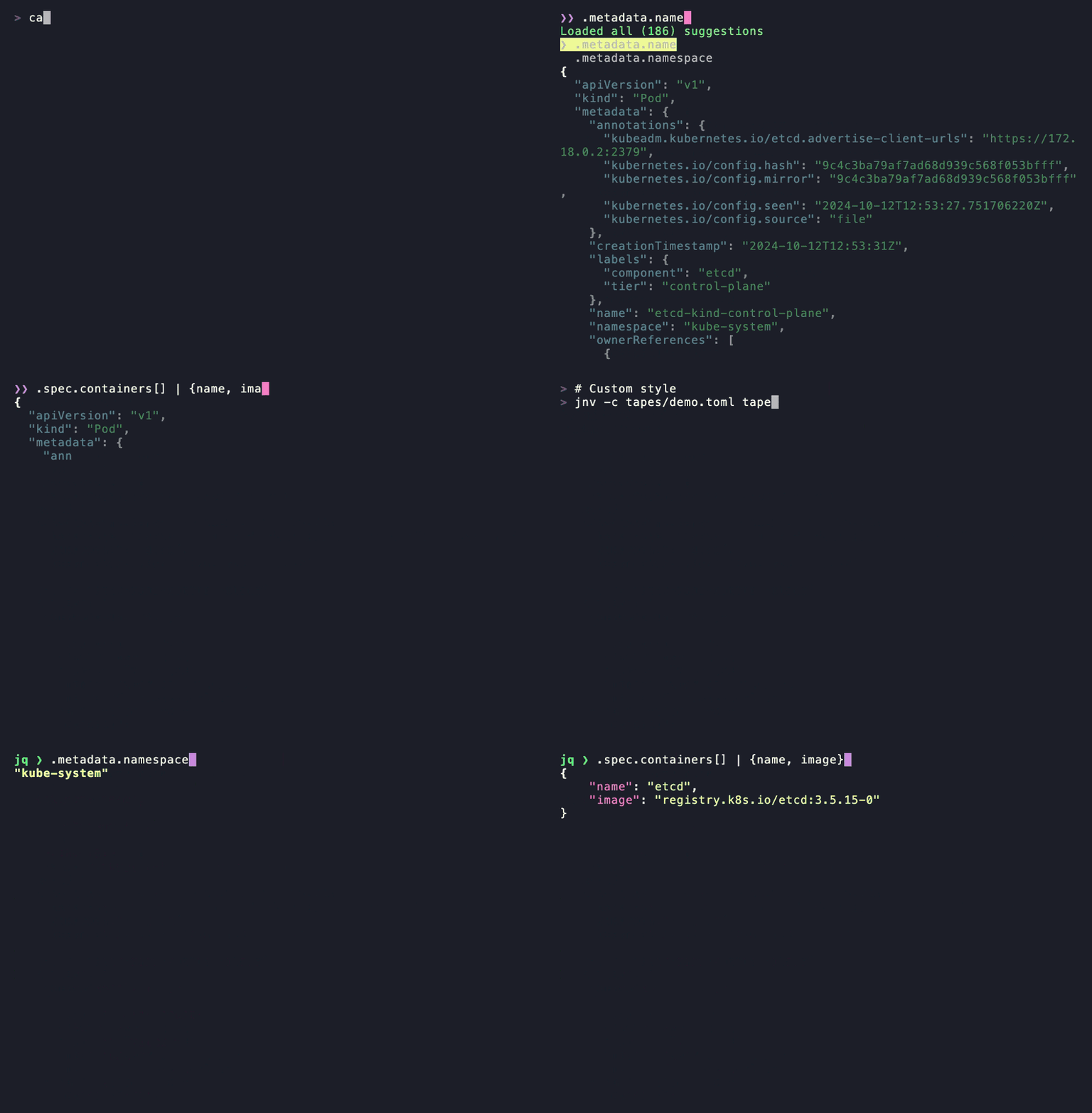
jnv is designed for navigating JSON,
offering an interactive JSON viewer and jq filter editor.
Inspired by jid
and jiq.
Features
Interactive JSON viewer and jq filter editor
Syntax highlighting for JSON
Use jaq to apply jq filter
This eliminates the need for users to prepare jq on their own
Configurable features via TOML configuration
Toggle hint message display
Adjust UI reactivity (debounce times and animation speed)
Editor appearance and behavior
JSON viewer styling
Adjust completion feature display and behavior
Keybinds
Capable of accommodating various format
Input: File, stdin
Data: A JSON or multiple JSON structures
that can be deserialized with
StreamDeserializer,
such as JSON Lines
Auto-completion for the filter
Only supports:
Identity
Object Identifier-Index
Array Index
Hint message to evaluate the filter
Installation
Homebrew
See here for more info.
brew install jnv
Or install via Homebrew Tap:
brew install ynqa/tap/jnv
MacPorts
See here for more info.
sudo port install jnv
Nix / NixOS
See package entry on search.nixos.org for more info.
nix-shell -p jnv
conda-forge
See here for more info.
pixi global install jnv
# or
cat data.json | pixi exec jnv
# or
conda install jnv
Docker
Build
(In the near future, the image will be available on something of registries)
docker build -t jnv .
And Run
(The following commad is just an example. Please modify the path to the file you want to mount)
docker run -it --rm -v $(pwd)/debug.json:/jnv/debug.json jnv /jnv/debug.json
Cargo
cargo install jnv
Examples
cat data.json | jnv

# or
jnv data.json

# or write current result to stdout on exit (UNIX only)
cat data.json | jnv --write-to-stdout | some-command
# and also output to file
cat data.json | jnv --write-to-stdout > result.json
Keymap
Key
Action
Ctrl + C
Exit
Ctrl + Q
Copy jq filter to clipboard
Ctrl + O
Copy JSON to clipboard
Shift + ↑, Shift + ↓
Switch to another mode
Editor mode (default)
Key
Action
Tab
Enter suggestion
←
Move cursor left
→
Move cursor right
Ctrl + A
Move cursor to line start
Ctrl + E
Move cursor to line end
Backspace
Delete character before cursor
Ctrl + U
Clear entire line
Alt + B
Move the cursor to the previous nearest character within set(.,|,(,),[,])
Alt + F
Move the cursor to the next nearest character within set(.,|,(,),[,])
Ctrl + W
Erase to the previous nearest character within set(.,|,(,),[,])
Alt + D
Erase to the next nearest character within set(.,|,(,),[,])
Suggestion in Editor (after Tab)
Key
Action
Tab, ↓
Select next suggestion
↑
Select previous suggestion
Others
Return to editor
JSON viewer mode
Key
Action
↑, Ctrl + K
Move up
↓, Ctrl + J
Move down
Ctrl + H
Move to last entry
Ctrl + L
Move to first entry
Enter
Toggle fold
Ctrl + P
Expand all
Ctrl + N
Collapse all
Usage
JSON navigator and interactive filter leveraging jq

Usage: jnv [OPTIONS] [INPUT]

Examples:
- Read from a file:
        jnv data.json

- Read from standard input:
        cat data.json | jnv

Arguments:
  [INPUT]  Optional path to a JSON file. If not provided or if "-" is specified, reads from standard input

Options:
  -c, --config <CONFIG_FILE>             Path to the configuration file.
      --default-filter <DEFAULT_FILTER>  Default jq filter to apply to the input data
      --write-to-stdout                  Write the current JSON result to stdout when exiting
  -h, --help                             Print help (see more with '--help')
  -V, --version                          Print version
Configuration
jnv uses a TOML format configuration file to customize various features.
The configuration file is loaded in the following order of priority:
Path specified on the command line (-c or --config option)
Default configuration file path
Default Configuration File Location
Following the dirs crate,
the default configuration file location for each platform is as follows:
If the configuration file does not exist,
it will be automatically created on first run.
Configuration
[!IMPORTANT]
The syntax in TOML configurations
like default.toml was revamped in v0.7.0,
and the configuration shown below reflects the new format.
A migration tool is not provided for this change.
Please manually replace/update your local
config.toml to match the new syntax.
[!WARNING]
Depending on the type of terminal and environment,
characters and styles may not be displayed properly.
Specific key bindings and decorative characters may not
display or function correctly in certain terminal emulators.
The following settings are available in config.toml
# Whether to hide hint messages
no_hint = false

# Editor settings
# Uses promkit_widgets::text_editor::Config directly
[editor.on_focus]

# Editor mode
# "Insert": Insert characters at the cursor position
# "Overwrite": Replace characters at the cursor position with new ones
edit_mode = "Insert"

# Characters considered as word boundaries
# These are used to define word movement and deletion behavior in the editor
word_break_chars = [".", "|", "(", ")", "[", "]"]

# Style notation (termcfg)
# Format: "fg=<color>,bg=<color>,ul=<color>,attr=<token|token...>"
# Examples:
# - "fg=blue"
# - "fg=#00FF00,bg=black,attr=bold|underlined"
# - "attr=dim"
#
# Color tokens:
# - reset, black, red, green, yellow, blue, magenta, cyan, white
# - darkgrey, darkred, darkgreen, darkyellow, darkblue, darkmagenta, darkcyan, grey
# - #RRGGBB
#
# Attribute tokens (examples):
# - bold, italic, underlined, dim, reverse, crossedout, nounderline, nobold
#
# Notes:
# - ANSI 256-color index tokens (0..255, e.g. "200") are currently out of notation scope.
# - See termcfg notation reference for full token list.
#
# References:
# - https://github.com/ynqa/termcfg/blob/main/Notations.md
# - https://github.com/ynqa/termcfg

# Prefix shown before the cursor
prefix = "❯❯ "
# Style for the prefix
prefix_style = "fg=blue"
# Style for the character under the cursor
active_char_style = "bg=magenta"
# Style for all other characters
inactive_char_style = ""

# Theme settings when the editor is unfocused
[editor.on_defocus]
# Prefix shown when focus is lost
prefix = "▼ "
# Style for the prefix when unfocused
prefix_style = "fg=blue,attr=dim"
# Style for the character under the cursor when unfocused
active_char_style = "attr=dim"
# Style for all other characters when unfocused
inactive_char_style = "attr=dim"

# JSON display settings
[json]
# Maximum number of JSON objects to read from streams (e.g., JSON Lines format)
# Limits how many objects are processed to reduce memory usage when handling large data streams
# No limit if unset
# max_streams =

# JSON display settings
# Uses promkit_widgets::jsonstream::Config directly
[json.stream]
# Number of spaces to use for indentation
indent = 2
# Style for curly brackets {}
curly_brackets_style = "attr=bold"
# Style for square brackets []
square_brackets_style = "attr=bold"
# Style for JSON keys
key_style = "fg=cyan"
# Style for string values
string_value_style = "fg=green"
# Style for number values
number_value_style = ""
# Style for boolean values
boolean_value_style = ""
# Style for null values
null_value_style = "fg=grey"
# Attribute for the selected row and unselected rows
active_item_attribute = "bold"
# Attribute for unselected rows
inactive_item_attribute = "dim"
# Behavior when JSON content exceeds the available width
# "Wrap": Wrap content to the next line
# "Truncate": Truncate content with an ellipsis (...)
overflow_mode = "Wrap"

# Completion feature settings
[completion]
# Settings for background loading of completion candidates
#
# Number of candidates loaded per chunk for search results
# A larger value displays results faster but uses more memory
search_result_chunk_size = 100

# Number of items loaded per batch during background loading
# A larger value finishes loading sooner but uses more memory temporarily
search_load_chunk_size = 50000

# Completion UI settings
# Uses promkit_widgets::listbox::Config directly
[completion.listbox]
# Number of lines to display for completion candidates
lines = 3
# Cursor character shown before the selected candidate
cursor = "❯ "
# Style for the selected candidate
active_item_style = "fg=grey,bg=yellow"
# Style for unselected candidates
inactive_item_style = "fg=grey"

# Keybinding settings
[keybinds]
# Key to exit the application
exit = ["Ctrl+C"]
# Key to copy the query to the clipboard
copy_query = ["Ctrl+Q"]
# Key to copy the result to the clipboard
copy_result = ["Ctrl+O"]
# Keys to switch focus between editor and JSON viewer
switch_mode = ["Shift+Down", "Shift+Up"]

# Keybindings for editor operations
[keybinds.on_editor]
# Move cursor left
backward = ["Left"]

# Move cursor right
forward = ["Right"]

# Move cursor to beginning of line
move_to_head = ["Ctrl+A"]
# Move cursor to end of line
move_to_tail = ["Ctrl+E"]
# Move cursor to previous word boundary
move_to_previous_nearest = ["Alt+B"]
# Move cursor to next word boundary
move_to_next_nearest = ["Alt+F"]
# Delete character at the cursor
erase = ["Backspace"]

# Delete all input
erase_all = ["Ctrl+U"]

# Delete from cursor to previous word boundary
erase_to_previous_nearest = ["Ctrl+W"]
# Delete from cursor to next word boundary
erase_to_next_nearest = ["Alt+D"]
# Trigger completion
completion = ["Tab"]
# Move up in the completion list
on_completion.up = ["Up"]
# Move down in the completion list
on_completion.down = ["Down", "Tab"]

# Keybindings for JSON viewer operations
[keybinds.on_json_viewer]
# Move up in JSON viewer
up = ["Up", "Ctrl+K", "ScrollUp"]
# Move down in JSON viewer
down = ["Down", "Ctrl+J", "ScrollDown"]
# Move to the top of JSON viewer
move_to_head = ["Ctrl+L"]
# Move to the bottom of JSON viewer
move_to_tail = ["Ctrl+H"]
# Toggle expand/collapse of JSON nodes
toggle = ["Enter"]
# Expand all JSON nodes
expand = ["Ctrl+P"]
# Collapse all JSON nodes
collapse = ["Ctrl+N"]

# Application reactivity settings
[reactivity_control]
# Delay before processing query input
# Prevents excessive updates while user is typing
query_debounce_duration = "600ms"

# Delay before redrawing after window resize
# Prevents frequent redraws during continuous resizing
resize_debounce_duration = "200ms"

# Interval for spinner animation updates
# Controls the speed of the loading spinner
spin_duration = "300ms"
The most recent commit recorded on ynqa/jnv was 14 days ago, based on the GitHub push timestamp. The repository has 79 forks — one of the better signals of community interest.
How does ynqa/jnv compare to other Developer Tools projects?
ynqa/jnv is tracked by TopGit in the Developer Tools category, with 6.1k GitHub stars and written in Rust. Browse the Developer Tools topic page on TopGit to compare it against similar projects by stars and activity.
How many stars does ynqa/jnv have?
ynqa/jnv has 6.1k GitHub stars — refresh the page for the live number, or check github.com/ynqa/jnv. TopGit mirrors GitHub's count but does not claim minute-by-minute accuracy.
What is ynqa/jnv?
ynqa/jnv (ynqa/jnv) is a Rust project on GitHub. From the project's own README: Interactive JSON filter using jq
What language is ynqa/jnv written in?
ynqa/jnv is written primarily in Rust. GitHub's language field is based on the largest share of bytes in the default branch.
What topics is ynqa/jnv associated with?
GitHub's repository topics for ynqa/jnv: "autocomplete", "cli", "command-line", "interactive", "jq", "json", "kubernetes", "prompt", "rust". TopGit's editorial category is Developer Tools.
Why is ynqa/jnv categorized under Developer Tools?
TopGit places ynqa/jnv in the Developer Tools category based on its GitHub topics and description (tagged: "autocomplete", "cli", "command-line"). Categories are assigned from real repository metadata, not editorial guesswork.
Read full README in the tab above.
Curious whether jnv is right for you?
Let ChatGPT, Claude, or Perplexity look into it — click below and see what AI actually says about jnv.

 /jnv