An AI-powered entry in TopGit's GitHub warehouse: zilliztech/claude-context, 12.3k stars, AI Tools, TypeScript. Code search MCP for Claude Code. Make entire codebase the context for any coding agent.
Snapshot summary built from the project's own GitHub metadata — there's no written TopGit review yet. The page will update automatically when a full review is published.
WHY NO REVIEW YET
TopGit writes full reviews for the most-starred, most-requested repositories. This page is a snapshot until then — see the READ ME tab for the original README in full.
🆕 Looking for persistent memory for Claude Code? Check out memsearch Claude Code plugin — a markdown-first memory system that gives your AI agent long-term memory across sessions.
Your entire codebase as Claude's context
Claude Context is an MCP plugin that adds semantic code search to Claude Code and other AI coding agents, giving them deep context from your entire codebase.
🧠 Your Entire Codebase as Context: Claude Context uses semantic search to find all relevant code from millions of lines. No multi-round discovery needed. It brings results straight into the Claude's context.
💰 Cost-Effective for Large Codebases: Instead of loading entire directories into Claude for every request, which can be very expensive, Claude Context efficiently stores your codebase in a vector database and only uses related code in context to keep your costs manageable.
🚀 Demo
Model Context Protocol (MCP) allows you to integrate Claude Context with your favorite AI coding assistants, e.g. Claude Code.
Quick Start
Prerequisites
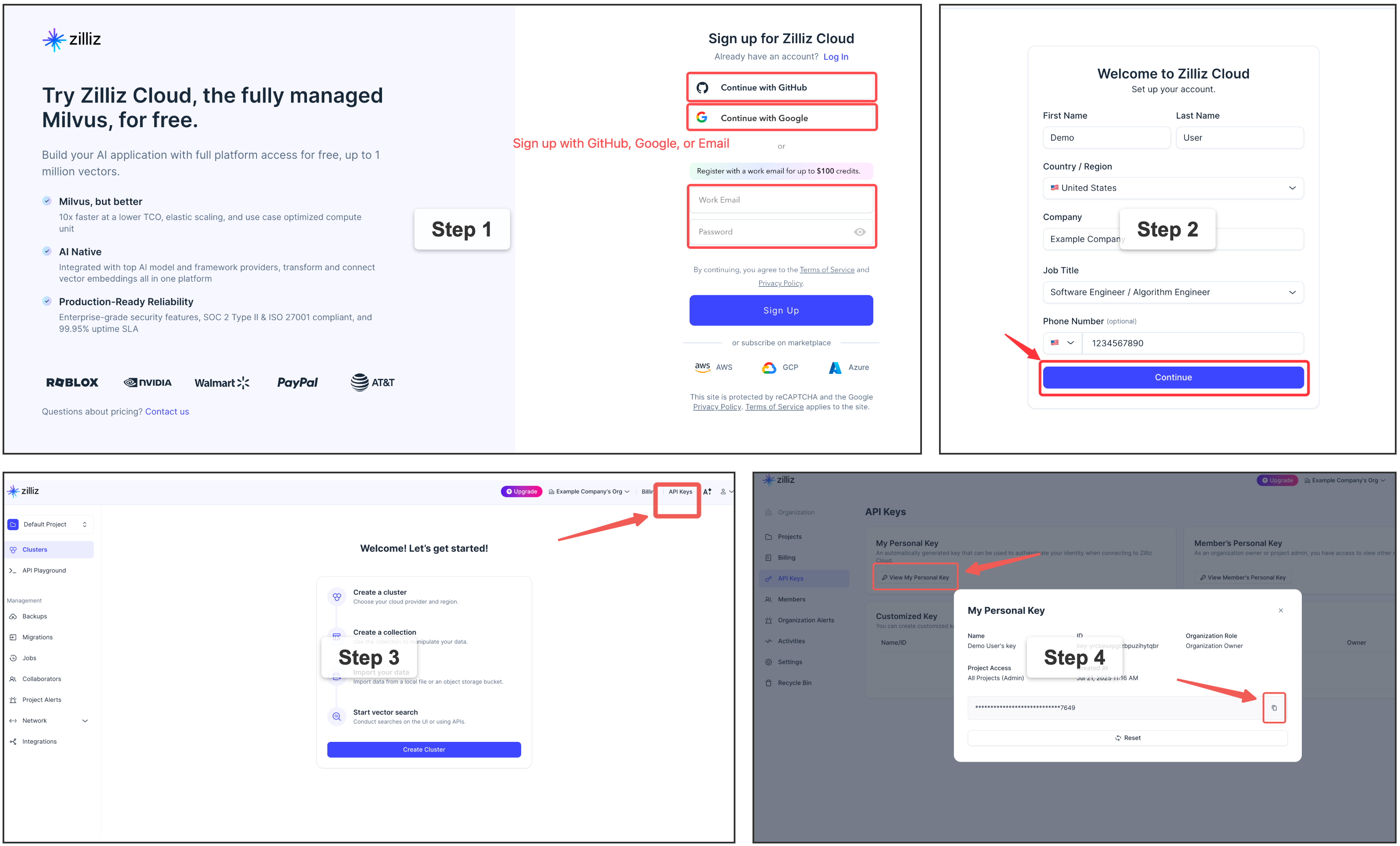
Get a free vector database on Zilliz Cloud 👈
Claude Context needs a vector database. You can sign up on Zilliz Cloud to get an API key.
Copy your Personal Key to replace your-zilliz-cloud-api-key in the configuration examples.
Get OpenAI API Key for embedding model
You need an OpenAI API key for the embedding model. You can get one by signing up at OpenAI.
Your API key will look like this: it always starts with sk-.
Copy your key and use it in the configuration examples below as your-openai-api-key.
Configure MCP for Claude Code
System Requirements:
Node.js >= 20.0.0
Configuration
Use the command line interface to add the Claude Context MCP server:
Go to: Settings -> Cursor Settings -> MCP -> Add new global MCP server
Pasting the following configuration into your Cursor ~/.cursor/mcp.json file is the recommended approach. You may also install in a specific project by creating .cursor/mcp.json in your project folder. See Cursor MCP docs for more info.
The Claude Context MCP server can be used with VS Code through MCP-compatible extensions. Add the following configuration to your VS Code MCP settings:
Cherry Studio allows for visual MCP server configuration through its settings interface. While it doesn't directly support manual JSON configuration, you can add a new server via the GUI:
For LangChain/LangGraph integration examples, see this example.
Other MCP Clients
The server uses stdio transport and follows the standard MCP protocol. It can be integrated with any MCP-compatible client by running:
npx @zilliz/claude-context-mcp@latest
Usage in Your Codebase
Open Claude Code
cd your-project-directory
claude
Index your codebase:
Index this codebase
Check indexing status:
Check the indexing status
Start searching:
Find functions that handle user authentication
🎉 That's it! You now have semantic code search in Claude Code.
Environment Variables Configuration
For more detailed MCP environment variable configuration, see our Environment Variables Guide.
Using Different Embedding Models
To configure custom embedding models (e.g., text-embedding-3-large for OpenAI, voyage-code-3 for VoyageAI), see the MCP Configuration Examples for detailed setup instructions for each provider.
File Inclusion & Exclusion Rules
For detailed explanation of file inclusion and exclusion rules, and how to customize them, see our File Inclusion & Exclusion Rules.
Available Tools
1. index_codebase
Index a codebase directory for hybrid search (BM25 + dense vector).
2. search_code
Search the indexed codebase using natural language queries with hybrid search (BM25 + dense vector).
3. clear_index
Clear the search index for a specific codebase.
4. get_indexing_status
Get the current indexing status of a codebase. Shows progress percentage for actively indexing codebases and completion status for indexed codebases.
📊 Evaluation
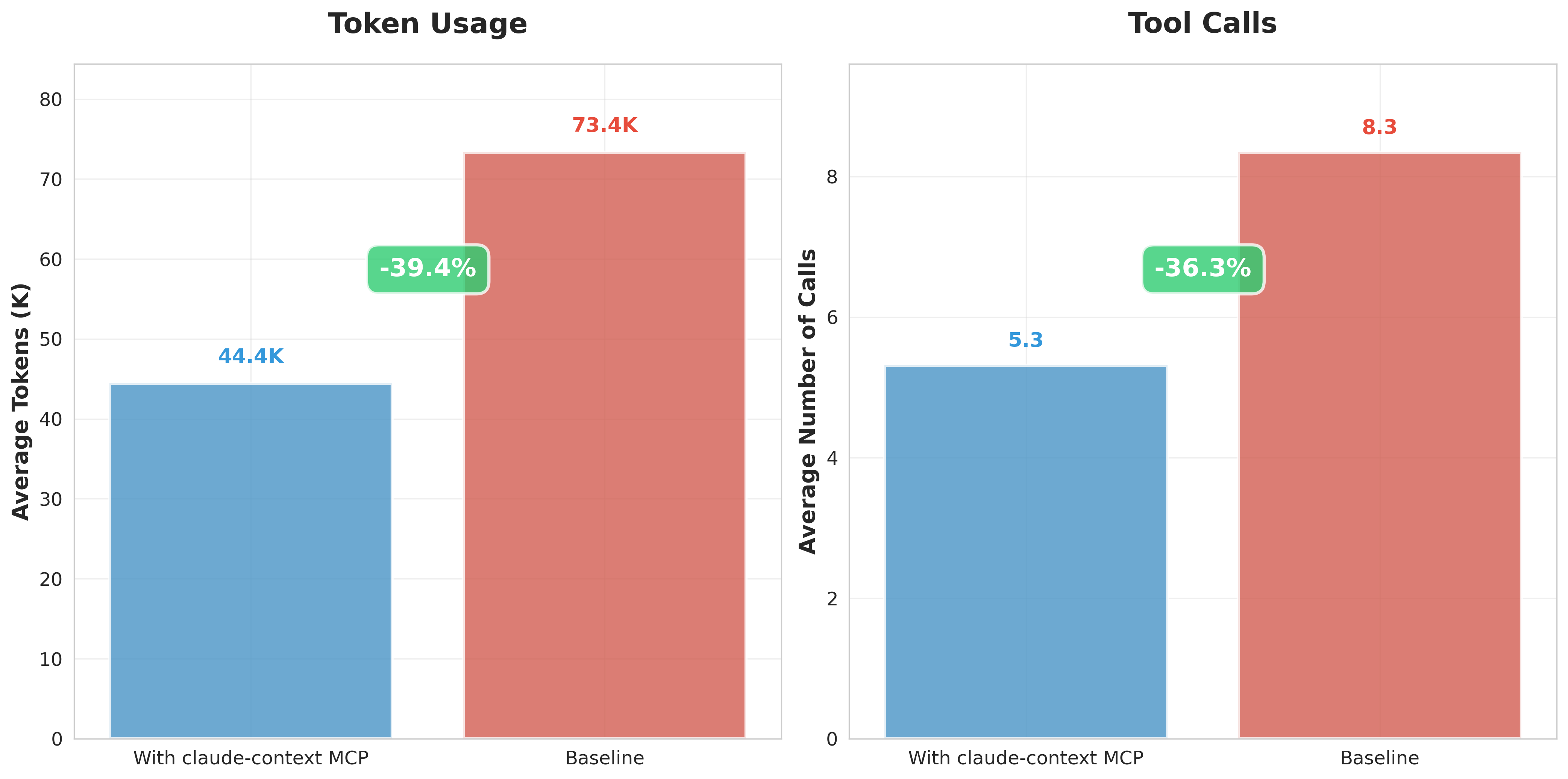
Our controlled evaluation demonstrates that Claude Context MCP achieves ~40% token reduction under the condition of equivalent retrieval quality. This translates to significant cost and time savings in production environments. This also means that, under the constraint of limited token context length, using Claude Context yields better retrieval and answer results.
For detailed evaluation methodology and results, see the evaluation directory.
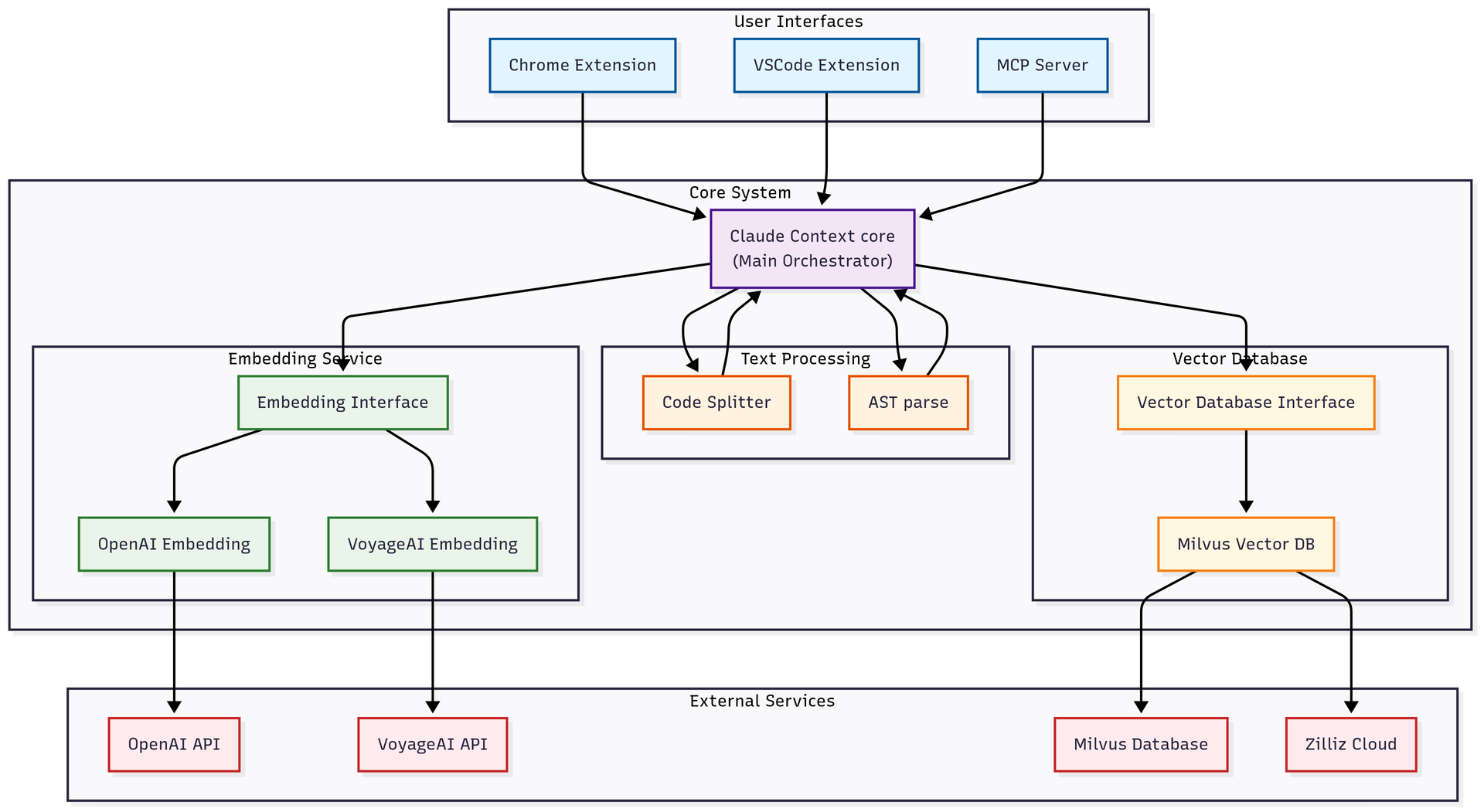
🏗️ Architecture
🔧 Implementation Details
🔍 Hybrid Code Search: Ask questions like "find functions that handle user authentication" and get relevant, context-rich code instantly using advanced hybrid search (BM25 + dense vector).
🧠 Context-Aware: Discover large codebase, understand how different parts of your codebase relate, even across millions of lines of code.
⚡ Incremental Indexing: Efficiently re-index only changed files using Merkle trees.
🧩 Intelligent Code Chunking: Analyze code in Abstract Syntax Trees (AST) for chunking.
🗄️ Scalable: Integrates with Zilliz Cloud for scalable vector search, no matter how large your codebase is.
🛠️ Customizable: Configure file extensions, ignore patterns, and embedding models.
Core Components
Claude Context is a monorepo containing three main packages:
@zilliz/claude-context-core: Core indexing engine with embedding and vector database integration
VSCode Extension: Semantic Code Search extension for Visual Studio Code
@zilliz/claude-context-mcp: Model Context Protocol server for AI agent integration
How active is development on zilliztech/claude-context?
The most recent commit recorded on zilliztech/claude-context was 1 month ago, based on the GitHub push timestamp. The repository has 904 forks — one of the better signals of community interest.
How many stars does zilliztech/claude-context have?
zilliztech/claude-context has 12.3k GitHub stars — refresh the page for the live number, or check github.com/zilliztech/claude-context. TopGit mirrors GitHub's count but does not claim minute-by-minute accuracy.
What language is zilliztech/claude-context written in?
zilliztech/claude-context is written primarily in TypeScript. GitHub's language field is based on the largest share of bytes in the default branch.
What license does zilliztech/claude-context use?
zilliztech/claude-context is released under the MIT license. Always verify the LICENSE file directly on GitHub for the authoritative terms — license strings can be edited out of sync with a project's actual stance.
What topics is zilliztech/claude-context associated with?
Where can I see zilliztech/claude-context in action?
The project maintains a homepage at https://github.com/zilliztech/claude-context/tree/master/docs. The README tab on this page also usually contains screenshots and a quickstart.
Where do I read more about zilliztech/claude-context?
This TopGit page is a snapshot — the READ ME tab shows the project's own README content (links stripped, images preserved). The GitHub repository at github.com/zilliztech/claude-context is the definitive source.
Read full README in the tab above.
Still deciding about claude-context?
One click hands the question to an AI along with this page — see what it says about claude-context.