zilliztech/GPTCache

zilliztech/GPTCache — 8.1k★ on GitHub (Python). Semantic cache for LLMs. Fully integrated with LangChain and llama_index.
Snapshot summary built from the project's own GitHub metadata — there's no written TopGit review yet. The page will update automatically when a full review is published.
TopGit writes full reviews for the most-starred, most-requested repositories. This page is a snapshot until then — see the READ ME tab for the original README in full.
Snapshot
Top contributors
Show top contributors
GPTCache : A Library for Creating Semantic Cache for LLM Queries
Slash Your LLM API Costs by 10x 💰, Boost Speed by 100x ⚡






🎉 GPTCache has been fully integrated with 🦜️🔗LangChain ! Here are detailed usage instructions.
🐳 The GPTCache server docker image has been released, which means that any language will be able to use GPTCache!
📔 This project is undergoing swift development, and as such, the API may be subject to change at any time. For the most up-to-date information, please refer to the latest documentation and release note.
NOTE: As the number of large models is growing explosively and their API shape is constantly evolving, we no longer add support for new API or models. We encourage the usage of using the get and set API in gptcache, here is the demo code: https://github.com/zilliztech/GPTCache/blob/main/examples/adapter/api.py
Quick Install
pip install gptcache
🚀 What is GPTCache?
ChatGPT and various large language models (LLMs) boast incredible versatility, enabling the development of a wide range of applications. However, as your application grows in popularity and encounters higher traffic levels, the expenses related to LLM API calls can become substantial. Additionally, LLM services might exhibit slow response times, especially when dealing with a significant number of requests.
To tackle this challenge, we have created GPTCache, a project dedicated to building a semantic cache for storing LLM responses.
😊 Quick Start
Note:
- You can quickly try GPTCache and put it into a production environment without heavy development. However, please note that the repository is still under heavy development.
- By default, only a limited number of libraries are installed to support the basic cache functionalities. When you need to use additional features, the related libraries will be automatically installed.
- Make sure that the Python version is 3.8.1 or higher, check:
python --version - If you encounter issues installing a library due to a low pip version, run:
python -m pip install --upgrade pip.
dev install
# clone GPTCache repo
git clone -b dev https://github.com/zilliztech/GPTCache.git
cd GPTCache

# install the repo
pip install -r requirements.txt
python setup.py install
example usage
These examples will help you understand how to use exact and similar matching with caching. You can also run the example on Colab. And more examples you can refer to the Bootcamp
Before running the example, make sure the OPENAI_API_KEY environment variable is set by executing echo $OPENAI_API_KEY.
If it is not already set, it can be set by using export OPENAI_API_KEY=YOUR_API_KEY on Unix/Linux/MacOS systems or set OPENAI_API_KEY=YOUR_API_KEY on Windows systems.
It is important to note that this method is only effective temporarily, so if you want a permanent effect, you'll need to modify the environment variable configuration file. For instance, on a Mac, you can modify the file located at
/etc/profile.
Click to SHOW example code
OpenAI API original usage
import os
import time

import openai


def response_text(openai_resp):
    return openai_resp['choices'][0]['message']['content']


question = 'what‘s chatgpt'

# OpenAI API original usage
openai.api_key = os.getenv("OPENAI_API_KEY")
start_time = time.time()
response = openai.ChatCompletion.create(
  model='gpt-3.5-turbo',
  messages=[
    {
        'role': 'user',
        'content': question
    }
  ],
)
print(f'Question: {question}')
print("Time consuming: {:.2f}s".format(time.time() - start_time))
print(f'Answer: {response_text(response)}\n')
OpenAI API + GPTCache, exact match cache
If you ask ChatGPT the exact same two questions, the answer to the second question will be obtained from the cache without requesting ChatGPT again.
import time


def response_text(openai_resp):
    return openai_resp['choices'][0]['message']['content']

print("Cache loading.....")

# To use GPTCache, that's all you need
# -------------------------------------------------
from gptcache import cache
from gptcache.adapter import openai

cache.init()
cache.set_openai_key()
# -------------------------------------------------

question = "what's github"
for _ in range(2):
    start_time = time.time()
    response = openai.ChatCompletion.create(
      model='gpt-3.5-turbo',
      messages=[
        {
            'role': 'user',
            'content': question
        }
      ],
    )
    print(f'Question: {question}')
    print("Time consuming: {:.2f}s".format(time.time() - start_time))
    print(f'Answer: {response_text(response)}\n')
OpenAI API + GPTCache, similar search cache
After obtaining an answer from ChatGPT in response to several similar questions, the answers to subsequent questions can be retrieved from the cache without the need to request ChatGPT again.
import time


def response_text(openai_resp):
    return openai_resp['choices'][0]['message']['content']

from gptcache import cache
from gptcache.adapter import openai
from gptcache.embedding import Onnx
from gptcache.manager import CacheBase, VectorBase, get_data_manager
from gptcache.similarity_evaluation.distance import SearchDistanceEvaluation

print("Cache loading.....")

onnx = Onnx()
data_manager = get_data_manager(CacheBase("sqlite"), VectorBase("faiss", dimension=onnx.dimension))
cache.init(
    embedding_func=onnx.to_embeddings,
    data_manager=data_manager,
    similarity_evaluation=SearchDistanceEvaluation(),
    )
cache.set_openai_key()

questions = [
    "what's github",
    "can you explain what GitHub is",
    "can you tell me more about GitHub",
    "what is the purpose of GitHub"
]

for question in questions:
    start_time = time.time()
    response = openai.ChatCompletion.create(
        model='gpt-3.5-turbo',
        messages=[
            {
                'role': 'user',
                'content': question
            }
        ],
    )
    print(f'Question: {question}')
    print("Time consuming: {:.2f}s".format(time.time() - start_time))
    print(f'Answer: {response_text(response)}\n')
OpenAI API + GPTCache, use temperature
You can always pass a parameter of temperature while requesting the API service or model.
The range of
temperatureis [0, 2], default value is 0.0.A higher temperature means a higher possibility of skipping cache search and requesting large model directly. When temperature is 2, it will skip cache and send request to large model directly for sure. When temperature is 0, it will search cache before requesting large model service.
The default
post_process_messages_funcistemperature_softmax. In this case, refer to API reference to learn about howtemperatureaffects output.
import time

from gptcache import cache, Config
from gptcache.manager import manager_factory
from gptcache.embedding import Onnx
from gptcache.processor.post import temperature_softmax
from gptcache.similarity_evaluation.distance import SearchDistanceEvaluation
from gptcache.adapter import openai

cache.set_openai_key()

onnx = Onnx()
data_manager = manager_factory("sqlite,faiss", vector_params={"dimension": onnx.dimension})

cache.init(
    embedding_func=onnx.to_embeddings,
    data_manager=data_manager,
    similarity_evaluation=SearchDistanceEvaluation(),
    post_process_messages_func=temperature_softmax
    )
# cache.config = Config(similarity_threshold=0.2)

question = "what's github"

for _ in range(3):
    start = time.time()
    response = openai.ChatCompletion.create(
        model="gpt-3.5-turbo",
        temperature = 1.0,  # Change temperature here
        messages=[{
            "role": "user",
            "content": question
        }],
    )
    print("Time elapsed:", round(time.time() - start, 3))
    print("Answer:", response["choices"][0]["message"]["content"])
To use GPTCache exclusively, only the following lines of code are required, and there is no need to modify any existing code.
from gptcache import cache
from gptcache.adapter import openai

cache.init()
cache.set_openai_key()
More Docs:
- Usage, how to use GPTCache better
- Features, all features currently supported by the cache
- Examples, learn better custom caching
- Distributed Caching and Horizontal Scaling
🎓 Bootcamp
- GPTCache with LangChain
- QA Generation
- Question Answering
- SQL Chain
- BabyAGI User Guide
- GPTCache with Llama_index
- WebPage QA
- GPTCache with OpenAI
- Chat completion
- Language Translation
- SQL Translate
- Twitter Classifier
- Multimodal: Image Generation
- Multimodal: Speech to Text
- GPTCache with Replicate
- Visual Question Answering
- GPTCache with Temperature Param
- OpenAI Chat
- OpenAI Image Creation
😎 What can this help with?
GPTCache offers the following primary benefits:
- Decreased expenses: Most LLM services charge fees based on a combination of number of requests and token count. GPTCache effectively minimizes your expenses by caching query results, which in turn reduces the number of requests and tokens sent to the LLM service. As a result, you can enjoy a more cost-efficient experience when using the service.
- Enhanced performance: LLMs employ generative AI algorithms to generate responses in real-time, a process that can sometimes be time-consuming. However, when a similar query is cached, the response time significantly improves, as the result is fetched directly from the cache, eliminating the need to interact with the LLM service. In most situations, GPTCache can also provide superior query throughput compared to standard LLM services.
- Adaptable development and testing environment: As a developer working on LLM applications, you're aware that connecting to LLM APIs is generally necessary, and comprehensive testing of your application is crucial before moving it to a production environment. GPTCache provides an interface that mirrors LLM APIs and accommodates storage of both LLM-generated and mocked data. This feature enables you to effortlessly develop and test your application, eliminating the need to connect to the LLM service.
- Improved scalability and availability: LLM services frequently enforce rate limits, which are constraints that APIs place on the number of times a user or client can access the server within a given timeframe. Hitting a rate limit means that additional requests will be blocked until a certain period has elapsed, leading to a service outage. With GPTCache, you can easily scale to accommodate an increasing volume of queries, ensuring consistent performance as your application's user base expands.
🤔 How does it work?
Online services often exhibit data locality, with users frequently accessing popular or trending content. Cache systems take advantage of this behavior by storing commonly accessed data, which in turn reduces data retrieval time, improves response times, and eases the burden on backend servers. Traditional cache systems typically utilize an exact match between a new query and a cached query to determine if the requested content is available in the cache before fetching the data.
However, using an exact match approach for LLM caches is less effective due to the complexity and variability of LLM queries, resulting in a low cache hit rate. To address this issue, GPTCache adopt alternative strategies like semantic caching. Semantic caching identifies and stores similar or related queries, thereby increasing cache hit probability and enhancing overall caching efficiency.
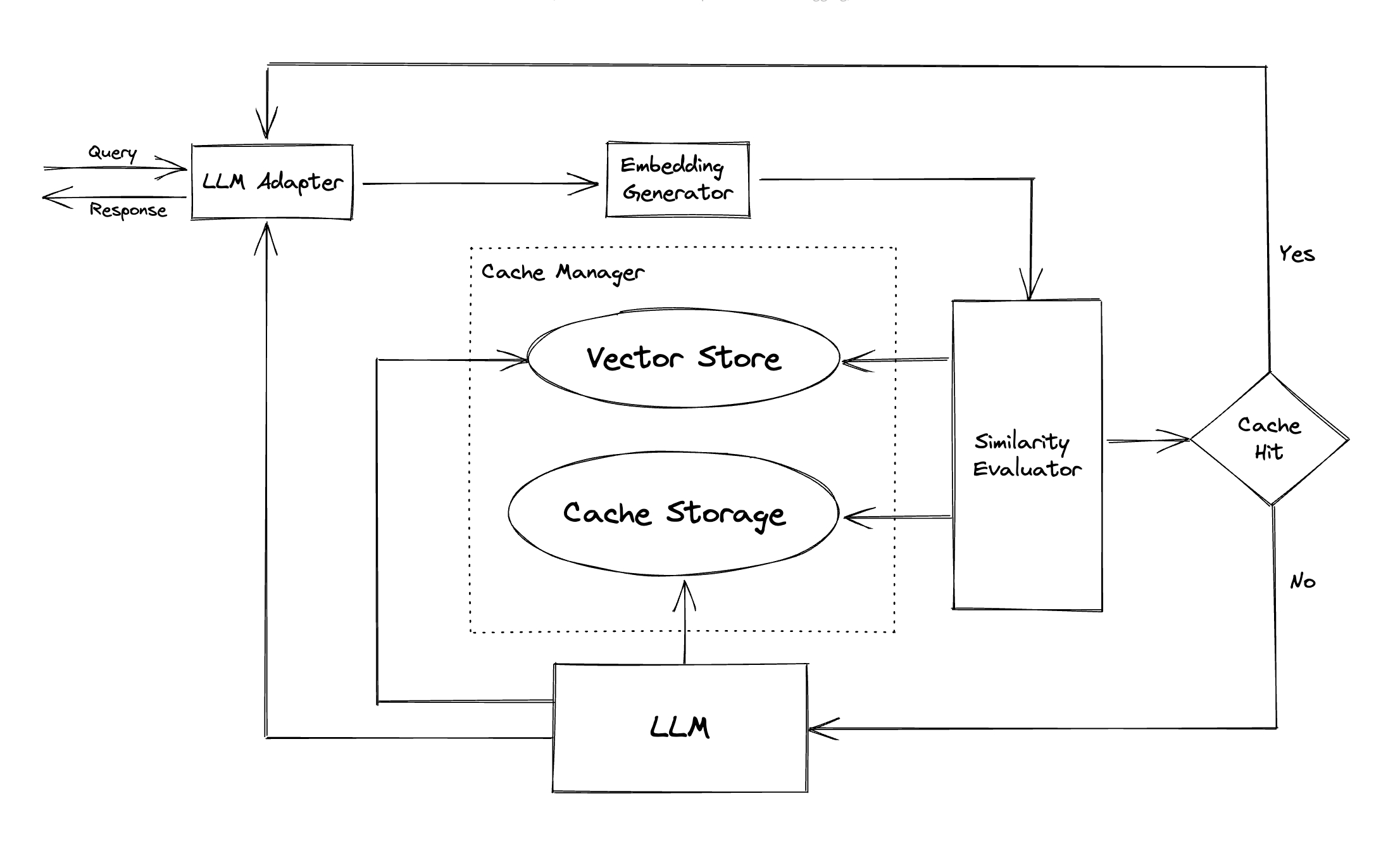
GPTCache employs embedding algorithms to convert queries into embeddings and uses a vector store for similarity search on these embeddings. This process allows GPTCache to identify and retrieve similar or related queries from the cache storage, as illustrated in the Modules section.
Featuring a modular design, GPTCache makes it easy for users to customize their own semantic cache. The system offers various implementations for each module, and users can even develop their own implementations to suit their specific needs.
In a semantic cache, you may encounter false positives during cache hits and false negatives during cache misses. GPTCache offers three metrics to gauge its performance, which are helpful for developers to optimize their caching systems:
- Hit Ratio: This metric quantifies the cache's ability to fulfill content requests successfully, compared to the total number of requests it receives. A higher hit ratio indicates a more effective cache.
- Latency: This metric measures the time it takes for a query to be processed and the corresponding data to be retrieved from the cache. Lower latency signifies a more efficient and responsive caching system.
- Recall: This metric represents the proportion of queries served by the cache out of the total number of queries that should have been served by the cache. Higher recall percentages indicate that the cache is effectively serving the appropriate content.
A sample benchmark is included for users to start with assessing the performance of their semantic cache.
🤗 Modules
-
LLM Adapter: The LLM Adapter is designed to integrate different LLM models by unifying their APIs and request protocols. GPTCache offers a standardized interface for this purpose, with current support for ChatGPT integration.
- Support OpenAI ChatGPT API.
- Support langchain.
- Support minigpt4.
- Support Llamacpp.
- Support dolly.
- Support other LLMs, such as Hugging Face Hub, Bard, Anthropic.
-
Multimodal Adapter (experimental): The Multimodal Adapter is designed to integrate different large multimodal models by unifying their APIs and request protocols. GPTCache offers a standardized interface for this purpose, with current support for integrations of image generation, audio transcription.
- Support OpenAI Image Create API.
- Support OpenAI Audio Transcribe API.
- Support Replicate BLIP API.
- Support Stability Inference API.
- Support Hugging Face Stable Diffusion Pipeline (local inference).
- Support other multimodal services or self-hosted large multimodal models.
-
Embedding Generator: This module is created to extract embeddings from requests for similarity search. GPTCache offers a generic interface that supports multiple embedding APIs, and presents a range of solutions to choose from.
- Disable embedding. This will turn GPTCache into a keyword-matching cache.
- Support OpenAI embedding API.
- Support ONNX with the GPTCache/paraphrase-albert-onnx model.
- Support Hugging Face embedding with transformers, ViTModel, Data2VecAudio.
- Support Cohere embedding API.
- Support fastText embedding.
- Support SentenceTransformers embedding.
- Support Timm models for image embedding.
- Support other embedding APIs.
-
Cache Storage: Cache Storage is where the response from LLMs, such as ChatGPT, is stored. Cached responses are retrieved to assist in evaluating similarity and are returned to the requester if there is a good semantic match. At present, GPTCache supports SQLite and offers a universally accessible interface for extension of this module.
- Support SQLite.
- Support DuckDB.
- Support PostgreSQL.
- Support MySQL.
- Support MariaDB.
- Support SQL Server.
- Support Oracle.
- Support DynamoDB.
- Support MongoDB.
- Support Redis.
- Support Minio.
- Support HBase.
- Support ElasticSearch.
- Support other storages.
-
Vector Store: The Vector Store module helps find the K most similar requests from the input request's extracted embedding. The results can help assess similarity. GPTCache provides a user-friendly interface that supports various vector stores, including Milvus, Zilliz Cloud, and FAISS. More options will be available in the future.
- Support Milvus, an open-source vector database for production-ready AI/LLM applications.
- Support Zilliz Cloud, a fully-managed cloud vector database based on Milvus.
- Support Milvus Lite, a lightweight version of Milvus that can be embedded into your Python application.
- Support FAISS, a library for efficient similarity search and clustering of dense vectors.
- Support Hnswlib, header-only C++/python library for fast approximate nearest neighbors.
- Support PGVector, open-source vector similarity search for Postgres.
- Support Chroma, the AI-native open-source embedding database.
- Support DocArray, DocArray is a library for representing, sending and storing multi-modal data, perfect for Machine Learning applications.
- Support qdrant
- Support weaviate
- Support other vector databases.
-
Cache Manager: The Cache Manager is responsible for controlling the operation of both the Cache Storage and Vector Store.
- Eviction Policy:
Cache eviction can be managed in memory using python's
cachetoolsor in a distributed fashion using Redis as a key-value store. - In-Memory Caching
Currently, GPTCache makes decisions about evictions based solely on the number of lines. This approach can result in inaccurate resource evaluation and may cause out-of-memory (OOM) errors. We are actively investigating and developing a more sophisticated strategy.
- Support LRU eviction policy.
- Support FIFO eviction policy.
- Support LFU eviction policy.
- Support RR eviction policy.
- Support more complicated eviction policies.
- Distributed Caching
If you were to scale your GPTCache deployment horizontally using in-memory caching, it won't be possible. Since the cached information would be limited to the single pod.
With Distributed Caching, cache information consistent across all replicas we can use Distributed Cache stores like Redis.
- Support Redis distributed cache
- Support memcached distributed cache
- Eviction Policy:
Cache eviction can be managed in memory using python's
-
Similarity Evaluator: This module collects data from both the Cache Storage and Vector Store, and uses various strategies to determine the similarity between the input request and the requests from the Vector Store. Based on this similarity, it determines whether a request matches the cache. GPTCache provides a standardized interface for integrating various strategies, along with a collection of implementations to use. The following similarity definitions are currently supported or will be supported in the future:
- The distance we obtain from the Vector Store.
- A model-based similarity determined using the GPTCache/albert-duplicate-onnx model from ONNX.
- Exact matches between the input request and the requests obtained from the Vector Store.
- Distance represented by applying linalg.norm from numpy to the embeddings.
- BM25 and other similarity measurements.
- Support other model serving framework such as PyTorch.
Note:Not all combinations of different modules may be compatible with each other. For instance, if we disable the Embedding Extractor, the Vector Store may not function as intended. We are currently working on implementing a combination sanity check for GPTCache.
😇 Roadmap
Coming soon! Stay tuned!
😍 Contributing
We are extremely open to contributions, be it through new features, enhanced infrastructure, or improved documentation.
For comprehensive instructions on how to contribute, please refer to our contribution guide.
Related repositories
prompts.chat is the largest open-source prompt library for AI, formerly called Awesome ChatGPT Prompts. It hosts curated prompts in CSV and Markdown, available as a public website, Hugging Face dataset, or self-hosted instance. The project supports multiple LLM providers including ChatGPT, Claude, Gemini, Llama, and Mistral. Self-hosting uses a Next.js setup wizard that configures authentication via GitHub, Google, or Azure AD, with PostgreSQL as the recommended database. CLI access, an MCP server, and a Claude Code plugin extend its reach into developer workflows. The codebase is MIT-licensed while prompt data falls under CC0. Its 166k GitHub stars make it an AI resource on the platform with 166k GitHub stars, and it has been cited by Harvard, Columbia, and Forbes.
prompts.chat is an open-source library of prompts written for AI chat assistants, first released in December 2022 under the name Awesome ChatGPT Prompts. The GitHub project has since grown and now distributes prompts through a website, a CSV file, a Markdown file, and a Hugging Face dataset, alongside a self-hosting option, a CLI, an MCP server, and a Claude Code plugin.
LangChain is a Python framework (MIT-licensed) for assembling LLM-powered apps and agents from standard components: model wrappers, prompts, retrieval, tools, and chain/graph orchestration handed off to LangGraph. It's for developers gluing together model providers and data sources, not for a single prompt-response call.
Microsoft's introductory course on building generative AI applications walks you through 21 structured lessons created by Microsoft Cloud Advocates. The curriculum alternates between conceptual 'Learn' lessons and hands-on 'Build' lessons, progressing from LLM fundamentals through advanced topics like RAG, AI agents, and fine-tuning. Each lesson includes a written explanation, video introduction, and working code samples in both Python and TypeScript. Basic Python or TypeScript knowledge is expected. The course supports Azure OpenAI, OpenAI API, Microsoft Foundry Models, and Foundry Local for fully offline execution. With over 50 language translations maintained via automated GitHub Actions, it's accessible to a global developer audience. MIT licensed with an active Discord community and developer forum for peer support.
Quick answers
How does zilliztech/GPTCache compare to other AI Tools projects?
zilliztech/GPTCache is tracked by TopGit in the AI Tools category, with 8.1k GitHub stars and written in Python. Browse the AI Tools topic page on TopGit to compare it against similar projects by stars and activity.
How many stars does zilliztech/GPTCache have?
zilliztech/GPTCache has 8.1k GitHub stars — refresh the page for the live number, or check github.com/zilliztech/GPTCache. TopGit mirrors GitHub's count but does not claim minute-by-minute accuracy.
Is zilliztech/GPTCache open source?
Yes — zilliztech/GPTCache ships under the MIT license, which makes its source code freely readable (and, depending on license terms, forkable and reusable). Source: github.com/zilliztech/GPTCache.
What else is in the AI Tools space?
zilliztech/GPTCache is tracked by TopGit under the AI Tools category, alongside 19 GitHub-tagged topics. Trending and Topics pages list peer repositories of comparable stars and language.
What is zilliztech/GPTCache?
zilliztech/GPTCache (zilliztech/GPTCache) is a Python project on GitHub. From the project's own README: Semantic cache for LLMs. Fully integrated with LangChain and llama_index.
Where can I see zilliztech/GPTCache in action?
The project maintains a homepage at https://gptcache.readthedocs.io. The README tab on this page also usually contains screenshots and a quickstart.
Where do I read more about zilliztech/GPTCache?
This TopGit page is a snapshot — the READ ME tab shows the project's own README content (links stripped, images preserved). The GitHub repository at github.com/zilliztech/GPTCache is the definitive source.
Read full README in the tab above.
Still deciding about GPTCache?
One click hands the question to an AI along with this page — see what it says about GPTCache.