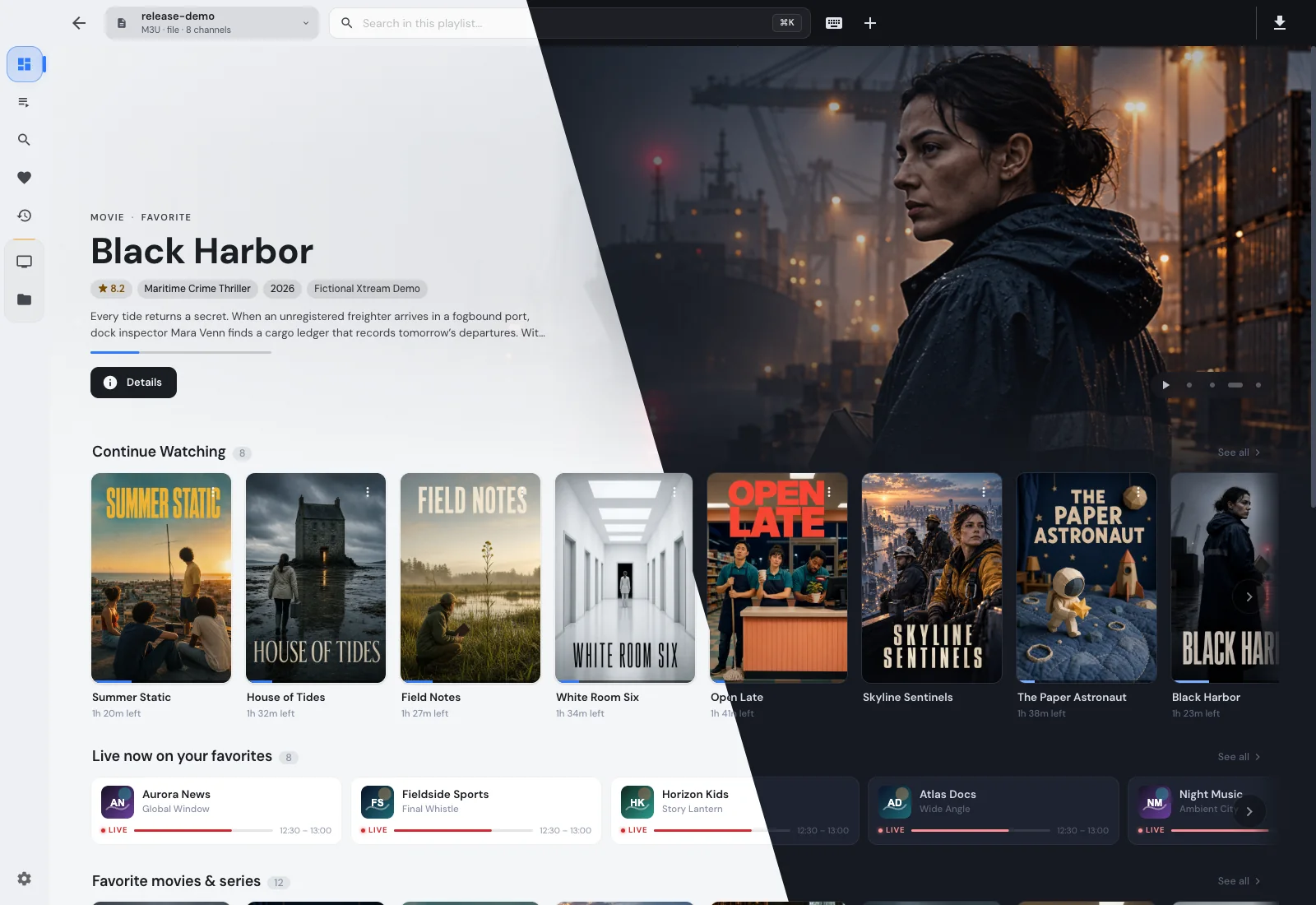
Snapshot của 4gray/iptvnator: 7.8k★ · TypeScript · Frontend. :tv: Cross-platform IPTV player application with multiple features, such as support of m3u and m3u8 playlists, favorites, TV guide, TV archive/catchup and more.
Tóm tắt dựng từ metadata GitHub của chính dự án — chưa có bài review TopGit. Trang sẽ tự động cập nhật khi bài review đầy đủ được xuất bản.
VÌ SAO CHƯA CÓ REVIEW
TopGit viết bài đầy đủ cho repo có nhiều sao nhất và được yêu cầu nhiều nhất. Trang này là snapshot trong thời gian chờ — xem README gốc ở tab READ ME.
A free, open-source IPTV player for macOS, Windows, Linux and the browser.
Bring your M3U playlists, Xtream Codes account or Stalker portal to watch live
TV, browse movies and series, and pick up where you left off.
Download ·
Website ·
Getting started ·
Gallery
[!IMPORTANT]
IPTVnator is a player: it does not provide or sell subscriptions, channels,
playlists or other media. Screenshots show demonstration content. Download
only from the official website or
GitHub Releases.
Learn about unofficial websites.
Download
Get the latest stable desktop release from the
download page or
GitHub Releases.
macOS
Windows
Linux
Apple Silicon / Intel
Installer / portable
AppImage, deb, rpm and more
For package-manager commands, experimental Linux Embedded MPV support and
nightly builds, see Installation.
Features
Your sources together: local or remote M3U/M3U8 playlists, Xtream Codes,
and Stalker / Ministra portals.
Live TV: channel groups, search and favorites, with a multi-channel
programme guide for M3U and Xtream. XMLTV imports and catch-up run on desktop.
Movies and series: posters, seasons, watch history and resume positions;
optional TMDB metadata with your own API key.
Playback options: built-in web players, external MPV/VLC/IINA and
experimental Embedded MPV on desktop.
Watch later: desktop downloads for movies and episodes, plus
continue-watching and favorites across sources.
Make it yours: light and dark themes, 21 language options, keyboard
shortcuts and a command palette (Ctrl/Cmd+K).
Use your screen: desktop apps, a self-hosted PWA and a phone remote for
the desktop player.
Full feature list and platform limits ·
Keyboard shortcuts ·
All screenshots
Self-hosted PWA
Run the browser app and its backend together with Docker:
docker compose -f docker/docker-compose.yml up --build -d
Open http://localhost:4333. No separate backend container is needed. You can
also run a server from the desktop app.
Connected clients can share sources. Favorites, Recently Viewed and supported
watch progress each have their own synchronization opt-in.
The PWA does not include M3U XMLTV, Embedded MPV, managed external-player
launching, the download manager or Electron remote-control features.
See Docker setup and client connections for configuration,
reverse proxies, playback troubleshooting and platform limits.
Smart TV
LG webOS and Samsung Tizen
LG webOS and Samsung Tizen share a dedicated, experimental TV client for M3U,
Xtream Codes and Stalker / Ministra sources. It requires a compatible IPTVnator
web backend. Build and install the package for your TV in Developer Mode.
LG webOS installation
Samsung Tizen installation and signing
Add sources from your phone by scanning a QR code, or connect the TV to your
self-hosted IPTVnator source library. Favorites, history and resume positions
currently stay on the TV.
See the TV README for compatibility, phone setup, source
synchronization and screenshots.
Fire TV / Android TV shell (experimental)
The Android shell bundles the same PWA used in the browser with an embedded
backend. It's designed primarily for Fire TV Stick and Android TV devices with a
D-pad remote. You can try it on tablets. Compact phone screens still need layout
work.
The Build TV shell APK workflow can publish a GitHub release, marked as a
pre-release by default. For APK builds, installation and remote controls, see
the Android shell guide.
Enigma2 receivers
Dreaminator is a standalone IPTV plugin and browser-based playlist manager for
Enigma2 receivers. Organize channels in a browser and watch with the receiver's
remote. Tested on the Dreambox DM520 and Vu+ Uno 4K SE.
Dreaminator on GitHub ·
Dreaminator on the IPTVnator blog
Help and development
User guides — sources, EPG,
playback, downloads and updates.
Troubleshooting — macOS and Linux startup fixes.
Build and develop — Node/pnpm setup, local
Electron/PWA runs and diagnostics.
Developer and agent documentation —
subsystem contracts; AGENTS.md and the
agent workflow cover contribution rules.
Report a bug or join
Telegram / Bluesky.
Support the project
Support development through GitHub Sponsors,
Ko-fi, or a star on GitHub.
Contributors
Show contributors
License and trademark
The source code is MIT licensed. The IPTVnator name and logo are
unregistered trademarks of the project owner and are not covered by that
license. Forks and redistributions, including app-store submissions, must use
a different name and their own icon. See TRADEMARK.md.
4gray/iptvnator có 7.8k sao GitHub — tải lại trang để xem số mới nhất, hoặc xem trực tiếp github.com/4gray/iptvnator. TopGit phản chiếu số sao của GitHub nhưng không cam kết đến từng phút.
Dự án có trang chủ ở https://4gray.github.io/iptvnator/. Tab "Readme" ở trang này thường có ảnh chụp và hướng dẫn bắt đầu nhanh.
4gray/iptvnator còn đang phát triển không?
Commit gần nhất trên 4gray/iptvnator là 3 tháng trước (theo timestamp GitHub). Repo có 1.1k fork — một chỉ báo về mức độ quan tâm của cộng đồng.
4gray/iptvnator dùng license gì?
4gray/iptvnator phát hành theo license MIT. Nên mở file LICENSE trên GitHub để xác nhận — license metadata đôi khi lệch với thực tế dự án.
4gray/iptvnator viết bằng ngôn ngữ gì?
4gray/iptvnator chủ yếu viết bằng TypeScript. Trường "language" của GitHub dựa trên phần lớn byte ở nhánh mặc định.
Đọc thêm về 4gray/iptvnator ở đâu?
Trang TopGit này là một snapshot — tab "Readme" hiển thị nguyên văn README của repo (đã bỏ link, giữ ảnh). Repo GitHub ở github.com/4gray/iptvnator là nguồn chính thức.
Đọc đầy đủ README ở tab phía trên.
Vẫn đang phân vân về iptvnator?
Một cú bấm sẽ gửi câu hỏi kèm trang này cho AI — xem AI nói gì về iptvnator.

 /iptvnator