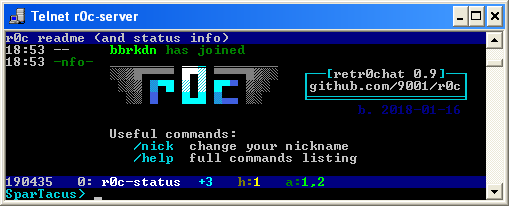
TopGit theo dõi 9001/r0c trên GitHub, đã đạt 105 sao. retr0chat telnet server
Tóm tắt dựng từ metadata GitHub của chính dự án — chưa có bài review TopGit. Trang sẽ tự động cập nhật khi bài review đầy đủ được xuất bản.
VÌ SAO CHƯA CÓ REVIEW
TopGit viết bài đầy đủ cho repo có nhiều sao nhất và được yêu cầu nhiều nhất. Trang này là snapshot trong thời gian chờ — xem README gốc ở tab READ ME.
retr0chat, irc-like chat service for superthin clients (on PyPI)
MIT-Licensed, 2018-01-07, ed @ irc.rizon.net
windows telnet 360 noscope <- good video
see installation or grab the latest release: r0c.py
summary
imagine being stuck on ancient gear, in the middle of nowhere, on a slow connection between machines that are even more archaic than the toaster you're trying to keep from falling apart
retr0chat is the lightweight, no-dependencies, runs-anywhere solution for when life gives you lemons
tries to be irssi
zero dependencies on python 2.6, 2.7, 3.x
supports telnet, netcat, /dev/tcp, TLS clients
is not an irc server, but can bridge to/from irc servers
modem-aware; comfortable at 1200 bps
fallbacks for inhumane conditions
linemode
no vt100 / ansi escape codes
endorsements
the german federal office for information security does not approve
compatibility
1980: TVI 920C
1987: IBM 3151 (also video), using gnu-screen to translate VT100 sequences
1993: windows 3.11
features
irc-like:
public channels with persistent history (pgup/pgdn)
message input with readline-like editing (arrow-left/right, home/end, backspace)
history of sent messages (arrow-up/down)
bandwidth-conservative (push/pop lines instead of full redraws; scroll-regions)
fast enough; 600 clients @ 750 msgs/sec, or 1500 cli @ 75 msg/s
bridge several irc channels from several networks into one r0c channel
windows clients
use putty in telnet mode
or the powershell client
or enable Telnet Client in control panel -> programs -> programs and features -> turn windows features on or off, then press WIN+R and run telnet r0c.int
putty is the best option;
the powershell client is OK and no longer spammy as of windows 10.0.15063 (win10 1703 / LTSC)
windows-telnet has a bug (since win7) where non-ascii letters occasionally render but usually dont
this is due to a buffer overflow in telnet.exe, so r0c will apply a rate-limit to avoid it
looks like messages larger than 512 bytes end up messing with the unicode glyphs area? or something
linux clients
most to least recommended
client
example
telnet
telnet r0c.int
socat
socat -,raw,echo=0 tcp:r0c.int:531
bash
mostly internals
netcat
nc r0c.int 531
you can even exec 147<>/dev/tcp/r0c.int/531;cat<&147&while IFS= read -rn1 x;do [ -z "$x" ]&&x=$'\n';printf %s "$x">&147;done (disconnect using exec 147<&-; killall cat #sorry)
tls clients
if you enable TLS with -tpt 2424 (telnet) and/or -tpn 1515 (netcat) you can connect to r0c with TLS encryption using any of the following:
run that command to start r0c with irc bridging enabled; r0c will then connect to an irc server (which we nicknamed a) on 127.0.0.1:6667 with the irc-nick r0c and bridge the irc-channel #chat with the r0c-channel #g
if you then start an irc server locally, for example miniircd by running python3 miniircd --verbose then you're all set, people can now join r0c by connecting via irc
to bridge additional channels on the same network, add more --ircb args, for example --ircb a,tech,tech like in the screenshot, and optionally add more networks with --ircn
firewall rules
skip this section if:
you are using the systemd service
or you are running as root and do not have a firewall
or you're on windows
if you're using firewalld, and just want to open up the high ports (not 23 and 531) then this is probably enough:
but having to specify the port when connecting is lame so consider the folllowing --
telnet uses port 23 by default, so on the server you'll want to port-forward 23 to 2323 (and 531 to 1531 for plaintext):
iptables -A INPUT -p tcp --dport 23 -m state --state NEW -j ACCEPT
iptables -A INPUT -p tcp --dport 531 -m state --state NEW -j ACCEPT
iptables -A INPUT -p tcp --dport 2323 -m state --state NEW -j ACCEPT
iptables -A INPUT -p tcp --dport 1531 -m state --state NEW -j ACCEPT
iptables -A INPUT -p tcp --dport 2424 -m state --state NEW -j ACCEPT  # tls telnet
iptables -A INPUT -p tcp --dport 1515 -m state --state NEW -j ACCEPT  # tls netcat
iptables -A INPUT -p tcp --dport 8023 -m state --state NEW -j ACCEPT  # http/ttyd
iptables -t nat -A PREROUTING -i eth0 -p tcp --dport 23 -j REDIRECT --to-port 2323
iptables -t nat -A PREROUTING -i eth0 -p tcp --dport 531 -j REDIRECT --to-port 1531
(you'll have to do this on every reboot)
documentation
not really but there is a list of commands and a list of hotkeys, and also UI demystified
protips
try the following commands and hotkeys after connecting:
/cy enables colored nicknames
/b3 (max cowbell) beeps on every message
/v or ctrl-n hides names and makes wordwrap more obvious; good for viewing a wall of text that somebody pasted
CTRL-L or /r if rendering breaks
other surprises
when running r0c.py it will extract a few bundled clients for your convenience (powershell and bash); look for the [SFX] sfxdir: /tmp/pe-r0c.1000 message during startup, they'll be in a clients subfolder over there
if you installed r0c through pip instead then the clients will be somewhere crazy like C:\Users\ed\AppData\Roaming\Python\share\doc\r0c\clients\powershell.ps1 or /home/ed/.local/share/doc/r0c/clients/powershell.ps1, good luck!
9001/r0c có 105 sao GitHub — tải lại trang để xem số mới nhất, hoặc xem trực tiếp github.com/9001/r0c. TopGit phản chiếu số sao của GitHub nhưng không cam kết đến từng phút.
9001/r0c có phải mã nguồn mở không?
Có — 9001/r0c phát hành theo license MIT, nghĩa là mã nguồn mở để đọc, fork và (tùy license) tái sử dụng. Mã: github.com/9001/r0c.
9001/r0c có website riêng không?
TopGit chưa ghi nhận URL trang chủ cho 9001/r0c. Phần README ở tab phía trên thường có link demo, hoặc xem mô tả GitHub của repo.
9001/r0c là gì?
9001/r0c (9001/r0c) là dự án Python trên GitHub. Theo mô tả gốc: retr0chat telnet server
Đọc thêm về 9001/r0c ở đâu?
Trang TopGit này là một snapshot — tab "Readme" hiển thị nguyên văn README của repo (đã bỏ link, giữ ảnh). Repo GitHub ở github.com/9001/r0c là nguồn chính thức.
Đọc đầy đủ README ở tab phía trên.
Vẫn đang phân vân về r0c?
Một cú bấm sẽ gửi câu hỏi kèm trang này cho AI — xem AI nói gì về r0c.

 /r0c