AbdullahAlfaraj/Auto-Photoshop-StableDiffusion-Plugin là dự án tích hợp AI trên GitHub với 7.3k sao, viết chủ yếu bằng TypeScript. A user-friendly plug-in that makes it easy to generate stable diffusion images inside Photoshop using either Automatic or ComfyUI as a backend.
Tóm tắt dựng từ metadata GitHub của chính dự án — chưa có bài review TopGit. Trang sẽ tự động cập nhật khi bài review đầy đủ được xuất bản.
VÌ SAO CHƯA CÓ REVIEW
TopGit viết bài đầy đủ cho repo có nhiều sao nhất và được yêu cầu nhiều nhất. Trang này là snapshot trong thời gian chờ — xem README gốc ở tab READ ME.
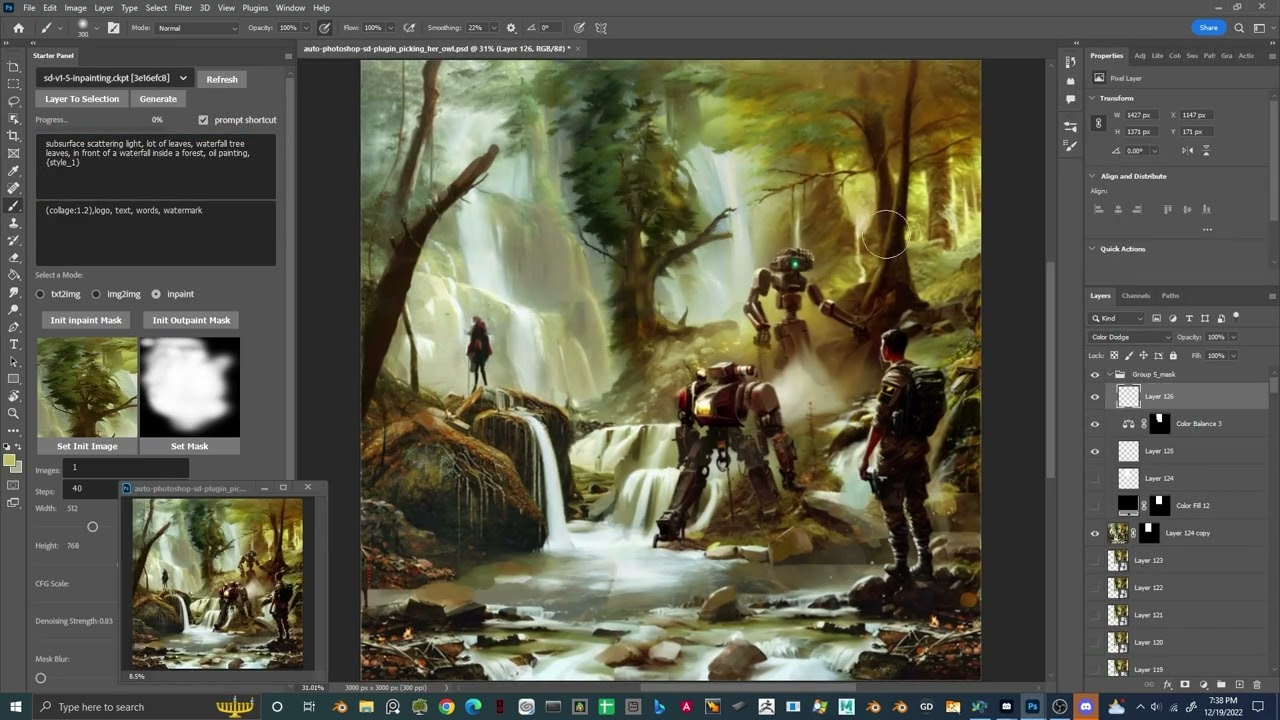
With Auto-Photoshop-StableDiffusion-Plugin, you can directly use the capabilities of Automatic1111 Stable Diffusion in Photoshop without switching between programs. This allows you to easily use Stable Diffusion AI in a familiar environment. You can edit your Stable Diffusion image with all your favorite tools and save it right in Photoshop.
Table of Contents
Auto-Photoshop-StableDiffusion-Plugin
Table of Contents
Demo:
Support Us On Patreon
How to Install
Method 1: One Click Installer
Method 2: The Unzip Method
Method 3: The UXP Method (for Developers/Programmers Only)
FAQ and Known Issues
What Photoshop version do I need to run the plugin?
Path Doesn't Exist
Plugin Load Failed
No application are connected to the service
Load command failed in App with ID PS and Version X.X.X
Exception in ASGI application / Expecting value: line 1 column 1
No Generations and Plugin Server doesn't send messages. (Remote setup)
No GPU Options
Stable Horde
Colab
Support Us On Patreon:
By supporting us on Patreon, you’ll help us continue to develop and improve the Auto-Photoshop-StableDiffusion-Plugin, making it even easier for you to use Stable Diffusion AI in a familiar environment. As a supporter, you’ll have the opportunity to provide feedback and suggestions for future development. Plus, you’ll get early access to new features and tutorials, as well as exclusive art tutorials and tips from a professional artist. We’re passionate about making AI approachable to artists and with your help, we can continue to do just that.
Auto-Photoshop-SD Backers and Sponsors:
💎 Diamond
Ronny Khalil
zachary
Razvan Matei
MasterAI
🥇 Gold
Alex
Olivier Lefebvre
Arthur Liu
Florin-Alexandru Ilinescu
Zenko
Juan Pablo Mendiola
Robin Edwards
Frederic Dreuilhe
Danny Sahagun
darius coal
Kerwin
The Dread Vixen Alinsa
Bruce Hunter
Chris Canterbury
Lawrence L Tran
Jake Skokan
que0005
Xavier Matia Bernasconi
Mats Oldin
Rodrigo Terra
Nicolas Meunier
Ihor Pankin
🥈 Silver
Amith Thomas
xiao yuan
Ezra Blake
Kevin Schofield
Mvs Srs
Felipe Cortes
Smith
Sanchez
Ziui Witter
🥉 Copper
Sebastian Karbowniczek
Petter Lundh
AWWalker
cdmusic
Jason Bessonette
22two
How To Install:
Use method 1 or 2 if you are an Artist
use method 3 if you are a Developer/Programmer
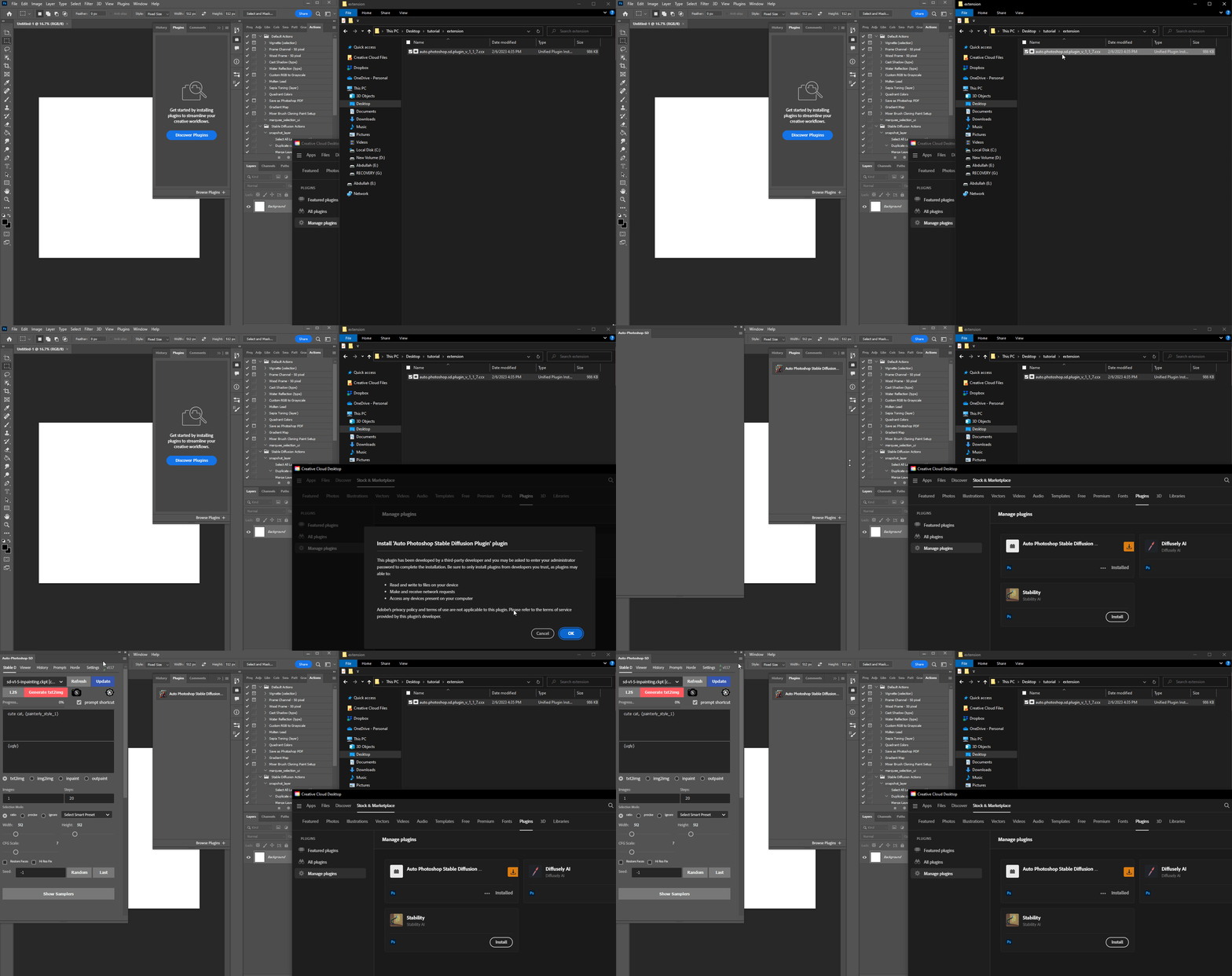
Method 1: One Click Installer
Download the .ccx file
run the ccx file . that's all. you will be able to use all of stable diffusion modes (txt2img, img2img, inpainting and outpainting), check the tutorials section to master the tool.
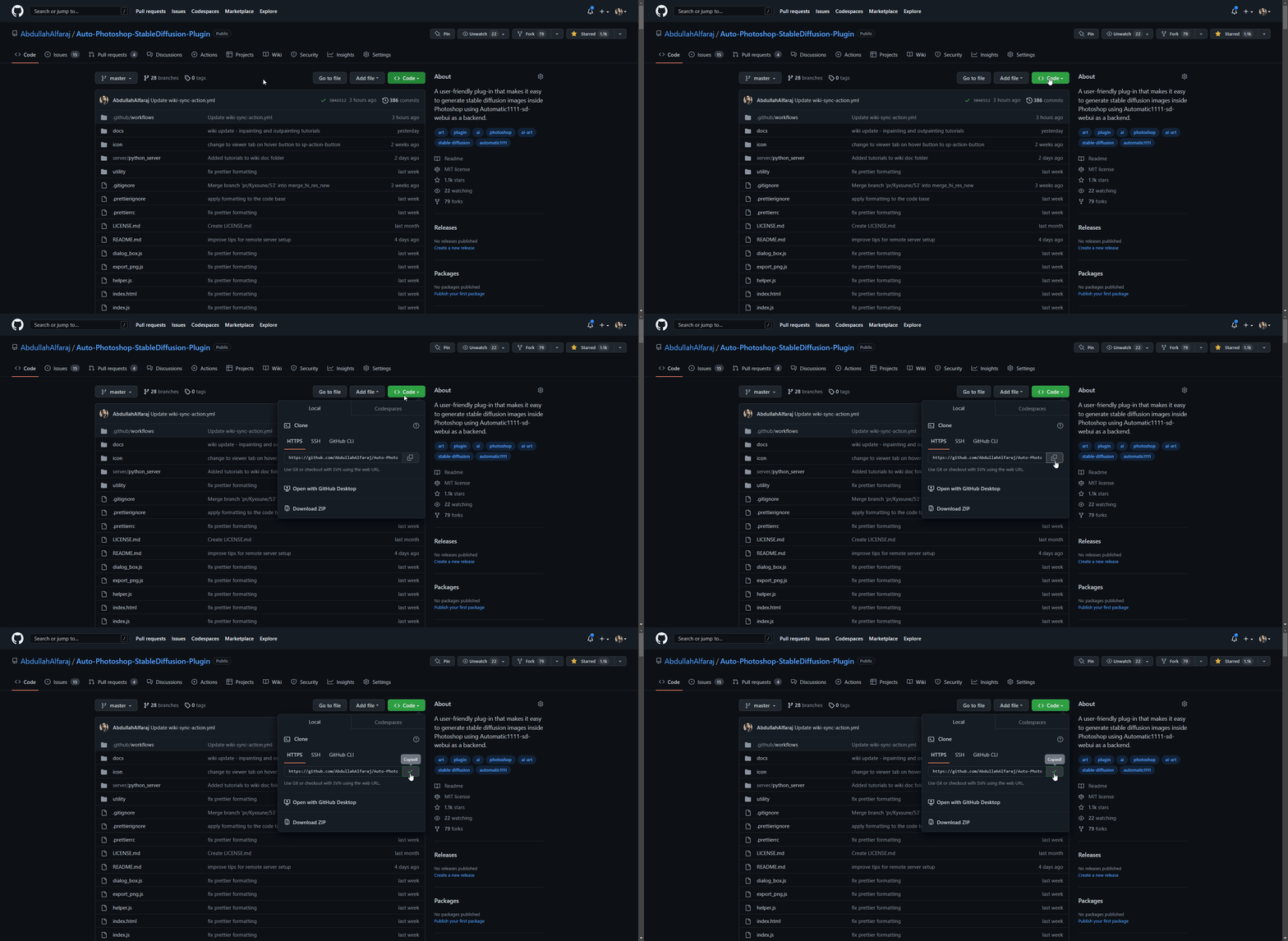
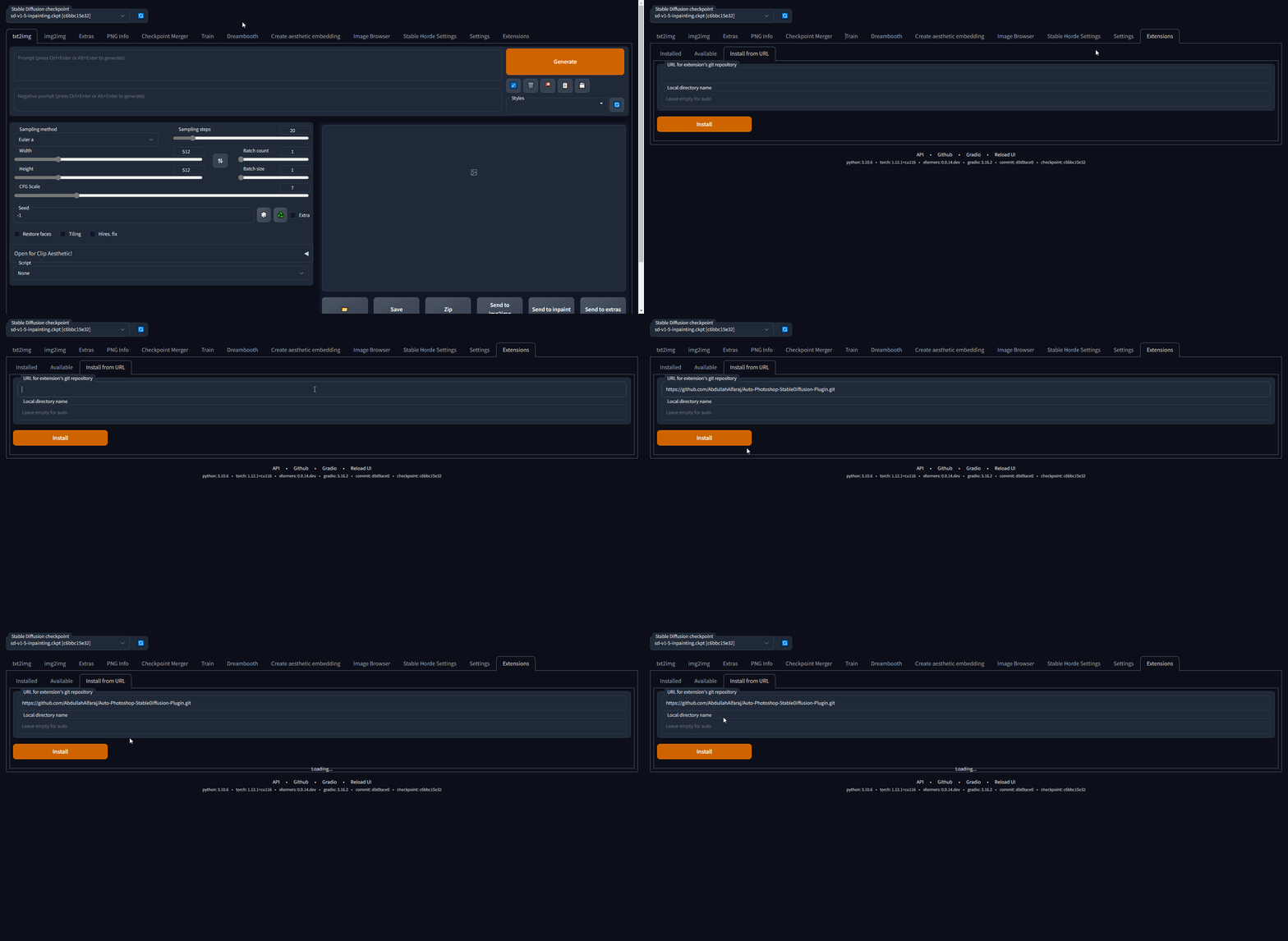
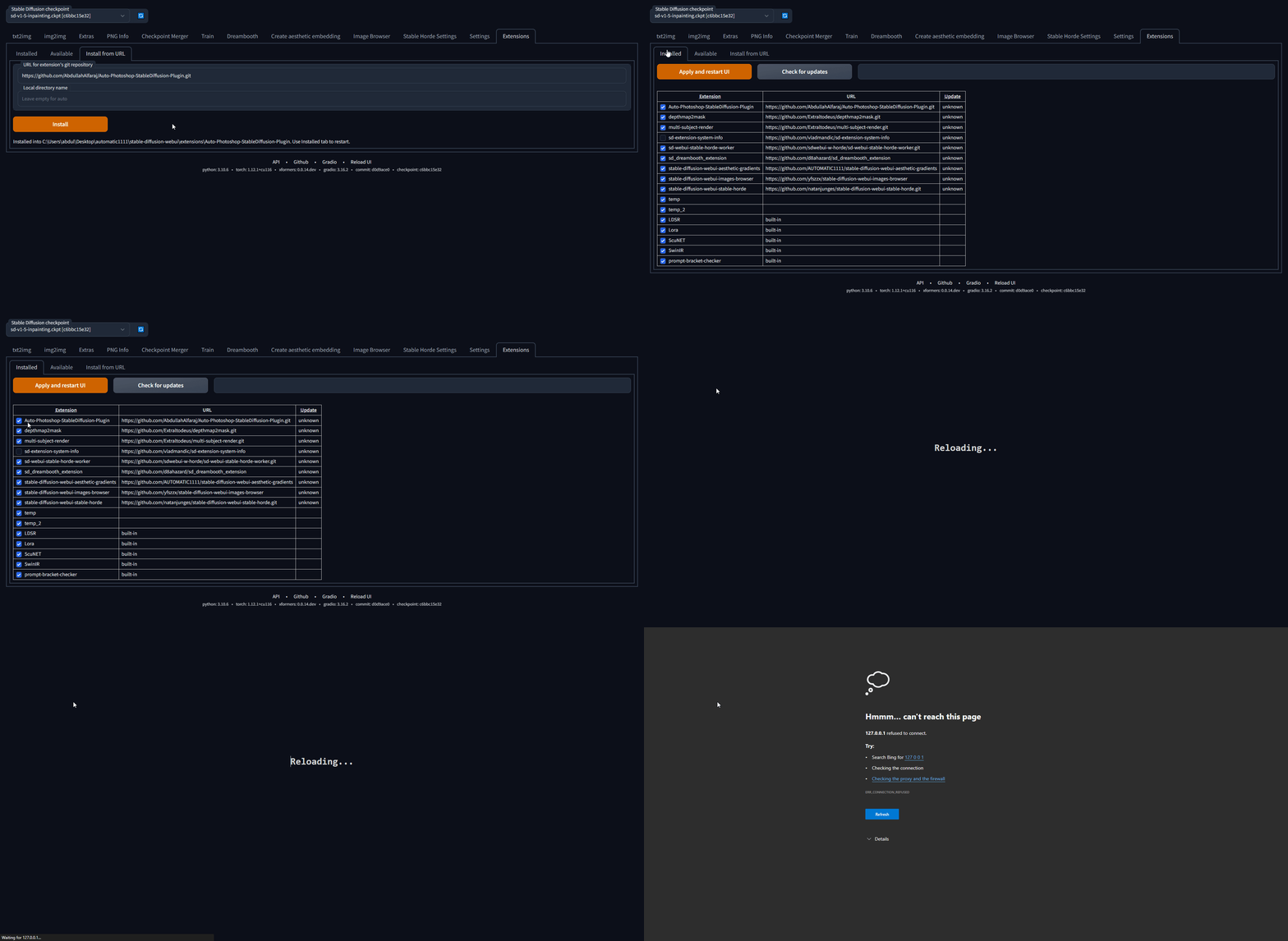
(Don't skip) Install the Auto-Photoshop-SD Extension from Automatic1111 extension tab. The extension will allow you to use mask expansion and mask blur, which are necessary for achieving good results when outpainting and inpainting.
a) Copy Auto-Photoshop plugin url
b) Paste the url in auto1111's extension tab and click install
c) Make sure the Auto-Photoshop plugin is listed, then click "Apply and Restart UI"
Method 2: The Unzip Method
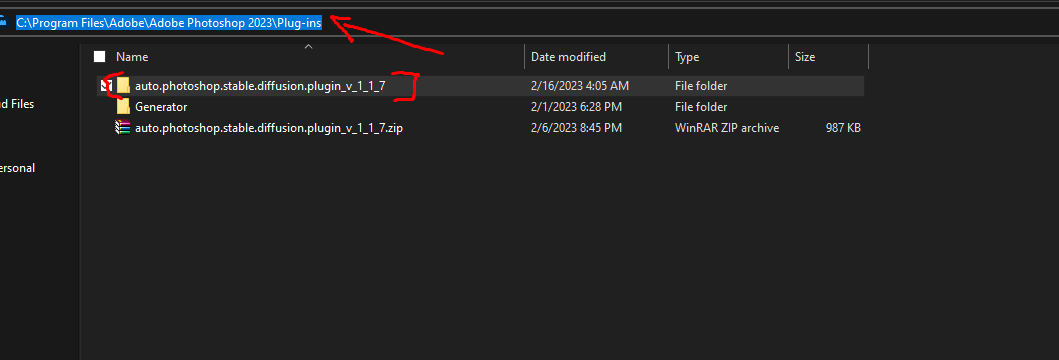
Download the .zip file
Unzip it in a folder with the same name
move the unzipped folder to the Photoshop Plugin folder
(Don't skip) Install the Auto-Photoshop-SD Extension from Automatic1111 extension tab. The extension will allow you to use mask expansion and mask blur, which are necessary for achieving good results when outpainting and inpainting.
a) Copy Auto-Photoshop plugin url
Method 3: The UXP method (Instruction for Developers):
For artists we recommend you use the one click installer. If you are a developer Watch the any of these videos or follow the instruction bellow.
For artists we recommend you use the one click installer
First time running the plugin (local Automatic1111):
open cmd window in the "Auto-Photoshop-StableDiffusion-Plugin" directory and then install the dependencies by typing:
npm install
build the plugin by transpiling typescript to javascript:
npm run watch
run "start_server.bat" inside "Auto-Photoshop-StableDiffusion-Plugin" directory
go to where you have automatic1111 installed.
Edit the "webui-user.bat" in automatic1111
change this line
set COMMANDLINE_ARGS=
to
set COMMANDLINE_ARGS= --api
that will allow the plugin to communicate with the automatic1111 project. After saving close the "webui-user.bat" file and run it normally.
run photoshop. go to edit -> prefrences -> plugins
make sure you check "Enable Developer Mode" checkbox
install "Adobe UXP Developer Tool" from here Installation (adobe.com)
this tool will add the plugin into photoshop
run Adobe UXP Developer Tool and click on "Add Plugin" button in the top right. Navigate to where you have "Auto-Photoshop-StableDiffusion-Plugin" folder and open "manifest.json"
select the plugin and click on Actions -> Load Selected
that's it.
First time running the plugin (remote Automatic1111):
The remote webui must also have --api set in COMMANDLINE_ARGS. You can check if api access is enabled by appending "/docs#" to the end of the url. If the documentation includes /sdapi/v1/samplers then api access is enabled.
edit start_server.bat (or start_server.sh if on linux) to point to the remote installation of Automatic1111
run "start_server.bat" inside "Auto-Photoshop-StableDiffusion-Plugin" directory
run photoshop. go to edit -> prefrences -> plugins
make sure you check "Enable Developer Mode" checkbox
install "Adobe UXP Developer Tool" from here Installation (adobe.com)
this tool will add the plugin into photoshop
run Adobe UXP Developer Tool and click on "Add Plugin" button in the top right. Navigate to where you have "Auto-Photoshop-StableDiffusion-Plugin" folder and open "manifest.json"
select the plugin and click on Actions -> Load Selected
that's it.
Demo:
FAQ and Known Issues
What Photoshop version do I need to run the plugin?
The minimum Photoshop version that the plugin supports is Photoshop v24
Plugin Load Failed
There are a few issues that can result in this error, please follow the instructions for the corresponding error message in the UDT logs
No application are connected to the service
This error occurs when Photoshop is not started before the plugin is attempted to be loaded. Simply start photoshop then restart UXP and load the plugin
Exception in ASGI application / Expecting value: line 1 column 1
This error occurs due to mismatched expectations between the plugin and the Automatic1111 backend.
It can be solved by both updating the version of the Automatic111 backend to the latest verion, and making sure "Save text information about generation parameters as chunks to png files" setting is enabled within the UI.
No Generations and Plugin Server doesn't send messages. (Remote setup)
This error occurs when the remote server does not have the api enabled. You can verify this by attempting to go to the URL you access the webui at and appending "/docs#" to the end of the url. If you have permissions, make relaunch the remote instance with the "--api" flag.
No GPU Options:
we provide two options to use the auto-photoshp plugin without GPU.
Stable Horde
This is an awesome free crowdsourced distributed cluster of Stable Diffusion workers. If you like this service, consider joining the horde yourself!
the horde is enabled completely by the generosity of volunteers so make sure you don't overwhelm the service and help join the cause if you can.
read more on their GitHub page
Colab:
we link to this Colab directly inside plugin find it in the settings tab. you only need to run it. no need to change any of the settings. copy the gradio.live url the colab will generate and paste it into sd url field in the settings tab.
AbdullahAlfaraj/Auto-Photoshop-StableDiffusion-Plugin có phải mã nguồn mở không?
Có — AbdullahAlfaraj/Auto-Photoshop-StableDiffusion-Plugin phát hành theo license MIT, nghĩa là mã nguồn mở để đọc, fork và (tùy license) tái sử dụng. Mã: github.com/AbdullahAlfaraj/Auto-Photoshop-StableDiffusion-Plugin.
AbdullahAlfaraj/Auto-Photoshop-StableDiffusion-Plugin có website riêng không?
TopGit chưa ghi nhận URL trang chủ cho AbdullahAlfaraj/Auto-Photoshop-StableDiffusion-Plugin. Phần README ở tab phía trên thường có link demo, hoặc xem mô tả GitHub của repo.
AbdullahAlfaraj/Auto-Photoshop-StableDiffusion-Plugin dùng license gì?
AbdullahAlfaraj/Auto-Photoshop-StableDiffusion-Plugin phát hành theo license MIT. Nên mở file LICENSE trên GitHub để xác nhận — license metadata đôi khi lệch với thực tế dự án.
AbdullahAlfaraj/Auto-Photoshop-StableDiffusion-Plugin là gì?
AbdullahAlfaraj/Auto-Photoshop-StableDiffusion-Plugin (AbdullahAlfaraj/Auto-Photoshop-StableDiffusion-Plugin) là dự án TypeScript trên GitHub. Theo mô tả gốc: A user-friendly plug-in that makes it easy to generate stable diffusion images inside Photoshop using either Automatic or ComfyUI as a backend.
Cùng nhóm AI Tools còn repo nào?
AbdullahAlfaraj/Auto-Photoshop-StableDiffusion-Plugin thuộc nhóm AI Tools trên TopGit, cùng 10 topic GitHub. Trang Trending và Topics liệt kê các repo cùng số sao và cùng ngôn ngữ để so sánh.
Đọc thêm về AbdullahAlfaraj/Auto-Photoshop-StableDiffusion-Plugin ở đâu?
Trang TopGit này là một snapshot — tab "Readme" hiển thị nguyên văn README của repo (đã bỏ link, giữ ảnh). Repo GitHub ở github.com/AbdullahAlfaraj/Auto-Photoshop-StableDiffusion-Plugin là nguồn chính thức.
Vì sao AbdullahAlfaraj/Auto-Photoshop-StableDiffusion-Plugin được xếp vào nhóm AI Tools?
TopGit xếp AbdullahAlfaraj/Auto-Photoshop-StableDiffusion-Plugin vào nhóm AI Tools dựa trên GitHub topics và mô tả của repo (gắn thẻ: "ai", "ai-art", "art"). Việc phân loại dựa trên metadata thật của repo, không phải đoán theo cảm tính biên tập.
Đọc đầy đủ README ở tab phía trên.
Vẫn đang phân vân về Auto-Photoshop-StableDiffusion-Plugin?
Một cú bấm sẽ gửi câu hỏi kèm trang này cho AI — xem AI nói gì về Auto-Photoshop-StableDiffusion-Plugin.

 /Auto-Photoshop-StableDiffusion-Plugin