Một mục hướng lập trình viên trong kho dữ liệu GitHub của TopGit: abiosoft/colima, 31.6k sao, nhóm Developer Tools, Go. Container runtimes on macOS (and Linux) with minimal setup
Tóm tắt dựng từ metadata GitHub của chính dự án — chưa có bài review TopGit. Trang sẽ tự động cập nhật khi bài review đầy đủ được xuất bản.
VÌ SAO CHƯA CÓ REVIEW
TopGit viết bài đầy đủ cho repo có nhiều sao nhất và được yêu cầu nhiều nhất. Trang này là snapshot trong thời gian chờ — xem README gốc ở tab READ ME.
Support for Intel and Apple Silicon macOS, and Linux
Simple CLI interface with sensible defaults
Automatic Port Forwarding
Volume mounts
Multiple instances
Support for multiple container runtimes
Docker (with optional Kubernetes)
Containerd (with optional Kubernetes)
Incus (containers and virtual machines)
GPU accelerated containers for AI workloads
Getting Started
Installation
Colima is available on Homebrew, MacPorts, Nix and Mise. Check here for other installation options.
# Homebrew
brew install colima

# MacPorts
sudo port install colima

# Nix
nix-env -iA nixpkgs.colima

# Mise
mise use -g colima@latest
Or stay on the bleeding edge (only Homebrew)
brew install --HEAD colima
Usage
Start Colima with defaults
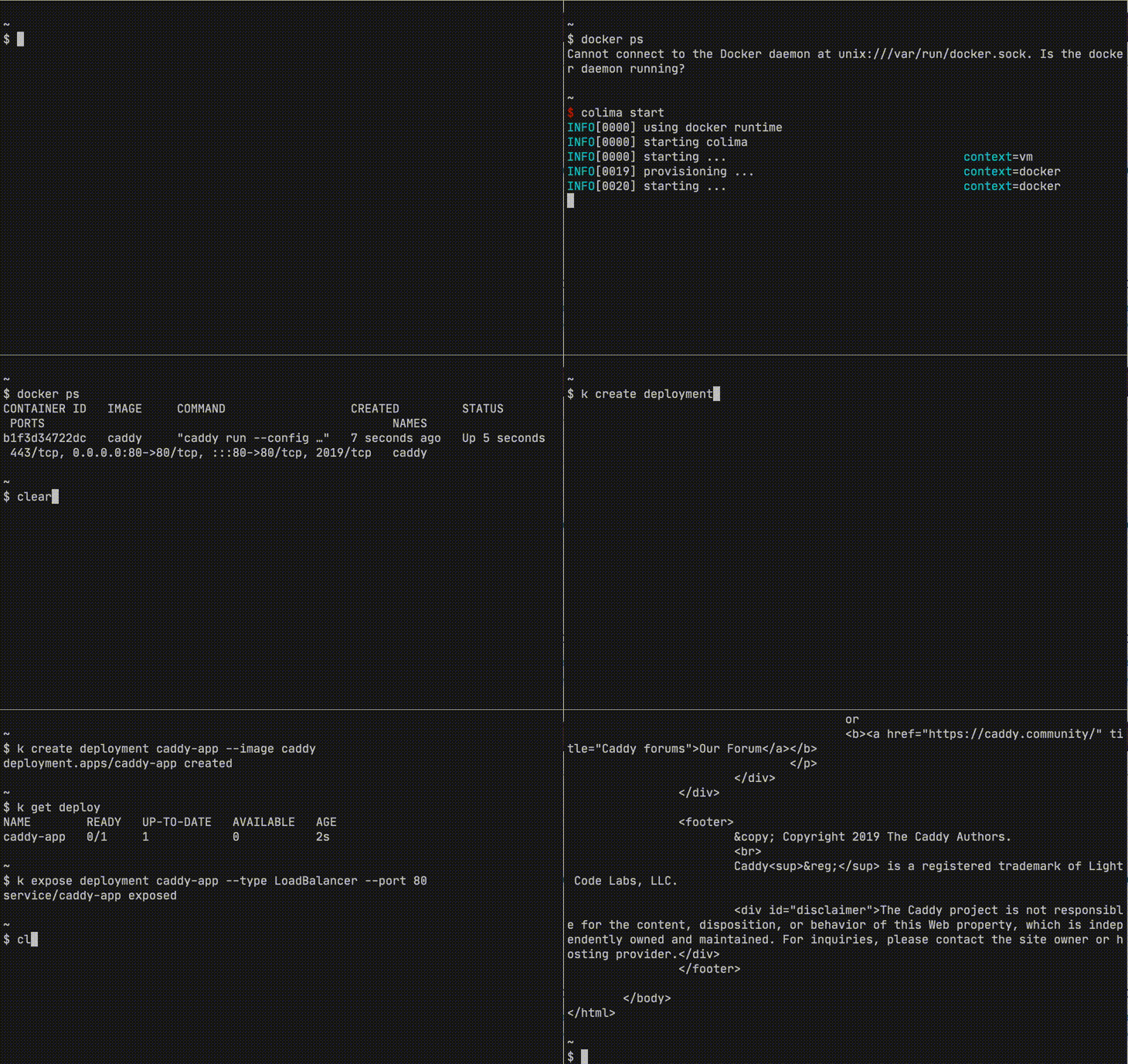
colima start
For more usage options
colima --help
colima start --help
Or use a config file
colima start --edit
Runtimes
On initial startup, Colima initiates with a user specified runtime that defaults to Docker.
Docker
Docker client is required for Docker runtime. Installable with brew install docker.
colima start
docker run hello-world
docker ps
You can use the docker client on macOS after colima start with no additional setup.
Containerd
colima start --runtime containerd starts and setup Containerd. You can use colima nerdctl to interact with
Containerd using nerdctl.
colima start --runtime containerd
nerdctl run hello-world
nerdctl ps
It is recommended to run colima nerdctl install to install nerdctl alias script in $PATH.
Kubernetes
kubectl is required for Kubernetes. Installable with brew install kubectl.
To enable Kubernetes, start Colima with --kubernetes flag.
colima start --kubernetes
kubectl run caddy --image=caddy
kubectl get pods
Interacting with Image Registry
For Docker runtime, images built or pulled with Docker are accessible to Kubernetes.
For Containerd runtime, images built or pulled in the k8s.io namespace are accessible to Kubernetes.
Incus
Requires v0.7.0
Incus client is required for Incus runtime. Installable with brew brew install incus.
colima start --runtime incus starts and setup Incus.
colima start --runtime incus
incus launch images:alpine/edge
incus list
You can use the incus client on macOS after colima start with no additional setup.
Note: Running virtual machines on Incus is only supported on m3 or newer Apple Silicon devices.
AI Models (GPU Accelerated)
Requires v0.10.0, Apple Silicon and macOS 13+
Colima supports GPU accelerated containers for AI workloads using the krunkit VM type.
Note: To use krunkit with colima, ensure it is installed. Please follow their installation instructions
Setup and use a model.
colima start --runtime docker --vm-type krunkit
colima model run gemma3
Colima supports two model runner backends:
Docker Model Runner (default) — supports Docker AI Registry and HuggingFace.
Ramalama — supports HuggingFace and Ollama registries.
The default registry is the Docker AI Registry. Models can be run by name without a prefix:
colima model run gemma3
colima model run llama3.2
# HuggingFace (Docker Model Runner)
colima model run hf.co/microsoft/Phi-3-mini-4k-instruct-gguf
# Ollama (requires ramalama runner)
colima model run ollama://gemma3 --runner ramalama
See the AI Workloads documentation for more details.
Customizing the VM
The default VM created by Colima has 2 CPUs, 2GiB memory and 100GiB storage.
The VM can be customized either by passing additional flags to colima start.
e.g. --cpu, --memory, --disk, --runtime.
Or by editing the config file with colima start --edit.
NOTE: Disk size can be increased after the VM is created.
Customization Examples
create VM with 1CPU, 2GiB memory and 10GiB storage.
colima start --cpu 1 --memory 2 --disk 10
modify an existing VM to 4CPUs and 8GiB memory.
colima stop
colima start --cpu 4 --memory 8
create VM with Rosetta 2 emulation. Requires v0.5.3 and macOS >= 13 (Ventura) on Apple Silicon.
colima start --vm-type=vz --vz-rosetta
Project Goal
To provide container runtimes on macOS with minimal setup.
What is with the name?
Colima means Containers on Lima.
Since Lima is aka Linux Machines. By transitivity, Colima can also mean Containers on Linux Machines.
And the Logo?
The logo was contributed by Daniel Hodvogner. Check this issue for more.
Troubleshooting and FAQs
Check here for Frequently Asked Questions, or visit the online FAQ for a searchable version.
How to Contribute?
Check here for the instructions on contributing to the project.
Community
GitHub Discussions
GitHub Issues
Announcements
#colima channel in the CNCF Slack
New account: https://slack.cncf.io/
Login: https://cloud-native.slack.com/
License
MIT
Sponsoring the Project
If you (or your company) are benefiting from the project and would like to support the contributors, kindly sponsor.
abiosoft/colima có 31.6k sao GitHub — tải lại trang để xem số mới nhất, hoặc xem trực tiếp github.com/abiosoft/colima. TopGit phản chiếu số sao của GitHub nhưng không cam kết đến từng phút.
abiosoft/colima có phải mã nguồn mở không?
Có — abiosoft/colima phát hành theo license MIT, nghĩa là mã nguồn mở để đọc, fork và (tùy license) tái sử dụng. Mã: github.com/abiosoft/colima.
abiosoft/colima còn đang phát triển không?
Commit gần nhất trên abiosoft/colima là 4 tháng trước (theo timestamp GitHub). Repo có 640 fork — một chỉ báo về mức độ quan tâm của cộng đồng.
abiosoft/colima dùng license gì?
abiosoft/colima phát hành theo license MIT. Nên mở file LICENSE trên GitHub để xác nhận — license metadata đôi khi lệch với thực tế dự án.
abiosoft/colima là gì?
abiosoft/colima (abiosoft/colima) là dự án Go trên GitHub. Theo mô tả gốc: Container runtimes on macOS (and Linux) with minimal setup
abiosoft/colima viết bằng ngôn ngữ gì?
abiosoft/colima chủ yếu viết bằng Go. Trường "language" của GitHub dựa trên phần lớn byte ở nhánh mặc định.
Cùng nhóm Developer Tools còn repo nào?
abiosoft/colima thuộc nhóm Developer Tools trên TopGit, cùng 12 topic GitHub. Trang Trending và Topics liệt kê các repo cùng số sao và cùng ngôn ngữ để so sánh.
Đọc thêm về abiosoft/colima ở đâu?
Trang TopGit này là một snapshot — tab "Readme" hiển thị nguyên văn README của repo (đã bỏ link, giữ ảnh). Repo GitHub ở github.com/abiosoft/colima là nguồn chính thức.
Đọc đầy đủ README ở tab phía trên.
Muốn nghe thêm một ý kiến về colima?
Hỏi một AI đọc được trang này — một cú bấm là có ngay nhận định về colima.

 /colima