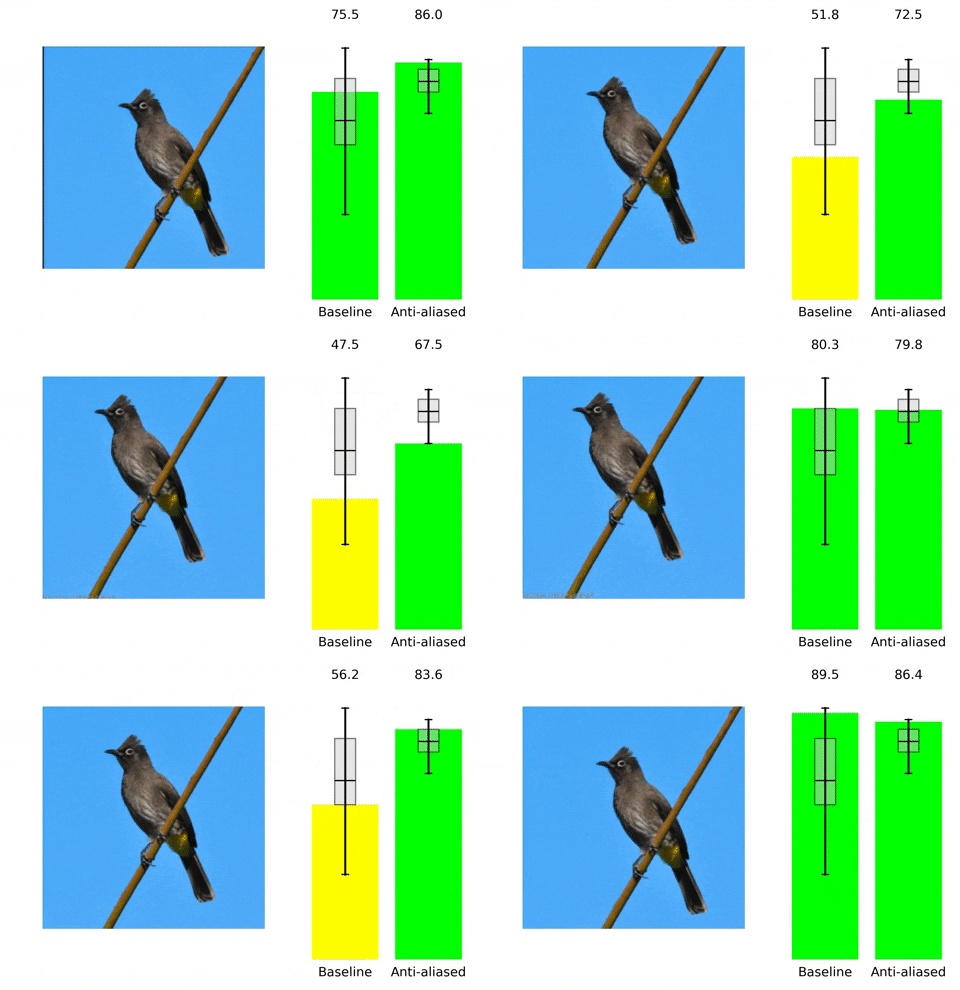
adobe/antialiased-cnns hiện có 1.7k sao trên GitHub, viết chủ yếu bằng Python. pip install antialiased-cnns to improve stability and accuracy
Tóm tắt dựng từ metadata GitHub của chính dự án — chưa có bài review TopGit. Trang sẽ tự động cập nhật khi bài review đầy đủ được xuất bản.
VÌ SAO CHƯA CÓ REVIEW
TopGit viết bài đầy đủ cho repo có nhiều sao nhất và được yêu cầu nhiều nhất. Trang này là snapshot trong thời gian chờ — xem README gốc ở tab READ ME.
Making Convolutional Networks Shift-Invariant Again
Richard Zhang. In ICML, 2019.
Quick & easy start
Run pip install antialiased-cnns
import antialiased_cnns
model = antialiased_cnns.resnet50(pretrained=True)
If you have a model already and want to antialias and continue training, copy your old weights over:
import torchvision.models as models
old_model = models.resnet50(pretrained=True) # old (aliased) model
antialiased_cnns.copy_params_buffers(old_model, model) # copy the weights over
If you want to modify your own model, use the BlurPool layer. More information about our provided models and how to use BlurPool is below.
C = 10 # example feature channel size
blurpool = antialiased_cnns.BlurPool(C, stride=2) # BlurPool layer; use to downsample a feature map
ex_tens = torch.Tensor(1,C,128,128)
print(blurpool(ex_tens).shape) # 1xCx64x64 tensor
Updates
(Oct 2020) Finetune I initialize the antialiased model with weights from baseline model, and finetune. Before, I was training from scratch. The results are better.
(Oct 2020) Additional models We now have 23 total model variants. I added variants of vgg, densenet, resnext, wide resnet varieties! The same conclusions hold.
(Sept 2020) Pip install You can also now pip install antialiased-cnns and load models with the pretrained=True flag.
(Sept 2020) Kernel 4 I have added kernel size 4 experiments. When downsampling an even sized feature map (e.g., a 128x128-->64x64), this is actually the correct size to use to keep the indices from drifting.
Table of contents
More information about antialiased models
Instructions for antialiasing your own model, using the BlurPool layer
ImageNet training and evaluation code. Achieving better consistency, while maintaining or improving accuracy, is an open problem. Help improve the results!
(0) Preliminaries
Pip install this package
pip install antialiased-cnns
Or clone this repository and install requirements (notably, PyTorch)
https://github.com/adobe/antialiased-cnns.git
cd antialiased-cnns
pip install -r requirements.txt
(1) Loading an antialiased model
The following loads a pretrained antialiased model, perhaps as a backbone for your application.
import antialiased_cnns
model = antialiased_cnns.resnet50(pretrained=True, filter_size=4)
We also provide weights for antialiased AlexNet, VGG16(bn), Resnet18,34,50,101, Densenet121, and MobileNetv2 (see example_usage.py).
(2) How to antialias your own architecture
The antialiased_cnns module contains the BlurPool class, which does blur+subsampling. Run pip install antialiased-cnns or copy the antialiased_cnns subdirectory.
Methodology The methodology is simple -- first evaluate with stride 1, and then use our BlurPool layer to do antialiased downsampling. Make the following architectural changes.
We assume incoming tensor has C channels. Computing a layer at stride 1 instead of stride 2 adds memory and run-time. As such, we typically skip antialiasing at the highest-resolution (early in the network), to prevent large increases.
Add antialiasing and then continue training If you already trained a model, and then add antialiasing, you can fine-tune from that old model:
If this doesn't work, you can just copy the parameters (and not buffers). Adding antialiasing doesn't add any parameters, so the parameter lists are identical. (It does add buffers, so some heuristic is used to match the buffers, which may throw an error.)
(3) ImageNet Evaluation, Results, and Training code
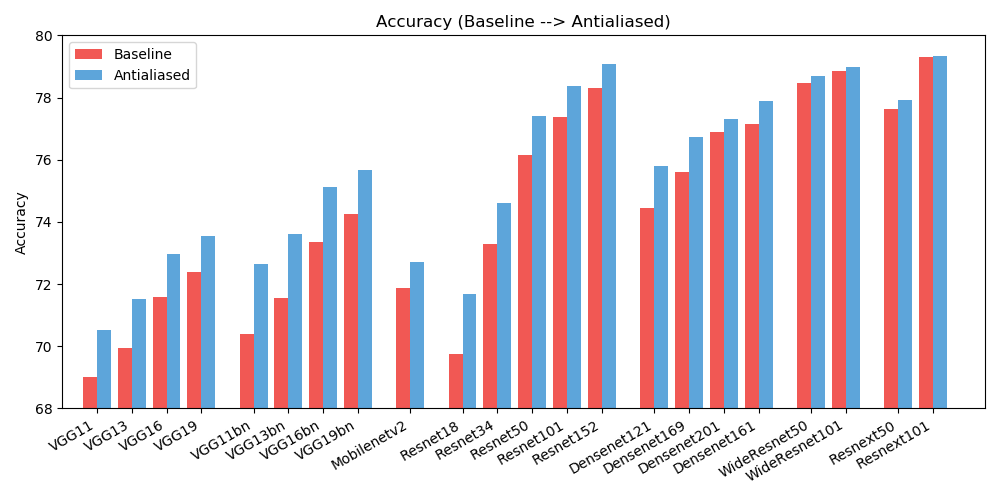
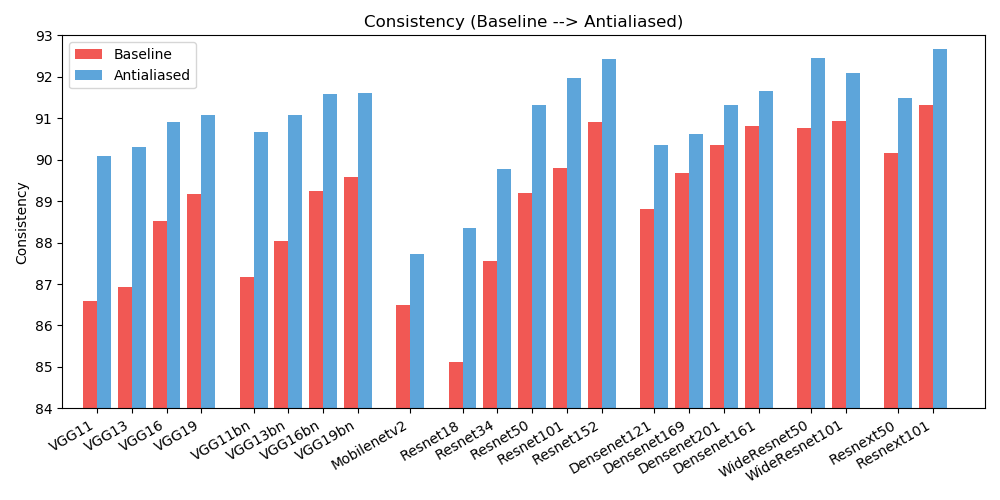
We observe improvements in both accuracy (how often the image is classified correctly) and consistency (how often two shifts of the same image are classified the same).
ACCURACY
Baseline
Antialiased
Delta
alexnet
56.55
56.94
+0.39
vgg11
69.02
70.51
+1.49
vgg13
69.93
71.52
+1.59
vgg16
71.59
72.96
+1.37
vgg19
72.38
73.54
+1.16
vgg11_bn
70.38
72.63
+2.25
vgg13_bn
71.55
73.61
+2.06
vgg16_bn
73.36
75.13
+1.77
vgg19_bn
74.24
75.68
+1.44
resnet18
69.74
71.67
+1.93
resnet34
73.30
74.60
+1.30
resnet50
76.16
77.41
+1.25
resnet101
77.37
78.38
+1.01
resnet152
78.31
79.07
+0.76
resnext50_32x4d
77.62
77.93
+0.31
resnext101_32x8d
79.31
79.33
+0.02
wide_resnet50_2
78.47
78.70
+0.23
wide_resnet101_2
78.85
78.99
+0.14
densenet121
74.43
75.79
+1.36
densenet169
75.60
76.73
+1.13
densenet201
76.90
77.31
+0.41
densenet161
77.14
77.88
+0.74
mobilenet_v2
71.88
72.72
+0.84
CONSISTENCY
Baseline
Antialiased
Delta
alexnet
78.18
83.31
+5.13
vgg11
86.58
90.09
+3.51
vgg13
86.92
90.31
+3.39
vgg16
88.52
90.91
+2.39
vgg19
89.17
91.08
+1.91
vgg11_bn
87.16
90.67
+3.51
vgg13_bn
88.03
91.09
+3.06
vgg16_bn
89.24
91.58
+2.34
vgg19_bn
89.59
91.60
+2.01
resnet18
85.11
88.36
+3.25
resnet34
87.56
89.77
+2.21
resnet50
89.20
91.32
+2.12
resnet101
89.81
91.97
+2.16
resnet152
90.92
92.42
+1.50
resnext50_32x4d
90.17
91.48
+1.31
resnext101_32x8d
91.33
92.67
+1.34
wide_resnet50_2
90.77
92.46
+1.69
wide_resnet101_2
90.93
92.10
+1.17
densenet121
88.81
90.35
+1.54
densenet169
89.68
90.61
+0.93
densenet201
90.36
91.32
+0.96
densenet161
90.82
91.66
+0.84
mobilenet_v2
86.50
87.73
+1.23
To reduce clutter, extended results (different filter sizes) are here. Help improve the results!
Licenses
This work is licensed under a Creative Commons Attribution-NonCommercial-ShareAlike 4.0 International License.
All material is made available under Creative Commons BY-NC-SA 4.0 license by Adobe Inc. You can use, redistribute, and adapt the material for non-commercial purposes, as long as you give appropriate credit by citing our paper and indicating any changes that you've made.
The repository builds off the PyTorch examples repository and torchvision models repository. These are BSD-style licensed.
Citation, contact
If you find this useful for your research, please consider citing this bibtex. Please contact Richard Zhang <rizhang at adobe dot com> with any comments or feedback.
adobe/antialiased-cnns có 1.7k sao GitHub — tải lại trang để xem số mới nhất, hoặc xem trực tiếp github.com/adobe/antialiased-cnns. TopGit phản chiếu số sao của GitHub nhưng không cam kết đến từng phút.
adobe/antialiased-cnns có những chủ đề gì?
GitHub topics của adobe/antialiased-cnns: "antialiasing", "artificial-intelligence", "cnns", "computer-vision", "convolutional-neural-networks", "icml", "icml-2019", "shift-equivariant", "shift-invariant". TopGit xếp repo vào nhóm AI Tools.
adobe/antialiased-cnns còn đang phát triển không?
Commit gần nhất trên adobe/antialiased-cnns là 2.4 năm trước (theo timestamp GitHub). Repo có 202 fork — một chỉ báo về mức độ quan tâm của cộng đồng.
adobe/antialiased-cnns là gì?
adobe/antialiased-cnns (adobe/antialiased-cnns) là dự án Python trên GitHub. Theo mô tả gốc: pip install antialiased-cnns to improve stability and accuracy
adobe/antialiased-cnns so với các dự án AI Tools khác thế nào?
adobe/antialiased-cnns được TopGit xếp vào nhóm AI Tools, với 1.7k sao GitHub và viết bằng Python. Xem trang chủ đề AI Tools trên TopGit để so sánh với các dự án tương tự theo số sao và mức độ hoạt động.
adobe/antialiased-cnns viết bằng ngôn ngữ gì?
adobe/antialiased-cnns chủ yếu viết bằng Python. Trường "language" của GitHub dựa trên phần lớn byte ở nhánh mặc định.
Vì sao adobe/antialiased-cnns được xếp vào nhóm AI Tools?
TopGit xếp adobe/antialiased-cnns vào nhóm AI Tools dựa trên GitHub topics và mô tả của repo (gắn thẻ: "antialiasing", "artificial-intelligence", "cnns"). Việc phân loại dựa trên metadata thật của repo, không phải đoán theo cảm tính biên tập.
Đọc đầy đủ README ở tab phía trên.
antialiased-cnns có đáng để bạn bỏ thời gian?
ChatGPT, Claude và Perplexity đều đọc được trang này. Hỏi thử xem họ nghĩ gì về antialiased-cnns.