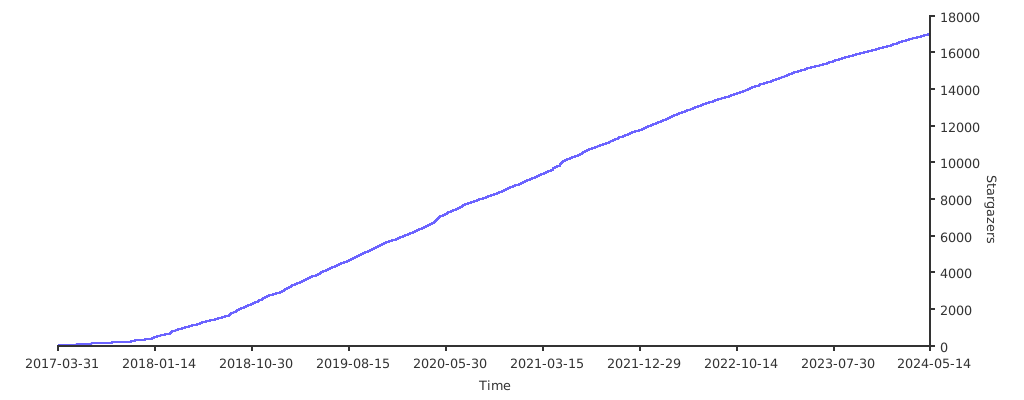
Trên GitHub, ahmetb/kubectx đã đạt 19.9k sao, nhóm Developer Tools, ngôn ngữ Go. Faster way to switch between clusters and namespaces in kubectl
Tóm tắt dựng từ metadata GitHub của chính dự án — chưa có bài review TopGit. Trang sẽ tự động cập nhật khi bài review đầy đủ được xuất bản.
VÌ SAO CHƯA CÓ REVIEW
TopGit viết bài đầy đủ cho repo có nhiều sao nhất và được yêu cầu nhiều nhất. Trang này là snapshot trong thời gian chờ — xem README gốc ở tab READ ME.
This repository provides both kubectx and kubens tools.
Install →
What are kubectx and kubens?
kubectx is a tool to switch between contexts (clusters) on kubectl
faster, and launch readonly shells for each context. kubens is a tool to switch between Kubernetes namespaces (and
configure them for kubectl) easily.
Here's a kubectx demo:
...and here's a kubens demo:
Usage
kubectx
Switch to another cluster that's in kubeconfig:
$ kubectx minikube
Switched to context "minikube".
Switch back to previous cluster:
$ kubectx -
Switched to context "oregon".
Start an isolated shell that only has a single context:
$ kubectx -s minikube
Start a read-only shell where write operations are blocked:
$ kubectx -r minikube
Rename context:
$ kubectx dublin=gke_ahmetb_europe-west1-b_dublin
Context "gke_ahmetb_europe-west1-b_dublin" renamed to "dublin".
kubens
Change the active namespace on kubectl:
$ kubens kube-system
Context "test" set.
Active namespace is "kube-system".
Go back to the previous namespace:
$ kubens -
Context "test" set.
Active namespace is "default".
Change the active namespace even if it doesn't exist:
$ kubens namespace-404 -f
Context "test" set.
Active namespace is "namespace-404".
If you have fzf installed, you can also
interactively select a context or cluster, or fuzzy-search by typing a few
characters. To learn more, read interactive mode →
Both kubectx and kubens support Tab completion on bash/zsh/fish
shells to help with long context names. You don't have to remember full context
names anymore.
Installation
Package manager
Command
Homebrew (macOS & Linux)
brew install kubectx
MacPorts (macOS)
sudo port install kubectx
apt (Debian/Ubuntu)
sudo apt install kubectx
pacman (Arch Linux)
sudo pacman -S kubectx
Chocolatey (Windows)
choco install kubens kubectx
Scoop (Windows)
scoop bucket add main && scoop install main/kubens main/kubectx
Alternatively, download binaries from the Releases page → and add them to somewhere in your PATH.
Shell completion scripts
zsh (with antibody)
Add this line to your Plugins File (e.g.
~/.zsh_plugins.txt):
ahmetb/kubectx path:completion kind:fpath
Depending on your setup, you might or might not need to call compinit or
autoload -U compinit && compinit in your ~/.zshrc after you load the Plugins
file. If you use oh-my-zsh, load the
completions before you load oh-my-zsh because oh-my-zsh will call
compinit.
zsh (plain)
The completion scripts have to be in a path that belongs to $fpath. Either
link or copy them to an existing folder.
If completion doesn't work, add autoload -U compinit && compinit to your
.zshrc (similar to
zsh-completions).
If you are not using oh-my-zsh, you
could link to /usr/share/zsh/functions/Completion (might require sudo),
depending on the $fpath of your zsh installation.
[!NOTE]
Tip: Show context/namespace in your shell prompt with oh-my-posh or
simply with kube-ps1.
Interactive mode
If you want kubectx and kubens commands to present you an interactive menu
with fuzzy searching, you just need to install
fzf in your $PATH.
Caveats:
If you have fzf installed, but want to opt out of using this feature, set the
environment variable KUBECTX_IGNORE_FZF=1.
If you want to keep fzf interactive mode but need the default behavior of the
command, you can do it by piping the output to another command (e.g. kubectx | cat ).
Customizing colors
If you like to customize the colors indicating the current namespace or context,
set the environment variables KUBECTX_CURRENT_FGCOLOR and
KUBECTX_CURRENT_BGCOLOR (refer color codes
here):
export KUBECTX_CURRENT_FGCOLOR=$(tput setaf 6) # blue text
export KUBECTX_CURRENT_BGCOLOR=$(tput setab 7) # white background
Colors in the output can be disabled by setting the
NO_COLOR environment variable.
If you liked kubectx, you may like my
kubectl-aliases project, too. I
recommend pairing kubectx and kubens with fzf and
kube-ps1.
Có — ahmetb/kubectx phát hành theo license Apache-2.0, nghĩa là mã nguồn mở để đọc, fork và (tùy license) tái sử dụng. Mã: github.com/ahmetb/kubectx.
ahmetb/kubectx có trang demo không?
Dự án có trang chủ ở https://kubectx.dev. Tab "Readme" ở trang này thường có ảnh chụp và hướng dẫn bắt đầu nhanh.
ahmetb/kubectx dùng license gì?
ahmetb/kubectx phát hành theo license Apache-2.0. Nên mở file LICENSE trên GitHub để xác nhận — license metadata đôi khi lệch với thực tế dự án.
ahmetb/kubectx là gì?
ahmetb/kubectx (ahmetb/kubectx) là dự án Go trên GitHub. Theo mô tả gốc: Faster way to switch between clusters and namespaces in kubectl
Cùng nhóm Developer Tools còn repo nào?
ahmetb/kubectx thuộc nhóm Developer Tools trên TopGit, cùng 4 topic GitHub. Trang Trending và Topics liệt kê các repo cùng số sao và cùng ngôn ngữ để so sánh.
Đọc thêm về ahmetb/kubectx ở đâu?
Trang TopGit này là một snapshot — tab "Readme" hiển thị nguyên văn README của repo (đã bỏ link, giữ ảnh). Repo GitHub ở github.com/ahmetb/kubectx là nguồn chính thức.
Vì sao ahmetb/kubectx được xếp vào nhóm Developer Tools?
TopGit xếp ahmetb/kubectx vào nhóm Developer Tools dựa trên GitHub topics và mô tả của repo (gắn thẻ: "kubectl", "kubectl-plugins", "kubernetes"). Việc phân loại dựa trên metadata thật của repo, không phải đoán theo cảm tính biên tập.
Đọc đầy đủ README ở tab phía trên.
Chưa chắc kubectx có hợp với bạn?
Để ChatGPT, Claude hoặc Perplexity tìm hiểu giúp — bấm bên dưới và xem AI nói gì về kubectx.
 /kubectx



/badge.svg)