Được TopGit lập chỉ mục từ metadata GitHub: aizhimou/pigeon-pod có 1.2k sao, viết chủ yếu bằng Java. Listen to YouTube & Bilibili. Anywhere.
Tóm tắt dựng từ metadata GitHub của chính dự án — chưa có bài review TopGit. Trang sẽ tự động cập nhật khi bài review đầy đủ được xuất bản.
VÌ SAO CHƯA CÓ REVIEW
TopGit viết bài đầy đủ cho repo có nhiều sao nhất và được yêu cầu nhiều nhất. Trang này là snapshot trong thời gian chờ — xem README gốc ở tab READ ME.
Self-hosting too much hassle? Try our
PigeonPod Cloud
简体中文 | Español | Português | 日本語 | Deutsch | Français | 한국어
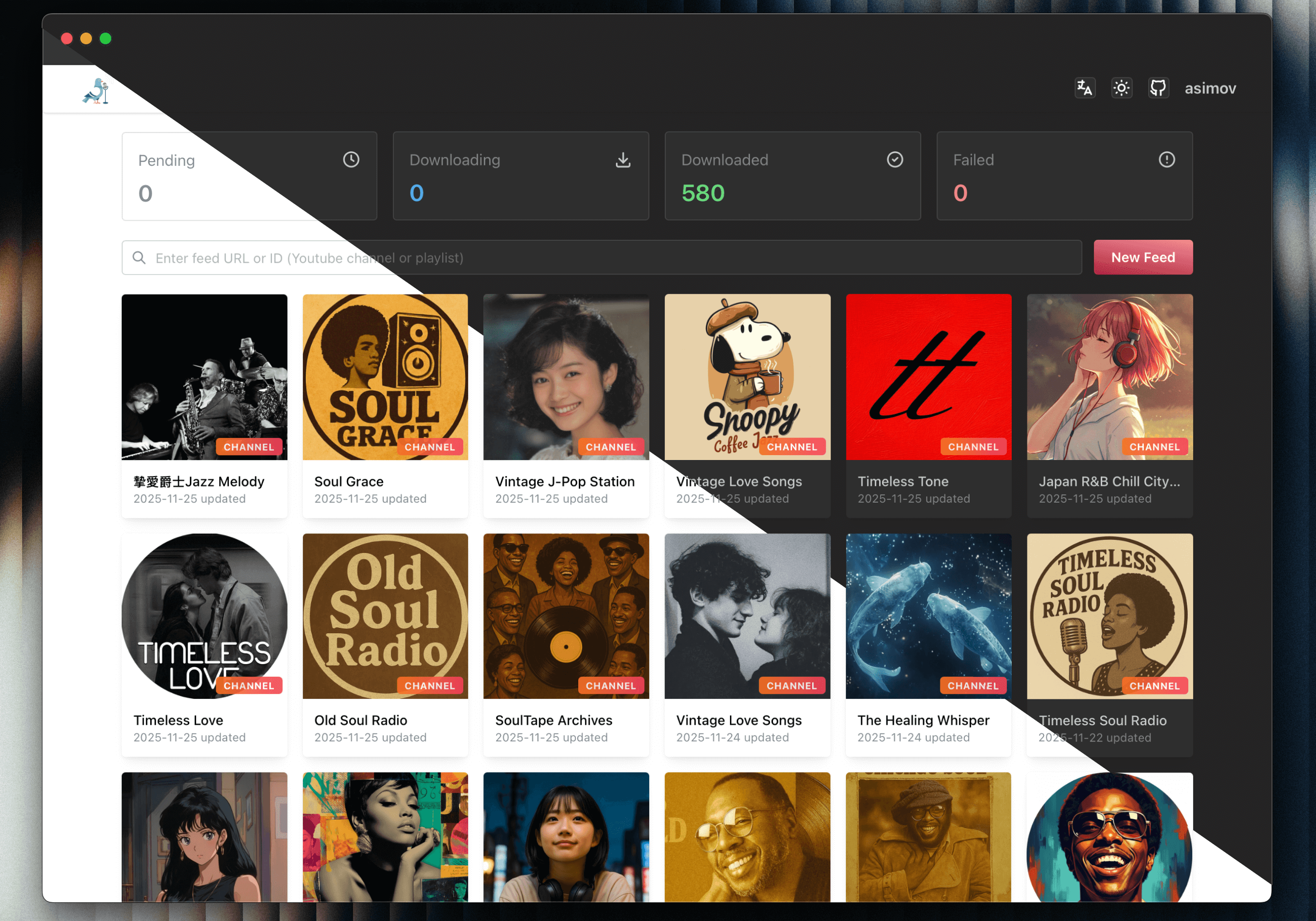
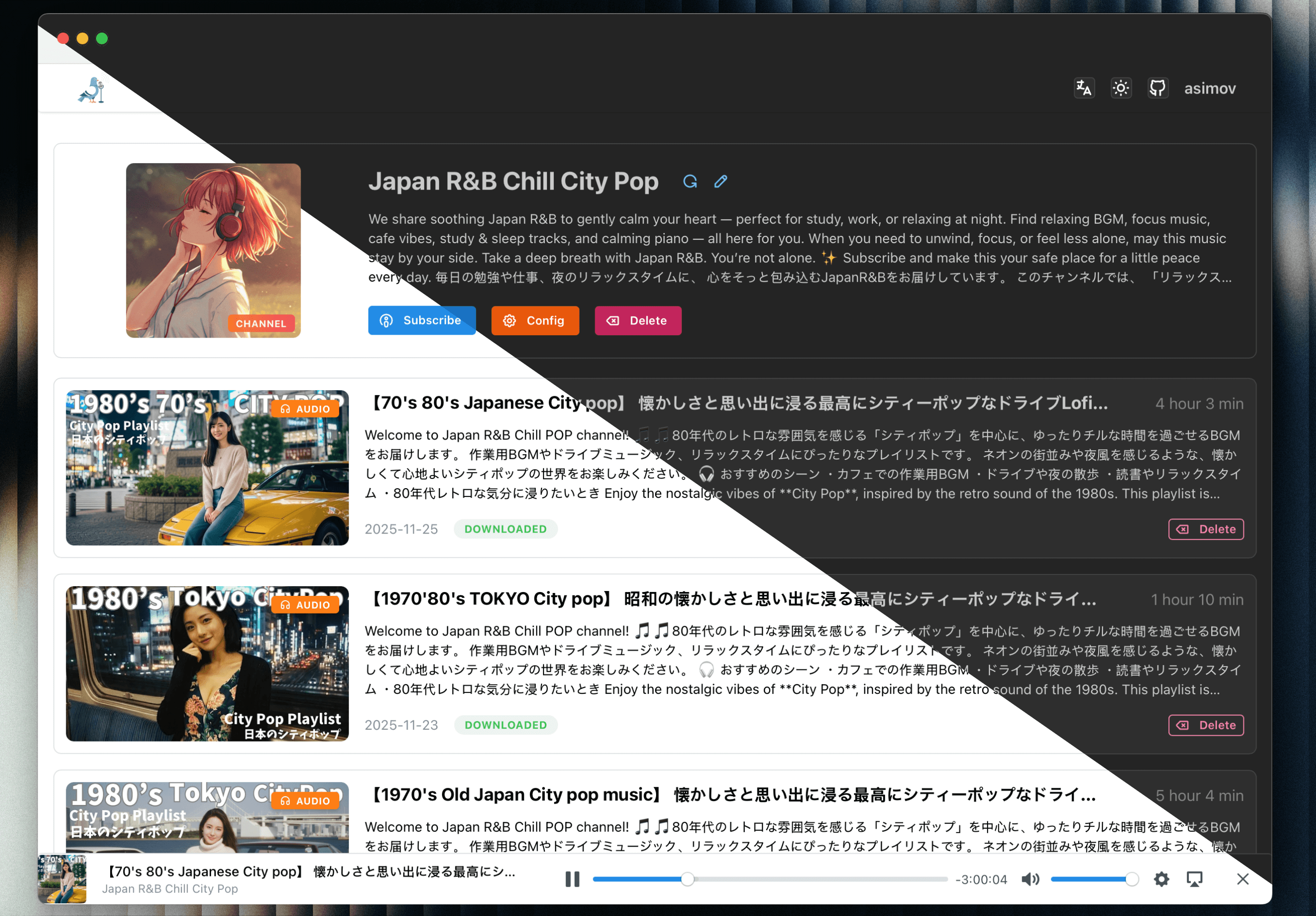
Screenshots
Channel list
Channel detail
Core Features
🎯 Smart Subscription & Preview: Subscribe to YouTube or Bilibili channels and playlists in seconds.
🎞 Single-video subscriptions: Turn one YouTube video into an auto-generated playlist feed.
📻 Secure RSS for Any Client: Generate protected standard RSS feeds for any podcast app.
🎦 Flexible Audio/Video Output: Download as audio or video with quality and format control.
🤖 Auto Sync & History Backfill: Keep subscriptions updated and backfill older videos on demand.
👥 Multi-user & Role-based Access: Manage multiple accounts with granular permissions, restricting system and feed configurations to admin users.
🍪 Expanded Cookie Support: Use YouTube and Bilibili cookies for more reliable restricted-content access.
🌍 Proxy-ready Network Access: Route YouTube API and yt-dlp traffic through custom proxies.
🔗 One-click Episode Sharing: Share any episode with a public page for direct playback without login.
📦 Fast Batch Downloads: Search, select, and queue large back catalogs efficiently.
📊 Download Dashboard & Bulk Actions: Track task status and retry, cancel, or delete in bulk.
🔔 Failed-download Digests & Alerts: Get email or webhook summaries when automatic retries are exhausted.
🔍 Per-feed Filters & Retention: Control sync scope with keywords, duration, and episode limits.
⏱ Smarter New Episode Downloads: Delay auto-downloads to improve fresh-video processing results.
🎛 Customizable Feeds & Player: Customize titles and cover art, then play episodes on the web.
🧩 Episode Management & Control: Download, retry, cancel, and delete episodes with file cleanup.
🔓 Trusted-environment Auto Login: Skip manual sign-in when PigeonPod runs behind trusted access controls.
🔒 Built-in SSL/TLS Encryption: Secure your self-hosted instance with native SSL support for encrypted web and RSS traffic.
📈 YouTube API Usage Insights: Monitor quota usage before sync jobs hit the limit.
🔄 OPML Subscription Export: Export subscriptions for easy migration between podcast clients.
⬆️ In-app yt-dlp Management: Manage runtimes, switch active versions, and update yt-dlp without leaving the app.
🛠 Advanced yt-dlp Arguments: Fine-tune downloads with custom yt-dlp arguments.
📚 Podcasting 2.0 Chapters Support: Generate chapter files for richer player navigation.
🌐 Multilingual Responsive UI: Use PigeonPod across devices in eight interface languages.
Deployment
Using Docker Compose (Recommended)
Make sure you have Docker and Docker Compose installed on your machine.
Use the docker-compose configuration file, modify environment variables according to your needs
version: '3.9'
services:
  pigeon-pod:
    image: 'ghcr.io/aizhimou/pigeon-pod:latest'
    restart: unless-stopped
    container_name: pigeon-pod
    ports:
      - '8834:8080'
    environment:
      - SPRING_DATASOURCE_URL=jdbc:sqlite:/data/pigeon-pod.db # set to your database path
      # Optional: disable PigeonPod built-in auth when running behind another auth layer
      # - PIGEON_AUTH_ENABLED=false
    volumes:
      - data:/data

volumes:
  data:
[!WARNING]
PIGEON_AUTH_ENABLED defaults to true. Set it to false only if another trusted layer already protects the web UI, such as an auth proxy, reverse proxy access control, VPN, or private network.
If you disable built-in auth, you must secure PigeonPod by other means. Do not expose an auth-disabled instance directly to the public Internet.
Start the service
docker-compose up -d
Access the application
Open your browser and visit http://localhost:8834 with default username: root and default password: Root@123
Run with JAR
Make sure you have Java 17+ and yt-dlp installed on your machine.
Download the latest release JAR from Releases
Create data directory in the same directory as the JAR file.
mkdir -p data
Run the application
java -jar -Dspring.datasource.url=jdbc:sqlite:/path/to/your/pigeon-pod.db \  # set to your database path
           pigeon-pod-x.x.x.jar
Access the application
Open your browser and visit http://localhost:8080 with default username: root and default password: Root@123
Storage Configuration
PigeonPod supports LOCAL and S3 storage modes.
You can only enable one mode at a time.
S3 mode supports MinIO, Cloudflare R2, AWS S3, and other S3-compatible services.
Switching storage mode does not migrate historical media automatically. You must migrate files manually.
Storage Quick Comparison
Mode
Pros
Cons
LOCAL
Easy setup, no external dependency
Uses local disk, harder to scale
S3
Better scalability, suitable for cloud deployment
Requires object storage setup and credentials
Documentation
Wiki Home
Quick Start
Installation
Configuration Overview
Troubleshooting
Advanced Customization
Tech Stack
Backend
Java 17 - Core language
Spring Boot 3.5 - Application framework
MyBatis-Plus 3.5 - ORM framework
Sa-Token - Authentication framework
SQLite - Lightweight database
Flyway - Database migration tool
YouTube Data API v3 - YouTube data retrieval
yt-dlp - Video download tool
Rome - RSS generation library
Frontend
Javascript (ES2024) - Core language
React 19 - Application framework
Vite 7 - Build tool
Mantine 8 - UI component library
i18next - Internationalization support
Axios - HTTP client
Development Guide
Environment Requirements
Java 17+
Node.js 22+
Maven 3.9+
SQLite
yt-dlp
Local Development
Clone the project
git clone https://github.com/aizhimou/PigeonPod.git
cd PigeonPod
Configure database
# Create data directory
mkdir -p data/audio

# Database file will be created automatically on first startup
Configure YouTube API
Create a project in Google Cloud Console
Enable YouTube Data API v3
Create an API key
Configure the API key in user settings
Start backend
cd backend
mvn spring-boot:run
Start frontend (new terminal)
cd frontend
npm install
npm run dev
Access the application
Frontend dev server: http://localhost:5173
Backend API: http://localhost:8080
Development Notes
Ensure yt-dlp is installed and available in command line
Configure correct YouTube API key
Ensure audio storage directory has sufficient disk space
Regularly clean up old audio files to save space
Star History
Made with ❤️ for podcast enthusiasts!
⭐ If you like PigeonPod, give us a star on GitHub!
GitHub topics của aizhimou/pigeon-pod: "listenbox", "mantine-ui", "podcast", "podsync", "react", "self-hosted", "springboot3", "youtube". TopGit xếp repo vào nhóm Developer Tools.
aizhimou/pigeon-pod có phải mã nguồn mở không?
Có — aizhimou/pigeon-pod phát hành theo license GPL-3.0, nghĩa là mã nguồn mở để đọc, fork và (tùy license) tái sử dụng. Mã: github.com/aizhimou/pigeon-pod.
aizhimou/pigeon-pod có trang demo không?
Dự án có trang chủ ở https://pigeonpod.cloud. Tab "Readme" ở trang này thường có ảnh chụp và hướng dẫn bắt đầu nhanh.
aizhimou/pigeon-pod còn đang phát triển không?
Commit gần nhất trên aizhimou/pigeon-pod là 2 tháng trước (theo timestamp GitHub). Repo có 95 fork — một chỉ báo về mức độ quan tâm của cộng đồng.
aizhimou/pigeon-pod dùng license gì?
aizhimou/pigeon-pod phát hành theo license GPL-3.0. Nên mở file LICENSE trên GitHub để xác nhận — license metadata đôi khi lệch với thực tế dự án.
Đọc thêm về aizhimou/pigeon-pod ở đâu?
Trang TopGit này là một snapshot — tab "Readme" hiển thị nguyên văn README của repo (đã bỏ link, giữ ảnh). Repo GitHub ở github.com/aizhimou/pigeon-pod là nguồn chính thức.
Đọc đầy đủ README ở tab phía trên.
Muốn nghe thêm một ý kiến về pigeon-pod?
Hỏi một AI đọc được trang này — một cú bấm là có ngay nhận định về pigeon-pod.
 /pigeon-pod