aleju/face-generator hiện có 310 sao trên GitHub, viết chủ yếu bằng Lua. Generate human faces with neural networks
Tóm tắt dựng từ metadata GitHub của chính dự án — chưa có bài review TopGit. Trang sẽ tự động cập nhật khi bài review đầy đủ được xuất bản.
VÌ SAO CHƯA CÓ REVIEW
TopGit viết bài đầy đủ cho repo có nhiều sao nhất và được yêu cầu nhiều nhất. Trang này là snapshot trong thời gian chờ — xem README gốc ở tab READ ME.
This is a script to generate new images of human faces using the technique of generative adversarial networks (GAN), as described in the paper by Ian J. Goodfellow.
GANs train two networks at the same time: A Generator (G) that draws/creates new images and a Discriminator (D) that distinguishes between real and fake images. G learns to trick D into thinking that his images are real (i.e. learns to produce good looking images). D learns to prevent getting tricked (i.e. learns what real images look like).
Ideally you end up with a G that produces beautiful images that look like real ones. On human faces that works reasonably well, probably because they contain a lot of structure (autoencoders work well on them too).
The code in this repository is a modified version of facebook's eyescream project.
Example images
The following images were generated by a model trained with th train.lua --D_L1=0 --D_L2=0 --D_iterations=2.
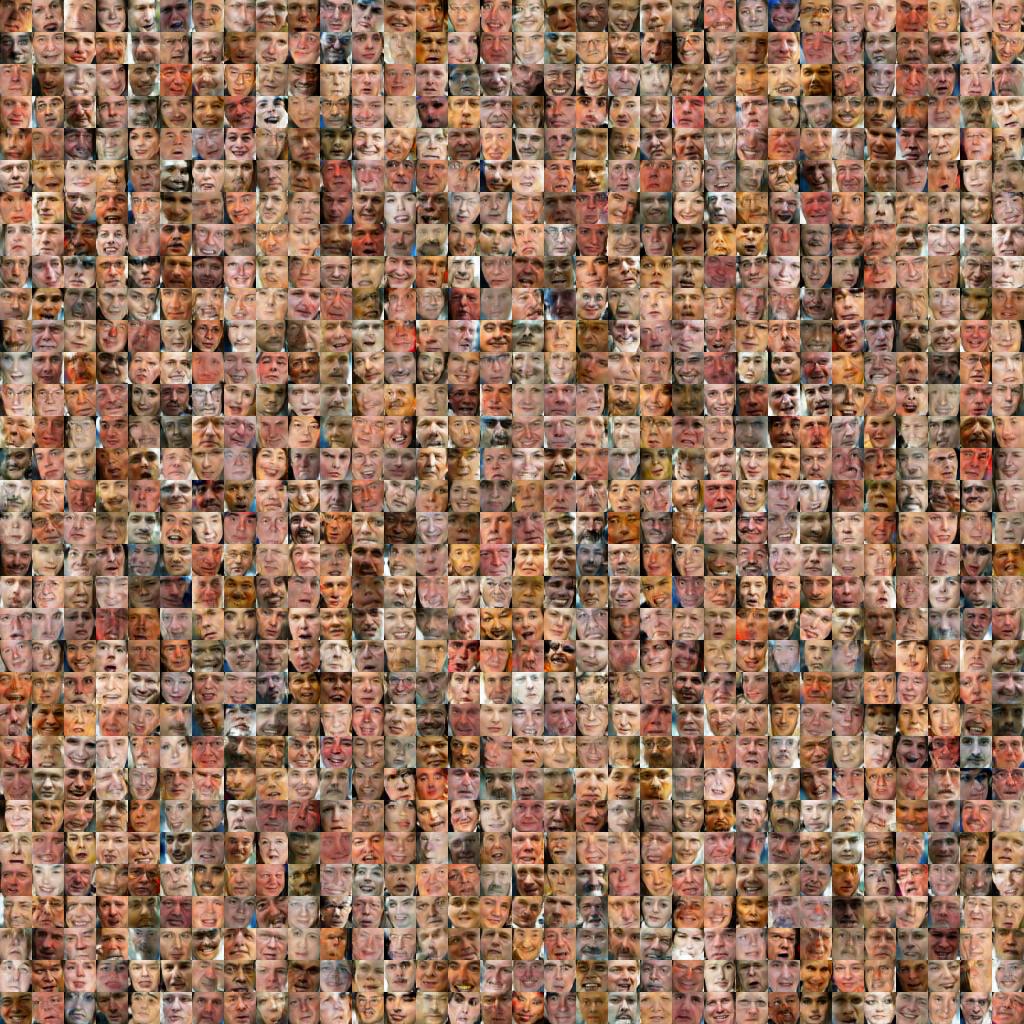
1024 randomly generated 32x32 face images.
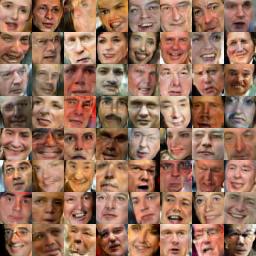
64 generated 32x32 images, rated by D as the best images among 1024 randomly generated ones.
16 generated images (each pair left) and their nearest neighbours from the training set (each pair right). Distance was measured by 2-Norm (torch.dist()). The 16 selected images were the "best" ones among 1024 images according to the rating by D, hence some similarity with the training set is expected.
Requirements
To generate the dataset:
Labeled Faces in the Wild (original dataset without funneling)
Python 2.7 (only tested with that version)
Scipy
Numpy
scikit-image
To run the GAN part:
Torch with the following libraries (most of them are probably already installed by default):
pl (luarocks install pl)
nn (luarocks install nn)
paths (luarocks install paths)
image (luarocks install image)
optim (luarocks install optim)
cutorch (luarocks install cutorch)
cunn (luarocks install cunn)
cudnn (luarocks install cudnn)
dpnn (luarocks install dpnn)
display
Nvidia GPU with >= 4 GB memory
cudnn3
Usage
Building the dataset:
Download Labeled Faces in the Wild and extract it somewhere
In dataset/ run python generate_dataset.py --path="/foo/bar/lfw", where /foo/bar/lfw is the path to your LFW dataset
To train a new model, follow these steps:
Start display with ~/.display/run.js &
Open http://localhost:8000 to see the training progress
Train a 32x32 color generator with th train.lua (add --grayscale for grayscale images)
Sample images with th sample.lua. Add --neighbours to sample nearest neighbours (takes long). Add e.g. --runs=10 to generate 10 times the amount of images.
You might have to work with the command line parameters --D_iterations and --G_iterations to get decent performance.
Sometimes you also might have to change --D_L2 (D's L2 norm) or --G_L2 (G's L2 norm). (Similar parameters are available for L1.)
Architecture
G's architecture is mostly copied from the blog post by Anders Boesen Lindbo Larsen and Søren Kaae Sønderby.
It is basically a full laplacian pyramid in one network.
The network starts with a small linear layer, which roughly generates 8x8 images.
That is followed by upsampling layers, which increase the image size to 16x16 and then 32x32 pixels.
where dimensions[1] is 3 (color) or 1 (grayscale), and dimensions[2] is the height of 32 (same as dimensions[3]).
Training is done with Adam (by default).
Command Line Parameters
The train.lua script has the following parameters:
--batchSize (default 16): The size of each batch, which will be split in two parts for G and D, making each one of them half-size. So a setting of 4 will create a batch of size of 2 for D (one image fake, one real) and another batch of size 2 for G. Because of that, the minimum size is 4 (and batches must be even sized).
--save (default "logs"): Directory to save the weights to.
--saveFreq (default 30): Save weights every N epochs.
--network (default ""): Name of a weights file in the save directory to load.
--noplot: Whether to NOT plot during training.
--N_epoch (default 1000): How many examples to use during each epoch (-1 means "use the whole dataset").
--G_SGD_lr (default 0.02): Learning rate for G's SGD, if SGD is used as the optimizer. (Note: There is no decay. You should use Adam or Adagrad.)
--G_SGD_momentum (default 0): Momentum for G's SGD.
--D_SGD_lr (default 0.02): Learning rate for D's SGD, if SGD is used as the optimizer. (Note: There is no decay. You should use Adam or Adagrad.)
--D_SGD_momentum (default 0): Momentum for D's SGD.
--G_adam_lr (default -1): Adam learning rate for G (-1 is automatic).
--D_adam_lr (default -1): Adam learning rate for D (-1 is automatic).
--G_L1 (default 0): L1 penalty on the weights of G.
--G_L2 (default 0): L2 penalty on the weights of G.
--D_L1 (default 0): L1 penalty on the weights of D.
--D_L2 (default 1e-4): L2 penalty on the weights of D.
--D_iterations (default 1): How often to optimize D per batch (e.g. 2 for D and 1 for G means that D will be trained twice as much).
--G_iterations (default 1): How often to optimize G per batch.
--D_maxAcc (default 1.01): Stop training of D roughly around that accuracy level until G has catched up. (Sounds good in theory, doesn't produce good results in practice.)
--D_clamp (default 1): To which value to clamp D's gradients (e.g. 5 means -5 to +5, 0 is off).
--G_clamp (default 5): To which value to clamp G's gradients (e.g. 5 means -5 to +5, 0 is off).
--D_optmethod (default "adam"): Optimizer to use for D, either "sgd" or "adam" or "adagrad".
--G_optmethod (default "adam"): Optimizer to use for D, either "sgd" or "adam" or "adagrad".
--threads (default 8): Number of threads.
--gpu (default 0): Index of the GPU to train on (0-4 or -1 for cpu). Nothing is optimized for CPU.
--noiseDim (default 100): Dimensionality of noise vector that will be fed into G.
--window (default 3): ID of the first plotting window (in display), will also use about 3 window-ids beyond that.
--scale (default 32): Scale of the images to train on (height, width). Loaded images will be converted to that size. Only optimized for 32.
--seed (default 1): Seed to use for the RNG.
--weightsVisFreq (default 0): How often to update the windows showing the activity of the network (only if >0; implies starting with qlua instead of th if set to >0).
--grayscale: Whether to activate grayscale mode on the images, i.e. training will happen on grayscale images.
--denoise: If added as parameter, the script will try to load a denoising autoencoder from logs/denoiser_CxHxW.net, where C is the number of image channels (1 or 3), H is the height of the images (see --scale) and W is the width. A denoiser can be trained using train_denoiser.lua.
Other
Training was done with Adam.
Batch size was 32.
The file train_c2f.lua is used to train a coarse to fine network of the laplacian pyramid. (Deprecated)
aleju/face-generator có 310 sao GitHub — tải lại trang để xem số mới nhất, hoặc xem trực tiếp github.com/aleju/face-generator. TopGit phản chiếu số sao của GitHub nhưng không cam kết đến từng phút.
aleju/face-generator có những chủ đề gì?
GitHub topics của aleju/face-generator: "deep-learning", "face", "gan", "lua", "torch". TopGit xếp repo vào nhóm AI Tools.
aleju/face-generator có website riêng không?
TopGit chưa ghi nhận URL trang chủ cho aleju/face-generator. Phần README ở tab phía trên thường có link demo, hoặc xem mô tả GitHub của repo.
aleju/face-generator còn đang phát triển không?
Commit gần nhất trên aleju/face-generator là 8.7 năm trước (theo timestamp GitHub). Repo có 70 fork — một chỉ báo về mức độ quan tâm của cộng đồng.
aleju/face-generator dùng license gì?
aleju/face-generator phát hành theo license MIT. Nên mở file LICENSE trên GitHub để xác nhận — license metadata đôi khi lệch với thực tế dự án.
aleju/face-generator viết bằng ngôn ngữ gì?
aleju/face-generator chủ yếu viết bằng Lua. Trường "language" của GitHub dựa trên phần lớn byte ở nhánh mặc định.
Đọc thêm về aleju/face-generator ở đâu?
Trang TopGit này là một snapshot — tab "Readme" hiển thị nguyên văn README của repo (đã bỏ link, giữ ảnh). Repo GitHub ở github.com/aleju/face-generator là nguồn chính thức.
Đọc đầy đủ README ở tab phía trên.
Chưa chắc face-generator có hợp với bạn?
Để ChatGPT, Claude hoặc Perplexity tìm hiểu giúp — bấm bên dưới và xem AI nói gì về face-generator.
 /face-generator