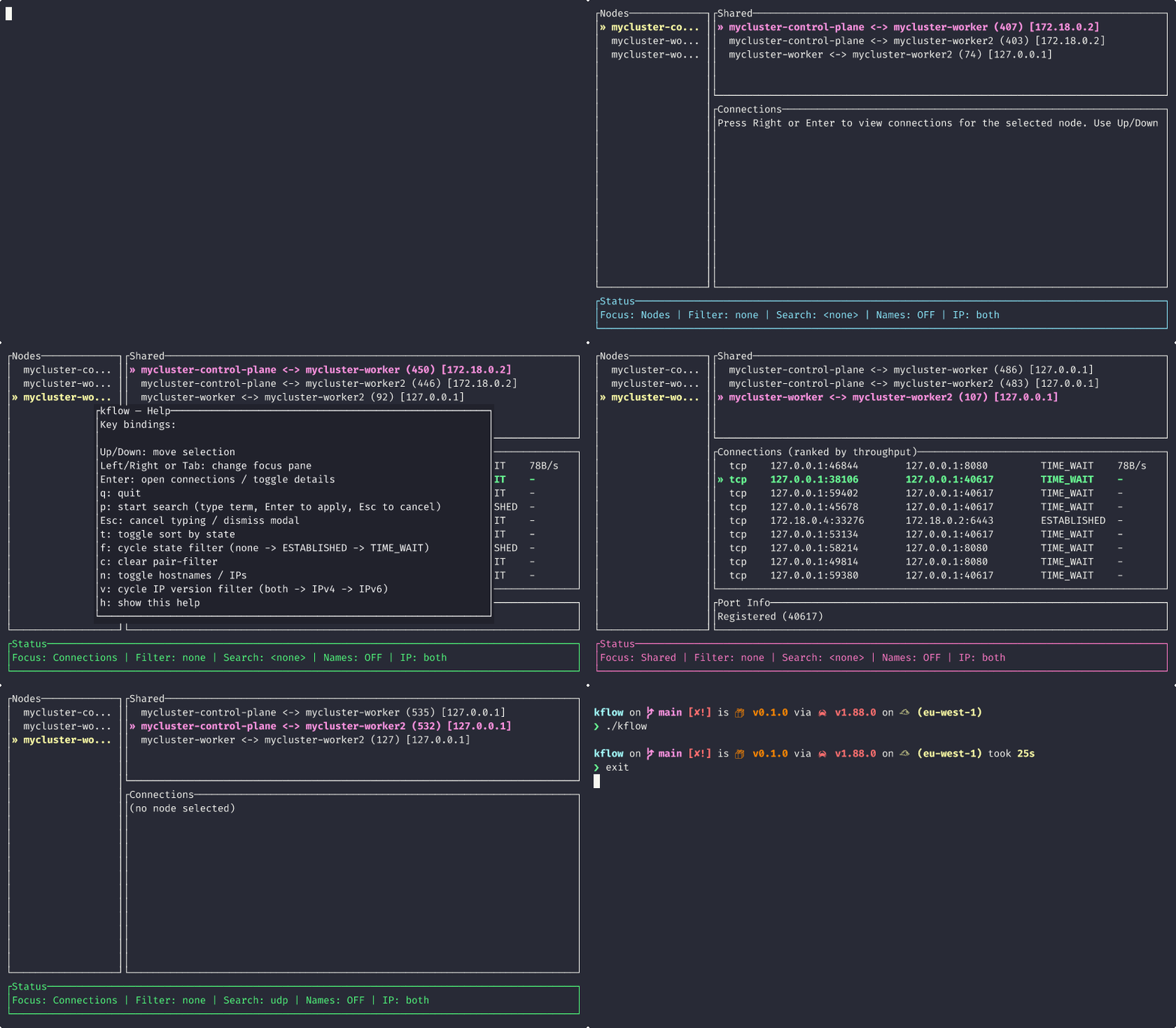
AlexsJones/kflow — dự án mã nguồn mở — đang có 64 sao GitHub. Like top for Kubernetes networking
Tóm tắt dựng từ metadata GitHub của chính dự án — chưa có bài review TopGit. Trang sẽ tự động cập nhật khi bài review đầy đủ được xuất bản.
VÌ SAO CHƯA CÓ REVIEW
TopGit viết bài đầy đủ cho repo có nhiều sao nhất và được yêu cầu nhiều nhất. Trang này là snapshot trong thời gian chờ — xem README gốc ở tab READ ME.
kflow is like top for Kubernetes networking.
It finds connections through conntrack on your nodes and identifies point to point connections across those nodes. It is a tool for debugging and diagnostics.
Coming soon: Throughput metrics to rank connections
The agent intentionally requires elevated privileges on the node. The DaemonSet mounts the host /proc into each pod, runs the container as root, and requests NET_ADMIN/NET_RAW capabilities so it can read live conntrack state. Applying the provided Kubernetes manifest therefore requires a user with permission to create DaemonSets and hostPath mounts in the target namespace (cluster-admin or equivalent RBAC is usually needed).
Build yourself
Build the CLI and daemon locally with Cargo. The repository contains a multi-stage Dockerfile.daemon and a k8s/daemonset.yaml manifest; the CLI provides install and uninstall subcommands that call kubectl for convenience.
To build and run the CLI (the binary is named kflow):
cargo build --bin kflow
./target/debug/kflow
Installing the Daemonset
Install the DaemonSet into the current cluster context (may require cluster-admin). The installer accepts an optional --conntrack value to override the path the daemon reads from inside the pod:
Notes: some environments (for example kind) may not expose conntrack entries by default or may use a different proc path. If pods show no connections, verify conntrack is present on the node (sudo head -n 20 /proc/net/nf_conntrack) and that the manifest is mounting /proc into /host/proc inside the pod.
Conntrack requirement and path locations
kflow relies on the kernel conntrack table being available on each node so the node-local daemon can read active connections. Many Linux distributions expose conntrack under /proc/net/ but the exact filename and location can vary by kernel/module and distribution.
Common paths you may encounter:
/proc/net/nf_conntrack (modern kernels, common on many distros)
/proc/net/ip_conntrack (older kernels or different module naming)
/proc/net/nf_conntrack6 (IPv6 conntrack on some systems)
If you run the provided DaemonSet the manifest mounts the host /proc into the pod at /host/proc and sets the default CONNTRACK_PATH to /host/proc/net/nf_conntrack. If you have a different host path, supply a container-visible path to the installer using --conntrack.
Examples:
Node exposes the file at /proc/net/nf_conntrack (default):
kflow install -n monitoring
Node exposes the file at /proc/net/ip_conntrack (override):
You mounted host /proc at a different location inside the pod (advanced):
Edit k8s/daemonset.yaml so the volumeMount and CONNTRACK_PATH agree, or pass the exact path the daemon can see inside the container with --conntrack.
Enable conntrack accounting (bytes)
To see non-zero per-connection byte counters and throughput in kflow, you must enable conntrack accounting on each node. This is a kernel setting and must be configured on the host (we do not change it from inside the pod).
For kind clusters:
# Enable on control-plane
docker exec kind-control-plane sh -c 'echo 1 > /proc/sys/net/netfilter/nf_conntrack_acct'

# Enable on each worker node
docker exec kind-worker sh -c 'echo 1 > /proc/sys/net/netfilter/nf_conntrack_acct'
docker exec kind-worker2 sh -c 'echo 1 > /proc/sys/net/netfilter/nf_conntrack_acct'
# repeat for all workers
For regular nodes:
sudo sh -c 'echo 1 > /proc/sys/net/netfilter/nf_conntrack_acct'
Make it persistent across reboots via sysctl:
echo 'net.netfilter.nf_conntrack_acct=1' | sudo tee /etc/sysctl.d/99-kflow.conf
sudo sysctl --system
Verify bytes are recorded:
On the node:
sudo head -5 /proc/net/nf_conntrack
Or from a kflow pod:
kubectl exec -n <namespace> <kflow-pod> -- head -5 /host/proc/net/nf_conntrack
If bytes= fields are present and increasing (e.g., bytes=1234 packets=10), kflow will compute per-connection throughput automatically. Note: Only NEW connections created after enabling accounting will show byte counters.
Troubleshooting bytes=0:
If you see bytes: 0 and throughput_bytes_per_sec: 0 in kflow even after enabling nf_conntrack_acct:
Verify accounting is enabled: cat /proc/sys/net/netfilter/nf_conntrack_acct should return 1
Check if bytes appear in conntrack output: sudo cat /proc/net/nf_conntrack | grep bytes
The setting only affects new connections. Existing connections won't show bytes retroactively. Generate new traffic or wait for connections to be re-established.
If auto-detection fails the daemon will log a message and fall back to the configured path; using KFLOW_DEBUG will emit helpful debug messages about which candidate paths were tested.
Quick debugging checklist if pods show no connections:
On the node, check that conntrack is present and readable: sudo head -n 20 /proc/net/nf_conntrack (or your distro's path).
Check the pod sees the same file: kubectl exec -n <ns> <pod> -- ls -l /host/proc/net and kubectl exec -n <ns> <pod> -- head -n 5 /host/proc/net/nf_conntrack.
If the file is at a different path on the host, use kflow install --conntrack <path> where <path> is the host's path (our installer translates /proc/... to the mounted /host/proc/... for you).
Some lightweight clusters (kind, k3s default configurations) may not enable conntrack by default; enable the kernel module or use a cluster that supports conntrack for full visibility.
AlexsJones/kflow có 64 sao GitHub — tải lại trang để xem số mới nhất, hoặc xem trực tiếp github.com/AlexsJones/kflow. TopGit phản chiếu số sao của GitHub nhưng không cam kết đến từng phút.
AlexsJones/kflow có phải mã nguồn mở không?
Có — AlexsJones/kflow phát hành theo license MIT, nghĩa là mã nguồn mở để đọc, fork và (tùy license) tái sử dụng. Mã: github.com/AlexsJones/kflow.
AlexsJones/kflow có website riêng không?
TopGit chưa ghi nhận URL trang chủ cho AlexsJones/kflow. Phần README ở tab phía trên thường có link demo, hoặc xem mô tả GitHub của repo.
AlexsJones/kflow là gì?
AlexsJones/kflow (AlexsJones/kflow) là dự án Rust trên GitHub. Theo mô tả gốc: Like top for Kubernetes networking
Đọc thêm về AlexsJones/kflow ở đâu?
Trang TopGit này là một snapshot — tab "Readme" hiển thị nguyên văn README của repo (đã bỏ link, giữ ảnh). Repo GitHub ở github.com/AlexsJones/kflow là nguồn chính thức.
Đọc đầy đủ README ở tab phía trên.
Vẫn đang phân vân về kflow?
Một cú bấm sẽ gửi câu hỏi kèm trang này cho AI — xem AI nói gì về kflow.
 /kflow