Là một dự án API, alufers/mitmproxy2swagger đã đạt 9.7k sao trên GitHub, ngôn ngữ HTML. Automagically reverse-engineer REST APIs via capturing traffic
Tóm tắt dựng từ metadata GitHub của chính dự án — chưa có bài review TopGit. Trang sẽ tự động cập nhật khi bài review đầy đủ được xuất bản.
VÌ SAO CHƯA CÓ REVIEW
TopGit viết bài đầy đủ cho repo có nhiều sao nhất và được yêu cầu nhiều nhất. Trang này là snapshot trong thời gian chờ — xem README gốc ở tab READ ME.
A tool for automatically converting mitmproxy captures to OpenAPI 3.0 specifications. This means that you can automatically reverse-engineer REST APIs by just running the apps and capturing the traffic.
🆕 NEW!
Added support for processing HAR exported from the browser DevTools. See Usage - HAR for more details.
Installation
First you will need python3 and pip3.
$ pip install mitmproxy2swagger
# ... or ...
$ pip3 install mitmproxy2swagger
# ... or ...
$ git clone [email protected]:alufers/mitmproxy2swagger.git
$ cd mitmproxy2swagger
$ docker build -t mitmproxy2swagger .
Then clone the repo and run mitmproxy2swagger as per examples below.
Usage
Mitmproxy
To create a specification by inspecting HTTP traffic you will need to:
Capture the traffic by using the mitmproxy tool. I personally recommend using mitmweb, which is a web interface built-in to mitmproxy.
$ mitmweb
Web server listening at http://127.0.0.1:8081/
Proxy server listening at http://*:9999
...
IMPORTANT
To configure your client to use the proxy exposed by mitm proxy, please consult the mitmproxy documentation for more information.
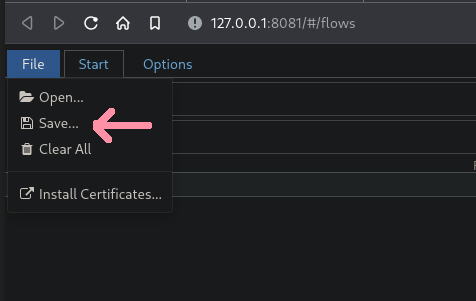
Save the traffic to a flow file.
In mitmweb you can do this by using the "File" menu and selecting "Save":
Please note that you can use an existing schema, in which case the existing schema will be extended with the new data. You can also run it a few times with different flow captures, the captured data will be safely merged.
<api_prefix> is the base url of the API you wish to reverse-engineer. You will need to obtain it by observing the requests being made in mitmproxy.
For example if an app has made requests like these:
Running the first pass should have created a section in the schema file like this:
x-path-templates:
  # Remove the ignore: prefix to generate an endpoint with its URL
  # Lines that are closer to the top take precedence, the matching is greedy
  - ignore:/addresses
  - ignore:/basket
  - ignore:/basket/add
  - ignore:/basket/checkouts
  - ignore:/basket/coupons/attach/{id}
  - ignore:/basket/coupons/attach/104754
You should edit the schema file with a text editor and remove the ignore: prefix from the paths you wish to be generated. You can also adjust the parameters appearing in the paths.
Run the command a second time (with the same schema file). It will pick up the edited lines and generate endpoint descriptions.
Please note that mitmproxy2swagger will not overwrite existing endpoint descriptions, if you want to overwrite them, you can delete them before running the second pass.
Passing --examples will add example data to requests and responses. Take caution when using this option, as it may add sensitive data (tokens, passwords, personal information etc.) to the schema.
Passing --headers will add headers data to requests and responses. Take caution when using this option, as it may add sensitive data (tokens, passwords, personal information etc.) to the schema.
HAR
Capture and export the traffic from the browser DevTools.
In the browser DevTools, go to the Network tab and click the "Export HAR" button.
Continue the same way you would do with the mitmproxy dump. mitmproxy2swagger will automatically detect the HAR file and process it.
Example output
See the examples. You will find a generated schema there and an html file with the generated documentation (via redoc-cli).
alufers/mitmproxy2swagger có phải mã nguồn mở không?
TopGit chưa ghi nhận license cho alufers/mitmproxy2swagger. Phần lớn repo public trên GitHub là mã nguồn mở, nhưng điều khoản khác nhau từng repo — mở file LICENSE để xác nhận.
alufers/mitmproxy2swagger là gì?
alufers/mitmproxy2swagger (alufers/mitmproxy2swagger) là dự án HTML trên GitHub. Theo mô tả gốc: Automagically reverse-engineer REST APIs via capturing traffic
alufers/mitmproxy2swagger so với các dự án API khác thế nào?
alufers/mitmproxy2swagger được TopGit xếp vào nhóm API, với 9.7k sao GitHub và viết bằng HTML. Xem trang chủ đề API trên TopGit để so sánh với các dự án tương tự theo số sao và mức độ hoạt động.
Cùng nhóm API còn repo nào?
alufers/mitmproxy2swagger thuộc nhóm API trên TopGit, cùng 4 topic GitHub. Trang Trending và Topics liệt kê các repo cùng số sao và cùng ngôn ngữ để so sánh.
Đọc thêm về alufers/mitmproxy2swagger ở đâu?
Trang TopGit này là một snapshot — tab "Readme" hiển thị nguyên văn README của repo (đã bỏ link, giữ ảnh). Repo GitHub ở github.com/alufers/mitmproxy2swagger là nguồn chính thức.
Vì sao alufers/mitmproxy2swagger được xếp vào nhóm API?
TopGit xếp alufers/mitmproxy2swagger vào nhóm API dựa trên GitHub topics và mô tả của repo (gắn thẻ: "mitmproxy", "openapi", "reverse-engineering"). Việc phân loại dựa trên metadata thật của repo, không phải đoán theo cảm tính biên tập.
Đọc đầy đủ README ở tab phía trên.
mitmproxy2swagger có đáng để bạn bỏ thời gian?
ChatGPT, Claude và Perplexity đều đọc được trang này. Hỏi thử xem họ nghĩ gì về mitmproxy2swagger.

 /mitmproxy2swagger