319 sao GitHub và vẫn tăng — amueller/ml-workshop-1-of-4 là dự án HTML mà TopGit đang theo dõi trên nền tảng. Introduction to Machine learning with Python, 4h interactive workshop
Tóm tắt dựng từ metadata GitHub của chính dự án — chưa có bài review TopGit. Trang sẽ tự động cập nhật khi bài review đầy đủ được xuất bản.
VÌ SAO CHƯA CÓ REVIEW
TopGit viết bài đầy đủ cho repo có nhiều sao nhất và được yêu cầu nhiều nhất. Trang này là snapshot trong thời gian chờ — xem README gốc ở tab READ ME.
Introduction to Machine learning with scikit-learn
Part 1 of 4
Other parts:
Part 2
Part 3
Part 4
Content
What is machine learning and what can it do for you?
Data loading and basic API of scikit-learn
Fundamentals of Data Preprocessing: scaling and categorical data
Imputation: dealing with missing values
Instructor
Andreas Mueller @amuellerml - Columbia University; Book: Introduction to Machine Learning with Python
This repository will contain the teaching material and other info associated
with the "Introduction to Machine Learning with scikit-learn" course.
About the workshop
Machine learning has become an indispensable tool across many areas of research and commercial applications. From text-to-speech for your phone to detecting the Higgs boson, machine learning excels at extracting knowledge from large amounts of data. This talk will give a general introduction to machine learning, as well as introduce practical tools for you to apply machine learning in your research. We will focus on one particularly important subfield of machine learning, supervised learning. The goal of supervised learning is to "learn" a function that maps inputs x to an output y, by using a collection of training data consisting of input-output pairs. We will walk through formulating a problem as a supervised machine learning problem, creating the necessary training data and applying and evaluating a machine learning algorithm. This workshop should give you all the necessary background to start using machine learning yourself.
Prerequisites
This workshop assumes familiarity with Jupyter notebooks and basics of pandas, matplotlib and numpy.
Obtaining the Tutorial Material
If you are familiar with git, it is most convenient if you clone the GitHub repository. This
is highly encouraged as it allows you to easily synchronize any changes to the material.
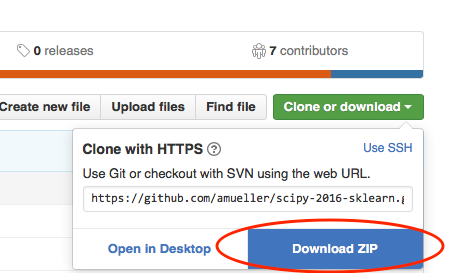
If you are not familiar with git, you can download the repository as a .zip file by heading over to the GitHub repository (https://github.com/amueller/ml-workshop-1-of-4) in your browser and click the green “Download” button in the upper right.
Please note that I may add and improve the material until shortly before the tutorial session, and we recommend you to update your copy of the materials one day before the tutorials. If you have an GitHub account and forked/cloned the repository via GitHub, you can sync your existing fork with via the following commands:
git pull origin master
Installation Notes
This tutorial will require recent installations of
NumPy
SciPy
matplotlib
pillow
pandas
scikit-learn (>=0.22.1)
IPython
Jupyter Notebook
The last one is important, you should be able to type:
jupyter notebook
in your terminal window and see the notebook panel load in your web browser.
Try opening and running a notebook from the material to see check that it works.
For users who do not yet have these packages installed, a relatively
painless way to install all the requirements is to use a Python distribution
such as Anaconda, which includes
the most relevant Python packages for science, math, engineering, and
data analysis; Anaconda can be downloaded and installed for free
including commercial use and redistribution.
The code examples in this tutorial requires Python 3.5 or later.
After obtaining the material, we strongly recommend you to open and execute
a Jupyter Notebook jupter notebook check_env.ipynb that is located at the
top level of this repository. Inside the repository, you can open the notebook
by executing
jupyter notebook check_env.ipynb
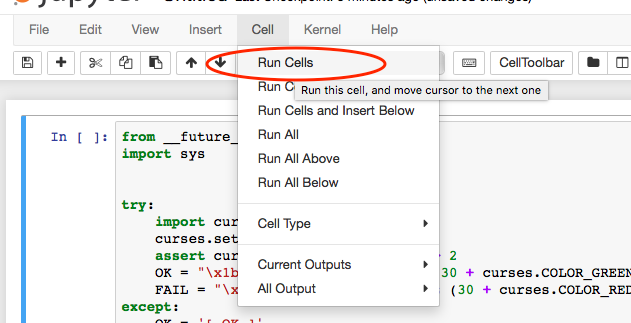
inside this repository. Inside the Notebook, you can run the code cell by
clicking on the "Run Cells" button as illustrated in the figure below:
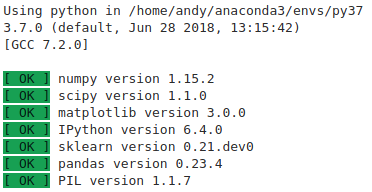
Finally, if your environment satisfies the requirements for the tutorials, the executed code cell will produce an output message as shown below:
amueller/ml-workshop-1-of-4 có 319 sao GitHub — tải lại trang để xem số mới nhất, hoặc xem trực tiếp github.com/amueller/ml-workshop-1-of-4. TopGit phản chiếu số sao của GitHub nhưng không cam kết đến từng phút.
amueller/ml-workshop-1-of-4 có phải mã nguồn mở không?
Có — amueller/ml-workshop-1-of-4 phát hành theo license MIT, nghĩa là mã nguồn mở để đọc, fork và (tùy license) tái sử dụng. Mã: github.com/amueller/ml-workshop-1-of-4.
amueller/ml-workshop-1-of-4 còn đang phát triển không?
Commit gần nhất trên amueller/ml-workshop-1-of-4 là 6.6 năm trước (theo timestamp GitHub). Repo có 154 fork — một chỉ báo về mức độ quan tâm của cộng đồng.
amueller/ml-workshop-1-of-4 là gì?
amueller/ml-workshop-1-of-4 (amueller/ml-workshop-1-of-4) là dự án HTML trên GitHub. Theo mô tả gốc: Introduction to Machine learning with Python, 4h interactive workshop
Đọc thêm về amueller/ml-workshop-1-of-4 ở đâu?
Trang TopGit này là một snapshot — tab "Readme" hiển thị nguyên văn README của repo (đã bỏ link, giữ ảnh). Repo GitHub ở github.com/amueller/ml-workshop-1-of-4 là nguồn chính thức.
Đọc đầy đủ README ở tab phía trên.
Chưa chắc ml-workshop-1-of-4 có hợp với bạn?
Để ChatGPT, Claude hoặc Perplexity tìm hiểu giúp — bấm bên dưới và xem AI nói gì về ml-workshop-1-of-4.