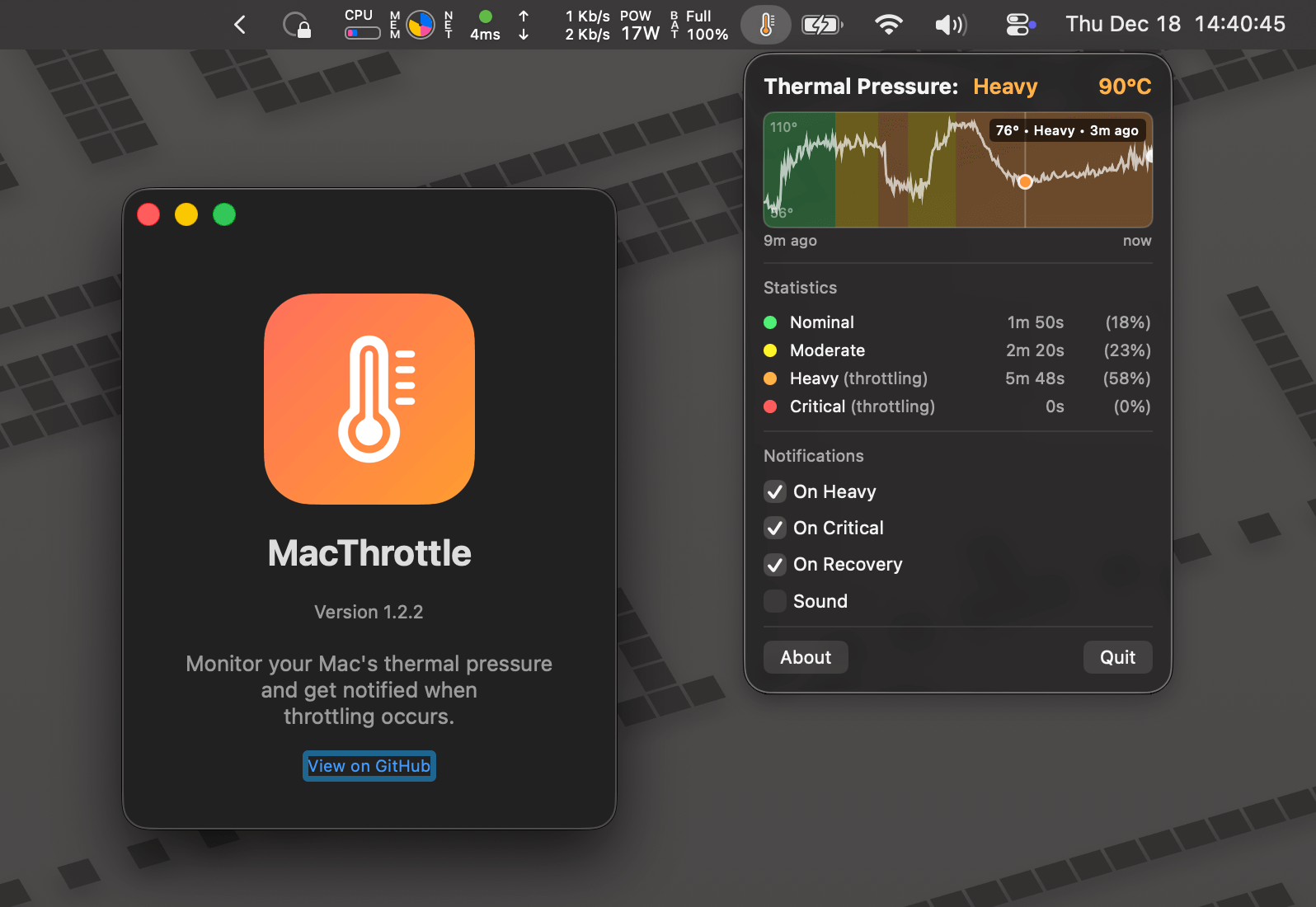
Trên GitHub, angristan/MacThrottle đã đạt 739 sao, nhóm Mobile, ngôn ngữ Swift. Menu bar app to know when your Mac is thermal throttling
Tóm tắt dựng từ metadata GitHub của chính dự án — chưa có bài review TopGit. Trang sẽ tự động cập nhật khi bài review đầy đủ được xuất bản.
VÌ SAO CHƯA CÓ REVIEW
TopGit viết bài đầy đủ cho repo có nhiều sao nhất và được yêu cầu nhiều nhất. Trang này là snapshot trong thời gian chờ — xem README gốc ở tab READ ME.
A lightweight macOS menu bar app that monitors thermal pressure and alerts you when your Mac is being throttled. No admin privileges required.
Features
Displays thermal pressure state in the menu bar using different thermometer icons
Shows CPU core temperature (reads directly from SMC)
Shows fan speed percentage (on Macs with fans)
History graph showing thermal state, temperature, and fan speed over the last 10 minutes
Statistics showing time spent in each thermal state
Configurable notifications:
When heavy throttling begins
When critical throttling occurs
When throttling stops (recovery)
Optional notification sounds
Launch at Login option
No helper daemon or admin privileges required
Thermal States
Icon
State
Description
thermometer.low
Nominal
Normal operation
thermometer.medium
Moderate
Elevated thermal pressure
thermometer.high
Heavy
Active throttling
thermometer.sun.fill
Critical
Severe throttling
Installation
Homebrew (recommended)
brew tap angristan/tap
brew install --cask macthrottle
Download from Releases
Since the app is not signed, Gatekeeper may block it on first launch. You can remove the quarantine attribute manually, or build it locally with Xcode to sign it with your own certificate.
Download the latest .dmg from Releases
Open it, and drag MacThrottle.app to your Applications folder
Building locally automatically signs the app with your development certificate, avoiding Gatekeeper issues.
# Clone the repo
git clone https://github.com/angristan/MacThrottle.git
cd MacThrottle

# Build with Xcode
xcodebuild -project MacThrottle.xcodeproj \
  -scheme MacThrottle \
  -configuration Release \
  -derivedDataPath build

# Run the app
open build/Build/Products/Release/MacThrottle.app
Or open MacThrottle.xcodeproj in Xcode and press Cmd+R to build and run.
How It Works
Thermal Pressure
MacThrottle reads thermal pressure using the Darwin notification system (notify_get_state), specifically the com.apple.system.thermalpressurelevel notification. The system reports 5 levels (nominal, moderate, heavy, trapping, sleeping), but MacThrottle consolidates the last two into "critical" since they're rarely reached in practice. Heavy is where throttling really kicks in.
Note: This notification name is not publicly documented by Apple. It comes from the private OSThermalNotification.h header (as kOSThermalNotificationPressureLevelName) and has been available since macOS 10.10. See Thermals and macOS for more details on macOS thermal APIs.
You can see it implemented in Bazel for example.
Why not ProcessInfo.thermalState?
macOS provides ProcessInfo.thermalState as a public API, but it has limited granularity (only 4 states vs the 5 actual pressure levels):
ProcessInfo.thermalState
Actual Pressure Level
nominal
nominal
fair
moderate
fair
heavy
serious
trapping
critical
sleeping
The moderate and heavy states both map to fair in ProcessInfo.thermalState, but the difference is significant: heavy is when throttling really kicks in. MacThrottle provides this granularity.
Temperature Reading
MacThrottle displays temperature alongside thermal pressure. Reported temperature is the maxmium of all CPU/GPU core temperatures.
It's using two methods:
SMC (Primary)
The System Management Controller (SMC) is a hardware chip in every Mac that manages thermal sensors, fans, and power. MacThrottle reads directly from the SMC via IOKit to get actual CPU core temperatures.
Reads chip-specific sensor keys (different for M1, M2, M3, etc)
Provides accurate per-core temperature readings
Based on the approach used by Stats
IOHIDEventSystem (Fallback)
If SMC reading fails, MacThrottle falls back to the IOHIDEventSystem private API:
Reads temperature events from PMU (Power Management Unit) sensors
Simpler but less granular: returns aggregate "tdie" temperatures rather than per-core values
May report slightly different (typically lower) values than SMC
The displayed temperature is the maximum reading across all available CPU sensors.
Fan Speed
On Macs with fans, MacThrottle reads fan speed from the SMC using standard fan keys (FNum for count, F0Ac/F1Ac for actual RPM, F0Mx/F1Mx for maximum RPM). The speed is displayed as a percentage of maximum capacity and shown as a dashed cyan line on the history graph.
Fanless Macs (like MacBook Air) won't show fan data or the "Show Fan Speed" toggle.
angristan/MacThrottle có 739 sao GitHub — tải lại trang để xem số mới nhất, hoặc xem trực tiếp github.com/angristan/MacThrottle. TopGit phản chiếu số sao của GitHub nhưng không cam kết đến từng phút.
angristan/MacThrottle có những chủ đề gì?
GitHub topics của angristan/MacThrottle: "apple", "apple-silicon", "mac", "macbook", "macbook-air", "macos", "swift", "swiftui", "thermal", "thermal-throttling". TopGit xếp repo vào nhóm Mobile.
angristan/MacThrottle có trang demo không?
Dự án có trang chủ ở https://stanislas.blog/2025/12/macos-thermal-throttling-app/. Tab "Readme" ở trang này thường có ảnh chụp và hướng dẫn bắt đầu nhanh.
angristan/MacThrottle còn đang phát triển không?
Commit gần nhất trên angristan/MacThrottle là 2 tháng trước (theo timestamp GitHub). Repo có 28 fork — một chỉ báo về mức độ quan tâm của cộng đồng.
angristan/MacThrottle dùng license gì?
angristan/MacThrottle phát hành theo license MIT. Nên mở file LICENSE trên GitHub để xác nhận — license metadata đôi khi lệch với thực tế dự án.
angristan/MacThrottle viết bằng ngôn ngữ gì?
angristan/MacThrottle chủ yếu viết bằng Swift. Trường "language" của GitHub dựa trên phần lớn byte ở nhánh mặc định.
Đọc thêm về angristan/MacThrottle ở đâu?
Trang TopGit này là một snapshot — tab "Readme" hiển thị nguyên văn README của repo (đã bỏ link, giữ ảnh). Repo GitHub ở github.com/angristan/MacThrottle là nguồn chính thức.
Đọc đầy đủ README ở tab phía trên.
Chưa chắc MacThrottle có hợp với bạn?
Để ChatGPT, Claude hoặc Perplexity tìm hiểu giúp — bấm bên dưới và xem AI nói gì về MacThrottle.
 /MacThrottle