Snapshot của anishathalye/porcupine: 1.3k★ · Go. A fast linearizability checker written in Go 🔎
Tóm tắt dựng từ metadata GitHub của chính dự án — chưa có bài review TopGit. Trang sẽ tự động cập nhật khi bài review đầy đủ được xuất bản.
VÌ SAO CHƯA CÓ REVIEW
TopGit viết bài đầy đủ cho repo có nhiều sao nhất và được yêu cầu nhiều nhất. Trang này là snapshot trong thời gian chờ — xem README gốc ở tab READ ME.
Porcupine is a fast linearizability checker used in both academia and
industry for testing the correctness of distributed systems. It takes a
sequential specification as executable Go code, along with a concurrent
history, and it determines whether the history is linearizable with respect to
the sequential specification. Porcupine also implements a visualizer for
histories and linearization points.
(click for interactive version)
Porcupine implements the algorithm described in Faster linearizability
checking via P-compositionality, an
optimization of the algorithm described in Testing for
Linearizability.
Porcupine is faster and can handle more histories than Knossos's
linearizability checker. Testing on the data in test_data/jepsen/, Porcupine
is generally 1,000x-10,000x faster and has a much smaller memory
footprint. On histories where it can take advantage of P-compositionality,
Porcupine can be millions of times faster.
Usage
Porcupine takes an executable model of a system along with a history, and it
runs a decision procedure to determine if the history is linearizable with
respect to the model. Porcupine supports specifying history in two ways, either
as a list of operations with given call and return times, or as a list of
call/return events in time order. Porcupine can also visualize histories, along
with partial linearizations, which may aid in debugging.
See the documentation for how to write a model and
specify histories. You can also check out some
example implementations of models from the tests.
Once you've written a model and have a history, you can use the
CheckOperations and CheckEvents functions
to determine if your history is linearizable. If you want to visualize a
history, along with partial linearizations, you can use the
Visualize function.
Testing linearizability
Suppose we're testing linearizability for operations on a read/write register
that's initialized to 0. We write a sequential specification for the register
like this:
type registerInput struct {
    op    bool // false = put, true = get
    value int
}

// a sequential specification of a register
registerModel := porcupine.Model{
    Init: func() interface{} {
        return 0
    },
    // step function: takes a state, input, and output, and returns whether it
    // was a legal operation, along with a new state
    Step: func(state, input, output interface{}) (bool, interface{}) {
        regInput := input.(registerInput)
        if regInput.op == false {
            return true, regInput.value // always ok to execute a put
        } else {
            readCorrectValue := output == state
            return readCorrectValue, state // state is unchanged
        }
    },
    // computes a hash for a state (optional field, improves performance)
    Hash: func(state interface{}) uint64 {
        return uint64(state.(int))
    },
}
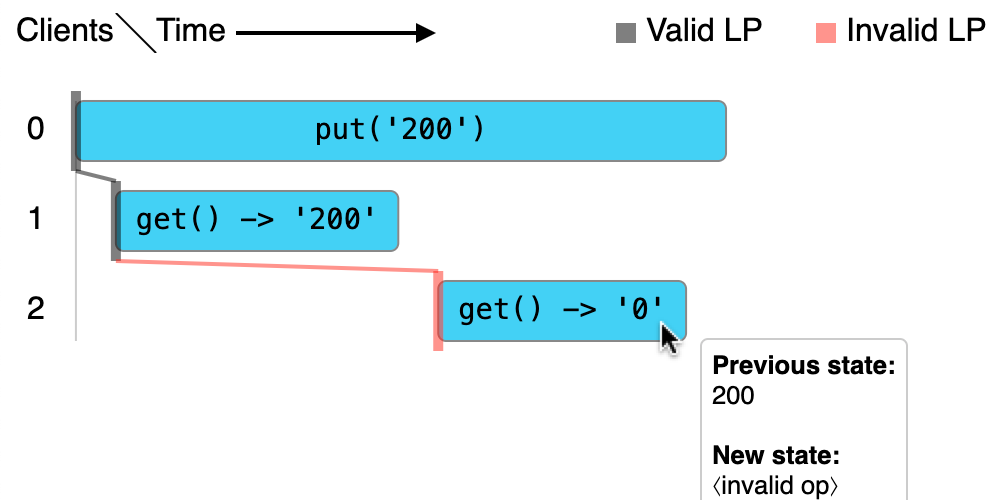
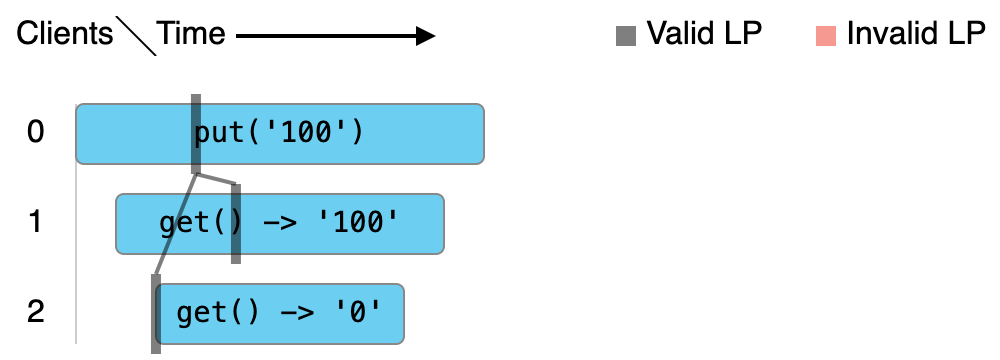
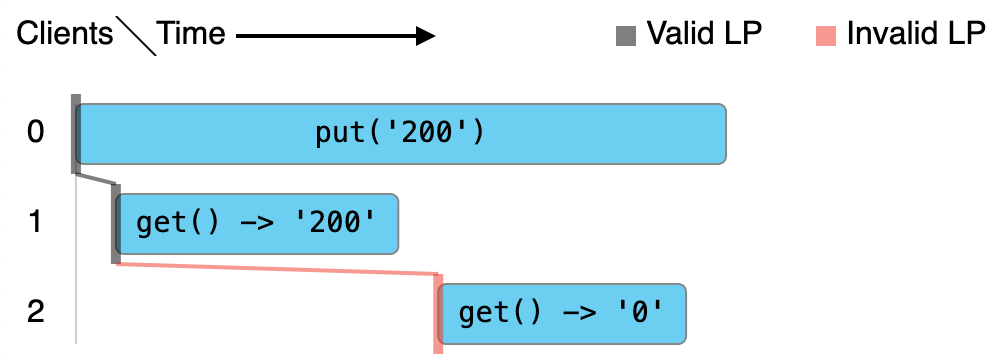
Suppose we have the following concurrent history from a set of 3 clients. In a
row, the first | is when the operation was invoked, and the second | is
when the operation returned.
See porcupine_test.go for more examples on how to write
models and histories.
Visualizing histories
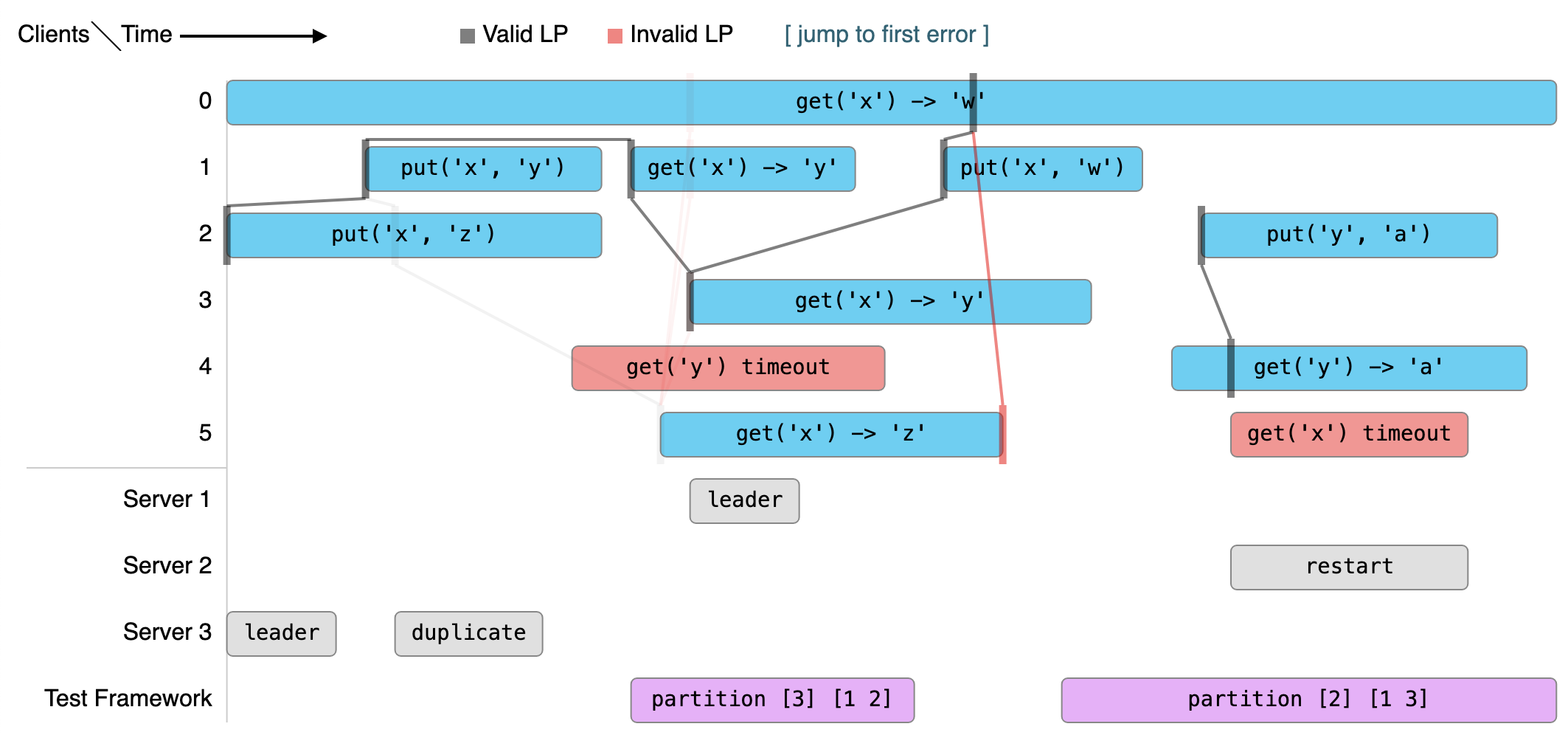
Porcupine provides functionality to visualize histories, along with the
linearization (or partial linearizations and illegal linearization points, in
the case of a non-linearizable history). The result is an HTML page that draws
an interactive visualization using JavaScript. The output looks like this:
You can see the full interactive version
here.
The visualization is by partition: all partitions are essentially independent,
so with the key-value store example above, operations related to each unique
key are in a separate partition.
Statically, the visualization shows all history elements, along with
linearization points for each partition. If a partition has no full
linearization, the visualization shows the longest partial linearization. It
also shows, for each history element, the longest partial linearization
containing that event, even if it's not the longest overall partial
linearization; these are greyed out by default. It also shows illegal
linearization points, history elements that were checked to see if they could
occur next but which were illegal to linearize at that point according to the
model.
When a history element is hovered over, the visualization highlights the most
relevant partial linearization. When it exists, the longest partial
linearization containing the event is shown. Otherwise, when it exists, the
visualization shows the longest partial linearization that ends with an illegal
LP that is the event being hovered over. Hovering over an event also shows a
tooltip showing extra information, such as the previous and current states of
the state machine, as well as the time the operation was invoked and when it
returned. This information is derived from the currently selected linearization.
Clicking on a history element selects it, which highlights the event with a
bold border. This has the effect of making the selection of a partial
linearization "sticky", so it's possible to move around the history without
de-selecting it. Clicking on another history element will select that one
instead, and clicking on the background will deselect.
All that's needed to visualize histories is the
CheckOperationsVerbose /
CheckEventsVerbose functions, which return extra
information that's used by the visualization, and the Visualize
function, which produces the visualization. For the visualization to be good,
it's useful to fill out the DescribeOperation and DescribeState fields of
the model. See visualization_test.go for an
end-to-end example of how to visualize a history using Porcupine.
You can also add custom annotations to visualizations, as shown in the example
above. This can be helpful for attaching debugging information, for example,
from servers or the test framework. You can do this using the
AddAnnotations method.
Notes
If Porcupine runs really slowly on your model/history, it may be inevitable,
due to state space explosion. See this
issue for a discussion
of this challenge in the context of a particular model and history.
When recording timestamps for operations, especially on ARM and other
weakly-ordered architectures, you may need to use memory barriers or atomic
operations to ensure accurate measurements and avoid spurious linearizability
violations. See this
issue for details.
Users
Porcupine is used in both academia and industry. It can be helpful to look at
existing uses of Porcupine to learn how you can design a robust testing
framework with linearizability checking at its core.
etcd uses Porcupine's linearizability checker and visualizer in its robustness tests [KubeCon 2023eu talk].
Amazon MemoryDB (SIGMOD'24) uses Porcupine to test MemoryDB consistency.
S2 Stream Store uses Porcupine's linearizability checker and visualizer in its linearizability tests.
LEGOStore (VLDB'22) uses Porcupine to test the linearizability of LEGOStore.
Fission uses Porcupine to test the linearizability of its per-function key-value statestore.
UnisonDB uses Porcupine to test the linearizability of its key-value storage engine.
Querator uses Porcupine's linearizability checker and visualizer in its linearizability tests to check FIFO ordering and lease semantics.
BuildBuddy uses Porcupine's linearizability checker and visualizer in its Raft store linearizability tests.
MIT 6.5840 (Distributed Systems) key-value store was the original motivation for the development of Porcupine, which is used to test the linearizability of the course's Raft-based distributed key-value store.
IIT Delhi COL733 (Cloud computing technology fundamentals) object store's testing harness uses Porcupine to test the linearizability of the strongly-consistent variant of CRAQ.
Does your system use Porcupine? Send a PR to add it to this list!
Citation
@misc{athalye2017porcupine,
  author = {Anish Athalye},
  title = {Porcupine: A fast linearizability checker in {Go}},
  year = {2017},
  howpublished = {\url{https://github.com/anishathalye/porcupine}}
}
License
Copyright (c) Anish Athalye. Released under the MIT License. See
LICENSE.md for details.
anishathalye/porcupine có 1.3k sao GitHub — tải lại trang để xem số mới nhất, hoặc xem trực tiếp github.com/anishathalye/porcupine. TopGit phản chiếu số sao của GitHub nhưng không cam kết đến từng phút.
anishathalye/porcupine có phải mã nguồn mở không?
Có — anishathalye/porcupine phát hành theo license MIT, nghĩa là mã nguồn mở để đọc, fork và (tùy license) tái sử dụng. Mã: github.com/anishathalye/porcupine.
anishathalye/porcupine có tag gì không?
Bản đồng bộ chưa ghi nhận topic GitHub nào cho anishathalye/porcupine. GitHub topics hiển thị ở thanh bên phải trang repo — đó là nơi đáng kiểm tra nhất.
anishathalye/porcupine có trang demo không?
Dự án có trang chủ ở https://anishathalye.com/testing-distributed-systems-for-linearizability/. Tab "Readme" ở trang này thường có ảnh chụp và hướng dẫn bắt đầu nhanh.
anishathalye/porcupine còn đang phát triển không?
Commit gần nhất trên anishathalye/porcupine là 2 tháng trước (theo timestamp GitHub). Repo có 71 fork — một chỉ báo về mức độ quan tâm của cộng đồng.
Đọc thêm về anishathalye/porcupine ở đâu?
Trang TopGit này là một snapshot — tab "Readme" hiển thị nguyên văn README của repo (đã bỏ link, giữ ảnh). Repo GitHub ở github.com/anishathalye/porcupine là nguồn chính thức.
Đọc đầy đủ README ở tab phía trên.
Muốn nghe thêm một ý kiến về porcupine?
Hỏi một AI đọc được trang này — một cú bấm là có ngay nhận định về porcupine.

 /porcupine