Là một công cụ bảo mật, aquasecurity/cloudsploit đã đạt 3.8k sao trên GitHub, ngôn ngữ JavaScript. Cloud Security Posture Management (CSPM)
Tóm tắt dựng từ metadata GitHub của chính dự án — chưa có bài review TopGit. Trang sẽ tự động cập nhật khi bài review đầy đủ được xuất bản.
VÌ SAO CHƯA CÓ REVIEW
TopGit viết bài đầy đủ cho repo có nhiều sao nhất và được yêu cầu nhiều nhất. Trang này là snapshot trong thời gian chờ — xem README gốc ở tab READ ME.
$ git clone https://github.com/aquasecurity/cloudsploit.git
$ cd cloudsploit
$ docker build . -t cloudsploit:0.0.1
$ docker run cloudsploit:0.0.1 -h
$ docker run -e AWS_ACCESS_KEY_ID=XX -e AWS_SECRET_ACCESS_KEY=YY cloudsploit:0.0.1 --compliance=pci
Documentation
Background
Deployment Options
Self-Hosted
Hosted at Aqua Wave
Installation
Configuration
Amazon Web Services
Microsoft Azure
Google Cloud Platform
Oracle Cloud Infrastructure
CloudSploit Config File
Credential Files
AWS
Azure
GCP
Oracle OCI
Environment Variables
Running
CLI Options
Compliance
HIPAA
PCI
CIS Benchmarks
Output Formats
Console Output
Ignoring Passing Results
CSV
JSON
JUnit XML
Collection Output
Suppressions
Running a Single Plugin
Architecture
Writing a Plugin
Other Notes
Background
CloudSploit by Aqua is an open-source project designed to allow detection of security risks in cloud infrastructure accounts, including: Amazon Web Services (AWS), Microsoft Azure, Google Cloud Platform (GCP), Oracle Cloud Infrastructure (OCI), and GitHub. These scripts are designed to return a series of potential misconfigurations and security risks.
Deployment Options
CloudSploit is available in two deployment options:
Self-Hosted
Follow the instructions below to deploy the open-source version of CloudSploit on your machine in just a few simple steps.
Hosted at Aqua Wave
A commercial version of CloudSploit hosted at Aqua Wave. Try Aqua Wave today!
Installation
Ensure that NodeJS is installed. If not, install it from here.
CloudSploit requires read-only permission to your cloud account. Follow the guides below to provision this access:
Amazon Web Services
Microsoft Azure
Google Cloud Platform
Oracle Cloud Infrastructure
For AWS, you can run CloudSploit directly and it will detect credentials using the default AWS credential chain.
CloudSploit Config File
The CloudSploit config file allows you to pass cloud provider credentials by:
A JSON file on your file system
Environment variables
Hard-coding (not recommended)
Start by copying the example config file:
$ cp config_example.js config.js
Edit the config file by uncommenting the relevant sections for the cloud provider you are testing. Each cloud has both a credential_file option, as well as inline options. For example:
azure: {
    // OPTION 1: If using a credential JSON file, enter the path below
    // credential_file: '/path/to/file.json',
    // OPTION 2: If using hard-coded credentials, enter them below
    // application_id: process.env.AZURE_APPLICATION_ID || '',
    // key_value: process.env.AZURE_KEY_VALUE || '',
    // directory_id: process.env.AZURE_DIRECTORY_ID || '',
    // subscription_id: process.env.AZURE_SUBSCRIPTION_ID || ''
}
Credential Files
If you use the credential_file option, point to a file in your file system that follows the correct format for the cloud you are using.
CloudSploit supports passing environment variables, but you must first uncomment the section of your config.js file relevant to the cloud provider being scanned.
You can then pass the variables listed in each section. For example, for AWS:
CIS Benchmarks are supported, both for Level 1 and Level 2 controls. Passing --compliance=cis will run both level 1 and level 2 controls.
Output Formats
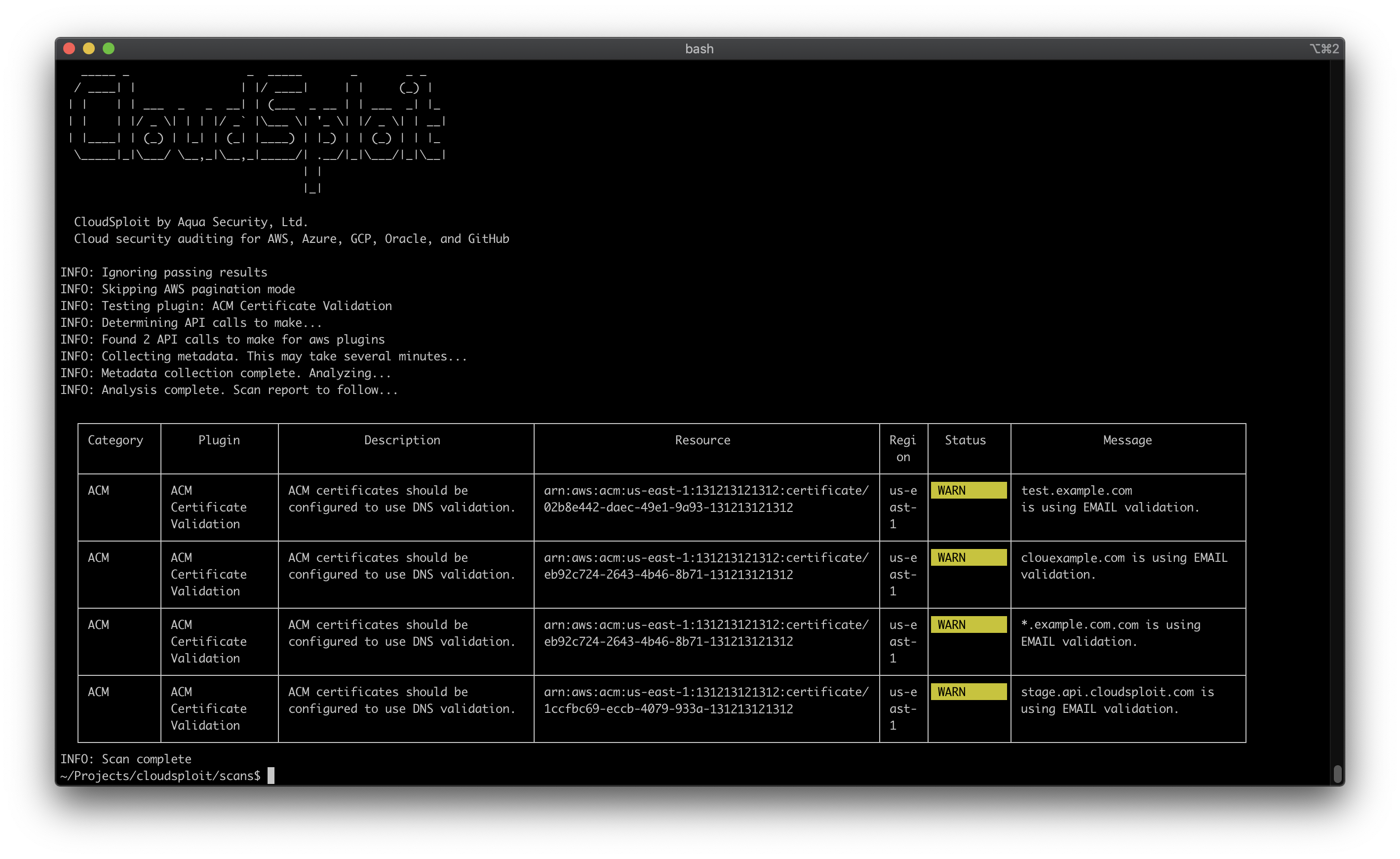
CloudSploit supports output in several formats for consumption by other tools. If you do not specify otherwise, CloudSploit writes output to standard output (the console) as a table.
Note: You can pass multiple output formats and combine options for further customization. For example:
# Print a table to the console and save a CSV file
$ ./index.js --csv=file.csv --console=table

# Print text to the console and save a JSON and JUnit file while ignoring passing results
$ ./index.js --json=file.json --junit=file.xml --console=text --ignore-ok
Console Output
By default, CloudSploit results are printed to the console in a table format (with colors). You can override this and use plain text instead, by running:
$ ./index.js --console=text
Alternatively, you can suppress the console output entirely by running:
$ ./index.js --console=none
Ignoring Passing Results
You can ignore results from output that return an OK status by passing a --ignore-ok commandline argument.
CSV
$ ./index.js --csv=file.csv
JSON
$ ./index.js --json=file.json
JUnit XML
$ ./index.js --junit=file.xml
Collection Output
CloudSploit saves the data queried from the cloud provider APIs in JSON format, which can be saved alongside other files for debugging or historical purposes.
$ ./index.js --collection=file.json
Suppressions
Results can be suppressed by passing the --suppress flag (multiple options are supported) with the following format:
--suppress pluginId:region:resourceId
For example:
# Suppress all results for the acmValidation plugin
$ ./index.js --suppress acmValidation:*:*

# Suppress all us-east-1 region results
$ ./index.js --suppress *:us-east-1:*

# Suppress all results matching the regex "certificate/*" in all regions for all plugins
$ ./index.js --suppress *:*:certificate/*
Running a Single Plugin
The --plugin flag can be used if you only wish to run one plugin.
$ ./index.js --plugin acmValidation
Architecture
CloudSploit works in two phases. First, it queries the cloud infrastructure APIs for various metadata about your account, namely the "collection" phase. Once all the necessary data is collected, the result is passed to the "scanning" phase. The scan uses the collected data to search for potential misconfigurations, risks, and other security issues, which are the resulting output.
Writing a Plugin
Please see our contribution guidelines and complete guide to writing CloudSploit plugins.
Writing a remediation
The --remediate flag can be used if you want to run remediation for the plugins mentioned as part of this argument. This takes a list of plugin names.
Please see our developing remediation guide for more details.
Other Notes
For other details about the Aqua Wave SaaS product, AWS security policies, and more, click here.
aquasecurity/cloudsploit có phải mã nguồn mở không?
Có — aquasecurity/cloudsploit phát hành theo license GPL-3.0, nghĩa là mã nguồn mở để đọc, fork và (tùy license) tái sử dụng. Mã: github.com/aquasecurity/cloudsploit.
aquasecurity/cloudsploit có trang demo không?
Dự án có trang chủ ở https://cloud.aquasec.com/signup. Tab "Readme" ở trang này thường có ảnh chụp và hướng dẫn bắt đầu nhanh.
aquasecurity/cloudsploit còn đang phát triển không?
Commit gần nhất trên aquasecurity/cloudsploit là 3 tháng trước (theo timestamp GitHub). Repo có 753 fork — một chỉ báo về mức độ quan tâm của cộng đồng.
aquasecurity/cloudsploit dùng license gì?
aquasecurity/cloudsploit phát hành theo license GPL-3.0. Nên mở file LICENSE trên GitHub để xác nhận — license metadata đôi khi lệch với thực tế dự án.
Đọc thêm về aquasecurity/cloudsploit ở đâu?
Trang TopGit này là một snapshot — tab "Readme" hiển thị nguyên văn README của repo (đã bỏ link, giữ ảnh). Repo GitHub ở github.com/aquasecurity/cloudsploit là nguồn chính thức.
Đọc đầy đủ README ở tab phía trên.
Vẫn đang phân vân về cloudsploit?
Một cú bấm sẽ gửi câu hỏi kèm trang này cho AI — xem AI nói gì về cloudsploit.

 /cloudsploit