athityakumar/colorls hiện có 5.1k sao trên GitHub, viết chủ yếu bằng Ruby. A Ruby gem that beautifies the terminal's ls command, with color and font-awesome icons. :tada:
Tóm tắt dựng từ metadata GitHub của chính dự án — chưa có bài review TopGit. Trang sẽ tự động cập nhật khi bài review đầy đủ được xuất bản.
VÌ SAO CHƯA CÓ REVIEW
TopGit viết bài đầy đủ cho repo có nhiều sao nhất và được yêu cầu nhiều nhất. Trang này là snapshot trong thời gian chờ — xem README gốc ở tab READ ME.
A Ruby script that colorizes the ls output with color and icons. Here are the screenshots of working example on an iTerm2 terminal (Mac OS), oh-my-zsh with powerlevel9k theme and powerline nerd-font + awesome-config font with the Solarized Dark color theme.
If you're interested in knowing the powerlevel9k configuration to get this prompt, have a look at this gist.
Table of contents
Usage
Flags
-1
-a (or) --all
-A (or) --almost-all
-d (or) --dirs
-f (or) --files
--help
-l (or) --long
--report
--tree (or) --tree=[DEPTH]
--gs (or) --git-status
--sd (or) --sort-dirs or --group-directories-first
--sf (or) --sort-files
-t
Combination of flags
Installation
Recommended configurations
Custom configurations
Updating
Uninstallation
Contributing
License
Usage
(Back to top)
Man pages have been added. Checkout man colorls.
Flags
With -1 : Lists one entry per line
With -a (or) --all : Does not ignore entries starting with '.'
With -A (or) --almost-all : Does not ignore entries starting with '.', except ./ and ../
With -d (or) --dirs : Shows only directories
With -f (or) --files : Shows only files
With --help : Prints a very helpful help menu
With -l (or) --long : Shows in long listing format
With --report : Shows brief report about number of files and folders shown
With --tree (or) --tree=[DEPTH] : Shows tree view of the directory with the specified depth (default 3)
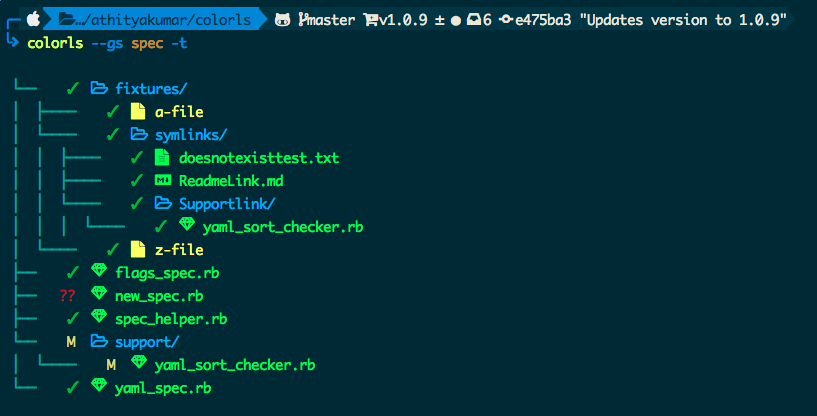
With --gs (or) --git-status : Shows git status for each entry
With --sd (or) --sort-dirs or --group-directories-first : Shows directories first, followed by files
With --sf (or) --sort-files : Shows files first, followed by directories
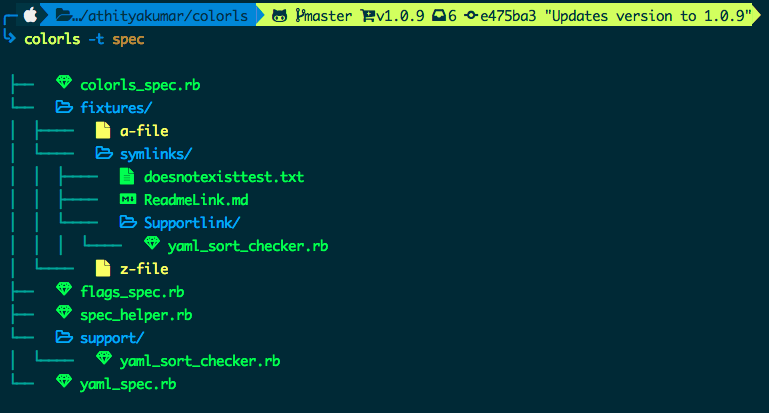
With -t : Sort by modification time, newest first (NEED TO ADD IMAGE)
With color options : --light or --dark can be passed as a flag, to choose the appropriate color scheme. By default, the dark color scheme is chosen. In order to tweak any color, read Custom configurations.
Combination of flags
Using --gs with -t :
Using --gs with -l :
Using --sd with -l and -A :
Using --non-human-readable with -l :
This will print the file sizes in bytes (non-human readable format)
Installation
(Back to top)
Install Ruby (preferably, version >= 2.6 via a version manager like rbenv)
Download and install a Nerd Font so you can see the library icons. Have a look at the Nerd Font README for installation instructions. We're using "Hack Nerd Font" for this guide.
Note for MacOS users using the stock terminal - Please enable Nerd Font at Terminal > Preferences > Profiles > Text > Font. Click Change.. and select Hack Nerd Font - Regular
Note for iTerm2 users - Please enable the Nerd Font at iTerm2 > Preferences > Profiles > Text > Non-ASCII font > Hack Regular Nerd Font Complete.
Note for HyperJS users - Please add "Hack Nerd Font" Font as an option to fontFamily in your ~/.hyper.js file.
Install the colorls ruby gem with gem install colorls
Note for rbenv users - In case of load error when using lc, please try the below patch.
rbenv rehash
rehash
Enable tab completion for flags by entering following line to your shell configuration file (~/.bashrc or ~/.zshrc) :
source $(dirname $(gem which colorls))/tab_complete.sh
Don't forget to restart your terminal
Start using colorls :tada:
Have a look at Recommended configurations and Custom configurations.
If you're having trouble following the installation guide above, here's a video reproducing steps 2 to 6.
Recommended configurations
(Back to top)
To add some short command (say, lc) with some flag options (say, -l, -A, --sd) by default, add this to your shell configuration file (~/.bashrc, ~/.zshrc, etc.) :
alias lc='colorls -lA --sd'
For changing the icon(s) to other unicode icons of choice (select icons from here), change the YAML files in a text editor of your choice (say, subl)
subl $(dirname $(gem which colorls))/yaml
Custom configurations
(Back to top)
You can overwrite the existing icons and colors mapping by copying the yaml files from $(dirname $(gem which colorls))/yaml into ~/.config/colorls, and changing them.
To overwrite color mapping :
Please have a look at the list of supported color names. You may also use a color hex code as long as it is quoted within the YAML file and prefaced with a # symbol.
Let's say that you're using the dark color scheme and would like to change the color of untracked file (??) in the --git-status flag to yellow. Copy the defaut dark_colors.yaml and change it.
Check if the ~/.config/colorls directory exists. If it doesn't exist, create it using the following command:
mkdir -p ~/.config/colorls
And then
cp $(dirname $(gem which colorls))/yaml/dark_colors.yaml ~/.config/colorls/dark_colors.yaml
In the ~/.config/colorls/dark_colors.yaml file, change the color set for untracked from darkorange to yellow, and save the change.
untracked: yellow
Or, using hex color codes:
untracked: '#FFFF00'
To overwrite icon mapping :
Please have a look at the list of supported icons. Let's say you want to add an icon for swift files. Copy the default files.yaml and change it.
cp $(dirname $(gem which colorls))/yaml/files.yaml ~/.config/colorls/files.yaml`
In the ~/.config/colorls/files.yaml file, add a new icon / change an existing icon, and save the change.
swift: "\uF179"
User contributed alias configurations :
@rjhilgefort
Updating
(Back to top)
Want to update to the latest version of colorls?
gem update colorls
Uninstallation
(Back to top)
Want to uninstall and revert back to the old style? No issues (sob). Please feel free to open an issue regarding how we can enhance colorls.
gem uninstall colorls
Contributing
(Back to top)
Your contributions are always welcome! Please have a look at the contribution guidelines first. :tada:
License
(Back to top)
The MIT License (MIT) 2017 - Athitya Kumar. Please have a look at the LICENSE.md for more details.
GitHub topics của athityakumar/colorls: "cli", "color", "eye-candy", "gem", "icons", "ls", "ruby", "terminal". TopGit xếp repo vào nhóm Developer Tools.
athityakumar/colorls có phải mã nguồn mở không?
Có — athityakumar/colorls phát hành theo license MIT, nghĩa là mã nguồn mở để đọc, fork và (tùy license) tái sử dụng. Mã: github.com/athityakumar/colorls.
athityakumar/colorls có website riêng không?
TopGit chưa ghi nhận URL trang chủ cho athityakumar/colorls. Phần README ở tab phía trên thường có link demo, hoặc xem mô tả GitHub của repo.
athityakumar/colorls còn đang phát triển không?
Commit gần nhất trên athityakumar/colorls là 3 tháng trước (theo timestamp GitHub). Repo có 397 fork — một chỉ báo về mức độ quan tâm của cộng đồng.
athityakumar/colorls dùng license gì?
athityakumar/colorls phát hành theo license MIT. Nên mở file LICENSE trên GitHub để xác nhận — license metadata đôi khi lệch với thực tế dự án.
Đọc thêm về athityakumar/colorls ở đâu?
Trang TopGit này là một snapshot — tab "Readme" hiển thị nguyên văn README của repo (đã bỏ link, giữ ảnh). Repo GitHub ở github.com/athityakumar/colorls là nguồn chính thức.
Đọc đầy đủ README ở tab phía trên.
colorls có đáng để bạn bỏ thời gian?
ChatGPT, Claude và Perplexity đều đọc được trang này. Hỏi thử xem họ nghĩ gì về colorls.

 /colorls