Được TopGit lập chỉ mục từ metadata GitHub: AvaloniaUI/Live.Avalonia có 443 sao, viết chủ yếu bằng C#. In-app live reload for Avalonia applications.
Tóm tắt dựng từ metadata GitHub của chính dự án — chưa có bài review TopGit. Trang sẽ tự động cập nhật khi bài review đầy đủ được xuất bản.
VÌ SAO CHƯA CÓ REVIEW
TopGit viết bài đầy đủ cho repo có nhiều sao nhất và được yêu cầu nhiều nhất. Trang này là snapshot trong thời gian chờ — xem README gốc ở tab READ ME.
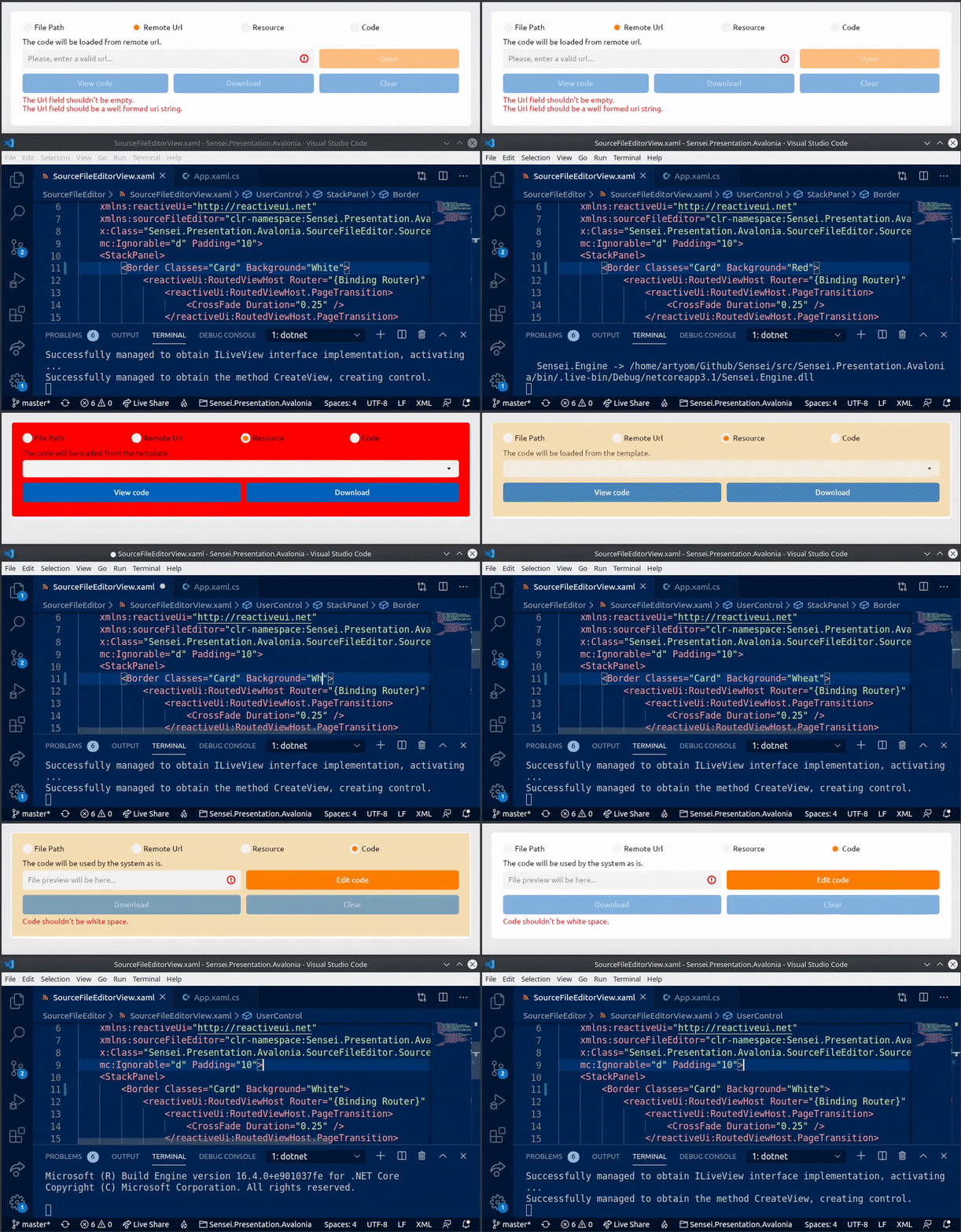
Live.Avalonia is an experimental project which intends to make the hot reloading feature working in Avalonia-based applications.
In Live.Avalonia, we rely on dotnet watch build .NET Core facility to rebuild an Avalonia project from sources when any of the source files change. Then, we re-embed the updated controls into a simple Avalonia Window. Live.Avalonia could possibly save you a lot of time spent clicking 'Build & Run' in your IDE, or typing dotnet run in the console. Worth noting, that Live.Avalonia doesn't require you to install any particular IDE tooling™ — you can edit files even in Vim, and the app will hot reload 🔥
Getting Started
WarningLive.Avalonia was not extensively tested, and is not guaranteed to work with every project setup, especially if you do some extraordinary stuff with weird MSBuild properties and your output assemblies. Use this tool at your own risk. Thank you for your flexibility.
Important Note By default, dotnet watch build triggers the build only when any .cs file changes. In order to have live reload working for .xaml files too, add the following line to your .csproj file: <Watch Include="**\*.xaml" />. See the Live.Avalonia.Sample project for more info.
Live.Avalonia is distributed via NuGet package manager:
dotnet add package Live.Avalonia
After installing the NuGet package, add the following lines to your App.xaml.cs file:
public class App : Application, ILiveView
{
    public override void Initialize() => AvaloniaXamlLoader.Load(this);

    public override void OnFrameworkInitializationCompleted()
    {
        if (Debugger.IsAttached || IsProduction())
        {
            // Debugging requires pdb loading etc, so we disable live reloading
            // during a test run with an attached debugger.
            var window = new Window();
            window.Content = CreateView(window);
            window.Show();
        }
        else
        {
            // Here, we create a new LiveViewHost, located in the 'Live.Avalonia'
            // namespace, and pass an ILiveView implementation to it. The ILiveView
            // implementation should have a parameterless constructor! Next, we
            // start listening for any changes in the source files. And then, we
            // show the LiveViewHost window. Simple enough, huh?
            var window = new LiveViewHost(this, Console.WriteLine);
            window.StartWatchingSourceFilesForHotReloading();
            window.Show();
        }

        // Here we subscribe to ReactiveUI default exception handler to avoid app
        // termination in case if we do something wrong in our view models. See:
        // https://www.reactiveui.net/docs/handbook/default-exception-handler/
        //
        // In case if you are using another MV* framework, please refer to its
        // documentation explaining global exception handling.
        RxApp.DefaultExceptionHandler = Observer.Create<Exception>(Console.WriteLine);
        base.OnFrameworkInitializationCompleted();
    }

    // When any of the source files change, a new version of the assembly is
    // built, and this method gets called. The returned content gets embedded
    // into the LiveViewHost window.
    public object CreateView(Window window) => new TextBlock { Text = "Hi!" };

    private static bool IsProduction()
    {
#if DEBUG
        return false;
#else
        return true;
#endif
    }
}
Then, run your Avalonia application:
dotnet run
Now, edit the control returned by ILiveView.CreateView, and the app will hot reload! 🔥
Pro tip If you are willing to use an assembly weaving tool like ReactiveUI.Fody for INotifyPropertyChanged injections, extract your view models into a separate assembly. For example, the Live.Avalonia.Sample project references the Live.Avalonia.Sample.Library project in order to have assembly postprocessing working as expected. Beware: if you change the code in the referenced assemblies, the app won't hot reload, and you will have to restart the app on your own to see changes.
Retaining App State
As we discovered in this Twitter thread, the state is retained, if you keep it in your ViewModel and pass it from Window to your View inside the ILiveView.CreateView method. So, if you are willing to keep app state the same after a hot reload, use the following ILiveView.CreateView implementation:
public object CreateView(Window window) {
    if (window.DataContext == null)
        window.DataContext = new AppViewModel();

    // The AppView class will inherit the DataContext
    // of the window. The AppView class can be a
    // UserControl, a Grid, a TextBlock, whatever.
    return new AppView();
}
Getting Started with F#
Thanks to @AngelMunoz and to @JaggerJo Live.Avalonia now supports MVU and Avalonia.FuncUI as well. See the Live.Avalonia.FuncUI.Sample directory in this repository for a compelling example. The composition root is located inside the Program.fs file.
Important Note By default, dotnet watch build triggers the build only when any .cs file changes. In order to have live reload working for .fs files too, add the following line to your .fsproj file: <Watch Include="**\*.fs" />. See the Live.Avalonia.FuncUI.Sample project for more info.
AvaloniaUI/Live.Avalonia có 443 sao GitHub — tải lại trang để xem số mới nhất, hoặc xem trực tiếp github.com/AvaloniaUI/Live.Avalonia. TopGit phản chiếu số sao của GitHub nhưng không cam kết đến từng phút.
AvaloniaUI/Live.Avalonia có phải mã nguồn mở không?
Có — AvaloniaUI/Live.Avalonia phát hành theo license MIT, nghĩa là mã nguồn mở để đọc, fork và (tùy license) tái sử dụng. Mã: github.com/AvaloniaUI/Live.Avalonia.
AvaloniaUI/Live.Avalonia còn đang phát triển không?
Commit gần nhất trên AvaloniaUI/Live.Avalonia là 3.0 năm trước (theo timestamp GitHub). Repo có 10 fork — một chỉ báo về mức độ quan tâm của cộng đồng.
AvaloniaUI/Live.Avalonia dùng license gì?
AvaloniaUI/Live.Avalonia phát hành theo license MIT. Nên mở file LICENSE trên GitHub để xác nhận — license metadata đôi khi lệch với thực tế dự án.
AvaloniaUI/Live.Avalonia là gì?
AvaloniaUI/Live.Avalonia (AvaloniaUI/Live.Avalonia) là dự án C# trên GitHub. Theo mô tả gốc: In-app live reload for Avalonia applications.
AvaloniaUI/Live.Avalonia viết bằng ngôn ngữ gì?
AvaloniaUI/Live.Avalonia chủ yếu viết bằng C#. Trường "language" của GitHub dựa trên phần lớn byte ở nhánh mặc định.
Cùng nhóm Backend còn repo nào?
AvaloniaUI/Live.Avalonia thuộc nhóm Backend trên TopGit, cùng 6 topic GitHub. Trang Trending và Topics liệt kê các repo cùng số sao và cùng ngôn ngữ để so sánh.
Đọc thêm về AvaloniaUI/Live.Avalonia ở đâu?
Trang TopGit này là một snapshot — tab "Readme" hiển thị nguyên văn README của repo (đã bỏ link, giữ ảnh). Repo GitHub ở github.com/AvaloniaUI/Live.Avalonia là nguồn chính thức.
Đọc đầy đủ README ở tab phía trên.
Vẫn đang phân vân về Live.Avalonia?
Một cú bấm sẽ gửi câu hỏi kèm trang này cho AI — xem AI nói gì về Live.Avalonia.
 /Live.Avalonia