Azure-Samples/azure-search-openai-demo hiện có 7.8k sao trên GitHub, viết chủ yếu bằng Python. A sample app for the Retrieval-Augmented Generation pattern running in Azure, using Azure AI Search for retrieval and Azure OpenAI large language models to power ChatGPT-style and Q&A experiences.
Tóm tắt dựng từ metadata GitHub của chính dự án — chưa có bài review TopGit. Trang sẽ tự động cập nhật khi bài review đầy đủ được xuất bản.
VÌ SAO CHƯA CÓ REVIEW
TopGit viết bài đầy đủ cho repo có nhiều sao nhất và được yêu cầu nhiều nhất. Trang này là snapshot trong thời gian chờ — xem README gốc ở tab READ ME.
RAG chat app with Azure OpenAI and Azure AI Search (Python)
This solution creates a ChatGPT-like frontend experience over your own documents using RAG (Retrieval Augmented Generation). It uses Azure OpenAI Service to access GPT models, and Azure AI Search for data indexing and retrieval.
This solution's backend is written in Python. There are also JavaScript, .NET, and Java samples based on this one. Learn more about developing AI apps using Azure AI Services.
Important Security Notice
This template, the application code and configuration it contains, has been built to showcase Microsoft Azure specific services and tools. We strongly advise our customers not to make this code part of their production environments without implementing or enabling additional security features. See our productionizing guide for tips, and consult the Azure OpenAI Landing Zone reference architecture for more best practices.
Table of Contents
Features
Azure account requirements
Cost estimation
Getting Started
GitHub Codespaces
VS Code Dev Containers
Local environment
Deploying
Deploying again
Running the development server
Using the app
Clean up
Guidance
Resources
📺 Watch a video overview of the app.
This sample demonstrates a few approaches for creating ChatGPT-like experiences over your own data using the Retrieval Augmented Generation pattern. It uses Azure OpenAI Service to access a GPT model (gpt-5.4-mini), and Azure AI Search for data indexing and retrieval.
The repo includes sample data so it's ready to try end to end. In this sample application we use a fictitious company called Zava, and the experience allows its employees to ask questions about the benefits, internal policies, as well as job descriptions and roles.
Features
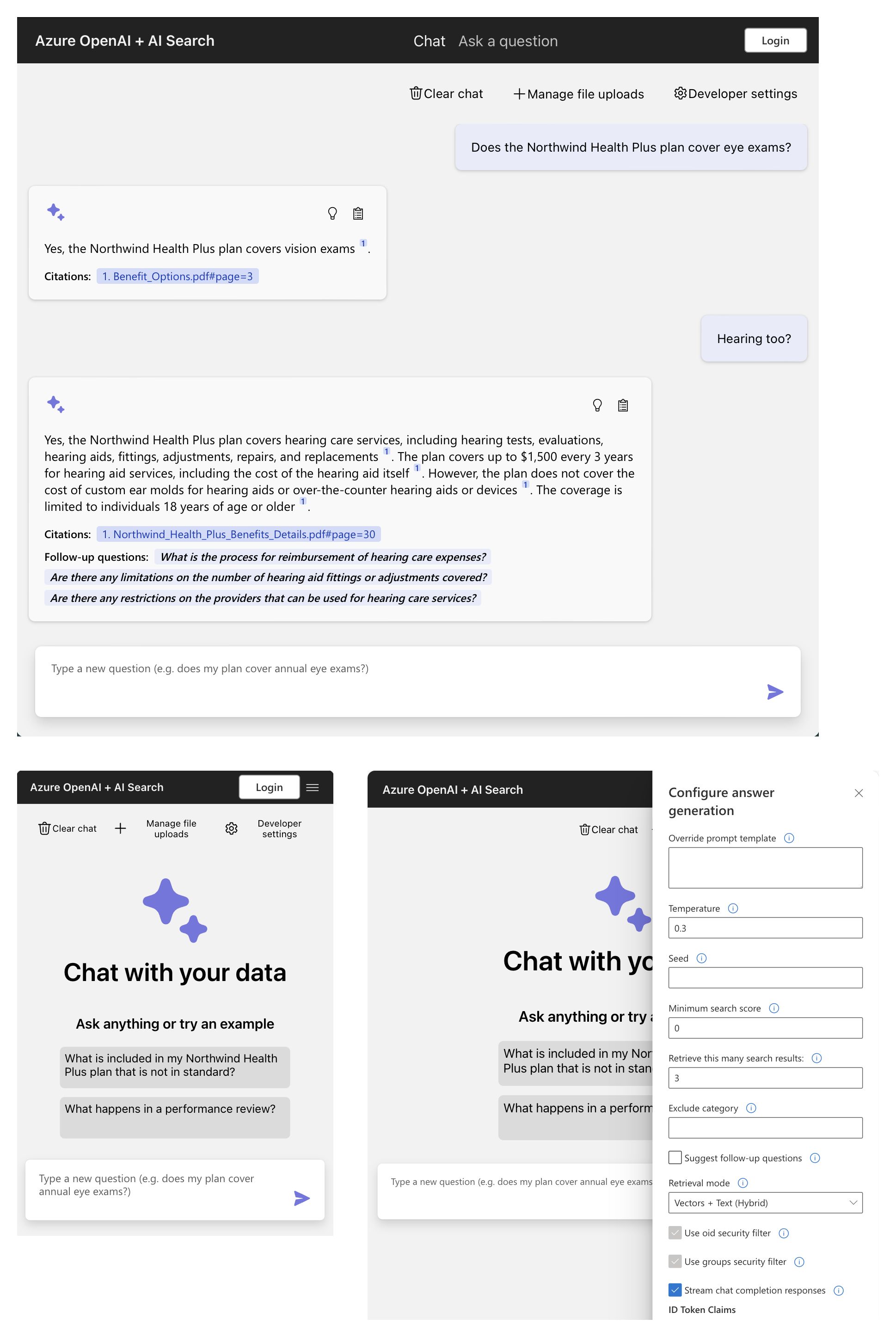
Chat (multi-turn) interface
Renders citations and thought process for each answer
Includes settings directly in the UI to tweak the behavior and experiment with options
Integrates Azure AI Search for indexing and retrieval of documents, with support for many document formats as well as cloud data ingestion
Optional usage of multimodal models to reason over image-heavy documents
Optional addition of speech input/output for accessibility
Optional automation of user login and data access via Microsoft Entra
Performance tracing and monitoring with Application Insights
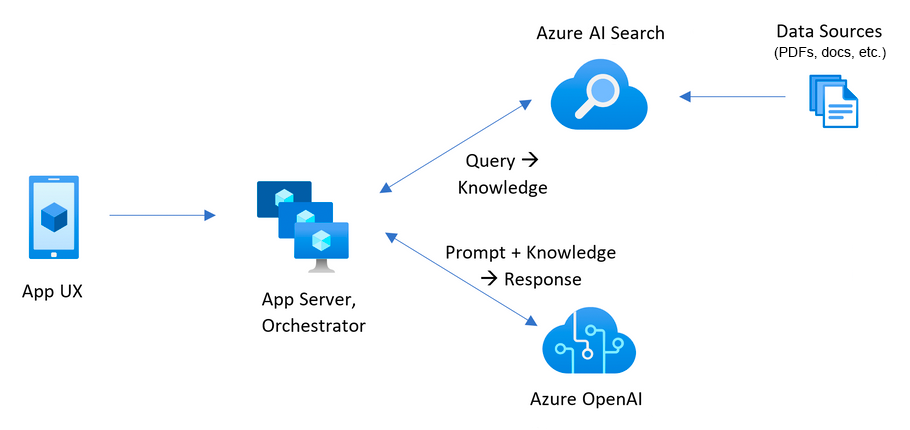
Architecture Diagram
Azure account requirements
IMPORTANT: In order to deploy and run this example, you'll need:
Azure account. If you're new to Azure, get an Azure account for free and you'll get some free Azure credits to get started. See guide to deploying with the free trial.
Azure account permissions:
Your Azure account must have Microsoft.Authorization/roleAssignments/write permissions, such as Role Based Access Control Administrator, User Access Administrator, or Owner. If you don't have subscription-level permissions, you must be granted RBAC for an existing resource group and deploy to that existing group.
Your Azure account also needs Microsoft.Resources/deployments/write permissions on the subscription level.
Cost estimation
Pricing varies per region and usage, so it isn't possible to predict exact costs for your usage.
However, you can try the Azure pricing calculator for the resources below.
Azure Container Apps: Default host for app deployment as of 10/28/2024. See more details in the ACA deployment guide. Consumption plan with 1 CPU core, 2 GB RAM, minimum of 0 replicas. Pricing with Pay-as-You-Go. Pricing
Azure Container Registry: Basic tier. Pricing
Azure App Service: Only provisioned if you deploy to Azure App Service following the App Service deployment guide. Basic Tier with 1 CPU core, 1.75 GB RAM. Pricing per hour. Pricing
Azure OpenAI: Standard tier, GPT and Ada models. Pricing per 1K tokens used, and at least 1K tokens are used per question. Pricing
Azure AI Document Intelligence: SO (Standard) tier using pre-built layout. Pricing per document page, sample documents have 261 pages total. Pricing
Azure AI Search: Basic tier, 1 replica, free level of semantic search. Pricing per hour. Pricing
Azure Blob Storage: Standard tier with ZRS (Zone-redundant storage). Pricing per storage and read operations. Pricing
Azure Cosmos DB: Only provisioned if you enabled chat history with Cosmos DB. Serverless tier. Pricing per request unit and storage. Pricing
Azure AI Vision: Only provisioned if you enabled multimodal approach. Pricing per 1K transactions. Pricing
Azure AI Content Understanding: Only provisioned if you enabled media description. Pricing per 1K images. Pricing
Azure Monitor: Pay-as-you-go tier. Costs based on data ingested. Pricing
To reduce costs, you can switch to free SKUs for various services, but those SKUs have limitations.
See this guide on deploying with minimal costs for more details.
⚠️ To avoid unnecessary costs, remember to take down your app if it's no longer in use,
either by deleting the resource group in the Portal or running azd down.
Getting Started
You have a few options for setting up this project.
The easiest way to get started is GitHub Codespaces, since it will setup all the tools for you,
but you can also set it up locally if desired.
GitHub Codespaces
You can run this repo virtually by using GitHub Codespaces, which will open a web-based VS Code in your browser:
Once the codespace opens (this may take several minutes), open a terminal window.
VS Code Dev Containers
A related option is VS Code Dev Containers, which will open the project in your local VS Code using the Dev Containers extension:
Start Docker Desktop (install it if not already installed)
Open the project:
In the VS Code window that opens, once the project files show up (this may take several minutes), open a terminal window.
Local environment
Install the required tools:
Azure Developer CLI
Python 3.10, 3.11, 3.12, 3.13, or 3.14
Important: Python and the pip package manager must be in the path in Windows for the setup scripts to work.
Important: Ensure you can run python --version from console. On Ubuntu, you might need to run sudo apt install python-is-python3 to link python to python3.
Node.js 20+
Git
Powershell 7+ (pwsh) - For Windows users only.
Important: Ensure you can run pwsh.exe from a PowerShell terminal. If this fails, you likely need to upgrade PowerShell.
Create a new folder and switch to it in the terminal.
Run this command to download the project code:
azd init -t azure-search-openai-demo
Note that this command will initialize a git repository, so you do not need to clone this repository.
Deploying
The steps below will provision Azure resources and deploy the application code to Azure Container Apps. To deploy to Azure App Service instead, follow the app service deployment guide.
Login to your Azure account:
azd auth login
For GitHub Codespaces users, if the previous command fails, try:
azd auth login --use-device-code
Create a new azd environment:
azd env new
Enter a name that will be used for the resource group.
This will create a new folder in the .azure folder, and set it as the active environment for any calls to azd going forward.
(Optional) This is the point where you can customize the deployment by setting environment variables, in order to use existing resources, enable optional features (such as auth or vision), or deploy low-cost options, or deploy with the Azure free trial.
Run azd up - This will provision Azure resources and deploy this sample to those resources, including building the search index based on the files found in the ./data folder.
Important: Beware that the resources created by this command will incur immediate costs, primarily from the AI Search resource. These resources may accrue costs even if you interrupt the command before it is fully executed. You can run azd down or delete the resources manually to avoid unnecessary spending.
You will be prompted to select two locations, one for the majority of resources and one for the OpenAI resource, which is currently a short list. That location list is based on the OpenAI model availability table and may become outdated as availability changes.
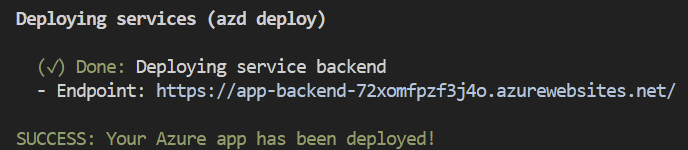
After the application has been successfully deployed you will see a URL printed to the console. Click that URL to interact with the application in your browser.
It will look like the following:
NOTE: It may take 5-10 minutes after you see 'SUCCESS' for the application to be fully deployed. If you see a "Python Developer" welcome screen or an error page, then wait a bit and refresh the page.
Deploying again
If you've only changed the backend/frontend code in the app folder, then you don't need to re-provision the Azure resources. You can just run:
azd deploy
If you've changed the infrastructure files (infra folder or azure.yaml), then you'll need to re-provision the Azure resources. You can do that by running:
azd up
Running the development server
You can only run a development server locally after having successfully run the azd up command. If you haven't yet, follow the deploying steps above.
Run azd auth login if you have not logged in recently.
Start the server:
Windows:
./app/start.ps1
Linux/Mac:
./app/start.sh
VS Code: Run the "VS Code Task: Start App" task.
It's also possible to enable hotloading or the VS Code debugger.
See more tips in the local development guide.
Using the app
In Azure: navigate to the Azure WebApp deployed by azd. The URL is printed out when azd completes (as "Endpoint"), or you can find it in the Azure portal.
Running locally: navigate to 127.0.0.1:50505
Once in the web app:
Try different topics in chat. Try follow up questions, clarifications, ask to simplify or elaborate on answer, etc.
Explore citations and sources
Click on "settings" to try different options, tweak prompts, etc.
Clean up
To clean up all the resources created by this sample:
Run azd down
When asked if you are sure you want to continue, enter y
When asked if you want to permanently delete the resources, enter y
The resource group and all the resources will be deleted.
Guidance
You can find extensive documentation in the docs folder:
Deploying:
Troubleshooting deployment
Debugging the app on App Service
Deploying with azd: deep dive and CI/CD
Deploying with existing Azure resources
Deploying from a free account
Enabling optional features
All features
Login and access control
Multimodal
Reasoning
Private endpoints
Agentic retrieval
Sharing deployment environments
Local development
Customizing the app
App architecture
HTTP Protocol
Data ingestion
Evaluation
Safety evaluation
Monitoring with Application Insights
Productionizing
Alternative RAG chat samples
Resources
📖 Docs: Get started using the chat with your data sample
📖 Blog: Revolutionize your Enterprise Data with ChatGPT: Next-gen Apps w/ Azure OpenAI and AI Search
📖 Docs: Azure AI Search
📖 Docs: Azure OpenAI Service
📖 Docs: Comparing Azure OpenAI and OpenAI
📖 Blog: Access Control in Generative AI applications with Azure AI Search
📺 Talk: Quickly build and deploy OpenAI apps on Azure, infused with your own data
📺 Video: RAG Deep Dive Series
Getting help
This is a sample built to demonstrate the capabilities of modern Generative AI apps and how they can be built in Azure.
For help with deploying this sample, please post in GitHub Issues. If you're a Microsoft employee, you can also post in our Teams channel.
This repository is supported by the maintainers, not by Microsoft Support,
so please use the support mechanisms described above, and we will do our best to help you out.
For general questions about developing AI solutions on Azure,
join the Azure AI Foundry Developer Community:
Note
Note: The PDF documents used in this demo contain information generated using a language model (Azure OpenAI Service). The information contained in these documents is only for demonstration purposes and does not reflect the opinions or beliefs of Microsoft. Microsoft makes no representations or warranties of any kind, express or implied, about the completeness, accuracy, reliability, suitability or availability with respect to the information contained in this document. All rights reserved to Microsoft.
Azure-Samples/azure-search-openai-demo có bao nhiêu sao?
Azure-Samples/azure-search-openai-demo có 7.8k sao GitHub — tải lại trang để xem số mới nhất, hoặc xem trực tiếp github.com/Azure-Samples/azure-search-openai-demo. TopGit phản chiếu số sao của GitHub nhưng không cam kết đến từng phút.
Azure-Samples/azure-search-openai-demo có những chủ đề gì?
GitHub topics của Azure-Samples/azure-search-openai-demo: "ai-azd-templates", "azd-templates", "azure", "azure-ai-search", "azurecognitivesearch", "azureopenai", "chatgpt", "openai". TopGit xếp repo vào nhóm AI Tools.
Azure-Samples/azure-search-openai-demo có phải mã nguồn mở không?
Có — Azure-Samples/azure-search-openai-demo phát hành theo license MIT, nghĩa là mã nguồn mở để đọc, fork và (tùy license) tái sử dụng. Mã: github.com/Azure-Samples/azure-search-openai-demo.
Azure-Samples/azure-search-openai-demo có trang demo không?
Dự án có trang chủ ở https://azure.microsoft.com/products/search. Tab "Readme" ở trang này thường có ảnh chụp và hướng dẫn bắt đầu nhanh.
Azure-Samples/azure-search-openai-demo còn đang phát triển không?
Commit gần nhất trên Azure-Samples/azure-search-openai-demo là 2 tháng trước (theo timestamp GitHub). Repo có 5.5k fork — một chỉ báo về mức độ quan tâm của cộng đồng.
Cùng nhóm AI Tools còn repo nào?
Azure-Samples/azure-search-openai-demo thuộc nhóm AI Tools trên TopGit, cùng 8 topic GitHub. Trang Trending và Topics liệt kê các repo cùng số sao và cùng ngôn ngữ để so sánh.
Đọc thêm về Azure-Samples/azure-search-openai-demo ở đâu?
Trang TopGit này là một snapshot — tab "Readme" hiển thị nguyên văn README của repo (đã bỏ link, giữ ảnh). Repo GitHub ở github.com/Azure-Samples/azure-search-openai-demo là nguồn chính thức.
Đọc đầy đủ README ở tab phía trên.
Vẫn đang phân vân về azure-search-openai-demo?
Một cú bấm sẽ gửi câu hỏi kèm trang này cho AI — xem AI nói gì về azure-search-openai-demo.
 /azure-search-openai-demo