TopGit theo dõi bbatsov/helm-projectile trên GitHub, đã đạt 339 sao. Helm UI for Projectile
Tóm tắt dựng từ metadata GitHub của chính dự án — chưa có bài review TopGit. Trang sẽ tự động cập nhật khi bài review đầy đủ được xuất bản.
VÌ SAO CHƯA CÓ REVIEW
TopGit viết bài đầy đủ cho repo có nhiều sao nhất và được yêu cầu nhiều nhất. Trang này là snapshot trong thời gian chờ — xem README gốc ở tab READ ME.
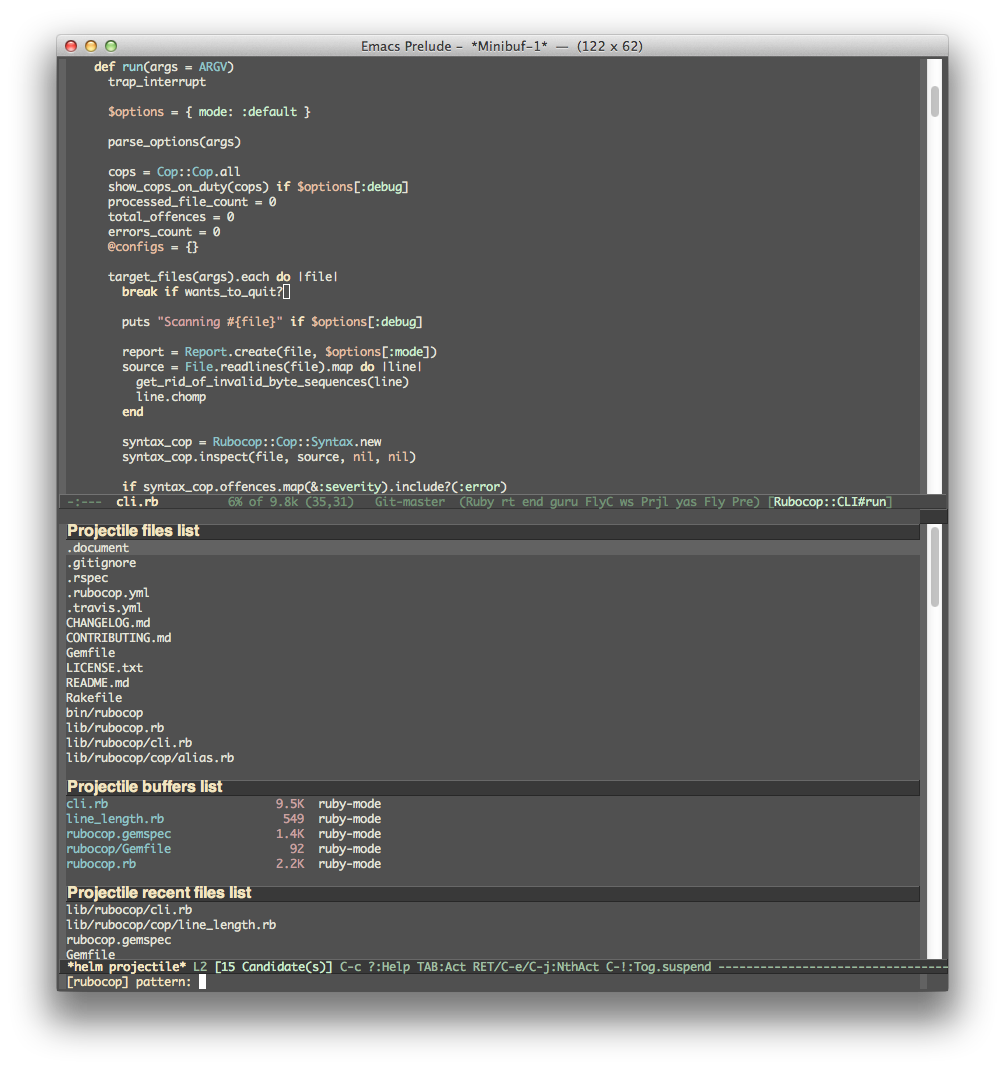
Projectile can be integrated
with Helm via
helm-source-projectile-projects,
helm-source-projectile-files-list,
helm-source-projectile-buffers-list and
helm-source-projectile-recentf-list sources (available in
helm-projectile.el). There is also an example function for calling
Helm with the Projectile file source. You can call it like this:
M-x helm-projectile
or even better - invoke the key binding h in Projectile's
keymap. Assuming you've opted for one of the recommended keymap prefixes (C-c p
or s-p), that would mean C-c p h or s-p h.
See Projectile's installation docs for more details.
Project Status
The project is currently looking for more maintainers. I (Bozhidar) don't use Helm myself and
don't have much time for the project, so I would definitely appreciate some help with it.
Contact me via e-mail or GitHub if you'd like to become a co-maintainer.
Installation
The recommended way to install helm-projectile is via package.el.
package.el
MELPA
You can install a snapshot version of helm-projectile from the
MELPA repository. The version of
Projectile there will always be up-to-date, but it might be unstable
(albeit rarely).
MELPA Stable
You can install the last stable version of helm-projectile from the
MELPA Stable repository.
el-get
helm-projectile is also available for installation from the
el-get package manager.
Emacs Prelude
helm-projectile is naturally part of the
Emacs Prelude. If you're a Prelude
user - helm-projectile is already properly configured and ready for
action.
Debian and Ubuntu
Users of Debian 9 or later or Ubuntu 16.04 or later may apt install elpa-helm-projectile.
Usage
For those who prefer helm to ido/ivy, the command helm-projectile-switch-project
can be used to replace projectile-switch-project to switch project. Please
note that this is different from simply setting projectile-completion-system
to helm, which just enables projectile to use the Helm completion to complete
a project name. The benefit of using helm-projectile-switch-project is that on
any selected project we can fire many actions, not limited to just the "switch
to project" action, as in the case of using helm completion by setting
projectile-completion-system to helm. Currently, there are five actions:
"Switch to project", "Open Dired in project's directory", "Open project root in
vc-dir or magit", "Switch to Eshell" and "Grep project files". We will add more
and more actions in the future.
helm-projectile is capable of opening multiple files by marking the files with
C-SPC or mark all files with M-a. Then, press RET,
all the selected files will be opened.
Note that the helm grep is different from projectile-grep because the helm
grep is incremental. To use it, select your projects (select multiple projects
by pressing C-SPC), press "C-s" (or "C-u C-s" for recursive grep), and type your
regexp. As you type the regexp in the mini buffer, the live grep results are
displayed incrementally.
helm-projectile also provides Helm versions of common Projectile commands. Currently,
these are the supported commands:
helm-projectile-switch-project
helm-projectile-find-file
helm-projectile-find-file-streaming (streams candidates as the project is indexed)
helm-projectile-find-file-in-known-projects
helm-projectile-find-file-dwim
helm-projectile-find-dir
helm-projectile-recentf
helm-projectile-switch-to-buffer
helm-projectile-grep
helm-projectile-ack (deprecated - use helm-projectile-rg or helm-projectile-ag)
helm-projectile-ag
helm-projectile-rg
Replace Helm equivalent commands in projectile-commander
A virtual directory manager that is unique to Helm Projectile
Why should you use these commands compared with the normal Projectile
commands, even if the normal commands use helm as
projectile-completion-system? The answer is, Helm specific commands
give more useful features. For example,
helm-projectile-switch-project allows opening a project in Dired,
Magit or Eshell. helm-projectile-find-file reuses actions in
helm-find-files (which is plenty) and able to open multiple
files. Another reason is that in a large source tree, helm-projectile
could be slow because it has to open all available sources.
On a large or remote project the up-front indexing that
helm-projectile-find-file does can make the picker slow to appear. If
that bothers you, set helm-projectile-find-file-strategy to
streaming and it (along with its other-window and other-frame
variants) will stream candidates as Projectile's indexing command lists
them, instead of waiting for the whole project to be indexed:
The default is sync, the original behavior. Note that for Git projects
the streaming strategy lists exactly what the indexing command prints,
so it doesn't fold in submodule files or drop deleted-but-unstaged ones.
The helm-projectile-find-file-streaming command streams regardless of
this setting.
Finding files, finding directories and switching projects each come in
-other-window, -other-frame and -other-tab variants
(e.g. helm-projectile-find-file-other-tab), matching Emacs' own
C-x 4 / C-x 5 / C-x t families. Inside a Helm session the same
targets are available as actions (and on C-c o, C-c C-o and C-c t
in the project and directory sources). The -other-tab commands need a
recent Helm and Emacs' tab-bar-mode.
If you want to use these commands, you have to activate
helm-projectile-mode to replace the normal Projectile commands:
helm-projectile-mode is a global minor mode; toggle it off (M-x helm-projectile-mode again) to go back to the normal Projectile
bindings. (The old helm-projectile-on / helm-projectile-off
commands still work but are deprecated in favor of the mode.) If you
want to disable fuzzy matching in Helm Projectile (it is enabled by
default), you must set helm-projectile-fuzzy-match to nil before
loading helm-projectile.
To fully learn Helm Projectile and see what it is capable of, you
should refer to this guide:
Exploring large projects with Projectile and Helm Projectile.
Obviously you need to have Helm installed for this to work. :-)
Known issues
Check out the project's
issue list
a list of unresolved issues. By the way - feel free to fix any of them
and sent me a pull request. :-)
Contributors
Here's a list of all the people who have contributed to the
development of Projectile.
Changelog
A fairly extensive changelog is available here.
Note: We started keeping track of changes there after version 1.0.
bbatsov/helm-projectile có 339 sao GitHub — tải lại trang để xem số mới nhất, hoặc xem trực tiếp github.com/bbatsov/helm-projectile. TopGit phản chiếu số sao của GitHub nhưng không cam kết đến từng phút.
bbatsov/helm-projectile có những chủ đề gì?
GitHub topics của bbatsov/helm-projectile: "emacs", "helm", "projectile". TopGit xếp repo vào nhóm mã nguồn mở.
bbatsov/helm-projectile còn đang phát triển không?
Commit gần nhất trên bbatsov/helm-projectile là 3 tháng trước (theo timestamp GitHub). Repo có 76 fork — một chỉ báo về mức độ quan tâm của cộng đồng.
bbatsov/helm-projectile là gì?
bbatsov/helm-projectile (bbatsov/helm-projectile) là dự án Emacs Lisp trên GitHub. Theo mô tả gốc: Helm UI for Projectile
bbatsov/helm-projectile viết bằng ngôn ngữ gì?
bbatsov/helm-projectile chủ yếu viết bằng Emacs Lisp. Trường "language" của GitHub dựa trên phần lớn byte ở nhánh mặc định.
Đọc đầy đủ README ở tab phía trên.
Muốn nghe thêm một ý kiến về helm-projectile?
Hỏi một AI đọc được trang này — một cú bấm là có ngay nhận định về helm-projectile.

 /helm-projectile