bbc/brave — 693★ trên GitHub (Python). Basic Real-time AV Editor - allowing you to preview, mix, and route live audio and video streams on the cloud
Tóm tắt dựng từ metadata GitHub của chính dự án — chưa có bài review TopGit. Trang sẽ tự động cập nhật khi bài review đầy đủ được xuất bản.
VÌ SAO CHƯA CÓ REVIEW
TopGit viết bài đầy đủ cho repo có nhiều sao nhất và được yêu cầu nhiều nhất. Trang này là snapshot trong thời gian chờ — xem README gốc ở tab READ ME.
This project is an open-source prototype. See 'Project status' and 'License' below for more.
Brave is a Basic real-time (remote) audio/videoeditor.
It allows LIVE video (and/or audio) to be received, manipulated, and sent elsewhere.
It is API driven and is designed to work remotely, such as on the cloud.
Example usage includes:
Forwarding RTMP from one place to another
Changing the size of video, and having a holding slate if the input disappears
Mixing two or more inputs
Adding basic graphics (images, text, etc)
Previewing video streams using WebRTC
Brave is based on GStreamer. It is, in one sense, a RESTful API for GStreamer (for live audio/video handling).
To learn more, read below, or see the FAQ, API guide, How-to guide and Config file guide.
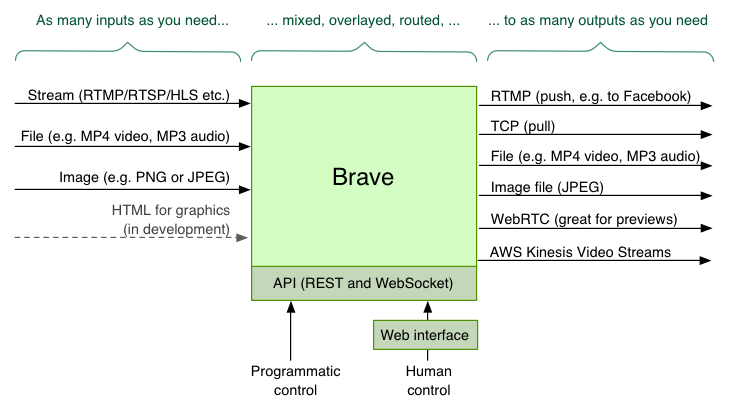
Architecture diagram
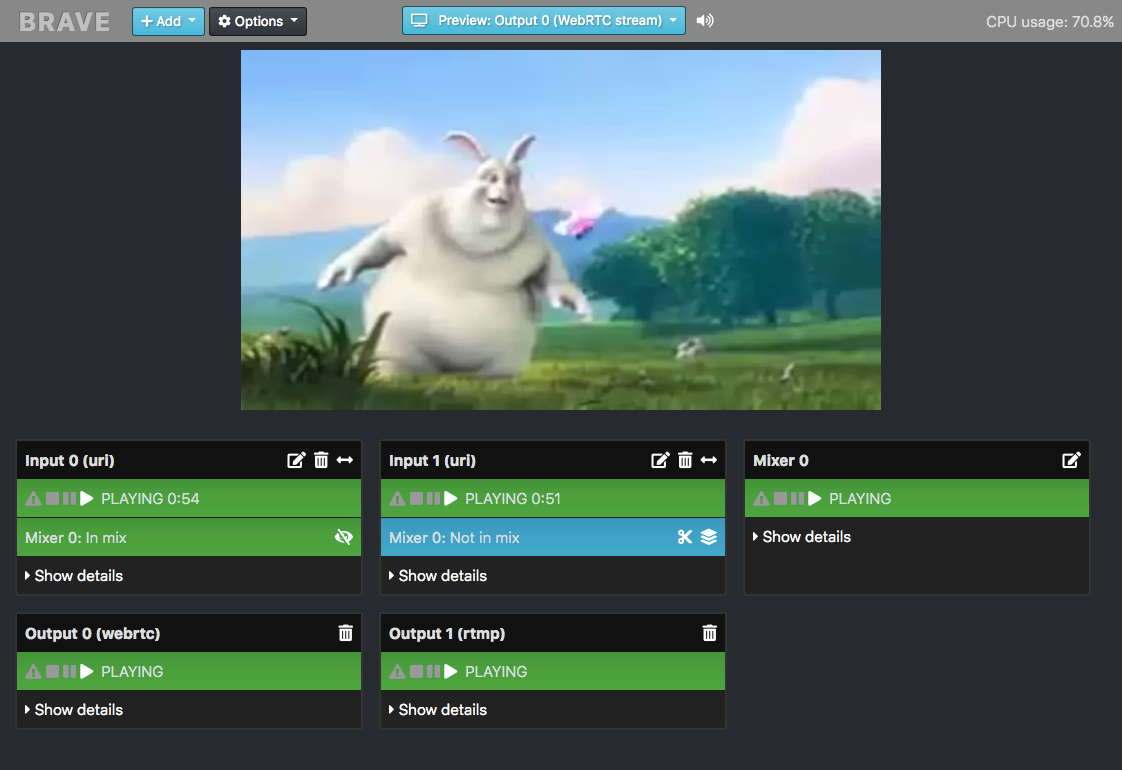
Web interface screenshot
This web interface is optional; Brave can be controlled via the API or startup config file.
Alternatives to consider
Similar open-source projects to this include:
OBS
Voctomix
Snowmix
FFdynamic
Capabilities
Brave allows you to configure inputs, outputs, mixers and overlays. You can have any number of each (subject to the limitations of your server). They can be created at startup using a config file, or created and changed dynamically via REST API.
Inputs
An input is a source of audio or video. There can be any number of inputs, added or removed at any time, which can then be sent to mixers and outputs. Input types include:
Live and non-live streams, through protocols such as RTMP, RTSP, and HLS
Files (e.g. mp4 or mp3) - either local or downloaded remotely
Images (PNG/SVG/JPEG)
MPEG or OGG retrieved via a TCP connection
Test audio / video streams
Read more about input types.
Outputs
An output is how the constructed audio/video is then sent, served or saved. There can be any number of outputs, added or removed at any time. Output types include:
RTMP - which can then send to Facebook Live and YouTube Live
TCP Server - which clients such as VLC can connect to
Local file - writing an mp4 file
Image - writing a JPEG file of the video periodically
WebRTC - for near-realtime previewing of the video (and audio)
AWS Kinesis Video Stream
Local - for playback on a local machine
Read more about output types.
Overlays
An overlay is something that can overlay the video from an input or mixer. (Overlays do not exist for audio.) There can be any number of overlays.
Supported overlay types:
Clock (place a clock over the video)
Text (write text over the video)
Effects
Read more about overlay types.
Mixers
There can be any number of mixers. They can take any number of inputs (including the output from another mixer). It can send to any number of outputs. Read more about mixers.
Project status
This project is still work in progress, and has not been thoroughly tested or used in any production environments.
Installation
First, install the dependencies, and then clone this repo.
Dependencies
Python 3.6 (or higher)
GStreamer 1.14.3 or higher (including the good/bad/ugly packages)
Multiple Python libraries (installed by pipenv)
Install guides
How to install on MacOS
How to install on Ubuntu
How to install on CentOS 7
How to use
To start:
./brave.py
Brave has an API and web interface, which by default is on port 5000. So if running locally, access by pointing your web browser at:
http://localhost:5000/
To change the port, either set the PORT environment variable, or set api_port in the config file.
Configuring inputs, outputs, overlays and mixers
There are three ways to configure Brave:
Web interface
REST API (plus optional websocket)
Config file
Web interface
The web interface is a simple client-side interface. It uses the API to allow the user to view and control Brave's setup.
The web interface can be found at http://localhost:5000/. (If running on a remote server, replacing localhost with the name of your server.)
API
The API allows read/write access of the state of Brave, including being able to create new inputs, outputs, and overlays dynamically. See the API documentation for more.
Config file
Brave can be configured by config file.
This includes being able to have certain inputs, mixers, outputs and overlays created when Brave starts.
Provide another config with the -c parameter, e.g.
./brave.py -c config/example_empty.yaml
See the Config File documentation for more.
STUN and TURN servers for WebRTC
A STUN or TURN server is likely required for Brave's WebRTC to work between remote connections.
Brave defaults to Google's public STUN server; this can be overridden in the config file, or by setting the STUN_SERVER environment variable. Likewise, a TURN_SERVER environment variable can be set if a TURN server is required. Its value should be in the format <usernane>:<credential>@<host>:<port>.
Tests
Brave has functional black-box tests that ensure the config file and API is working correctly.
To run them:
pytest
A few useful pytest options:
To see the output, add -s.
To see the name of each test being run, add -v.
To run only failing tests, add --lf.
To filter to tests that match a string: -k <string_to_match>
All tests should pass.
Code quality (linting)
To check code quality, Flake8 is used. To run:
flake8 --count brave
Debugging
Brave is based on GStreamer, which is a complex beast. If you're experiencing errors or reliability issues, here's a guide on how to debug.
Run the tests
Run the test framework.
Logging
Brave outputs log messages, which should include all errors. To see finer grained logging, set LOG_LEVEL=debug, i.e.
LOG_LEVEL=debug ./brave.py
For even more, ask GStreamer to provide much more debug output with:
GST_DEBUG=4 LOG_LEVEL=debug ./brave.py
Analyse the elements
Brave creates multiple GStreamer pipelines, each containing multiple linked elements.
Spotting which element has caused an error can help track down the problem.
To see, select 'Debug view' from the web interface. Or, visit the /api/elements API endpoint.
Look out for:
Elements not in the PLAYING state
Elements with different caps
If there are situations where it work and where it doesn't, try capturing the two /elements responses, and diffing them.
Switch off audio or video
If you're manipulating video that has audio, try disabling audio using enable_audio: false in the config file.
And then similarly, disabling video using enable_video: false.
This will help inform if it's the audio handling or video handling that's at fault.
Divide and conquer
If you repeatably get an error, identify what's causing it by removing inputs/outputs/overlays until the problem goes away. Try and find the minimum required to cause the problem.
License
Brave is licensed under the Apache 2 license.
Brave uses GStreamer which is licensed under the LGPL. GStreamer is dynamically linked, and is not distributed as part of the Brave codebase. Here is the GStreamer license. Here is the GStreamer licensing documentation.
bbc/brave có 693 sao GitHub — tải lại trang để xem số mới nhất, hoặc xem trực tiếp github.com/bbc/brave. TopGit phản chiếu số sao của GitHub nhưng không cam kết đến từng phút.
bbc/brave có những chủ đề gì?
GitHub topics của bbc/brave: "gstreamer", "live-streaming", "multimedia", "python", "rtmp", "video-handling", "video-streams". TopGit xếp repo vào nhóm Backend.
bbc/brave còn đang phát triển không?
Commit gần nhất trên bbc/brave là 3.2 năm trước (theo timestamp GitHub). Repo có 148 fork — một chỉ báo về mức độ quan tâm của cộng đồng.
bbc/brave là gì?
bbc/brave (bbc/brave) là dự án Python trên GitHub. Theo mô tả gốc: Basic Real-time AV Editor - allowing you to preview, mix, and route live audio and video streams on the cloud
bbc/brave so với các dự án Backend khác thế nào?
bbc/brave được TopGit xếp vào nhóm Backend, với 693 sao GitHub và viết bằng Python. Xem trang chủ đề Backend trên TopGit để so sánh với các dự án tương tự theo số sao và mức độ hoạt động.
bbc/brave viết bằng ngôn ngữ gì?
bbc/brave chủ yếu viết bằng Python. Trường "language" của GitHub dựa trên phần lớn byte ở nhánh mặc định.
Vì sao bbc/brave được xếp vào nhóm Backend?
TopGit xếp bbc/brave vào nhóm Backend dựa trên GitHub topics và mô tả của repo (gắn thẻ: "gstreamer", "live-streaming", "multimedia"). Việc phân loại dựa trên metadata thật của repo, không phải đoán theo cảm tính biên tập.
Đọc đầy đủ README ở tab phía trên.
Vẫn đang phân vân về brave?
Một cú bấm sẽ gửi câu hỏi kèm trang này cho AI — xem AI nói gì về brave.

 /brave