biolab/orange3 là dự án tập trung dữ liệu trên GitHub với 5.8k sao, viết chủ yếu bằng Python. 🍊 :bar_chart: :bulb: Orange: Interactive data analysis
Tóm tắt dựng từ metadata GitHub của chính dự án — chưa có bài review TopGit. Trang sẽ tự động cập nhật khi bài review đầy đủ được xuất bản.
VÌ SAO CHƯA CÓ REVIEW
TopGit viết bài đầy đủ cho repo có nhiều sao nhất và được yêu cầu nhiều nhất. Trang này là snapshot trong thời gian chờ — xem README gốc ở tab READ ME.
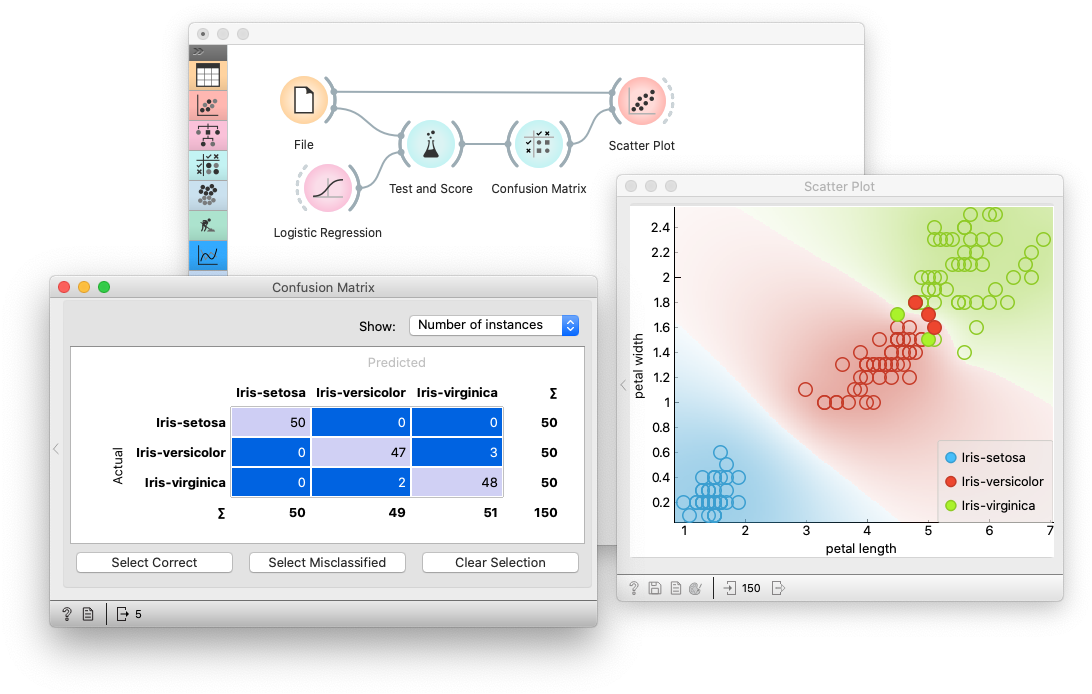
Orange is a data mining and visualization toolbox for novice and expert alike. To explore data with Orange, one requires no programming or in-depth mathematical knowledge. We believe that workflow-based data science tools democratize data science by hiding complex underlying mechanics and exposing intuitive concepts. Anyone who owns data, or is motivated to peek into data, should have the means to do so.
Installing
On Windows and macOS, download the latest installer. To install an add-on, head to Options -> Add-ons... in the menu bar.
On Linux (or for development), install using conda, pip or uv.
Installing with Conda
First, install Miniconda for your OS.
Then, create a new conda environment, and install orange3:
# Add conda-forge to your channels for access to the latest release
conda config --add channels conda-forge

# Perhaps enforce strict conda-forge priority
conda config --set channel_priority strict

# Create and activate an environment for Orange
conda create python=3.12 --yes --name orange3
conda activate orange3

# Install Orange
conda install orange3
Run Orange from the correct environment.
conda activate orange3
python -m Orange.canvas
Note that the first launch may take some time.
For installation of an add-on, use:
conda install orange3-<addon name>
See specific add-on repositories for details.
Installing with pip
We recommend using our standalone installer or conda. Installation with pip might require a C/C++ compiler (on Windows we suggest using Microsoft Visual Studio Build Tools). To install Orange, create and activate a virtual environment, then run:
pip install PyQt6 PyQt6-WebEngine orange3
Run Orange by activating the environment and then executing python -m Orange.canvas. Note that the first launch may take some time.
add uv tools to the path (see instructions printed by uv) and then run orange with orange-canvas. The first launch may take some time.
Installing with winget (Windows only)
To install Orange with winget, run:
winget install --id UniversityofLjubljana.Orange
Developing
Want to write a widget? Use the Orange3 example add-on template.
Want to get involved? Join us on Discord, introduce yourself in #general!
Take a look at our contributing guide and style guidelines.
Check out our widget development docs for a comprehensive guide on writing Orange widgets.
The Orange ecosystem
The development of core Orange is primarily split into three repositories:
biolab/orange-canvas-core implements the canvas,
biolab/orange-widget-base is a handy widget GUI library,
biolab/orange3 brings it all together and implements the base data mining toolbox.
Additionally, add-ons implement additional widgets for more specific use cases. Anyone can write an add-on. Some of our first-party add-ons:
biolab/orange3-text
biolab/orange3-bioinformatics
biolab/orange3-timeseries
biolab/orange3-single-cell
biolab/orange3-imageanalytics
biolab/orange3-educational
biolab/orange3-geo
biolab/orange3-associate
biolab/orange3-network
biolab/orange3-explain
Setting up for core Orange development
First, fork the repository by pressing the fork button in the top-right corner of this page.
Set your GitHub username,
export MY_GITHUB_USERNAME=replaceme
create a conda environment, clone your fork, and install it:
conda create python=3.12 --yes --name orange3
conda activate orange3

git clone ssh://[email protected]/$MY_GITHUB_USERNAME/orange3

# Install PyQt. This will install PyQt6; you can also use PyQt5
pip install -r orange3/requirements-pyqt.txt
pip install -e orange3
Now you're ready to work with git. See GitHub's guides on pull requests, forks if you're unfamiliar. If you're having trouble, get in touch on Discord.
Running
Run Orange with python -m Orange.canvas (after activating the conda environment).
python -m Orange.canvas -l 2 --no-splash --no-welcome will skip the splash screen and welcome window, and output more debug info. Use -l 4 for more.
Add --clear-widget-settings to clear the widget settings before start.
To explore the dark side of the Orange, try --style=fusion:breeze-dark
Argument --help lists all available options.
To run tests, use unittest Orange.tests Orange.widgets.tests
Setting up for development of all components
Should you wish to contribute Orange's base components (the widget base and the canvas), you must also clone these two repositories from Github instead of installing them as dependencies of Orange3.
First, fork all the repositories to which you want to contribute.
Set your GitHub username,
export MY_GITHUB_USERNAME=replaceme
create a conda environment, clone your forks, and install them:
conda create python=3.12 --yes --name orange3
conda activate orange3

# Install PyQT and PyQtWebEngine. You can also use PyQt6
pip install -r requirements-pyqt.txt

git clone ssh://[email protected]/$MY_GITHUB_USERNAME/orange-widget-base
pip install -e orange-widget-base

git clone ssh://[email protected]/$MY_GITHUB_USERNAME/orange-canvas-core
pip install -e orange-canvas-core

git clone ssh://[email protected]/$MY_GITHUB_USERNAME/orange3
pip install -e orange3

# Repeat for any add-on repositories
It's crucial to install orange-base-widget and orange-canvas-core before orange3 to ensure that orange3 will use your local versions.
TopGit chưa ghi nhận license cho biolab/orange3. Phần lớn repo public trên GitHub là mã nguồn mở, nhưng điều khoản khác nhau từng repo — mở file LICENSE để xác nhận.
biolab/orange3 có trang demo không?
Dự án có trang chủ ở https://orangedatamining.com. Tab "Readme" ở trang này thường có ảnh chụp và hướng dẫn bắt đầu nhanh.
biolab/orange3 còn đang phát triển không?
Commit gần nhất trên biolab/orange3 là 3 tháng trước (theo timestamp GitHub). Repo có 1.1k fork — một chỉ báo về mức độ quan tâm của cộng đồng.
Đọc thêm về biolab/orange3 ở đâu?
Trang TopGit này là một snapshot — tab "Readme" hiển thị nguyên văn README của repo (đã bỏ link, giữ ảnh). Repo GitHub ở github.com/biolab/orange3 là nguồn chính thức.
Đọc đầy đủ README ở tab phía trên.
Vẫn đang phân vân về orange3?
Một cú bấm sẽ gửi câu hỏi kèm trang này cho AI — xem AI nói gì về orange3.

 /orange3