Canop/termimad là một trong những repo phía máy chủ mà TopGit theo dõi, hiện có 1.2k sao, viết chủ yếu bằng Rust. A library to display rich (Markdown) snippets and texts in a rust terminal application
Tóm tắt dựng từ metadata GitHub của chính dự án — chưa có bài review TopGit. Trang sẽ tự động cập nhật khi bài review đầy đủ được xuất bản.
VÌ SAO CHƯA CÓ REVIEW
TopGit viết bài đầy đủ cho repo có nhiều sao nhất và được yêu cầu nhiều nhất. Trang này là snapshot trong thời gian chờ — xem README gốc ở tab READ ME.
Termimad is a set of cross-platform utilities dedicated to CLI and TUI apps,
leveraging Markdown to format terminal rendering, allowing separation of structure, data and skin,
using crossterm as backend for styling and event,
based on crokey for key combinations support
with a focus on total control and performances, with no active loop,
using crossbeam for event passing,
striving to be correct, even on Unicode and wide characters
Termimad is not
a TUI framework: Unless you have serious performance concerns or want precise control, you'll find it much easier and faster, when building a TUI application, to just use one of the TUI frameworks of the Rust ecosystem
a generic Markdown renderer
consistent or complete in any way
Markdown in Termimad
The goal isn't to display any markdown text with its various extensions (a terminal isn't really fit for that).
The goal is rather to improve the display of texts in a terminal application when we want both the text and the skin to be easily configured.
Wrapping, table balancing, and scrolling are essential features of Termimad.
A text or a table can be displayed in an a priori unknown part of the screen, scrollable if desired, with a dynamically discovered width.
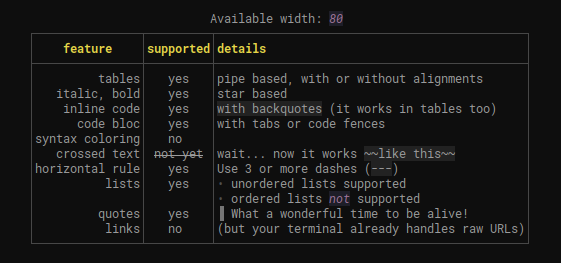
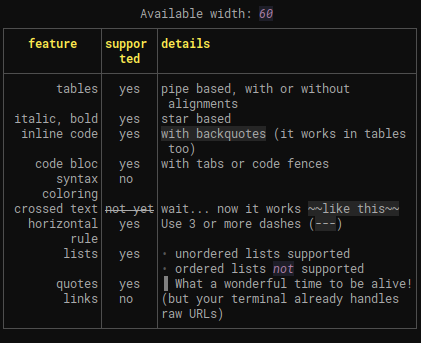
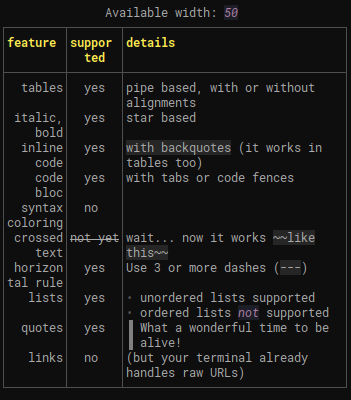
For example this markdown:
|:-:|:-:|-
|**feature**|**supported**|**details**|
|-:|:-:|-
| tables | yes | pipe based, with or without alignments
| italic, bold | yes | star based |
| inline code | yes | `with backquotes` (it works in tables too)
| code bloc | yes |with tabs or code fences
| syntax coloring | no |
| crossed text |  ~~not yet~~ | wait... now it works `~~like this~~`
| horizontal rule | yes | Use 3 or more dashes (`---`)
| lists | yes|* unordered lists supported
|  | |* ordered lists *not* supported
| quotes |  yes |> What a wonderful time to be alive!
| links | no | (but your terminal already handles raw URLs)
|-
will give different results depending on the width:
Usage
[dependencies]
termimad = "0.20"
With the default skin:
termimad::print_inline("**some** *nested **style*** and `some(code)`");
or
print!("{}", termimad::inline("**some** *nested **style*** and `some(code)`"));
Result:
Inline snippets with a custom skin:
Inline snippets are one line or less.
let mut skin = MadSkin::default();
skin.bold.set_fg(Yellow);
skin.print_inline("*Hey* **World!** Here's `some(code)`");
skin.paragraph.set_fgbg(Magenta, rgb(30, 30, 40));
skin.italic.add_attr(Underlined);
println!("\nand now {}\n", skin.inline("a little *too much* **style!** (and `some(code)` too)"));
Result:
Texts
Texts can be several lines. Tables and code blocks are automatically aligned, justified and consistently wrapped.
skin.print_text("# title\n* a list item\n* another item");
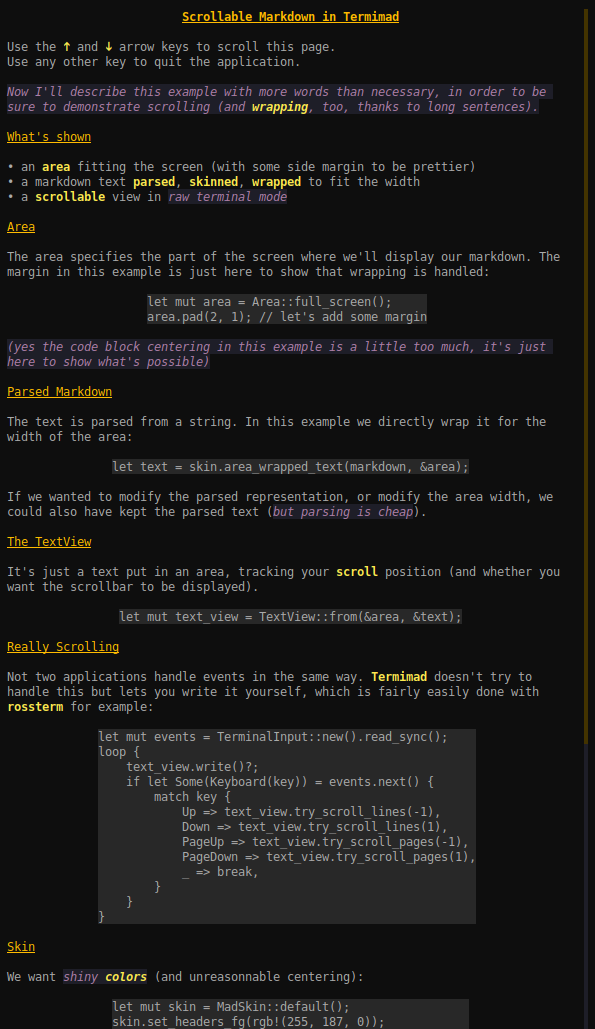
Scrollable TextView in a raw terminal:
The code for this example is in examples/scrollable. To read the whole text just do
cargo run --example scrollable
Templates
In order to separate the rendering format from the content, you may want to have some constant markdown and fill some placeholders with dynamic items.
The format! macro is not always a good solution for that because you may not be sure the content is free of characters which may mess the markdown.
A solution is to use one of the templating functions or macros.
A template is to markdown what a prepared statement is to SQL: interpreted once and preventing the content to be interpreted as parts of the structure.
Inline Templates
Example:
mad_print_inline!(
    &skin,
    "**$0 formula:** *$1*", // the markdown template, interpreted once
    "Disk",  // fills $0
    "2*π*r", // fills $1. Note that the stars don't mess the markdown
);
Main difference with using skin.print_inline(format!( ... )) to build some markdown and parse it:
the markdown parsing and template building are done only once (using once_cell internally)
the given values aren't interpreted as markdown fragments and don't impact the style
arguments can be omited, repeated, given in any order
no support for fmt parameters or arguments other than &str(in the current version)
Inline templates are especially convenient combined with automated expansion or ellipsis, for filling a field in a terminal application.
You'll find more examples and advice in the inline-template example.
Text Template
When you want to fill a multi-line area, for example the help page of your terminal application, you may use a text template.
A template defines placeholders as ${name} which you may fill when using it.
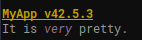
For example
let text_template = TextTemplate::from(r#"
    # ${app-name} v${app-version}
    It is *very* ${adj}.
    "#);
let mut expander = text_template.expander();
expander
    .set("app-name", "MyApp")
    .set("adj", "pretty")
    .set("app-version", "42.5.3");
skin.print_expander(expander);
This would render like this:
The values you set with set aren't parsed as markdown, so they may freely contain stars or backquotes.
A template is reusable and can be defined from a text content or any string.
By using sub-templates, you may handle repetitions. They're handy for lists or tables.
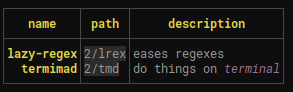
For example
let text_template = TextTemplate::from(r#"
    |:-:|:-:|:-:|
    |**name**|**path**|**description**|
    |-:|:-:|:-|
    ${module-rows
    |**${module-name}**|`${app-version}/${module-key}`|${module-description}|
    }
    |-|-|-|
    "#);
let mut expander = text_template.expander();
expander
    .set("app-version", "2");
expander.sub("module-rows")
    .set("module-name", "lazy-regex")
    .set("module-key", "lrex")
    .set("module-description", "eases regexes");
expander.sub("module-rows")
    .set("module-name", "termimad")
    .set("module-key", "tmd")
    .set_md("module-description", "do things on *terminal*");
skin.print_expander(expander);
to get
On this example, you can note that
sub("module-rows") gets an expander for the sub template called module-rows
set_md can be used when you want to insert not just a raw uninterpreted string but some inline markdown.
you don't need to fill global placeholders again (here ${app-version}).
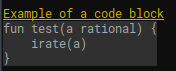
If you want to insert a block of code, you may use set_lines which applies the line style to all passed lines.
For example
let text_template = TextTemplate::from(r#"
    ## Example of a code block
        ${some-function}
    "#);
let mut expander = text_template.expander();
expander.set_lines("some-function", r#"
    fun test(a rational) {
    irate(a)
    }
    "#);
skin.print_expander(expander);
to get
You'll find more text template functions in the documentation and in the example (run cargo run --example text-template).
You may also be interested in OwningTemplateExpander: an alternative expander owning the values which may be handy when you build them while iterating in sub templates.
Asking questions
A frequent need in CLI apps is to ask the user to select an answer.
The Question API and the ask! macros cover most basic needs.
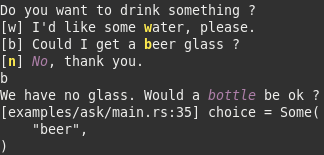
Here's an example of asking with a default choice (that you get by hitting enter) and a returned value:
let choice = ask!(skin, "Do you want to drink something ?", ('n') {
    ('w', "I'd like some **w**ater, please.") => {
        mad_print_inline!(skin, "*Wait a minute, please, I'll fetch some.*\n");
        Some("water")
    }
    ('b', "Could I get a **b**eer glass ?") => {
        mad_print_inline!(skin, "We have no glass, so here's a *bottle*.\n");
        Some("beer")
    }
    ('n', "*No*, thank you.") => {
        None
    }
});
dbg!(choice);
Skin Files
A MadSkin can be deserialized using serde.
For example, such a skin in Hjson could be
bold: "#fb0 bold"
italic: dim italic
strikeout: crossedout red
bullet: ○ yellow bold
paragraph: gray(20)
code_block: gray(2) gray(15) center
headers: [
    yellow bold center
    yellow underlined
    yellow
]
quote: > red
horizontal-rule: "~ #00cafe"
table: "#540 center"
scrollbar: "#fb0 gray(11) |"
Execute cargo run --example skin-file for an example and explanations.
Events and inputs
Termimad also includes a few utilities helping efficient managing of events and user input in a multithread application.
Advices to get started
Start by reading the examples (in /examples): they cover almost the whole API, including templates, how to use an alternate screen or scroll the page, etc. Many examples print a bunch of relevant documentation.
The render-input-markdown example lets you type some markdown in a text area and see it rendered below
Be careful that some colors aren't displayable on all terminals. The default color set of your application should not include arbitrary RGB colors.
The event / event-source part of Termimad is currently tailored for a short number of applications. If you use it or want to use it, please come and tell me so that your needs are taken into account!
If your goal is to format some CLI application output, for example a few tables, have a look at dysk which is one of the simplest possible uses
If a feature is missing, or you don't know how to use some part, come and ping me on my chat during West European hours.
Open-source applications using termimad
broot is a file manager and uses termimad for its help screen, status information and event management
bacon is a background Rust compiler. It uses Termimad for display and event management
dysk is a terminal utility displaying file systems. Termimad templates are used to show the data in tables
Humility is a debugger for embedded systems. It uses Termimad to print Markdown documentation with the humility doc subcommand
SafeCloset is a secret safe. Its TUI uses Termimad a lot, especially inputs
Rhit is a nginx log analyzer. Termimad templates are used to show the data in tables
lapin is a terminal game. It uses Termimad for display and event management
backdown is a file deduplicator. It uses Termimad to print on screen and ask questions
If you're the author of another application using Termimad, please tell me.
Reexports
Crossterm is a 0.x library which means its API isn't frozen. And it does change sometimes so libraries based on Crossterm can't always use its last version.
Crossterm is reexported by Termimad so you don't have to declare the import yourself. You may use crossterm as termimad::crossterm.
unicode_width, which also had a breaking change in a patch version, is reexported too.
Canop/termimad có 1.2k sao GitHub — tải lại trang để xem số mới nhất, hoặc xem trực tiếp github.com/Canop/termimad. TopGit phản chiếu số sao của GitHub nhưng không cam kết đến từng phút.
Canop/termimad có phải mã nguồn mở không?
Có — Canop/termimad phát hành theo license MIT, nghĩa là mã nguồn mở để đọc, fork và (tùy license) tái sử dụng. Mã: github.com/Canop/termimad.
Canop/termimad còn đang phát triển không?
Commit gần nhất trên Canop/termimad là 4 tháng trước (theo timestamp GitHub). Repo có 48 fork — một chỉ báo về mức độ quan tâm của cộng đồng.
Canop/termimad dùng license gì?
Canop/termimad phát hành theo license MIT. Nên mở file LICENSE trên GitHub để xác nhận — license metadata đôi khi lệch với thực tế dự án.
Canop/termimad là gì?
Canop/termimad (Canop/termimad) là dự án Rust trên GitHub. Theo mô tả gốc: A library to display rich (Markdown) snippets and texts in a rust terminal application
Canop/termimad viết bằng ngôn ngữ gì?
Canop/termimad chủ yếu viết bằng Rust. Trường "language" của GitHub dựa trên phần lớn byte ở nhánh mặc định.
Cùng nhóm Backend còn repo nào?
Canop/termimad thuộc nhóm Backend trên TopGit, cùng 6 topic GitHub. Trang Trending và Topics liệt kê các repo cùng số sao và cùng ngôn ngữ để so sánh.
Đọc thêm về Canop/termimad ở đâu?
Trang TopGit này là một snapshot — tab "Readme" hiển thị nguyên văn README của repo (đã bỏ link, giữ ảnh). Repo GitHub ở github.com/Canop/termimad là nguồn chính thức.
Đọc đầy đủ README ở tab phía trên.
termimad có đáng để bạn bỏ thời gian?
ChatGPT, Claude và Perplexity đều đọc được trang này. Hỏi thử xem họ nghĩ gì về termimad.

 /termimad