Chlumsky/msdfgen hiện có 5.0k sao trên GitHub, viết chủ yếu bằng C++. Multi-channel signed distance field generator
Tóm tắt dựng từ metadata GitHub của chính dự án — chưa có bài review TopGit. Trang sẽ tự động cập nhật khi bài review đầy đủ được xuất bản.
VÌ SAO CHƯA CÓ REVIEW
TopGit viết bài đầy đủ cho repo có nhiều sao nhất và được yêu cầu nhiều nhất. Trang này là snapshot trong thời gian chờ — xem README gốc ở tab READ ME.
This is a utility for generating signed distance fields from vector shapes and font glyphs,
which serve as a texture representation that can be used in real-time graphics to efficiently reproduce said shapes.
Although it can also be used to generate conventional signed distance fields best known from
this Valve paper
and perpendicular distance fields, its primary purpose is to generate multi-channel distance fields,
using a method I have developed. Unlike monochrome distance fields, they have the ability
to reproduce sharp corners almost perfectly by utilizing all three color channels.
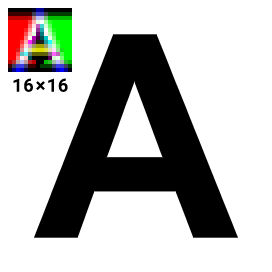
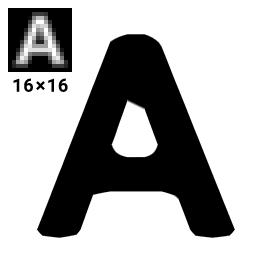
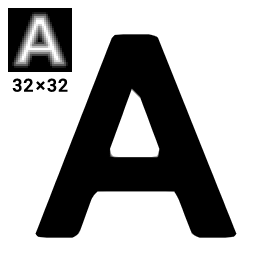
The following comparison demonstrates the improvement in image quality.
To learn more about this method, you can read my Master's thesis.
Check out my MSDF-Atlas-Gen if you want to generate entire font atlases for text rendering.
See what's new in the changelog.
Getting started
The project can be used either as a library or as a console program. It is divided into two parts, core
and extensions. The core module has no dependencies and only uses bare C++. It contains all
key data structures and algorithms, which can be accessed through the msdfgen.h header.
Extensions contain utilities for loading fonts and SVG files, as well as saving PNG images.
Those are exposed by the msdfgen-ext.h header. This module uses
FreeType,
TinyXML2,
libpng,
and (optionally) Skia.
Additionally, there is the main.cpp, which wraps the functionality into
a comprehensive standalone console program. To start using the program immediately,
there is a Windows binary available for download in the "Releases" section.
To use the project as a library, you may install it via the vcpkg package manager as
vcpkg install msdfgen
Or, to build the project from source, you may use the included CMake script.
In its default configuration, it requires vcpkg as the provider for third-party library dependencies.
If you set the environment variable VCPKG_ROOT to the vcpkg directory,
the CMake configuration will take care of fetching all required packages from vcpkg.
Console commands
The standalone program is executed as
msdfgen <mode> <input> <options>
where only the input specification is required.
Mode can be one of:
sdf – generates a conventional monochrome (true) signed distance field.
psdf – generates a monochrome signed perpendicular distance field.
msdf (default) – generates a multi-channel signed distance field using my new method.
mtsdf – generates a combined multi-channel and true signed distance field in the alpha channel.
The input can be specified as one of:
-font <filename.ttf> <character code> – to load a glyph from a font file.
Character code can be expressed as either a decimal (63) or hexadecimal (0x3F) Unicode value, or an ASCII character
in single quotes ('?').
-svg <filename.svg> – to load an SVG file. Note that only the last vector path in the file will be used.
-shapedesc <filename.txt>, -defineshape <definition>, -stdin – to load a text description of the shape
from either a file, the next argument, or the standard input, respectively. Its syntax is documented further down.
The complete list of available options can be printed with -help.
Some of the important ones are:
-o <filename> – specifies the output file name. The desired format will be deduced from the extension
(png, bmp, tiff, rgba, fl32, txt, bin). Otherwise, use -format.
-dimensions <width> <height> – specifies the dimensions of the output distance field (in pixels).
-range <range>, -pxrange <range> – specifies the width of the range around the shape
between the minimum and maximum representable signed distance in shape units or distance field pixels, respectively.
-scale <scale> – sets the scale used to convert shape units to distance field pixels.
-translate <x> <y>, -pxtranslate <x> <y> – sets the translation of the shape in shape units
or distance field pixels. Otherwise the origin (0, 0) lies in the bottom left corner.
-autoframe – automatically frames the shape to fit the distance field. If the output must be precisely aligned,
you should manually position it using -translate and -scale instead.
-angle <angle> – specifies the maximum angle to be considered a corner.
Can be expressed in radians (3.0) or degrees with D at the end (171.9D).
-testrender <filename.png> <width> <height> - tests the generated distance field by using it to render an image
of the original shape into a PNG file with the specified dimensions. Alternatively, -testrendermulti renders
an image without combining the color channels, and may give you an insight in how the multi-channel distance field works.
-exportshape <filename.txt> - saves the text description of the shape with edge coloring to the specified file.
This can be later edited and used as input through -shapedesc.
-printmetrics – prints some useful information about the shape's layout.
will take the glyph capital M from the Arial Bold typeface, generate a 32×32 multi-channel distance field
with a 4 pixels wide distance range, store it into msdf.png, and create a test render of the glyph as render.png.
Note: Do not use -autoframe to generate character maps! It is intended as a quick preview only.
Library API
If you choose to use this utility inside your own program, there are a few simple steps you need to perform
in order to generate a distance field. Please note that all classes and functions are in the msdfgen namespace.
Acquire a Shape object. You can either load it via loadGlyph or loadSvgShape, or construct it manually.
It consists of closed contours, which in turn consist of edges. An edge is represented by a LinearEdge, QuadraticEdge,
or CubicEdge. You can construct them from two endpoints and 0 to 2 Bézier control points.
Normalize the shape using its normalize method and assign colors to edges if you need a multi-channel SDF.
This can be performed automatically using the edgeColoringSimple (or other) heuristic, or manually by setting each edge's
color member. Keep in mind that at least two color channels must be turned on in each edge.
Call generateSDF, generatePSDF, generateMSDF, or generateMTSDF to generate a distance field into a floating point
Bitmap object. This can then be worked with further or saved to a file using saveBmp, savePng, saveTiff, etc.
You may also render an image from the distance field using renderSDF. Consider calling simulate8bit
on the distance field beforehand to simulate the standard 8 bits/channel image format.
Using a multi-channel distance field generated by this program is similarly simple to how a monochrome distance field is used.
The only additional operation is computing the median of the three channels inside the fragment shader,
right after sampling the distance field. This signed distance value can then be used the same way as usual.
Important: Make sure to interpret the MSDF color channels in linear space just like the alpha channel and not as sRGB,
even if the image format (PNG, BMP) may suggest otherwise.
The following is an example GLSL fragment shader with anti-aliasing:
Here, screenPxRange() represents the distance field range in output screen pixels. For example, if the pixel range was set to 2
when generating a 32x32 distance field, and it is used to draw a quad that is 72x72 pixels on the screen,
it should return 4.5 (because 72/32 * 2 = 4.5).
For 2D rendering, this can generally be replaced by a precomputed uniform value.
For rendering in a 3D perspective only, where the texture scale varies across the screen,
you may want to implement this function with fragment derivatives in the following way.
I would suggest precomputing unitRange as a uniform variable instead of pxRange for better performance.
uniform float pxRange; // set to distance field's pixel range

vec2 sqr(vec2 x) { return x*x; } // squares vector components

float screenPxRange() {
    vec2 unitRange = vec2(pxRange)/vec2(textureSize(msdf, 0));
    // If inversesqrt is not available, use vec2(1.0)/sqrt
    vec2 screenTexSize = inversesqrt(sqr(dFdx(texCoord))+sqr(dFdy(texCoord)));
    // Can also be approximated as screenTexSize = vec2(1.0)/fwidth(texCoord);
    return max(0.5*dot(unitRange, screenTexSize), 1.0);
}
screenPxRange() must never be lower than 1. If it is lower than 2, there is a high probability that the anti-aliasing will fail
and you may want to re-generate your distance field with a wider range.
Shape description syntax
The text shape description has the following syntax.
Each closed contour is enclosed by braces: { <contour 1> } { <contour 2> }
Each point (and control point) is written as two real numbers separated by a comma.
Points in a contour are separated with semicolons.
The last point of each contour must be equal to the first, or the symbol # can be used, which represents the first point.
There can be an edge segment specification between any two points, also separated by semicolons.
This can include the edge's color (c, m, y or w) and/or one or two Bézier curve control points inside parentheses.
At the beginning, there may be an Y-axis direction specifier @y-up or @y-down.
For example,
{ -1, -1; m; -1, +1; y; +1, +1; m; +1, -1; y; # }
would represent a square with magenta and yellow edges,
{ 0, 1; (+1.6, -0.8; -1.6, -0.8); # }
is a teardrop shape formed by a single cubic Bézier curve.
Chlumsky/msdfgen có 5.0k sao GitHub — tải lại trang để xem số mới nhất, hoặc xem trực tiếp github.com/Chlumsky/msdfgen. TopGit phản chiếu số sao của GitHub nhưng không cam kết đến từng phút.
Chlumsky/msdfgen có phải mã nguồn mở không?
Có — Chlumsky/msdfgen phát hành theo license MIT, nghĩa là mã nguồn mở để đọc, fork và (tùy license) tái sử dụng. Mã: github.com/Chlumsky/msdfgen.
Chlumsky/msdfgen có tag gì không?
Bản đồng bộ chưa ghi nhận topic GitHub nào cho Chlumsky/msdfgen. GitHub topics hiển thị ở thanh bên phải trang repo — đó là nơi đáng kiểm tra nhất.
Chlumsky/msdfgen có website riêng không?
TopGit chưa ghi nhận URL trang chủ cho Chlumsky/msdfgen. Phần README ở tab phía trên thường có link demo, hoặc xem mô tả GitHub của repo.
Chlumsky/msdfgen còn đang phát triển không?
Commit gần nhất trên Chlumsky/msdfgen là 2 tháng trước (theo timestamp GitHub). Repo có 520 fork — một chỉ báo về mức độ quan tâm của cộng đồng.
Đọc thêm về Chlumsky/msdfgen ở đâu?
Trang TopGit này là một snapshot — tab "Readme" hiển thị nguyên văn README của repo (đã bỏ link, giữ ảnh). Repo GitHub ở github.com/Chlumsky/msdfgen là nguồn chính thức.
Đọc đầy đủ README ở tab phía trên.
Vẫn đang phân vân về msdfgen?
Một cú bấm sẽ gửi câu hỏi kèm trang này cho AI — xem AI nói gì về msdfgen.

 /msdfgen