Một mục mã nguồn mở trong kho dữ liệu GitHub của TopGit: Chuyu-Team/VC-LTL, 1.1k sao, C++. Shared to msvcrt.dll and optimize the C/C++ application file size.
Tóm tắt dựng từ metadata GitHub của chính dự án — chưa có bài review TopGit. Trang sẽ tự động cập nhật khi bài review đầy đủ được xuất bản.
VÌ SAO CHƯA CÓ REVIEW
TopGit viết bài đầy đủ cho repo có nhiều sao nhất và được yêu cầu nhiều nhất. Trang này là snapshot trong thời gian chờ — xem README gốc ở tab READ ME.
VC-LTL - An elegant way to compile lighter binaries.
简体中文
VC-LTL 5.0 available, 4.0 version no longer provides support!!!
I would like to turn into a stone bridge, go through 500 years of wind, 500 years of Sun, rain for 500 years, but she walked off a bridge!
1. About VC-LTL
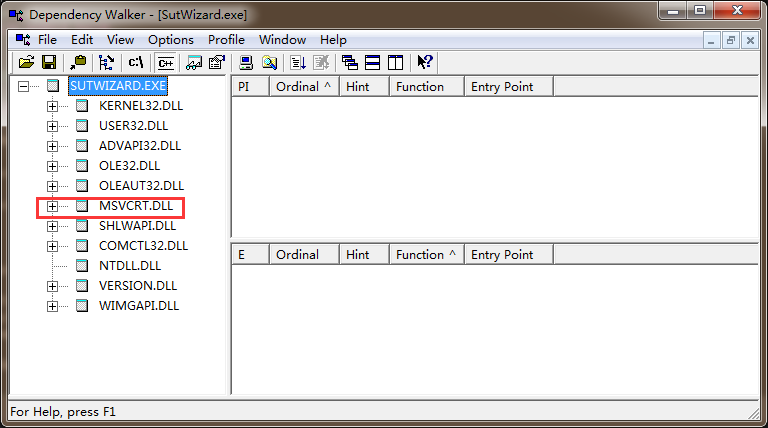
VC-LTL is an open source CRT library based on the MS VCRT that reduce program binary size and say goodbye to Microsoft runtime DLLs, such as msvcr120.dll, api-ms-win-crt-time-l1-1-0.dll and other dependencies.
VC-LTL was originally a dedicated Dism++ runtime and was isolated and open sourced from Dism++ source code on Mar 6, 2017.
There are plenty of modules in large projects. If all binaries uses static
compilation, it will use plenty of disk space and finally may crashed because
of the fiber local storage (FLS) limitation.
But the VC-LTL can make your project using the built-in msvcrt.dll in the
Windows. It solves the C runtime deployment problem and the fiber local storage
(FLS) limitation problem effectively, and greatly reduce the binaries size.
What a handy library!
Everyone can use it for free, even for the commerical use. Of course, I hope
that if you mentioned the VC-LTL in your project, because I want to help more
people.
GitHub: github.com/Chuyu-Team/VC-LTL (English)
Gitee: gitee.com/Chuyu-Team/VC-LTL (Chinese)
QQ Group: 633710173
1.1. The principle of VC-LTL
After using the VC-LTL, the binaries will be dynamically linked to the built-in
msvcrt.dll in the Windows to reduce the binaries size. It is generally
available if you use the VC-LTL in the project using the C Runtime and the STL.
However you cannot use the VC-LTL in the MFC project with the VC-LTL because it
is too complex to support.
After using the VC-LTL, the size of the binaries will reduce about 30%
if compiled from the C++ source code, and about 50% if compiled
from the pure C source code.
Visual Studio 2015 (Support Clang with Microsoft CodeGen, Clang 3.7 with Microsoft CodeGen, Clang-LLVM)
Visual Studio 2017 (Support Clang with Microsoft CodeGen, Clang-LLVM)
Visual Studio 2019 (Support Clang-LLVM)
2.2. Supported Build Tools
Build Tool
Helper
Visual Studio
VC-LTL helper for Visual Studio.props
CMake
VC-LTL helper for cmake.cmake
NMake, CL
VC-LTL helper for nmake.cmd
QMake
VC-LTL helper for qmake.pri
2.3. Supported Windows Versions
OS
x86
x64
arm
arm64
Windows XP, Windows Server 2003
√
√
-
-
Windows Vista, Windows Server 2008
√
√
-
-
Windows 7, Windows Server 2008 R2
√
√
-
-
Windows 8, Windows Server 2012, Windows RT
√
√
√
-
Windows 8.1, Windows Server 2012 R2, Windows RT 8.1
√
√
√
-
Windows 10, Windows Server 2016, Windows Server 2019
√
√
√
√
The binaries compiled with the VC-LTL is compatible with Windows XP and
later, even in the environment which installed no hotfixes.
3. How to used?
We will enter the theme, we have prepared a rich VC-LTL Samples for your reference, and welcome to join our QQ group (633710173).
3.1. Using VC-LTL in Visual Studio
3.1.1. Choose reference mode
3.1.1.1. Reference via NuGet (recommend)
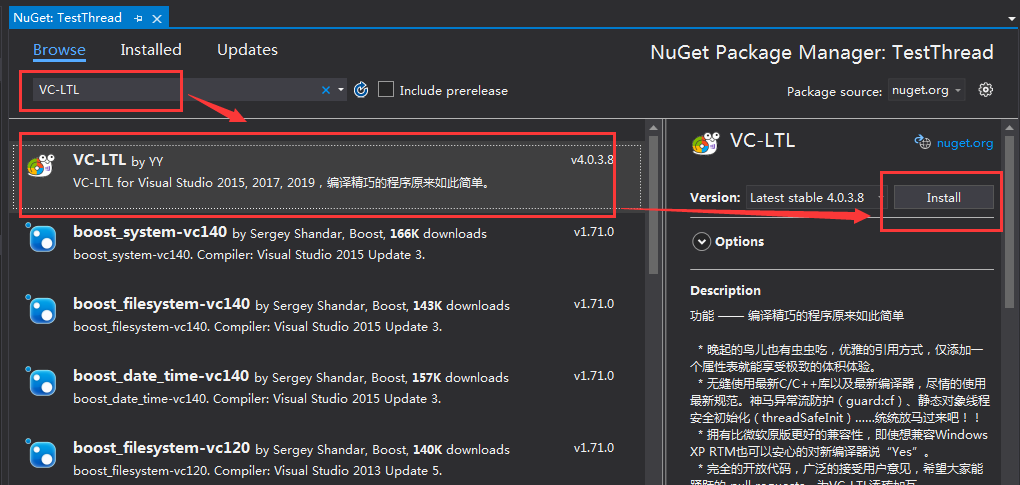
Right-click on the project and select "Manage NuGet Packages", then search for VC-LTL and choose the version that suits you, and finally click Install.
3.1.1.2. Reference via Registry
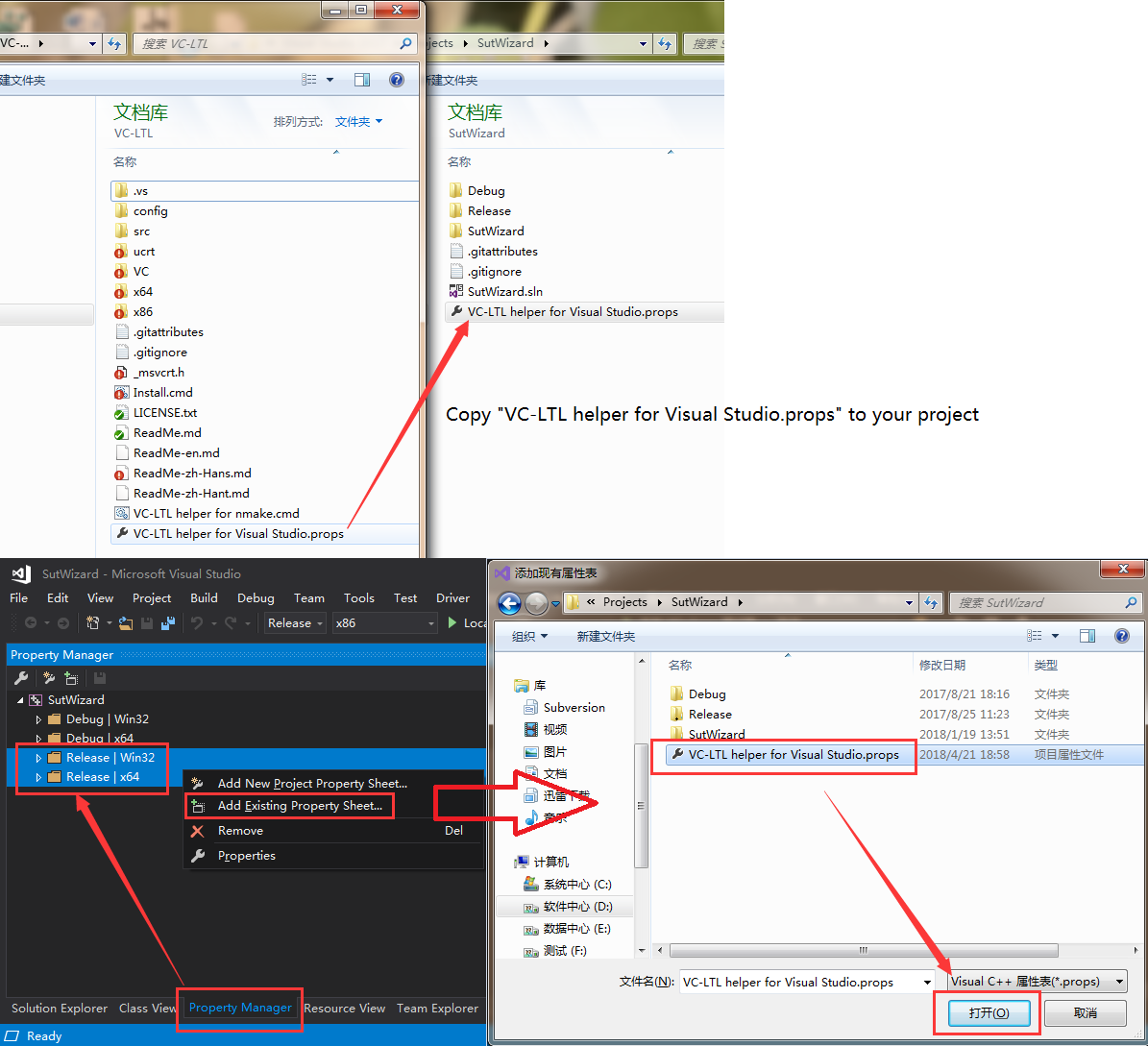
If you download and unzip VC-LTL Binary to D:\Src\VC-LTL, please double-click D:\Src\VC-LTL\Install.cmd.
The script will save the information in the registry HKCU\Code\VC-LTL.
Copy VC-LTL helper for Visual Studio.props to your project, then open the Property Manager ( View - Property Manager ) and right-click on the Release Configuration, click on Add Existing Property Sheet..., and finally select VC-LTL helper for Visual Studio.props.
3.1.2. Configure Project Properties
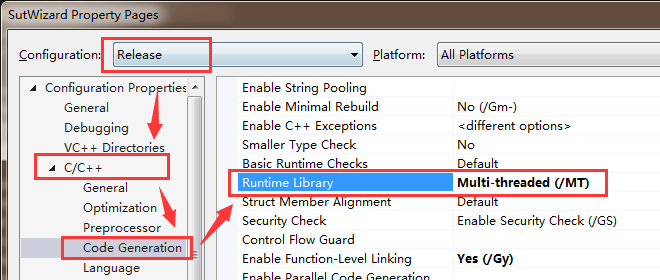
C/C++ - Code Generation -Runtime Library adjust to Multi-threaded (/MT)
For XP support, please Right click on the project, Properties - 初雨团队 VC-LTL - 启用 Windows XP兼容 - "Yes".
3.2. Using VC-LTL in CMake
If you download and unzip VC-LTL Binary to D:\Src\VC-LTL, please double-click D:\Src\VC-LTL\Install.cmd.
The script will save the information in the registry HKCU\Code\VC-LTL.
3.2.1. Add VC-LTL Module File
Copy VC-LTL helper for cmake.cmake to your project. Then add include("VC-LTL helper for cmake.cmake") to CMakeLists.txt.
Example:
cmake_minimum_required(VERSION 3.5.2)
project(ltltest)

include("VC-LTL helper for cmake.cmake")

add_subdirectory(src)
3.2.2. Modify The Configuration
Make sure to use /MT to compile project when using VC-LTL. For XP support, please modify VC-LTL helper for cmake.cmake to enable set(SupportWinXP "true").
3.3. Using VC-LTL in NMake/CL
3.3.1. Run VC-LTL Cmd Script
If you download and unzip VC-LTL Binary to D:\Src\VC-LTL, please double-click D:\Src\VC-LTL\Install.cmd.
The script will save the information in the registry HKCU\Code\VC-LTL.
Copy VC-LTL helper for nmake.cmd to your project. Run vcvars32.bat or vcvars64.bat and execute this script. The script will automatically modify the include and lib environment variables.
Make sure to use /MT to compile project when using VC-LTL. For XP support, please modify VC-LTL helper for nmake.cmd to enable set SupportWinXP=true.
3.4. Rebuild (Release only)
Is the file size smaller? If you fail to compile, please refer to 4. FAQ. You can also feedback and work together to improve VC-LTL.
If VC-LTL is referenced correctly, it will be output at the time of generation: note: 进入ltl普通模式,已准备引用到VC-LTL。定义 _DISABLE_DEPRECATE_LTL_MESSAGE 可关闭信息提示。.
Compile with VC-LTL must be compiled with /MT, and all dependent static libraries must also be recompiled with VC-LTL.
Chuyu-Team/VC-LTL có 1.1k sao GitHub — tải lại trang để xem số mới nhất, hoặc xem trực tiếp github.com/Chuyu-Team/VC-LTL. TopGit phản chiếu số sao của GitHub nhưng không cam kết đến từng phút.
Chuyu-Team/VC-LTL có phải mã nguồn mở không?
Có — Chuyu-Team/VC-LTL phát hành theo license EPL-2.0, nghĩa là mã nguồn mở để đọc, fork và (tùy license) tái sử dụng. Mã: github.com/Chuyu-Team/VC-LTL.
Chuyu-Team/VC-LTL còn đang phát triển không?
Commit gần nhất trên Chuyu-Team/VC-LTL là 5.0 năm trước (theo timestamp GitHub). Repo có 212 fork — một chỉ báo về mức độ quan tâm của cộng đồng.
Chuyu-Team/VC-LTL dùng license gì?
Chuyu-Team/VC-LTL phát hành theo license EPL-2.0. Nên mở file LICENSE trên GitHub để xác nhận — license metadata đôi khi lệch với thực tế dự án.
Chuyu-Team/VC-LTL là gì?
Chuyu-Team/VC-LTL (Chuyu-Team/VC-LTL) là dự án C++ trên GitHub. Theo mô tả gốc: Shared to msvcrt.dll and optimize the C/C++ application file size.
Chuyu-Team/VC-LTL viết bằng ngôn ngữ gì?
Chuyu-Team/VC-LTL chủ yếu viết bằng C++. Trường "language" của GitHub dựa trên phần lớn byte ở nhánh mặc định.
Đọc thêm về Chuyu-Team/VC-LTL ở đâu?
Trang TopGit này là một snapshot — tab "Readme" hiển thị nguyên văn README của repo (đã bỏ link, giữ ảnh). Repo GitHub ở github.com/Chuyu-Team/VC-LTL là nguồn chính thức.
Đọc đầy đủ README ở tab phía trên.
Chưa chắc VC-LTL có hợp với bạn?
Để ChatGPT, Claude hoặc Perplexity tìm hiểu giúp — bấm bên dưới và xem AI nói gì về VC-LTL.

 /VC-LTL