cmu-db/bustub được TopGit xếp vào nhóm dự án dữ liệu, với 5.1k sao trên GitHub, viết chủ yếu bằng C++. The BusTub Relational Database Management System (Educational)
Tóm tắt dựng từ metadata GitHub của chính dự án — chưa có bài review TopGit. Trang sẽ tự động cập nhật khi bài review đầy đủ được xuất bản.
VÌ SAO CHƯA CÓ REVIEW
TopGit viết bài đầy đủ cho repo có nhiều sao nhất và được yêu cầu nhiều nhất. Trang này là snapshot trong thời gian chờ — xem README gốc ở tab READ ME.
BusTub is a relational database management system built at Carnegie Mellon University for the Introduction to Database Systems (15-445/645) course. This system was developed for educational purposes and should not be used in production environments.
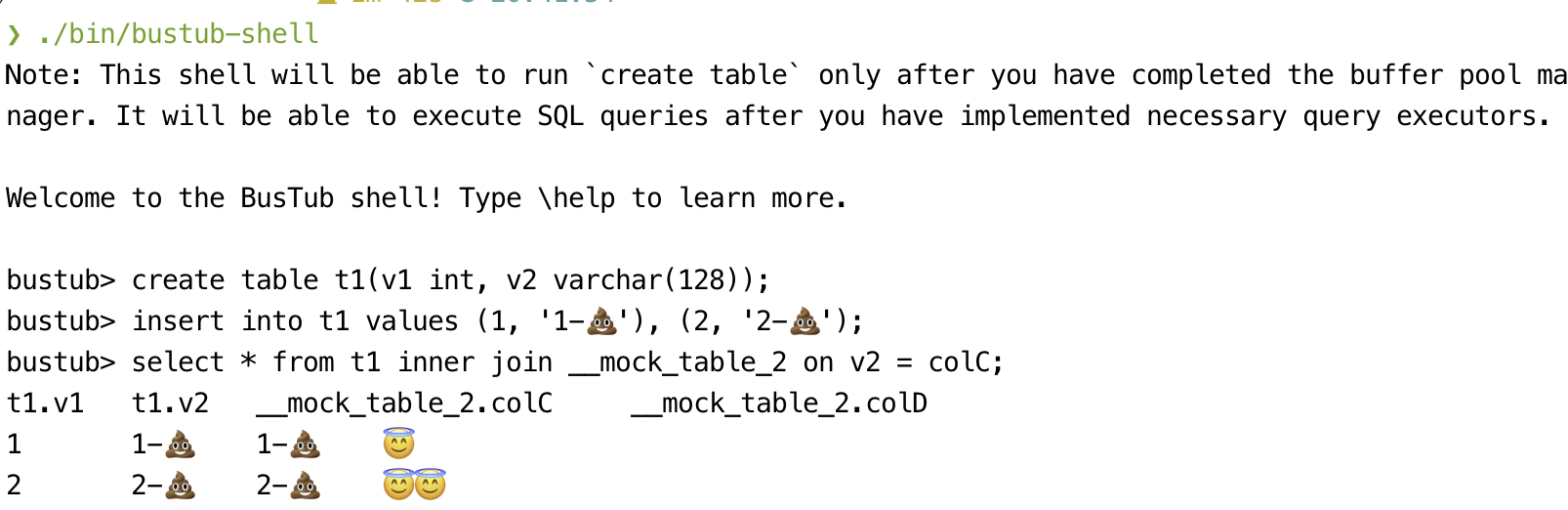
BusTub supports basic SQL and comes with an interactive shell. You can get it running after finishing all the course projects.
WARNING: IF YOU ARE A STUDENT IN THE CLASS, DO NOT DIRECTLY FORK THIS REPO. DO NOT PUSH PROJECT SOLUTIONS PUBLICLY. THIS IS AN ACADEMIC INTEGRITY VIOLATION AND CAN LEAD TO GETTING YOUR DEGREE REVOKED, EVEN AFTER YOU GRADUATE.
We make the autograder for each assignment available to non-CMU students on Gradescope after their due date for CMU students. In exchange for making this available to the public, we ask that you do not make your project implementations public on GitHub or other source code repositories. Please read the course FAQ on how to use the autograder on Gradescope. Run python3 gradescope_sign.py to sign an agreement before submitting to the autograder.
WARNING: IF YOU ARE A STUDENT OUTSIDE CMU, DO NOT MAKE YOUR SOLUTION PUBLICLY AVAILABLE, AND DO SUBMIT YOUR OWN WORK. OTHERWISE, YOU WILL BE BANNED FROM USING THE AUTOGRADER. Thank you for creating a fair learning environment.
Cloning this Repository
The following instructions are adapted from the GitHub documentation on duplicating a repository. The procedure below walks you through creating a private BusTub repository that you can use for development.
Create a new repository under your account. Pick a name (e.g. bustub-private) and select Private for the repository visibility level.
On your development machine, create a bare clone of the public BusTub repository:
Next, mirror the public BusTub repository to your own private BusTub repository. Suppose your GitHub name is student and your repository name is bustub-private. The procedure for mirroring the repository is then:
$ cd bustub-public

# If you pull / push over HTTPS
$ git push https://github.com/student/bustub-private.git master

# If you pull / push over SSH
$ git push [email protected]:student/bustub-private.git master
This copies everything in the public BusTub repository to your own private repository. You can now delete your local clone of the public repository:
$ cd ..
$ rm -rf bustub-public
Clone your private repository to your development machine:
# If you pull / push over HTTPS
$ git clone https://github.com/student/bustub-private.git

# If you pull / push over SSH
$ git clone [email protected]:student/bustub-private.git
Add the public BusTub repository as a second remote. This allows you to retrieve changes from the CMU-DB repository and merge them with your solution throughout the semester:
$ git remote add public https://github.com/cmu-db/bustub.git
You can verify that the remote was added with the following command:
$ git remote -v
origin	https://github.com/student/bustub-private.git (fetch)
origin	https://github.com/student/bustub-private.git (push)
public	https://github.com/cmu-db/bustub.git (fetch)
public	https://github.com/cmu-db/bustub.git (push)
You can now pull in changes from the public BusTub repository as needed with:
$ git pull public master
Disable GitHub Actions from the project settings of your private repository; otherwise, you may run out of GitHub Actions quota.
We suggest working on your projects in separate branches. If you do not understand how Git branches work, learn how. If you fail to do this, you might lose all your work at some point in the semester, and nobody will be able to help you.
Build
We recommend developing BusTub on Ubuntu 24.04, or macOS (M1/M2/Intel). We do not support any other environments (i.e., do not open issues or come to office hours to debug them). We do not support WSL. The grading environment runs
Ubuntu 24.04.
Linux (Recommended) / macOS (Development Only)
To ensure that you have the proper packages on your machine, run the following script to automatically install them:
# Linux
$ sudo build_support/packages.sh
# macOS
$ build_support/packages.sh
Then run the following commands to build the system:
$ mkdir build
$ cd build
$ cmake ..
$ make
If you want to compile the system in debug mode, pass in the following flag to cmake:
Debug mode:
$ cmake -DCMAKE_BUILD_TYPE=Debug ..
$ make -j`nproc`
This enables AddressSanitizer by default.
If you want to use other sanitizers,
$ cmake -DCMAKE_BUILD_TYPE=Debug -DBUSTUB_SANITIZER=thread ..
$ make -j`nproc`
There are some differences between macOS and Linux (i.e., mutex behavior) that might cause test cases
to produce different results in different platforms. We recommend students to use a Linux VM for running
test cases and reproducing errors whenever possible.
Có — cmu-db/bustub phát hành theo license MIT, nghĩa là mã nguồn mở để đọc, fork và (tùy license) tái sử dụng. Mã: github.com/cmu-db/bustub.
cmu-db/bustub là gì?
cmu-db/bustub (cmu-db/bustub) là dự án C++ trên GitHub. Theo mô tả gốc: The BusTub Relational Database Management System (Educational)
cmu-db/bustub so với các dự án Data khác thế nào?
cmu-db/bustub được TopGit xếp vào nhóm Data, với 5.1k sao GitHub và viết bằng C++. Xem trang chủ đề Data trên TopGit để so sánh với các dự án tương tự theo số sao và mức độ hoạt động.
Cùng nhóm Data còn repo nào?
cmu-db/bustub thuộc nhóm Data trên TopGit, cùng 2 topic GitHub. Trang Trending và Topics liệt kê các repo cùng số sao và cùng ngôn ngữ để so sánh.
Đọc thêm về cmu-db/bustub ở đâu?
Trang TopGit này là một snapshot — tab "Readme" hiển thị nguyên văn README của repo (đã bỏ link, giữ ảnh). Repo GitHub ở github.com/cmu-db/bustub là nguồn chính thức.
Vì sao cmu-db/bustub được xếp vào nhóm Data?
TopGit xếp cmu-db/bustub vào nhóm Data dựa trên GitHub topics và mô tả của repo (gắn thẻ: "database", "dbms"). Việc phân loại dựa trên metadata thật của repo, không phải đoán theo cảm tính biên tập.
Đọc đầy đủ README ở tab phía trên.
Muốn nghe thêm một ý kiến về bustub?
Hỏi một AI đọc được trang này — một cú bấm là có ngay nhận định về bustub.
 /bustub