containerd/stargz-snapshotter là dự án Go với 1.6k sao trong nhóm Developer Tools. Fast container image distribution plugin with lazy pulling
Tóm tắt dựng từ metadata GitHub của chính dự án — chưa có bài review TopGit. Trang sẽ tự động cập nhật khi bài review đầy đủ được xuất bản.
VÌ SAO CHƯA CÓ REVIEW
TopGit viết bài đầy đủ cho repo có nhiều sao nhất và được yêu cầu nhiều nhất. Trang này là snapshot trong thời gian chờ — xem README gốc ở tab READ ME.
Read also introductory blog: Startup Containers in Lightning Speed with Lazy Image Distribution on Containerd
Pulling image is one of the time-consuming steps in the container lifecycle.
Research shows that time to take for pull operation accounts for 76% of container startup time[FAST '16].
Stargz Snapshotter is an implementation of snapshotter which aims to solve this problem by lazy pulling.
Lazy pulling here means a container can run without waiting for the pull completion of the image and necessary chunks of the image are fetched on-demand.
eStargz is a lazily-pullable image format proposed by this project.
This is compatible to OCI/Docker images so this can be pushed to standard container registries (e.g. ghcr.io) as well as this is still runnable even on eStargz-agnostic runtimes including Docker.
eStargz format is based on stargz image format by CRFS but comes with additional features like runtime optimization and content verification.
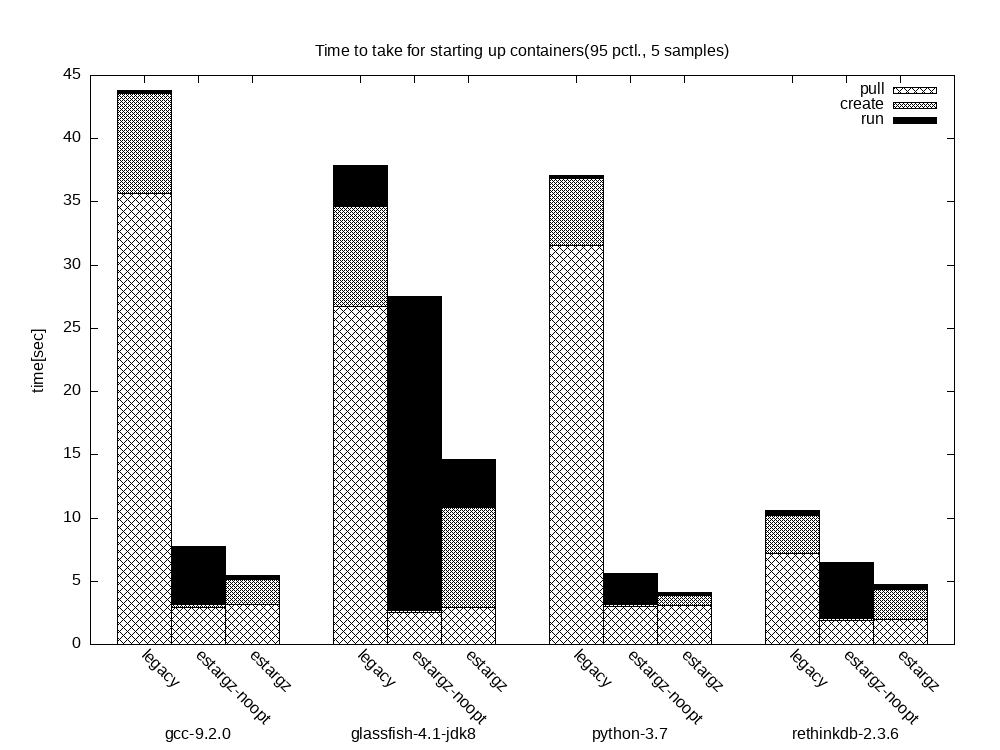
The following histogram is the benchmarking result for startup time of several containers measured on Github Actions, using GitHub Container Registry.
legacy shows the startup performance when we use containerd's default snapshotter (overlayfs) with images copied from docker.io/library without optimization.
For this configuration, containerd pulls entire image contents and pull operation takes accordingly.
When we use stargz snapshotter with eStargz-converted images but without any optimization (estargz-noopt) we are seeing performance improvement on the pull operation because containerd can start the container without waiting for the pull completion and fetch necessary chunks of the image on-demand.
But at the same time, we see the performance drawback for run operation because each access to files takes extra time for fetching them from the registry.
When we use eStargz with optimization (estargz), we can mitigate the performance drawback observed in estargz-noopt images.
This is because stargz snapshotter prefetches and caches likely accessed files during running the container.
On the first container creation, stargz snapshotter waits for the prefetch completion so create sometimes takes longer than other types of image.
But it's still shorter than waiting for downloading all files of all layers.
The above histogram is the benchmarking result on the commit ecdb227.
We are constantly measuring the performance of this snapshotter so you can get the latest one through the badge shown top of this doc.
Please note that we sometimes see dispersion among the results because of the NW condition on the internet and the location of the instance in the Github Actions, etc.
Our benchmarking method is based on HelloBench.
:nerd_face: You can also run containers on IPFS with lazy pulling. This is an experimental feature. See ./docs/ipfs.md for more details.
Stargz Snapshotter is a non-core sub-project of containerd.
Quick Start with Kubernetes
For more details about stargz snapshotter plugin and its configuration, refer to Containerd Stargz Snapshotter Plugin Overview.
For more details about setup lazy pulling of eStargz with containerd, CRI-O, Podman, systemd, etc., refer to Install Stargz Snapshotter and Stargz Store.
For more details about integration status of eStargz with tools in community, refer to Integration of eStargz with other tools
For using stargz snapshotter on kubernetes nodes, you need the following configuration to containerd as well as run stargz snapshotter daemon on the node.
We assume that you are using containerd (> v1.4.2) as a CRI runtime.
version = 2

# Plug stargz snapshotter into containerd
# Containerd recognizes stargz snapshotter through specified socket address.
# The specified address below is the default which stargz snapshotter listen to.
[proxy_plugins]
  [proxy_plugins.stargz]
    type = "snapshot"
    address = "/run/containerd-stargz-grpc/containerd-stargz-grpc.sock"
  [proxy_plugins.stargz.exports]
    root = "/var/lib/containerd-stargz-grpc/"

# Use stargz snapshotter through CRI
[plugins."io.containerd.grpc.v1.cri".containerd]
  snapshotter = "stargz"
  disable_snapshot_annotations = false
You can try our prebuilt KinD node image that contains the above configuration.
:information_source: kind binary v0.16.x or newer is recommended for ghcr.io/containerd/stargz-snapshotter:0.12.1-kind.
:information_source: You can get latest node images from ghcr.io/containerd/stargz-snapshotter:${VERSION}-kind namespace.
Then you can create eStargz pods on the cluster.
In this example, we create a stargz-converted Node.js pod (ghcr.io/stargz-containers/node:17.8.0-esgz) as a demo.
The following command lazily pulls ghcr.io/stargz-containers/node:17.8.0-esgz from Github Container Registry and creates the pod so the time to take for it is shorter than the original image library/node:13.13.
Stargz snapshotter also supports further configuration including private registry authentication, mirror registries, etc.
Getting eStargz images
For more examples and details about the image converter ctr-remote, refer to Optimize Images with ctr-remote image optimize.
For more details about eStargz format, refer to eStargz: Standard-Compatible Extensions to Tar.gz Layers for Lazy Pulling Container Images
For lazy pulling images, you need to prepare eStargz images first.
There are several ways to achieve that.
This section describes some of them.
Trying pre-built eStargz images
You can try our pre-converted eStargz images on ghcr.io listed in Trying pre-converted images.
Building eStargz images using BuildKit
BuildKit supports building eStargz image since v0.10.
You can try it using Docker Buildx.
The following command builds an eStargz image and push it to ghcr.io/ktock/hello:esgz.
Flags oci-mediatypes=true,compression=estargz enable to build eStargz.
NOTE1: force-compression=true isn't needed if the base image is already eStargz.
NOTE2: Docker still does not support lazy pulling of eStargz.
eStargz-enabled BuildKit (v0.10) will be included to Docker v22.XX however you can build eStargz images with the prior version using Buildx driver feature.
You can enable the specific version of BuildKit using docker buildx create (this example specifies v0.10.3).
Kaniko is an image builder runnable in containers and Kubernetes.
Since v1.5.0, it experimentally supports building eStargz.
GGCR_EXPERIMENT_ESTARGZ=1 is needed.
NOTE: --estargz should be specified in conjunction with --oci
Please refer to nerdctl document for details for further information (e.g. lazy pulling): https://github.com/containerd/nerdctl/blob/master/docs/stargz.md
Creating eStargz images using ctr-remote
ctr-remote allows converting an image into eStargz with optimizing it.
As shown in the above benchmarking result, on-demand lazy pulling improves the performance of pull but causes runtime performance penalty because reading files induce remotely downloading contents.
For solving this, ctr-remote has workload-based optimization for images.
For trying the examples described in this section, you can also use the docker-compose-based demo environment.
You can setup this environment as the following commands (put this repo on ${GOPATH}/src/github.com/containerd/stargz-snapshotter).
Note that this runs privileged containers on your host.
Generally, container images are built with purpose and the workloads are defined in the Dockerfile with some parameters (e.g. entrypoint, envvars and user).
By default, ctr-remote optimizes the performance of reading files that are most likely accessed in the workload defined in the Dockerfile.
You can also specify the custom workload using options if needed.
The following example converts the legacy library/ubuntu:20.04 image into eStargz.
The command also optimizes the image for the workload of executing ls on /bin/bash.
The thing actually done is it runs the specified workload in a temporary container and profiles all file accesses with marking them as likely accessed also during runtime.
The converted image is still docker-compatible so you can run it with eStargz-agnostic runtimes (e.g. Docker).
Finally, the following commands clear the local cache then pull the eStargz image lazily.
Stargz snapshotter prefetches files that are most likely accessed in the optimized workload, which hopefully increases the cache hit rate for that workload and mitigates runtime overheads as shown in the benchmarking result shown top of this doc.
# ctr-remote image rm --sync registry2:5000/ubuntu:20.04
# ctr-remote images rpull --plain-http registry2:5000/ubuntu:20.04
fetching sha256:610399d1... application/vnd.oci.image.index.v1+json
fetching sha256:0b4a26b4... application/vnd.oci.image.manifest.v1+json
fetching sha256:8d8d9dbe... application/vnd.oci.image.config.v1+json
# ctr-remote run --rm -t --snapshotter=stargz registry2:5000/ubuntu:20.04 test /bin/bash
root@8eabb871a9bd:/# ls
bin  boot  dev  etc  home  lib  lib32  lib64  libx32  media  mnt  opt  proc  root  run  sbin  srv  sys  tmp  usr  var
NOTE: You can perform lazy pulling from any OCI-compatible registries (e.g. docker.io, ghcr.io, etc) as long as the image is formatted as eStargz.
Importing Stargz Snapshotter as go module
Currently, Stargz Snapshotter repository contains two Go modules as the following and both of them need to be imported.
github.com/containerd/stargz-snapshotter
github.com/containerd/stargz-snapshotter/estargz
Please make sure you import the both of them and they point to the same commit version.
Project details
Stargz Snapshotter is a containerd non-core sub-project, licensed under the Apache 2.0 license.
As a containerd non-core sub-project, you will find the:
containerd/stargz-snapshotter có 1.6k sao GitHub — tải lại trang để xem số mới nhất, hoặc xem trực tiếp github.com/containerd/stargz-snapshotter. TopGit phản chiếu số sao của GitHub nhưng không cam kết đến từng phút.
containerd/stargz-snapshotter có phải mã nguồn mở không?
Có — containerd/stargz-snapshotter phát hành theo license Apache-2.0, nghĩa là mã nguồn mở để đọc, fork và (tùy license) tái sử dụng. Mã: github.com/containerd/stargz-snapshotter.
containerd/stargz-snapshotter còn đang phát triển không?
Commit gần nhất trên containerd/stargz-snapshotter là 7 ngày trước (theo timestamp GitHub). Repo có 155 fork — một chỉ báo về mức độ quan tâm của cộng đồng.
containerd/stargz-snapshotter dùng license gì?
containerd/stargz-snapshotter phát hành theo license Apache-2.0. Nên mở file LICENSE trên GitHub để xác nhận — license metadata đôi khi lệch với thực tế dự án.
containerd/stargz-snapshotter là gì?
containerd/stargz-snapshotter (containerd/stargz-snapshotter) là dự án Go trên GitHub. Theo mô tả gốc: Fast container image distribution plugin with lazy pulling
containerd/stargz-snapshotter viết bằng ngôn ngữ gì?
containerd/stargz-snapshotter chủ yếu viết bằng Go. Trường "language" của GitHub dựa trên phần lớn byte ở nhánh mặc định.
Cùng nhóm Developer Tools còn repo nào?
containerd/stargz-snapshotter thuộc nhóm Developer Tools trên TopGit, cùng 5 topic GitHub. Trang Trending và Topics liệt kê các repo cùng số sao và cùng ngôn ngữ để so sánh.
Đọc thêm về containerd/stargz-snapshotter ở đâu?
Trang TopGit này là một snapshot — tab "Readme" hiển thị nguyên văn README của repo (đã bỏ link, giữ ảnh). Repo GitHub ở github.com/containerd/stargz-snapshotter là nguồn chính thức.
Đọc đầy đủ README ở tab phía trên.
Muốn nghe thêm một ý kiến về stargz-snapshotter?
Hỏi một AI đọc được trang này — một cú bấm là có ngay nhận định về stargz-snapshotter.
 /stargz-snapshotter