coreybutler/node-mac là dự án mã nguồn mở trên GitHub, viết chủ yếu bằng JavaScript, với 540 sao. Node utilities for Mac
Tóm tắt dựng từ metadata GitHub của chính dự án — chưa có bài review TopGit. Trang sẽ tự động cập nhật khi bài review đầy đủ được xuất bản.
VÌ SAO CHƯA CÓ REVIEW
TopGit viết bài đầy đủ cho repo có nhiều sao nhất và được yêu cầu nhiều nhất. Trang này là snapshot trong thời gian chờ — xem README gốc ở tab READ ME.
This README provides a pretty good overview of what node-mac has to offer, but better
documentation is now available at the node-mac documentation portal.
node-mac
This is a standalone module, originally designed for internal use in NGN.
However; it is capable of providing the same features for Node.js scripts independently of NGN.
For alternative versions, see node-windows and node-linux
Overview
This module helps create/manage native processes and event logs for Node.js applications on Mac OSX.
Notice Some vesions of Node will not display the pretty title (Hello World) of the process. See the underlying issue in Node core. Instead, it just displays "node", but still functions normally.
To start, install node-mac via:
npm install node-mac
node-mac is a utility for creating/managing Node.js scripts as OSX daemons. Please note that like
all OSX daemons, creating one requires sudo/root privileges. To create a service with
node-mac, prepare a script like:
    var Service = require('node-mac').Service;

    // Create a new service object
    var svc = new Service({
      name:'Hello World',
      description: 'The nodejs.org example web server.',
      script: '/path/to/helloworld.js'
    });

    // Listen for the "install" event, which indicates the
    // process is available as a service.
    svc.on('install',function(){
      svc.start();
    });

    svc.install();
The code above creates a new Service object, providing a pretty name and description.
The script attribute identifies the Node.js script that should run as a service. Upon running
this, the script will be visible from the Activity Monitor.
The Service object emits the following events:
install - Fired when the script is installed as a service.
alreadyinstalled - Fired if the script is already known to be a service.
invalidinstallation - Fired if an installation is detected but missing required files.
uninstall - Fired when an uninstallation is complete.
start - Fired when the new service is started.
stop - Fired when the service is stopped.
error - Fired in some instances when an error occurs.
In the example above, the script listens for the install event. Since this event
is fired when a service installation is complete, it is safe to start the service.
Services created by node-mac are similar to most other services running on OSX.
They can be stopped from the Activity Monitor and make logs available in the Console app.
Environment Variables
Sometimes you may want to provide a service with static data, passed in on creation of the service. You can do this by setting environment variables in the service config, as shown below:
    var svc = new Service({
      name:'Hello World',
      description: 'The nodejs.org example web server.',
      script: '/path/to/helloworld.js',
      env: {
        name: "HOME",
        value: process.env["USERPROFILE"] // service is now able to access the user who created its home directory
      }
    });
You can also supply an array to set multiple environment variables:
    var svc = new Service({
      name:'Hello World',
      description: 'The nodejs.org example web server.',
      script: '/path/to/helloworld.js',
      env: [{
        name: "HOME",
        value: process.env["USERPROFILE"] // service is now able to access the user who created its home directory
      },
      {
        name: "TEMP",
        value: path.join(process.env["USERPROFILE"],"/temp") // use a temp directory in user's home directory
      }]
    });
Cleaning Up: Uninstall a Service
Uninstalling a previously created service is syntactically similar to installation.
    var Service = require('node-mac').Service;

    // Create a new service object
    var svc = new Service({
      name:'Hello World',
      script: require('path').join(__dirname,'helloworld.js')
    });

    // Listen for the "uninstall" event so we know when it's done.
    svc.on('uninstall',function(){
      console.log('Uninstall complete.');
      console.log('The service exists: ',svc.exists);
    });

    // Uninstall the service.
    svc.uninstall();
The uninstall process only removes process-specific files. It does NOT delete your Node.js script, but it will remove the logs!
This process also removes the plist file for the service.
What Makes node-mac Services Unique?
Lots of things!
Long Running Processes & Monitoring:
The built-in service recovery for OSX services is fairly limited and cannot easily be configured
from code. Therefore, node-mac creates a wrapper around the Node.js script. This wrapper
is responsible for restarting a failed service in an intelligent and configurable manner. For example,
if your script crashes due to an unknown error, node-mac will attempt to restart it. By default,
this occurs every second. However; if the script has a fatal flaw that makes it crash repeatedly,
it adds unnecessary overhead to the system. node-mac handles this by increasing the time interval
between restarts and capping the maximum number of restarts.
Smarter Restarts That Won't Pummel Your Server:
Using the default settings, node-mac adds 25% to the wait interval each time it needs to restart
the script. With the default setting (1 second), the first restart attempt occurs after one second.
The second occurs after 1.25 seconds. The third after 1.56 seconds (1.25 increased by 25%) and so on.
Both the initial wait time and the growth rate are configuration options that can be passed to a new
Service. For example:
    var svc = new Service({
      name:'Hello World',
      description: 'The nodejs.org example web server.',
      script: '/path/to/helloworld.js',
      wait: 2,
      grow: .5
    });
In this example, the wait period will start at 2 seconds and increase by 50%. So, the second attempt
would be 3 seconds later while the fourth would be 4.5 seconds later.
Don't DOS Yourself!
Repetitive recycling could potentially go on forever with a bad script. To handle these situations, node-mac
supports two kinds of caps. Using maxRetries will cap the maximum total number of times the service
restarts itself before it kills the process. By default, this is unlimited. Setting it to 3 would tell the
process to stop restarting itself (i.e. leave the dead process alone) after it tries to restart it 3 times.
Another option is maxRestarts, which caps the number of restarts attempted within a 60 second period.
For example, if this is set to 3 (the default) and the process crashes/restarts repeatedly,
node-mac will stop restarting the process after the 3rd crash within a 60 second timeframe.
Both of these configuration options can be set, just like wait or grow.
Finally, an attribute called abortOnError can be set to true if you want your script to not restart
at all when it exits with an error.
How Services Are Made
node-mac uses the launchd utility to create a unique process
for each Node.js script deployed as a service. A plist file is created in /Library/LaunchDaemons
by default. Additionally, two log files are generated in /Library/Logs/<name> for general output
and error logging.
Event Logging
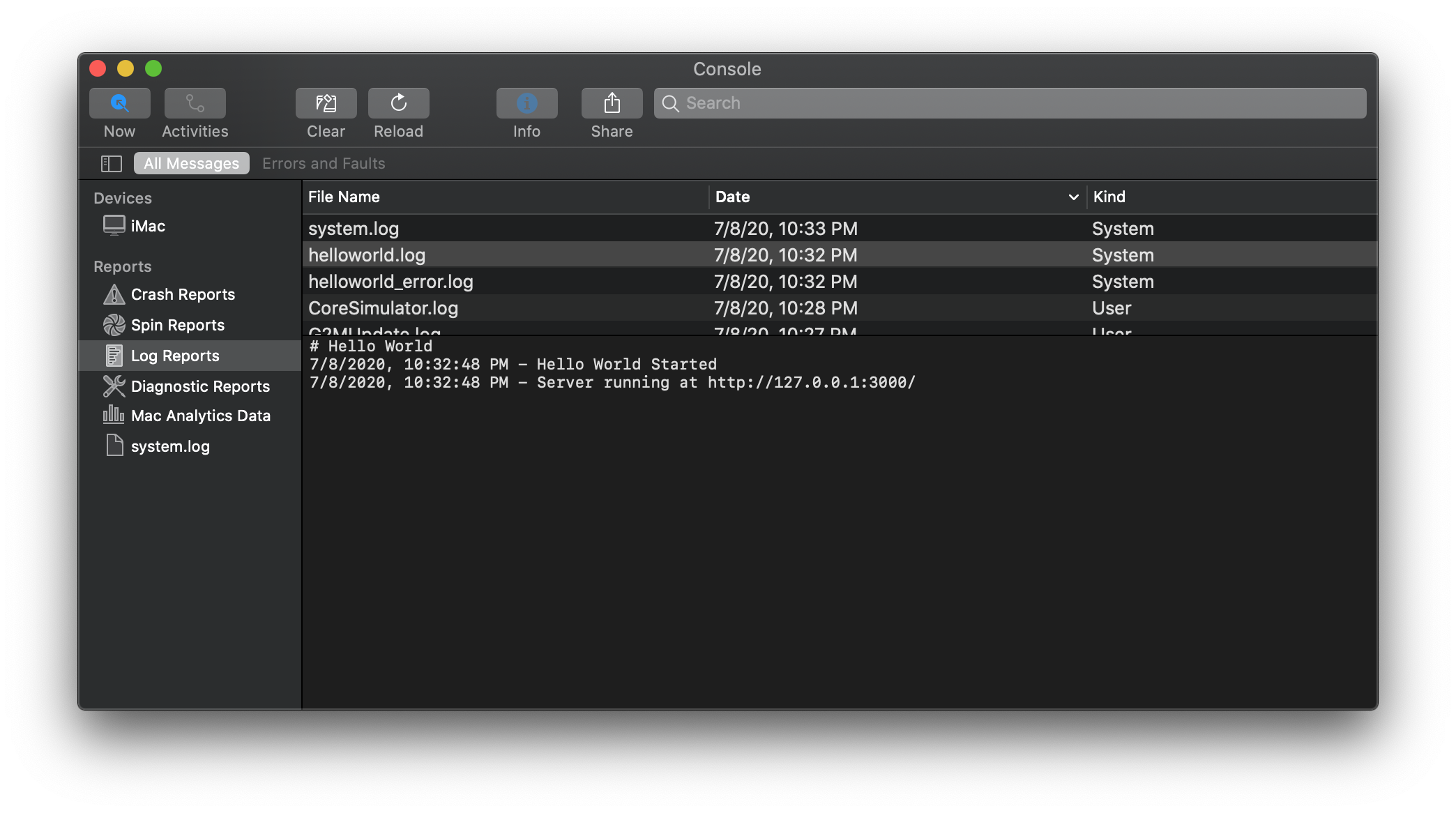
Services created with node-mac have two event logs that can be viewed through the Console app.
A log source named myappname.log provides basic logging for the service. It can be used to see
when the entire service starts/stops. A second log, named myappname_error.log stores error output.
By default, any console.log, console.warn, console.error or other output will be made available
in one of these two files.
License (MIT)
Copyright (c) 2013 Corey Butler
Permission is hereby granted, free of charge, to any person obtaining
a copy of this software and associated documentation files (the
'Software'), to deal in the Software without restriction, including
without limitation the rights to use, copy, modify, merge, publish,
distribute, sublicense, and/or sell copies of the Software, and to
permit persons to whom the Software is furnished to do so, subject to
the following conditions:
The above copyright notice and this permission notice shall be
included in all copies or substantial portions of the Software.
THE SOFTWARE IS PROVIDED 'AS IS', WITHOUT WARRANTY OF ANY KIND,
EXPRESS OR IMPLIED, INCLUDING BUT NOT LIMITED TO THE WARRANTIES OF
MERCHANTABILITY, FITNESS FOR A PARTICULAR PURPOSE AND NONINFRINGEMENT.
IN NO EVENT SHALL THE AUTHORS OR COPYRIGHT HOLDERS BE LIABLE FOR ANY
CLAIM, DAMAGES OR OTHER LIABILITY, WHETHER IN AN ACTION OF CONTRACT,
TORT OR OTHERWISE, ARISING FROM, OUT OF OR IN CONNECTION WITH THE
SOFTWARE OR THE USE OR OTHER DEALINGS IN THE SOFTWARE.
coreybutler/node-mac có 540 sao GitHub — tải lại trang để xem số mới nhất, hoặc xem trực tiếp github.com/coreybutler/node-mac. TopGit phản chiếu số sao của GitHub nhưng không cam kết đến từng phút.
coreybutler/node-mac có phải mã nguồn mở không?
TopGit chưa ghi nhận license cho coreybutler/node-mac. Phần lớn repo public trên GitHub là mã nguồn mở, nhưng điều khoản khác nhau từng repo — mở file LICENSE để xác nhận.
coreybutler/node-mac có tag gì không?
Bản đồng bộ chưa ghi nhận topic GitHub nào cho coreybutler/node-mac. GitHub topics hiển thị ở thanh bên phải trang repo — đó là nơi đáng kiểm tra nhất.
coreybutler/node-mac có website riêng không?
TopGit chưa ghi nhận URL trang chủ cho coreybutler/node-mac. Phần README ở tab phía trên thường có link demo, hoặc xem mô tả GitHub của repo.
coreybutler/node-mac còn đang phát triển không?
Commit gần nhất trên coreybutler/node-mac là 2.4 năm trước (theo timestamp GitHub). Repo có 51 fork — một chỉ báo về mức độ quan tâm của cộng đồng.
Đọc thêm về coreybutler/node-mac ở đâu?
Trang TopGit này là một snapshot — tab "Readme" hiển thị nguyên văn README của repo (đã bỏ link, giữ ảnh). Repo GitHub ở github.com/coreybutler/node-mac là nguồn chính thức.
Đọc đầy đủ README ở tab phía trên.
Vẫn đang phân vân về node-mac?
Một cú bấm sẽ gửi câu hỏi kèm trang này cho AI — xem AI nói gì về node-mac.
 /node-mac